What does the DMARC adkim tag do?
 ChatGPT
 Claude
 Gemini
 Perplexity
 Grok
GrokIn brief
DMARC adkim sets DKIM alignment to relaxed or strict. Learn how each mode compares domains, affects senders, and how to validate a safe change.
The DMARC adkim tag tells a receiving system how a passing DKIM signature's d= domain must align with the visible RFC 5322 From: domain. adkim=r uses relaxed alignment and is the default. adkim=s uses strict alignment and requires an exact domain match. The setting affects domains that rely on DKIM to achieve a DMARC pass.
This page focuses on changing adkim safely: identify affected senders, preserve the current record, validate the new mode with delivered messages and aggregate reports, and roll back if a legitimate path loses its aligned pass. For the broad aspf versus adkim comparison, use the DMARC alignment guide. For p, sp, np, and inherited subdomain policy, use the DMARC policy inheritance guide.
At a glance
Quick takeaways
adkimis an optional DMARC record tag that selects the DKIM identifier alignment mode.- When
adkimis absent, RFC 9989 defaults it to relaxed alignment,r. - Relaxed alignment accepts domains with the same Organizational Domain.
- Strict alignment,
s, requires the passing DKIMd=domain to exactly match the visible From domain. - The
adkimtag does not make a DKIM signature pass and does not set SPF alignment behavior. - A public DNS check confirms the published tag, while delivered-message headers and DMARC reports show whether production senders align.
Safe-change decision at a glance
| Evidence before the change | What adkim=s would do | Safe next action |
|---|---|---|
Passing DKIM d= exactly matches the visible From domain | DKIM can remain aligned | Validate a fresh production message and confirm the same identity in aggregate reports |
Passing DKIM d= is a subdomain of the visible From domain | A relaxed-only DKIM path loses alignment | Reconfigure the signer, retain adkim=r, or verify a separate aligned SPF path before changing |
| DKIM fails or no signature passes | adkim cannot make DKIM pass | Repair DKIM first; do not use an alignment-mode change as the fix |
| Sender identity is unknown | Impact cannot be established from DNS | Inventory the source and inspect delivered-message headers before publication |
Before editing DNS, save the complete current DMARC TXT value, its owner name, TTL, lookup time, and change owner. A rollback means restoring that known-good complete record—not publishing a second DMARC record.
Who is affected?
RFC 9989, the current DMARC specification, defines adkim as the DKIM identifier alignment mode in a DMARC record. The rule applies when a receiver evaluates whether a passing DKIM signature can satisfy DMARC for the domain in the visible RFC 5322 From: field.
The tag does not apply to a DKIM signature by itself. DKIM must first pass validation. DMARC then compares the authenticated DKIM identifier with the RFC 5322 From Author Domain under the selected alignment mode.
The relevant identifiers are:
- The From domain is the domain in the visible
From:address. - The DKIM authenticated identifier is the
d=domain in a passing DKIM signature. - The Organizational Domain is the domain boundary RFC 9989 uses for relaxed alignment.
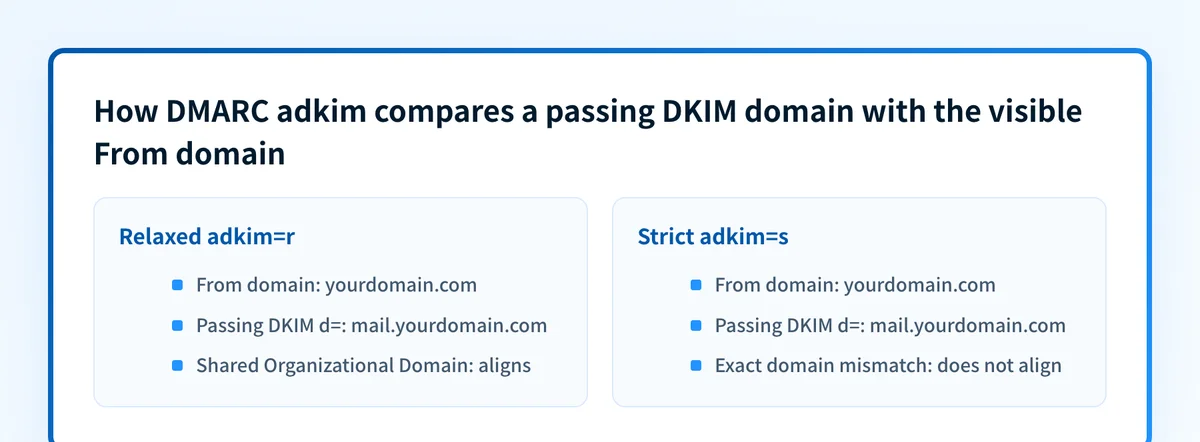
From: alerts@yourdomain.com and a passing DKIM signature with d=mail.yourdomain.com share an Organizational Domain. They can align under relaxed mode. They do not align under strict mode because the two domains are different.
This can affect any legitimate production sender, including transactional platforms, support systems, marketing tools, billing mail, monitoring alerts, and MSP-managed client domains. Review each sending path separately. A domain's published DKIM records do not show which signer an application actually uses.
For broader DMARC terminology and policy behavior, see the Palisade DMARC learning hub.
What are the requirements?
The DMARC record may select relaxed or strict DKIM alignment
RFC 9989 defines adkim as an optional tag. Its valid values are r for relaxed DKIM identifier alignment and s for strict DKIM identifier alignment. If the tag is omitted, the default is r.
v=DMARC1; p=none; adkim=r
v=DMARC1; p=none; adkim=s
These are illustrative only. Publish one DMARC TXT record for the domain and retain the policy and reporting values your organization has approved.
The adkim setting changes only the domain relationship DMARC accepts after DKIM passes. It does not select a DKIM key, change a selector, repair an invalid signature, or alter the message content covered by DKIM.
Relaxed alignment compares Organizational Domains
RFC 9989 defines relaxed DKIM alignment as a match when the DKIM authenticated identifier and RFC 5322 From Author Domain have the same Organizational Domain.
From: alerts@yourdomain.com
DKIM-Signature: d=mail.yourdomain.com; s=selector1; ...
With adkim=r, the example can align after the DKIM signature passes because mail.yourdomain.com and yourdomain.com share the same Organizational Domain. The selector name does not establish DMARC alignment.
Relaxed alignment permits a legitimate sender to use a DKIM subdomain while presenting a parent domain in From:. It does not allow an unrelated third-party domain to align merely because the message appears to come from your domain.
Strict alignment requires an exact domain match
RFC 9989 defines strict DKIM alignment as an exact match between the DKIM authenticated identifier and the RFC 5322 From Author Domain.
Using the same message example, adkim=s does not align d=mail.yourdomain.com with From: alerts@yourdomain.com. For strict DKIM alignment, the sender needs a passing d=yourdomain.com signature, or the visible From domain needs to match the signing domain exactly.
Strict alignment can express a narrower domain-identity rule. It can also remove the DKIM-based DMARC pass for a legitimate sender that previously depended on relaxed alignment.
DMARC may still pass through aligned SPF
The adkim tag controls DKIM alignment only. DMARC can pass when either DKIM or SPF passes and aligns with the visible From domain under the applicable alignment rule. A message that loses aligned DKIM after an adkim=s change may still have aligned SPF.
Do not assume that every message signed with a subdomain will fail DMARC after a strict-DKIM change. Inspect the full authentication result for the exact delivered message, including its SPF result and authenticated domain. The DMARC fo tag controls failure-reporting options, not DKIM alignment.
Does RFC 9989 require strict DKIM alignment?
RFC 9989 was published in May 2026 as a Proposed Standard and obsoletes RFC 7489. It is the current core DMARC specification, and it defines the adkim tag and the two DKIM alignment modes. The adkim tag remains optional. RFC 9989 does not require domain owners to publish adkim=s, and it does not set a rollout date for strict alignment.
A mailbox provider can make local filtering or delivery decisions beyond DMARC's published protocol rules. A public DNS lookup cannot prove a receiver's private decision or future inbox placement.
How do I change adkim safely?
1. Collect the visible From and passing DKIM identities
For each production source, send a message through its normal path to a mailbox where you can inspect the raw headers. Record the visible From domain, every passing DKIM d= value, the SPF result, and the DMARC result.
Include mail from every application that uses the domain. For MSP work, maintain this evidence per customer domain and sender rather than applying one shared alignment decision.
2. Identify relaxed-only DKIM paths
Compare the visible From domain with each passing DKIM d= domain. A sender relies on relaxed DKIM alignment when both domains share an Organizational Domain but are not an exact match.
For example, d=mail.yourdomain.com with From: alerts@yourdomain.com is a relaxed-only match. A DNS inventory cannot prove this relationship because it does not expose the signer used on a delivered production message.
3. Confirm another aligned path before tightening alignment
Use adkim=s only after evidence shows every sender that needs DKIM-based DMARC pass has an exact-match DKIM identity, or another verified aligned authentication path.
A platform that relies on a subdomain may offer a custom DKIM domain, a configurable visible From domain, or an aligned SPF return path. Verify the platform's real production headers before changing the DMARC record.
Changing to adkim=s before testing every production sender can cause legitimate mail to fail DMARC. Start with delivered-message evidence and aggregate-report data.
4. Publish one complete DMARC record
Add the chosen adkim value to the existing DMARC record at _dmarc.yourdomain.com. Do not publish a second DMARC record.
_dmarc.yourdomain.com TXT "v=DMARC1; p=none; adkim=s; rua=mailto:dmarc@yourdomain.com"This is illustrative only. Use your approved reporting address and current policy values. Review the whole record before publication because an invalid or duplicate record can affect DMARC policy discovery.
The DMARC np tag has a separate purpose. It controls policy treatment for non-existent subdomains and does not change DKIM alignment.
5. Define the rollback trigger before publication
Record the exact condition that will cause a rollback. A practical trigger is evidence that an authorized production sender lost its DKIM-aligned DMARC pass after the change and does not have another verified aligned authentication path.
Keep the previous complete DMARC value in the change record. If the trigger occurs, restore that value at the same _dmarc owner name. Do not add a second TXT record and do not change p, sp, reporting addresses, or unrelated tags during the rollback. DNS caches can retain the strict value until its TTL expires, so continue testing through the same sender and receiver path while the restored value propagates.
If the previous record omitted adkim, restoring it also restores the RFC default of relaxed alignment. Confirm that result with authoritative DNS and a public resolver rather than assuming that the control panel's saved state is already visible to Mail Receivers.
How do I validate the change?
Validate a change at four layers.
First, confirm DNS. Use the DMARC checker to inspect the public DMARC record and verify that one valid record publishes the intended adkim mode. Check the authoritative DNS server and at least one public resolver when you control the DNS change.
Second, confirm the sender's own authentication status where its interface provides it. A green vendor status is useful evidence, but it does not prove that the exact production message used the expected DKIM identity.
Third, inspect a delivered message from each production path. Confirm that DKIM passes, identify the signature's d= domain, compare it with the visible From domain, and check the receiver's DMARC result. This is the evidence that shows whether the sender aligns under the mode you published.
Finally, review DMARC aggregate reports after data accumulates. Look for legitimate sources that now show DKIM alignment failures or a changed DMARC disposition. Aggregate data helps identify sources that a test-message inventory missed.
Compare the post-change evidence with the baseline captured before publication. If an expected sender changes from aligned DKIM to unaligned DKIM, determine whether aligned SPF still produces the DMARC pass. If neither path aligns, use the predefined rollback rather than changing several authentication controls at once.
A passing public record check does not prove that every production source signs with the configured domain, that a receiver will make a particular filtering decision, or that future messages will authenticate.
Inspect the published DMARC alignment mode
Check the public record before changing adkim, then compare it with delivered-message headers from the senders that rely on DKIM.
Palisade autonomously analyzes DMARC aggregate-report data, identifies sending sources and authentication or alignment issues, and creates prioritized remediation tickets. It can propose the next policy step when the evidence supports it, while a human reviews the evidence and applies the DNS change. A DMARC record check cannot prove the DKIM identity used by every production application or control a receiver's private delivery decision.
Evidence
Sources and further reading
Questions readers ask
Frequently asked questions
What is the default value of the DMARC adkim tag?
Relaxed alignment, adkim=r, is the default when the adkim tag is absent from a DMARC record.
Does adkim=s require the DKIM selector to match the From domain?
No. Strict alignment compares the passing DKIM signature's d= domain with the visible From domain. The DKIM selector in s= is not the domain alignment value.
Can a message pass DMARC if DKIM fails strict alignment?
Yes. A message may still pass DMARC through aligned SPF. Inspect the delivered message's SPF, DKIM, and DMARC results rather than relying on the DKIM result alone.
Should every domain use strict DKIM alignment?
No. RFC 9989 permits both relaxed and strict alignment. Use strict alignment only after production evidence shows that legitimate senders have an exact-match DKIM identity or another verified aligned authentication path.
Does a DMARC checker prove that all senders align with adkim?
No. A DMARC checker can inspect the published record. It cannot prove the DKIM d= domain used by every production sender or a receiver's private filtering decision.

Written by
Samuel ChenardCEO & Co-Founder, Palisade
Samuel Chenard is the CEO and co-founder of Palisade, agentic DMARC software for IT teams and MSPs, from one domain to thousands.
More from Samuel →