What are the key elements of DMARC syntax?
 ChatGPT
 Claude
 Gemini
 Perplexity
 Grok
GrokIn brief
DMARC syntax uses DNS tags such as v, p, rua, adkim, and aspf to publish a policy, request reports, set alignment, and prepare your domain for enforcement.
DMARC syntax is a semicolon-separated set of tag-value pairs in one DNS TXT record at _dmarc.yourdomain.com. The one required tag is v=DMARC1, and it must come first. A policy tag such as p=none, p=quarantine, or p=reject conventionally follows it. Other tags request aggregate reports, set alignment preferences, or define subdomain handling. Correct syntax publishes a policy. It does not prove that every production sender passes DMARC.
At a glance
Quick takeaways
- A DMARC record is a DNS TXT record published at
_dmarc.yourdomain.com. v=DMARC1identifies the record as a DMARC record and appears first.pstates the requested handling for messages that fail DMARC.ruarequests aggregate DMARC reports at one or more reporting destinations.adkimandaspfset DKIM and SPF alignment modes.- A valid DNS record still needs delivered-message and aggregate-report validation.
How DMARC syntax works
DMARC is specified in RFC 9989 as a DNS-based policy and reporting mechanism. Its record is made of tags in the form name=value, separated by semicolons. Receivers use the record only after evaluating DMARC authentication and identifier alignment for the visible From domain.
The two tags that establish the record are:
v=DMARC1: Identifies the DMARC version. Put this tag first.p=: States the requested policy for the organizational domain after DMARC failure. Valid policy values arenone,quarantine, andreject.
v=DMARC1; p=none; rua=mailto:dmarc-reports@yourdomain.comp=none does not request enforcement action for DMARC failures. It can still request aggregate reports through rua, which helps a domain owner identify legitimate and unauthorized sources before considering a stronger policy.
p=quarantine asks a receiver to treat failing mail as suspicious. p=reject asks a receiver not to accept failing mail. The receiving system retains its own local handling decision, so a published policy is not proof of one receiver's action on one message.
For a wider protocol overview, visit the Palisade learning center.
When the syntax changes
A short record can be valid, but the right tags depend on what the domain needs to express.
Use sp when subdomains need a policy distinct from the organizational domain. If a visible From address uses alerts.yourdomain.com, inspect the policy discovery for that exact domain before assuming the root-domain record is the only relevant record.
Use rua when your team needs aggregate reports. The destination must be a valid reporting URI, commonly a mailto: address. A reporting address on another domain can require external reporting authorization under the DMARC specification.
Use adkim and aspf when you need to state alignment preferences:
adkim=roradkim=scontrols relaxed or strict DKIM alignment.aspf=roraspf=scontrols relaxed or strict SPF alignment.
Do not move top=quarantineorp=rejectbased only on a syntactically valid record. A sender can pass SPF or DKIM and still fail DMARC if the passing identifier does not align with the visible From domain.
RFC 9989 identifies the older pct tag as historic. Do not depend on it as the basis for a current policy rollout. Use aggregate-report evidence and same-path message tests to decide when a stronger policy is appropriate.
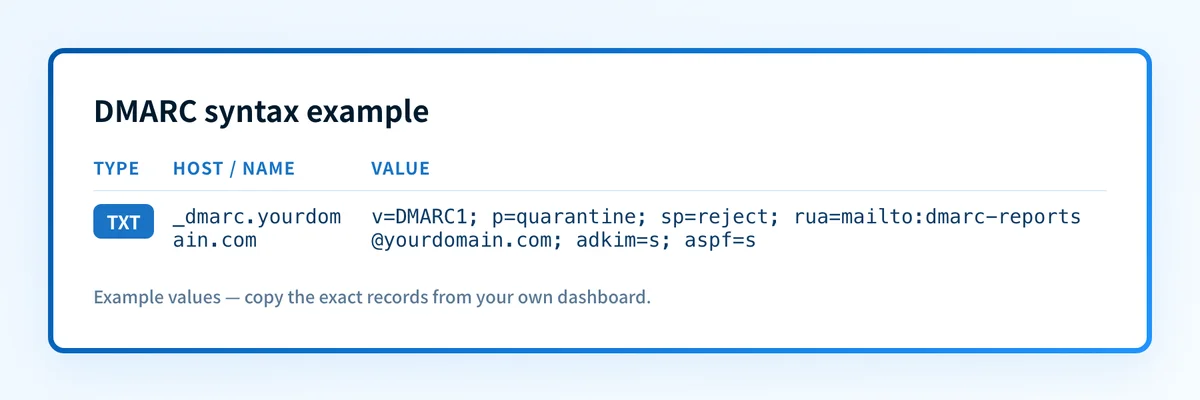
Worked DMARC syntax example
The following is illustrative only. Do not copy the reporting address into production unless your team owns and operates it.
v=DMARC1; p=quarantine; sp=reject; rua=mailto:dmarc-reports@yourdomain.com; adkim=s; aspf=sThis example has these elements:
v=DMARC1identifies the record.p=quarantinerequests suspicious treatment for DMARC failures using the organizational domain.sp=rejectrequests a different policy for subdomains.rua=mailto:dmarc-reports@yourdomain.comrequests aggregate reports.adkim=srequests strict DKIM alignment.aspf=srequests strict SPF alignment.
What to check after publishing the record
Start with the evidence you have.
If you have a domain name and need to inspect public DNS, use the DMARC checker to look up the published record. Confirm the hostname, the tag order, and whether the returned record matches the approved DNS change.
If you need other public DNS checks, review Palisade's email security tools.
If you control DNS, query the authoritative DNS service and at least one public resolver after publishing. DNS visibility confirms that the record is available. It does not show that a mailing platform signs messages correctly or uses the intended envelope sender.
If you have a delivered production message, inspect its raw headers. The Authentication-Results header can show the receiver's recorded SPF, DKIM, and DMARC evaluation for that message. Compare the visible From domain with the domains that passed SPF or DKIM.
If aggregate reports have started to arrive, use them to identify sources and failure patterns over time. That is the DMARC layer of validation. It is separate from DNS publication, a vendor's configuration screen, and a single delivered message.
Check the DMARC syntax your domain publishes
A public lookup is the right next step when you need to confirm the record currently visible in DNS. Check the actual TXT record before changing policy, then compare it with the DNS value your team approved.
Check the published DMARC record
A public-record check cannot prove that a mailing application is signing production mail, that every legitimate sender aligns, or how a specific receiver will place a future message.
When ongoing aggregate reports reveal unidentified senders or recurring alignment failures, Start with Palisade. Palisade analyzes DMARC aggregate-report data, identifies sources and alignment issues, and proposes prioritized remediation work. A human still reviews the evidence and applies any DNS or policy change.
Evidence
Sources and further reading
Questions readers ask
Frequently asked questions
Does every DMARC record need rua?
No. The rua tag is optional in the DMARC record syntax. It requests aggregate reports, which are useful when a domain owner needs evidence about sending sources and DMARC outcomes before changing policy.
Does p=reject guarantee that mail will be rejected?
No. p=reject is a domain owner's requested DMARC failure policy. A receiving system makes the final handling decision according to its own local policy and message evaluation.
Can I put a DMARC record at the root domain?
No. The DMARC policy record is published at a hostname beginning with _dmarc, such as _dmarc.yourdomain.com. A TXT record at yourdomain.com is not the DMARC policy record for that domain.
Is adkim=s always the right choice?
No. Strict DKIM alignment requires the authenticated DKIM domain to exactly match the visible From domain. Check real messages from each production sender before requesting strict alignment.
Does a passing DMARC checker result prove email delivery?
No. A checker can confirm the public DNS record it retrieves. It cannot prove that a specific production message authenticated, that a receiver accepted it, or that future messages will reach the inbox.

Written by
Samuel ChenardCEO & Co-Founder, Palisade
Samuel Chenard is the CEO and co-founder of Palisade, agentic DMARC software for IT teams and MSPs, from one domain to thousands.
More from Samuel →