What format do DMARC aggregate reports use?
 ChatGPT
 Claude
 Gemini
 Perplexity
 Grok
GrokIn brief
DMARC aggregate reports use RFC 9990 XML data, commonly delivered as .xml.gz files. Learn the report fields, validation, and safe ingestion.
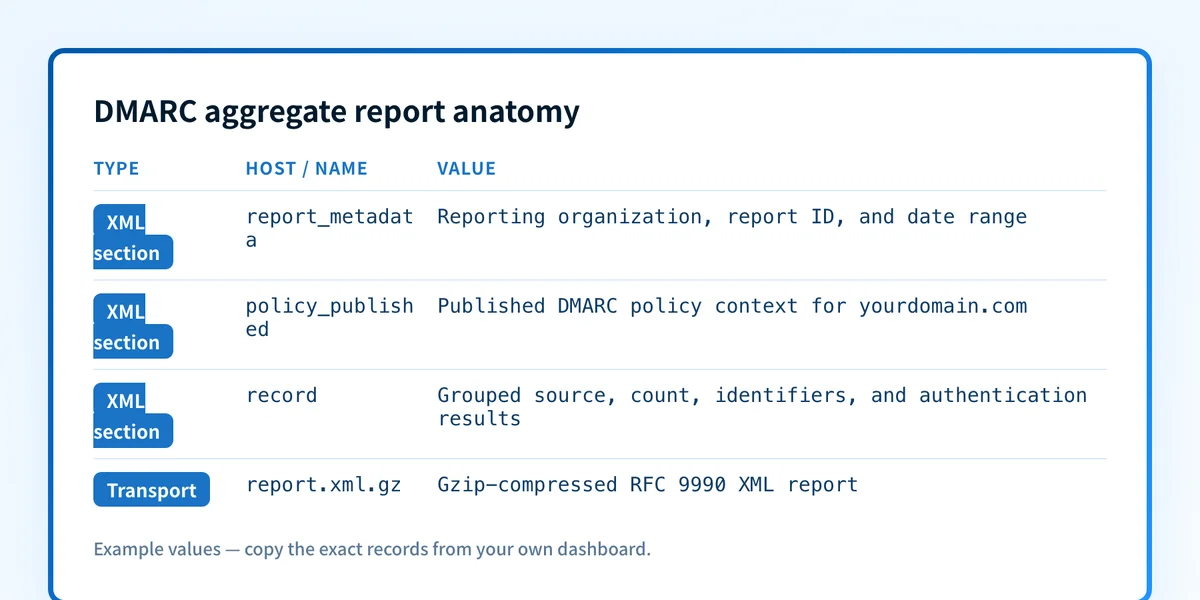
DMARC aggregate reports use the XML format defined by RFC 9990. Receivers commonly package the XML as a compressed .xml.gz file for delivery to the reporting address published in a DMARC rua tag. One report groups messages with matching evaluation results over a date range, so it is useful evidence about sending sources and authentication outcomes, but it is not the same as a delivered message's full headers.
At a glance
Quick takeaways
- RFC 9990 defines the XML structure for DMARC aggregate reports.
- Aggregate report files commonly arrive as XML compressed with gzip, often using a
.xml.gzfilename. report_metadataidentifies the reporting organization, report ID, and covered time range.policy_publishedrecords the DMARC policy the receiver evaluated for the domain.- Each
recordgroups message counts and DMARC evaluation results for a source and identifier combination. - Aggregate data helps identify trends and sources, but it does not prove delivery, inbox placement, or a receiver's private decision for one message.
Who is affected?
Domain owners that publish a DMARC record with an aggregate reporting destination are affected, along with the teams or MSPs that receive and process those reports. The reporting destination is specified with the rua tag in the domain's DMARC record. RFC 9990's aggregate-reporting specification defines the report format and report-generation framework.
A domain can publish DMARC without requesting aggregate reports. A receiver can also have its own reporting practices, so a rua destination is not a promise that every receiver will send a report on the same schedule or with identical grouping.
Aggregate reports concern DMARC evaluation. The policy and identifier-alignment rules that produce those results are defined in RFC 9989, the current DMARC specification. RFC 9991 is separate: it covers DMARC failure reporting, not aggregate XML reports.
If you need to decide where reports should be sent, see what a DMARC RUA tag is. This page focuses on what arrives at that destination and how to interpret its structure safely.
What are the requirements?
The report uses RFC 9990 XML
RFC 9990 defines an XML schema with a top-level feedback element. Inside it, the major sections are report_metadata, policy_published, and one or more record elements.
feedback
├── report_metadata
├── policy_published
└── record
    ├── row
    ├── identifiers
    └── auth_results
The XML is machine-readable, which allows a report processor to extract fields consistently. It is not designed as a human-readable incident record. A parser should preserve the original file and validate the document before treating its contents as operational evidence.
Report metadata identifies the sender and reporting period
The report_metadata element contains information about the organization that generated the report, a report identifier, and the report's date range. RFC 9990 represents the beginning and end of that range as Unix epoch timestamps.
<!-- Illustrative only. Do not publish production report IDs or reporting addresses. -->
<report_metadata>
  <org_name>receiver.example</org_name>
  <email>dmarc-reports@receiver.example</email>
  <report_id>example-report-20260813-001</report_id>
  <date_range>
    <begin>1786579200</begin>
    <end>1786665600</end>
  </date_range>
</report_metadata>
The date range tells you when the receiver grouped the observed mail. It does not tell you when every message was delivered, rejected, deferred, or placed in a mailbox. Use the range when comparing reports, but do not assume separate receivers use the same reporting window.
Published policy records the evaluated DMARC policy
The policy_published element records the DMARC policy information the receiver used for the evaluated domain, including the domain and applicable alignment and disposition settings. This is useful context because it distinguishes a report generated while the domain published p=none from one generated while a stricter policy was published.
<!-- Illustrative only. Use the domain's actual published record for a policy decision. -->
<policy_published>
  <domain>yourdomain.com</domain>
  <adkim>r</adkim>
  <aspf>r</aspf>
  <p>none</p>
  <sp>none</sp>
  <pct>100</pct>
</policy_published>
The published-policy block is historical report context. Before changing a DMARC policy, check the current DNS record and compare it with recent aggregate evidence. The DMARC learning hub covers the broader protocol and policy rollout process.
Each record is grouped evidence, not a message copy
A record contains a row, identifiers, and auth_results. The row includes the source IP address, the number of messages represented by the grouping, and the receiver's DMARC policy evaluation. The identifiers section includes identifiers such as the visible header_from domain. The auth_results section reports the receiver's observed DKIM and SPF results.
<!-- Illustrative only. This is sample data, not a receiver interface or a production report. -->
<record>
  <row>
    <source_ip>192.0.2.10</source_ip>
    <count>42</count>
    <policy_evaluated>
      <disposition>none</disposition>
      <dkim>pass</dkim>
      <spf>pass</spf>
    </policy_evaluated>
  </row>
  <identifiers>
    <header_from>yourdomain.com</header_from>
  </identifiers>
  <auth_results>
    <dkim>
      <domain>mail.yourdomain.com</domain>
      <result>pass</result>
    </dkim>
    <spf>
      <domain>mail.yourdomain.com</domain>
      <result>pass</result>
    </spf>
  </auth_results>
</record>
A count of 42 means the receiver grouped 42 messages under the reported conditions. It does not expose 42 individual message headers. For a single-message investigation, collect the raw headers from the delivered or rejected message and inspect its Authentication-Results fields. Aggregate reporting is evidence about patterns, while a message header is evidence about one delivery path.
When does the requirement take effect?
RFC 9990 was published in May 2026 as an IETF Standards Track RFC. It is the current aggregate-reporting specification and replaces the aggregate reporting material previously carried in RFC 7489. RFC 9990's RFC Editor record lists its publication status and obsoleted documents.
RFC 9989, published at the same time, is the current core DMARC specification. Its policy-evaluation rules explain the policy_evaluated, SPF, DKIM, and identifier-alignment information that appears in an aggregate report. There is no universal receiver enforcement date for aggregate reporting: report generation and delivery remain receiver behavior within the RFC's framework.
How do I implement the requirement?
1. Publish a DMARC record with an aggregate destination
Publish a DMARC TXT record at _dmarc.yourdomain.com and add a rua URI that your organization controls.
; Illustrative only. Replace the address with a reporting mailbox or processor you control.
_dmarc.yourdomain.com. IN TXT "v=DMARC1; p=none; rua=mailto:dmarc-reports@yourdomain.com"
The domain that receives reports needs to be able to accept attachments and retain them safely. If the reporting destination uses a different organizational domain, RFC 9990's external-report authorization rules apply.
2. Accept compressed report attachments safely
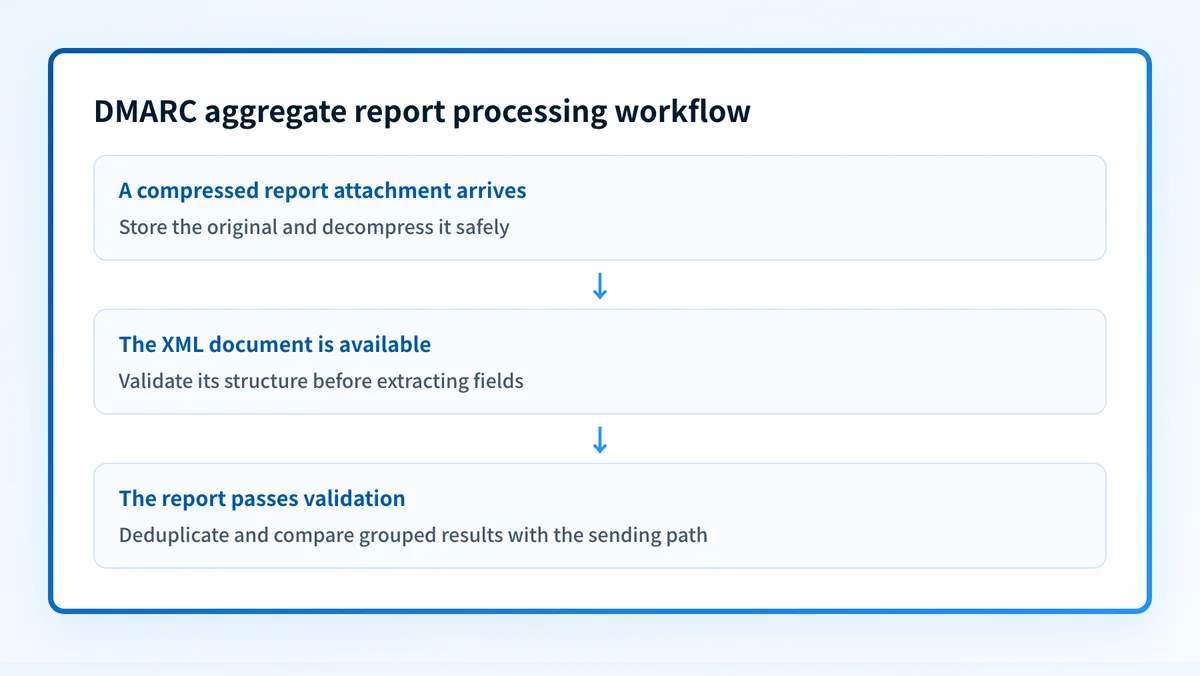
Treat .xml.gz as transport packaging, not as a different report format. Store the original attachment, decompress it in a controlled process, and enforce file-size and expansion limits before parsing.
Do not execute anything embedded in an attachment. Configure XML parsing to reject external entity resolution and unexpected document types. An aggregate report is data from a remote reporting organization, so it should enter the same controlled ingestion path as other untrusted files.
3. Validate the XML shape before extracting fields
Validate that the document follows the RFC 9990 aggregate-report structure before mapping values into tickets, dashboards, or automation. Reject malformed documents and record why they failed validation without exposing full report contents in routine logs.
Keep parsing separate from policy action. A DMARC result in one record can identify a source that needs investigation, but it does not by itself require a DMARC policy change.
4. Deduplicate before aggregating results
Use the reporting organization, report ID, policy domain, and date range as part of a deduplication key. A recipient mailbox may receive a duplicate attachment through forwarding, retry, or an ingestion error.
Keep the raw report and the normalized record set associated with that key. If a corrected report arrives, preserve enough provenance to determine whether it replaces or supplements prior data rather than silently double-counting message volume.
5. Compare grouped results with the actual sending path
Investigate sources that fail DMARC, show an unexpected identifier, or appear at meaningful volume. Then verify the sender configuration and inspect a real message from that same production path.
For SPF and DKIM investigations, use the current DNS configuration and message evidence together. A valid DNS record does not prove that an application used the expected return path or selector for a given message.
How do I validate compliance?
Validate aggregate-report processing at four layers.
- DNS: query the domain's DMARC record through the authoritative DNS path and a public resolver. Confirm that the
ruadestination matches the intended reporting workflow. - Report transport: confirm that the reporting mailbox or processor receives the attachment and retains the original compressed file.
- XML: decompress the file safely, validate the RFC 9990 structure, and confirm that metadata, policy, records, identifiers, and authentication results can be extracted without duplicates.
- Message and DMARC evidence: compare a reported source with a real message from that production source, then use successive aggregate reports to determine whether the same pattern persists.
Do not raise a DMARC policy solely because one XML record parses successfully. Review legitimate and unauthorized sending sources across enough report data to understand the operational risk.
Turn aggregate XML into prioritized sender work
A valid XML report can show that a source exists and how a receiver grouped its DMARC results. It does not inventory every future sender, repair SPF or DKIM configuration, or decide when your domain should move to a stricter DMARC policy.
Palisade's DMARC Agent analyzes aggregate-report data, identifies sending sources and authentication or alignment issues, and creates prioritized remediation tickets for human review. It does not decide the policy change or apply it automatically.
Palisade does not autonomously change your DMARC policy, guarantee delivery, or prove a receiver's decision for any individual message.
Evidence
Sources and further reading
Questions readers ask
Frequently asked questions
Are DMARC aggregate reports XML files?
Yes. RFC 9990 defines DMARC aggregate reports as XML documents. They are often delivered as compressed .xml.gz attachments, but gzip is packaging around the XML report.
Does one aggregate report row represent one email?
No. A record includes a count that represents multiple messages grouped by the receiver's reported evaluation conditions. It is not a copy of an individual message or its complete headers.
Does a DMARC aggregate report prove inbox placement?
No. Aggregate reports provide grouped DMARC evaluation evidence. They do not prove inbox placement, delivery for every message, or a receiver's private spam and filtering decisions.
Can I use the published policy in a report to change DMARC enforcement?
Only as historical context. The policy_published section shows the policy evaluated for that report. Check the current DNS record, real production message headers, and recurring aggregate evidence before proposing a policy change.
Is RFC 9991 the format for DMARC aggregate reports?
No. RFC 9991 defines DMARC failure reporting. RFC 9990 defines the XML format and framework for DMARC aggregate reports.

Written by
Samuel ChenardCEO & Co-Founder, Palisade
Samuel Chenard is the CEO and co-founder of Palisade, agentic DMARC software for IT teams and MSPs, from one domain to thousands.
More from Samuel →