Office 365 DMARC monitoring
 ChatGPT
 Claude
 Gemini
 Perplexity
 Grok
GrokIn brief
Office 365 DMARC monitoring: check the domain's published DMARC record, then validate aggregate reports and real production messages separately.
DMARC monitoring for Office 365 starts with the domain that appears in the visible From address, not with an assumed tenant setting. Check the published DMARC record first, then keep DNS publication, any reporting destination, and delivered-message authentication evidence separate. A public DNS lookup can show the current record. It cannot prove that Office 365 sent a particular message with aligned authentication or that a receiving system accepted it.
At a glance
Quick takeaways
- DMARC monitoring begins with the visible From domain used by the production message.
- A DMARC TXT lookup shows what DNS publishes at the time of the query.
- A published record does not prove that Office 365 is signing, aligning, or using the expected sending path.
- A delivered production message provides separate authentication evidence through its headers.
- Aggregate-report data, once available, is separate from DNS and message-header checks.
- Do not treat a public checker result as proof of future delivery or a receiver's private filtering decision.
How DMARC monitoring works for an Office 365 domain
DMARC monitoring is an evidence-gathering task. The first object is the DNS record for the domain used in the visible From field. The second is a real message sent through the production Office 365 path. The third is the aggregate-report data that accumulates after receivers process mail for the domain.
These layers answer different questions.
A DNS result can answer whether a public DMARC record is discoverable and what it currently contains. It cannot show whether the application or service that sent a message used the intended authentication path.
A message header can show the authentication result recorded for that delivery path. It is evidence about that message, at that receiver, at that time. It does not inventory every source that may send with the same From domain.
Aggregate-report data can help connect sending sources and DMARC outcomes over time. It does not replace a direct check of a business-critical message after a configuration change.
For a broader explanation of the protocol and its policy role, see Palisade's DMARC learning hub. The operational question for Office 365 remains narrower: does the exact domain and production path have evidence at every relevant layer?
When the answer changes
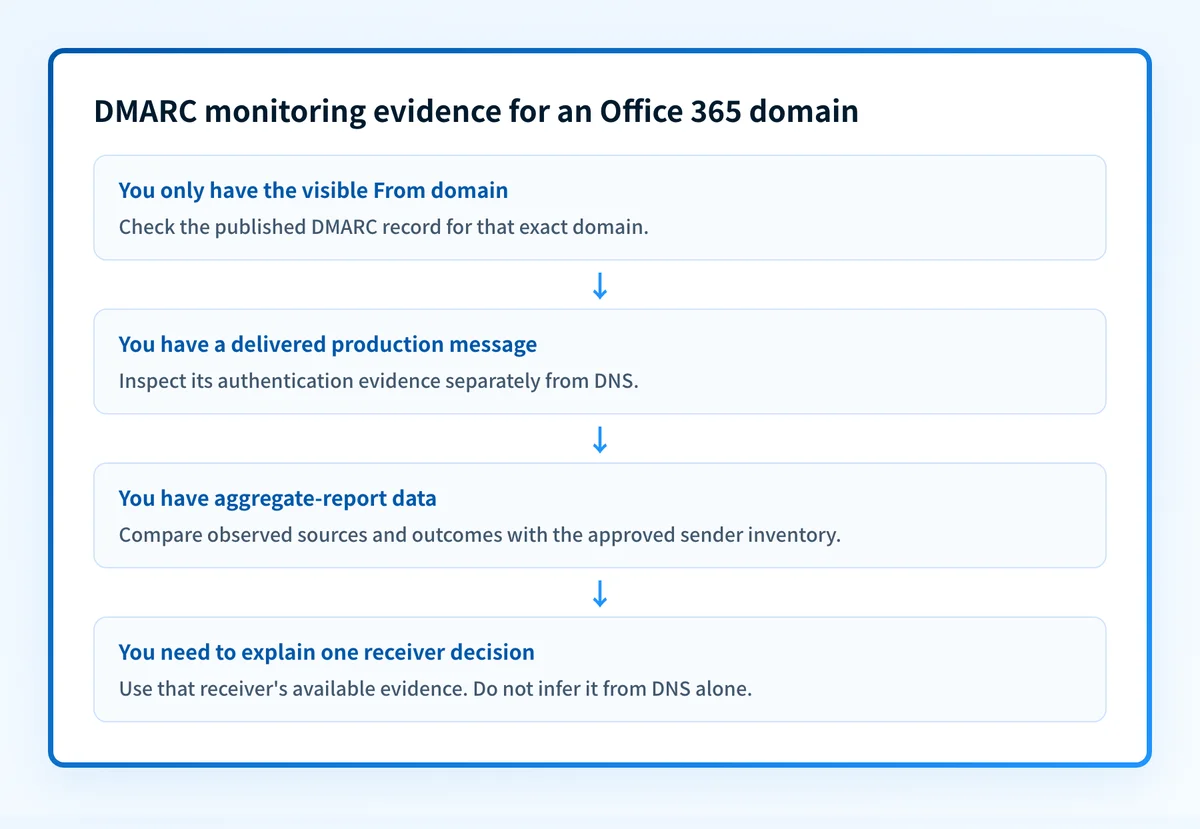
The correct next check depends on the evidence already available.
- If you only have a domain name, inspect the published DMARC record. This establishes the public DNS state, not sending behavior.
- If you have a message that was delivered from the production path, preserve its headers and inspect its authentication results. This establishes evidence for that message, not all future mail.
- If you have aggregate-report data, compare its sending-source and authentication outcomes with the approved inventory of services that use the domain.
- If the visible From domain is a subdomain, start with that exact subdomain. Do not assume that a root-domain lookup answers the policy question for a more specific domain.
- If a receiver made a placement, rejection, or filtering decision, use the receiver's own evidence where available. A DNS lookup alone cannot establish why that receiver acted.
Do not change a DMARC policy because a record lookup looks correct. Confirm the exact production sending path first, especially for business-critical mail.
A green status in one system is not a replacement for the other layers. The useful decision rule is straightforward: when the question is about DNS, query DNS; when it is about one message, inspect that message; when it is about recurring sending sources, use accumulated reporting evidence.
Worked evidence example
Use the following as an evidence worksheet, not as a universal Office 365 configuration. The values are illustrative only. Do not publish another organization's reporting address or account-generated DNS values.
Visible From domain: alerts.yourdomain.com
DNS question: Is a DMARC TXT record published for this exact domain?
Message question: Does a delivered production message show aligned authentication?
Reporting question: Which observed sending sources need review over time?
Receiver question: What evidence explains this receiver's handling decision?
This worksheet keeps the evidence objects distinct.
For example, an operator may discover that _dmarc.alerts.yourdomain.com has no usable public record while the organizational domain has one. That is a DNS finding. It does not establish whether a message from alerts.yourdomain.com passed or failed DMARC.
A second operator may have a delivered message but no record history. The message can be inspected for the exact sending path. It cannot establish whether a future DNS change, new sender, or different Office 365 workflow will behave the same way.
A third operator may have report data that identifies a source requiring review. That finding should be compared with the legitimate sender inventory before any policy decision. Do not infer that every observed IP address is authorized merely because it appears in report data.
The evidence should stay attributable to its layer. This prevents a common mistake: treating a public record check as a complete Office 365 DMARC-monitoring result.
Practical next step
Start with the evidence you have.
If you only know the domain, use the Palisade DMARC checker to inspect the published DMARC record. Record the exact domain queried and the lookup time. If production mail uses a subdomain in the visible From field, check that domain too.
If you have a delivered production message, preserve the raw headers before changing DNS or sender settings. Compare the visible From domain, the sending path, and the recorded authentication outcomes. Keep private headers, recipient addresses, message content, and tenant identifiers out of tickets or shared documents unless your organization's handling rules allow them.
If you already receive aggregate reports, review them against the approved sender inventory and separate known services from sources that need investigation. A report trend may identify work to do. It does not authorize a policy change by itself.
For a focused explanation of the record that the lookup returns, use the DMARC policy guide. For a product overview of ongoing DMARC work, see Palisade's DMARC Agent.
Check the DMARC record behind your Office 365 domain
Use the domain that appears in the visible From address to inspect its current public DMARC record before interpreting message or report evidence.
Check the domain's DMARC record
A public record check does not prove that Office 365 sent an aligned message, collect reports, monitor later DNS changes, or explain a receiver's final handling decision. Palisade can analyze DMARC aggregate-report data, identify sending sources and authentication or alignment issues, and propose prioritized remediation work. A human reviews the evidence and applies any DNS or policy change.
Evidence
Sources and further reading
Questions readers ask
Frequently asked questions
Does a DMARC lookup prove Office 365 is configured correctly?
No. A lookup shows the public DNS record available at the queried domain. It does not prove that a production Office 365 message used the expected authentication path or passed DMARC.
Should I query the root domain or the visible From subdomain?
Yes. Query the exact domain used in the visible From address first. A subdomain can require its own review, so a root-domain result may not answer the operational question.
Can a delivered message replace aggregate-report monitoring?
No. A delivered message is evidence about one delivery path and time. Aggregate-report data can provide a separate view of observed sending sources and outcomes over time.
Does a passing DMARC result guarantee inbox placement?
No. DMARC evidence concerns authentication and alignment for the message. A receiving system can apply additional local decisions when handling mail.
Can Palisade change a DMARC policy automatically?
No. Palisade can analyze DMARC aggregate-report data, identify issues, create prioritized remediation tickets, and propose a next policy step. A human reviews the evidence and applies the change.

Written by
Samuel ChenardCEO & Co-Founder, Palisade
Samuel Chenard is the CEO and co-founder of Palisade, agentic DMARC software for IT teams and MSPs, from one domain to thousands.
More from Samuel →