How does Palisade DMARC monitoring protect email deliverability?
 ChatGPT
 Claude
 Gemini
 Perplexity
 Grok
GrokIn brief
Palisade DMARC monitoring helps protect email deliverability by finding unauthenticated sending sources before a stricter DMARC policy is requested.
Palisade DMARC monitoring can protect email deliverability by turning DMARC aggregate-report data into an inventory of sending sources, authentication results, and alignment issues. That lets an IT team investigate legitimate mail that would fail DMARC before requesting a stricter policy. It supports safer enforcement, but it does not guarantee inbox placement or make a receiver accept a message.
At a glance
Quick takeaways
- DMARC monitoring uses aggregate reports to show how mail using a domain is authenticating at participating receivers.
- A DMARC pass requires an aligned SPF or DKIM pass for the visible From domain.
- A public DMARC record check shows what DNS publishes now, not whether every production message passes.
- Legitimate sources that fail alignment need investigation before a stronger DMARC policy can be safely requested.
- Palisade analyzes aggregate-report data and creates prioritized remediation tickets, while a human reviews evidence and applies changes.
- DMARC strengthens domain authentication, but mailbox providers still make their own delivery and placement decisions.
How DMARC monitoring protects deliverability
DMARC connects the visible From domain to SPF or DKIM authentication through identifier alignment. The current DMARC specification, RFC 9989, defines the protocol's policy and discovery behavior, while RFC 9990 defines the aggregate reporting this article relies on.
A monitoring policy commonly uses p=none. That policy does not request quarantine or rejection for a DMARC failure. It can still request aggregate reports through the rua tag. Those reports give the domain owner evidence about authentication outcomes and the sources observed sending mail that uses the domain.
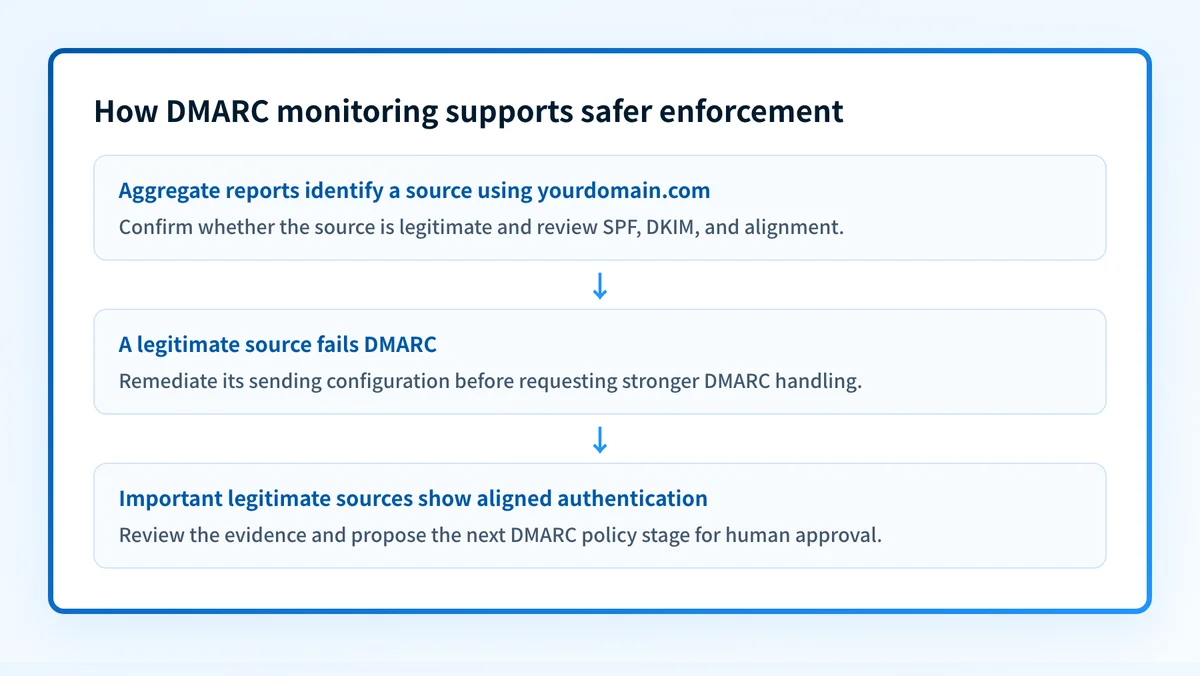
That evidence matters before a domain owner asks receivers to apply stronger handling to DMARC failures. If a business application sends mail with an unaligned SPF identity and no aligned DKIM signature, it may work while the domain is monitoring. The same path can become a delivery problem once the published policy asks receivers to quarantine or reject failures.
Palisade is DMARC software that autonomously analyzes DMARC aggregate-report data, identifies sending sources and authentication or alignment issues, and creates prioritized remediation tickets. It can also detect when a domain appears ready for the next policy stage and propose a next policy step. The human team reviews the evidence and applies the DNS change.
A DMARC report does not contain the full message body. It is aggregate feedback. To validate a specific production message, inspect its delivered headers. RFC 8601 defines the Authentication-Results header field, which can show an evaluator's SPF, DKIM, and DMARC results for that message.
For broader context on protocol behavior, see how a DMARC record protects a domain and supports email delivery.
When monitoring changes the next action
Monitoring is most useful when the team has evidence of more than one sender, a planned policy increase, or an authentication failure that has not been tied to a specific source.
Use this decision rule:
- If DNS has no usable DMARC record, publish and validate a monitoring record before making an enforcement decision.
- If aggregate reports show a legitimate source failing DMARC, identify the sender's SPF and DKIM configuration before changing policy.
- If a source passes SPF or DKIM but fails alignment, compare the authenticated domain with the visible From domain.
- If an unfamiliar source fails both SPF and DKIM, do not assume it is legitimate. Record the evidence and investigate the business owner, service, and sending path.
- If known, important sources show aligned authentication over an appropriate observation period, review whether a stronger policy is suitable.
p=none and still have delivery problems caused by reputation, content, recipient policy, or an application-specific sending configuration. Conversely, a passing DMARC result does not prove future mail will pass after a sender changes its return path, signing domain, or infrastructure.
Do not treat a vendor status indicator as complete validation. A working result needs evidence at four layers:
- DNS: query the authoritative DNS service and at least one public resolver.
- Vendor: confirm the sender's current authentication status in its own interface.
- Message: send a real message through the exact production path and inspect its headers.
- DMARC: review aggregate reports after data has accumulated.
A worked monitoring record and evidence check
This illustrative record requests aggregate reports while publishing a monitoring policy:
v=DMARC1; p=none; rua=mailto:dmarc-reports@yourdomain.comDo not copy the reporting address without confirming that your reporting destination is authorized and able to receive the reports. The actual record must use your domain and your approved reporting workflow.
The evidence sequence for yourdomain.com is:
- Query
_dmarc.yourdomain.comand confirm the published TXT value. - Send an email from each important production service using
@yourdomain.comin the visible From address. - Inspect the delivered message's
Authentication-Resultsheader forspf=,dkim=, anddmarc=. - Compare the header result with the source's aggregate-report result once reports arrive.
- Investigate any source that fails DMARC or authenticates with a domain that does not align with the visible From domain.
Authentication-Results: mx.example.net;
 dkim=pass header.d=yourdomain.com;
 spf=pass smtp.mailfrom=mail.yourdomain.com;
 dmarc=pass header.from=yourdomain.com
The exact syntax and properties are defined by RFC 8601. This example is evidence about one evaluated message. It does not establish the status of every mail stream or every receiver.
What to do with the evidence you have
If you only have a domain name, start with Palisade's DMARC checker to inspect the public record. Compare the result with the DNS record your team intended to publish.
If you have a delivered message, inspect its raw headers before changing DNS. The header can show whether the relevant receiver recorded a DMARC pass or failure for that one message.
If you have aggregate reports, group the results by source and sending service. Confirm ownership for known sources, then prioritize paths that fail SPF or DKIM alignment. For the wider operating context, the Palisade learning center includes related email-authentication guidance, and the email deliverability section covers factors that sit outside DMARC.
Do not raise a DMARC policy based only on a public DNS lookup. A correct record in DNS does not prove that business-critical mail is using the intended SPF or DKIM identity.
Continue from report evidence to a reviewed policy decision
When reports show a recurring sender or alignment problem, Palisade can analyze the aggregate-report data, identify the affected source, and create a prioritized remediation ticket. After the evidence supports the next stage, it can propose a policy step for human review.
Palisade does not automatically change the DMARC policy, repair every sender, guarantee inbox placement, or prove that future messages will authenticate.
Evidence
Sources and further reading
Questions readers ask
Frequently asked questions
Does DMARC monitoring improve inbox placement by itself?
No. DMARC monitoring supplies evidence about sources and authentication outcomes. It can help a team prevent authentication failures from reaching a stricter policy stage, but it does not control a receiver's reputation, content assessment, or inbox-placement decision.
Does p=none block failing email?
No. A p=none policy does not request quarantine or rejection for DMARC failures. It can request aggregate reports that help the domain owner investigate those failures.
Can a DMARC checker show whether an email passed?
No. A public DMARC checker can inspect the domain's published DNS record. To validate an individual message, inspect the delivered message headers. To assess recurring traffic, use aggregate-report data.
Does a DKIM pass always produce a DMARC pass?
No. DKIM must pass with a domain aligned to the visible From domain for DKIM to satisfy DMARC. A valid signature using an unrelated domain may still leave the message without an aligned authentication pass.
Should a domain move to p=reject after finding one passing sender?
No. A domain owner should confirm its important legitimate sending paths before requesting stronger handling for failures. A single passing message does not prove that every application, regional sender, or transactional path is aligned.

Written by
Dominic LandryDeliverability & DNS
Dominic Landry works on email deliverability and DNS configuration at Palisade, from SPF and DKIM records through to DMARC enforcement.
More from Dominic →