How does Palisade handle DMARC for inbound emails?
 ChatGPT
 Claude
 Gemini
 Perplexity
 Grok
GrokIn brief
Palisade supports domain monitoring and email authentication management, but its public docs do not document inbound DMARC filtering or enforcement.

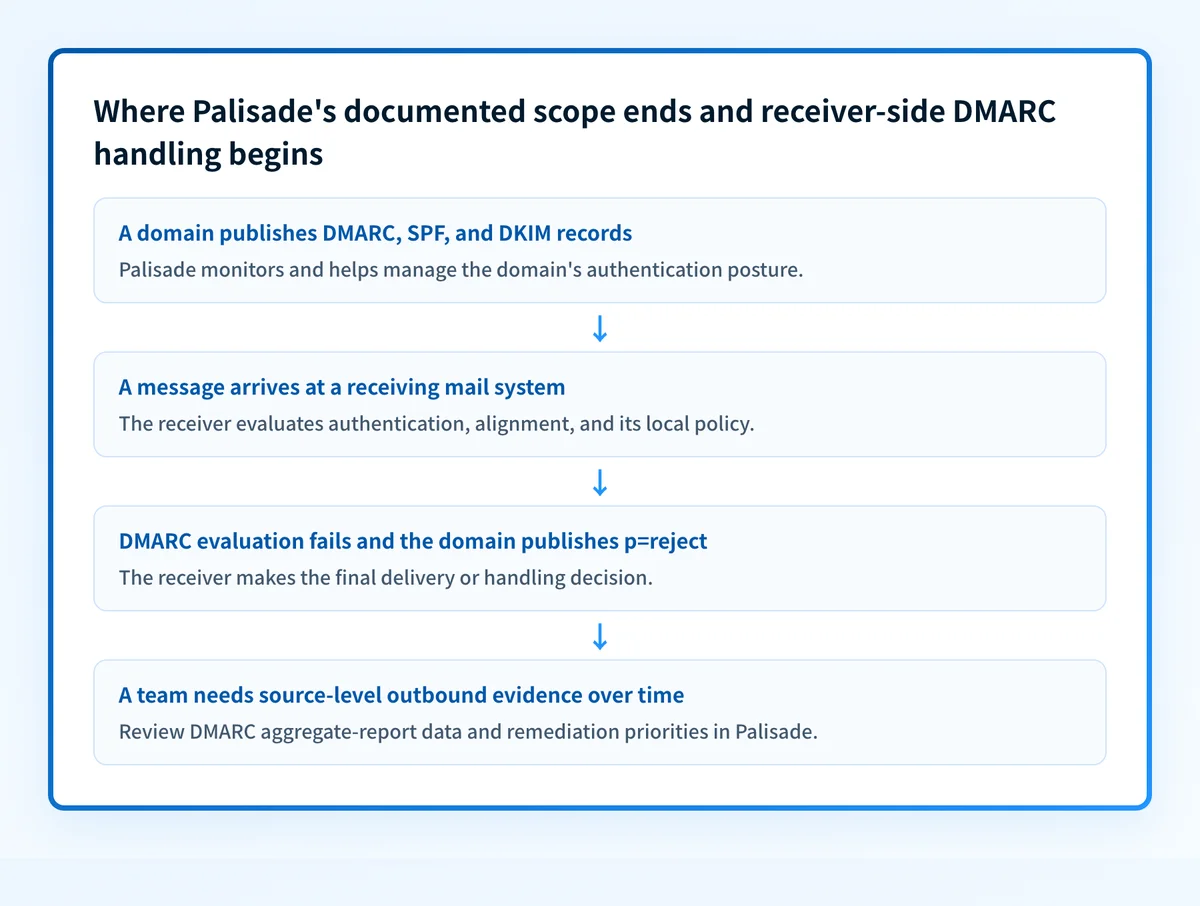
Palisade's public documentation covers domain monitoring, DMARC, SPF, and DKIM management, plus Hosted MTA-STS for inbound TLS. It does not publicly document an inbound-DMARC filtering or enforcement feature, including default delivery actions, exception lists, gateway controls, or message-level anti-spoofing decisions. DMARC can guide a receiving system's handling of a failed message, but that receiver-side function is separate from the documented Palisade scope.
At a glance
Quick takeaways
- Palisade publicly documents monitoring and management for DMARC, SPF, and DKIM.
- Palisade also documents Hosted MTA-STS, which concerns TLS protection for inbound SMTP connections.
- RFC 9989 defines DMARC as a way for a domain owner to publish requested handling for messages that fail DMARC evaluation.
- The receiving mail system makes the final disposition decision for a failed message.
- Public DNS can show a domain's DMARC record, but it cannot show a receiver's private filtering decision.
- Palisade's published documentation does not establish that it filters inbound messages or enforces another sender's DMARC policy.
How inbound DMARC works at a receiving mail system
DMARC evaluates whether SPF or DKIM passes with an identifier aligned to the domain in the visible From field. If DMARC fails, the sender domain's published policy can request none, quarantine, or reject.
That request is not a universal delivery command. RFC 9989 leaves the final handling decision with the receiving system, which can apply its own local policies and mail-flow context. A domain publishing p=reject therefore does not prove that every receiver will reject every failed message.
Palisade's DMARC learning hub explains the domain-owner side of this process: publishing a policy, discovering legitimate sending sources, and validating authentication alignment. Palisade's public documentation describes domain monitoring and management of DMARC, SPF, and DKIM. It also documents Hosted MTA-STS for inbound TLS, which helps a sending system validate the receiving domain's TLS requirements during SMTP delivery. Those documented functions do not establish an inbound mailbox filtering or DMARC-enforcement function.
When the answer changes
The answer changes only when a current public product source documents a specific inbound-mail capability. Without that evidence, do not assume that a product which monitors your domains also receives messages for your users, applies another domain's DMARC policy, quarantines messages, or maintains inbound exceptions.
Use this decision rule:
- If you need to know what your own domain publishes, inspect its DNS DMARC record.
- If you need to know whether your production mail passes DMARC, inspect a delivered message from the exact sending path and review DMARC aggregate reports after they accumulate.
- If you need to know why a received message was accepted, rejected, quarantined, or routed, use evidence from the receiving mail system or security gateway that made that decision.
- If you need to manage your outbound domain posture over time, Palisade's documented monitoring and remediation workflow is the relevant product scope.
For more detail on the feedback data that supports a domain-owner investigation, see whether DMARC failure reports are worth the trouble.
A worked inbound-DMARC evidence boundary
Consider a message that claims to be from billing@yourdomain.com. A receiving system evaluates the message's authentication and alignment, then decides what to do with the result. The domain's DNS policy is only one input to that receiver-side decision.
Visible From domain: yourdomain.com
SPF result: fail
DKIM result: fail
DMARC result: fail
Published DMARC policy: p=reject
Receiver-side result: determined by the receiving mail system
This is an illustrative evidence object, not a record from a live domain.
The first five lines describe evidence that DMARC evaluation can use. The final line cannot be filled in from public DNS alone. Under RFC 9989's DMARC policy model, p=reject is the domain owner's requested handling for DMARC failures. It does not disclose a particular receiver's final action.
Hosted MTA-STS addresses a different inbound-email question. It lets a receiving domain publish TLS requirements for SMTP delivery to its mail exchangers. It does not evaluate the visible From domain, determine DMARC alignment, or decide whether an inbound message is spoofed. Keep transport protection and message authentication separate when reviewing email security controls.
What to check next
Start with the evidence you actually have.
- If you have a domain name and need to inspect its published DMARC policy, use the Palisade DMARC checker. Compare the result with the intended DNS change record.
- If you have a suspicious received message, obtain its raw headers and use the mailbox provider or gateway that received it to determine the actual disposition. A public record lookup is not a substitute for that receiver-side evidence.
- If you operate the sending domain, validate DNS through the authoritative server and a public resolver, then send a real message through the production path. Check its authentication results and review aggregate reports after data accumulates.
- If you are assessing inbound TLS, confirm the receiving domain's MTA-STS policy and test the SMTP path separately from DMARC.
Investigate the documented domain-monitoring gap
A DMARC record lookup can show what a domain publishes today, but it cannot inventory every production sender that uses the domain or show which sources still fail alignment. Palisade is agentic DMARC software that analyzes aggregate-report data, identifies sending sources and authentication or alignment issues, and proposes remediation work for human review.
Palisade does not, based on its published documentation, act as an inbound DMARC filter, control a receiving system's private disposition decision, or guarantee that future messages will authenticate.
Evidence
Sources and further reading
Questions readers ask
Frequently asked questions
Does Palisade publicly document inbound DMARC enforcement?
No. Palisade's public documentation covers domain monitoring, email-authentication management, and Hosted MTA-STS for inbound TLS. It does not publicly document inbound-DMARC enforcement, message filtering, or default delivery actions.
Does p=reject guarantee that a spoofed email is rejected?
No. p=reject requests rejection after DMARC failure. The receiving mail system makes the final disposition decision and can apply local policy.
Can a DMARC checker explain why a received email reached an inbox?
No. A checker can inspect the sender domain's public DNS record. It cannot see the raw message, the recipient's gateway configuration, or the receiving system's private filtering decision.
Is Hosted MTA-STS the same as inbound DMARC filtering?
No. Hosted MTA-STS concerns TLS requirements for SMTP delivery to a receiving domain's mail exchangers. DMARC evaluates authorization and alignment for the visible From domain.
What evidence proves a production sending path passes DMARC?
Only a real delivered message from that exact production path can show its message-level authentication results. DNS confirmation and a vendor status indicator are useful separate checks, while aggregate reports provide broader DMARC evidence after data accumulates.

Written by
Samuel ChenardCEO & Co-Founder, Palisade
Samuel Chenard is the CEO and co-founder of Palisade, agentic DMARC software for IT teams and MSPs, from one domain to thousands.
More from Samuel →