How does a DMARC record protect my domain and improve email delivery?
 ChatGPT
 Claude
 Gemini
 Perplexity
 Grok
GrokIn brief
DMARC protects your domain by requesting handling for spoofed mail and supports delivery when legitimate mail passes aligned SPF or DKIM today.
A DMARC record protects your domain by telling receiving mail systems how to handle messages that use your visible From domain but fail DMARC authentication. It supports email delivery when your legitimate mail has an aligned SPF or DKIM pass, because receivers can distinguish authorized mail from unauthenticated impersonation attempts. DMARC does not guarantee inbox placement or force every receiver to take the requested action.
At a glance
Quick takeaways
- DMARC checks whether SPF or DKIM passed and aligned with the visible From domain.
- A DMARC policy applies after DMARC failure, not to mail that passes DMARC.
p=nonerequests monitoring, whilep=quarantineandp=rejectrequest stronger handling.- A receiving mail system makes its own final delivery decision.
- Legitimate senders need aligned SPF or DKIM before a domain moves to stronger DMARC enforcement.
- DMARC supports deliverability, but reputation, content, and receiver policy still affect placement.
How a DMARC record protects a domain
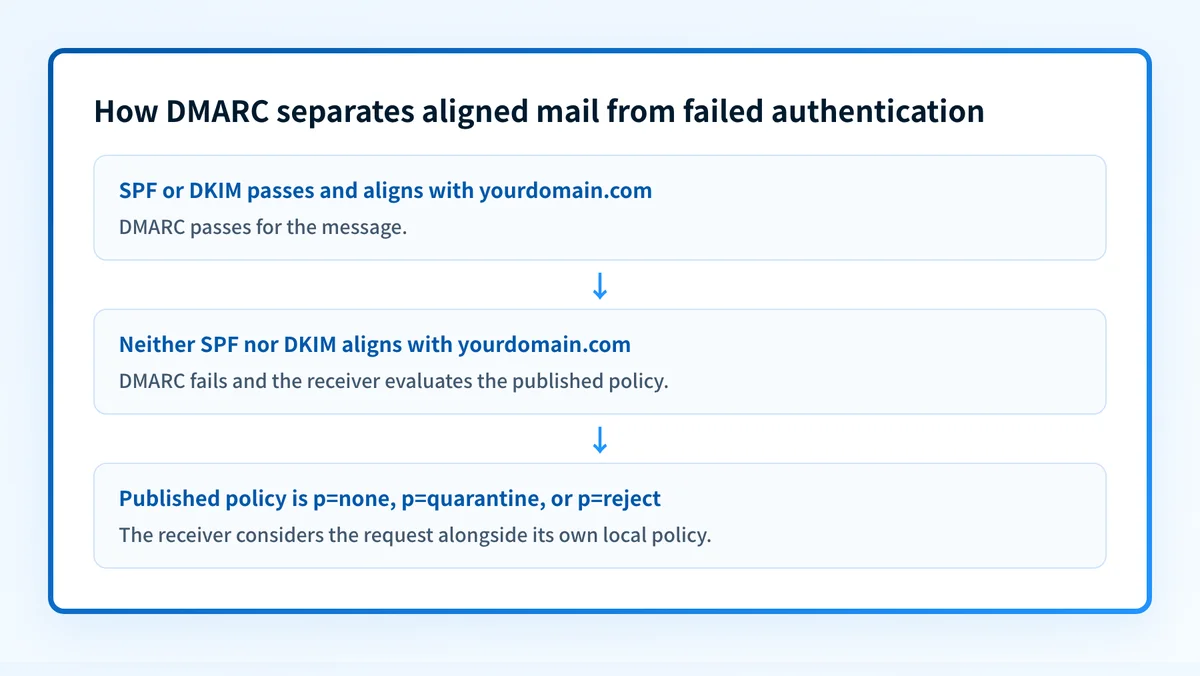
RFC 9989 defines DMARC as a mechanism that lets a domain owner publish a DNS policy for mail using that domain in the visible From field. A message passes DMARC when SPF or DKIM passes and the authenticated domain aligns with that visible From domain.
That alignment matters because a message can contain a familiar From address while being sent through infrastructure the domain owner did not authorize. When neither aligned SPF nor aligned DKIM passes, the receiving system evaluates the published DMARC policy.
The main policy tag is p:
p=noneasks receivers to take no specific disposition action for DMARC failures.p=quarantineasks receivers to treat failing mail as suspicious.p=rejectasks receivers not to accept failing mail.
p=reject record is therefore a strong domain-owner request, not proof that every receiver rejects every failing message.
For a broader explanation of the record and policy tags, visit the DMARC learning hub.
When DMARC supports delivery, and when it does not
DMARC supports delivery when a legitimate sending path produces an aligned SPF or DKIM pass. It gives receivers a standard authentication result for that message, while enforcement makes unauthorized use of the visible From domain harder.
Google's Email sender guidelines require bulk senders to authenticate email with SPF or DKIM and require DMARC for messages sent from a domain that sends more than 5,000 messages per day to Gmail accounts. Those requirements show that authentication is part of current sender expectations. They do not mean that a DMARC pass guarantees inbox placement.
Use this decision rule:
- If a production message has an aligned SPF or DKIM pass, DMARC can pass for that message.
- If neither identifier aligns, DMARC fails and the receiver can consider the published policy.
- If the domain has no usable DMARC record, the receiver has no DMARC policy request from that domain.
- If a public DNS lookup shows a correct record, it still does not prove that an application is signing mail, using the intended return path, or reaching the inbox.
Do not move top=quarantineorp=rejectuntil the legitimate production senders using the visible From domain have been identified and tested. An unknown sender that fails DMARC can lose mail when stronger enforcement begins.
A worked DMARC record and message result
This illustrative record requests aggregate reports while asking receivers to reject messages that fail DMARC:
v=DMARC1; p=reject; rua=mailto:dmarc-reports@yourdomain.comDo not publish this example unchanged. Use a report destination your organization controls and authorizes. RFC 9989 defines rua as the tag for aggregate report destinations.
For a message from billing@yourdomain.com, the result that matters is an aligned pass. The Authentication-Results field is the standardized header field receivers use to report authentication assessments, as defined by RFC 8601.
Authentication-Results: receiver.example;
  dkim=pass header.d=yourdomain.com;
  spf=pass smtp.mailfrom=yourdomain.com;
  dmarc=pass header.from=yourdomain.com
This example shows both mechanisms aligned to yourdomain.com. Only one aligned SPF or DKIM pass is needed for DMARC to pass. A DNS record alone cannot establish this result. Inspect a real delivered message from the exact production path, then compare its authentication results with the record.
Your domain may also need other DNS records for its sending infrastructure. The business email DNS records guide covers the related record types without treating them as substitutes for delivered-message evidence.
What to check next
Start with the evidence you have:
- If you only have a domain name, check the published DMARC record. Confirm the hostname, tags, and policy the public DNS response shows.
- If you have a delivered message, inspect its raw headers for
Authentication-Results. Compareheader.fromwith the domain that passed SPF or DKIM. - If you administer the sending service, verify its current authentication status and the return-path or DKIM configuration in that service's documentation or interface.
- After reports accumulate, review aggregate-report data to identify sources that fail authentication or alignment before changing the policy.
Use DMARC evidence to prepare for enforcement
A record lookup can show what the domain publishes today. The remaining question is which legitimate senders still fail alignment, and whether the domain is ready for a stronger policy.
Palisade is DMARC software that analyzes DMARC aggregate-report data, identifies sending sources and alignment issues, and creates prioritized remediation tickets. It can propose the next policy step when the evidence supports it, while a human reviews the evidence and applies the DNS change.
Palisade does not change your DMARC policy autonomously, guarantee inbox placement, or prove that every future message will authenticate.
Evidence
Sources and further reading
Questions readers ask
Frequently asked questions
Does DMARC stop all phishing that uses my brand?
No. DMARC helps stop unauthorized mail that uses your exact visible From domain when receivers evaluate and apply the policy. It does not stop look-alike domains, compromised legitimate accounts, or every other phishing technique.
Does a DMARC pass mean the message will reach the inbox?
No. A DMARC pass confirms the required aligned SPF or DKIM authentication result for that message. The receiving system can also consider its own reputation signals, content filtering, and local policy.
Can SPF pass while DMARC fails?
Yes. SPF can pass for a domain that does not align with the visible From domain. DMARC requires an SPF pass with alignment, or a DKIM pass with alignment.
Is p=none useful?
Yes. p=none publishes a valid DMARC policy while requesting no specific handling for failures. When paired with rua, it can support aggregate-report collection while a team identifies legitimate senders and fixes alignment problems.
Should I publish p=reject immediately?
No. Publish stronger enforcement only after validating the legitimate sending paths that use the domain. Check DNS, sender configuration, real delivered-message headers, and aggregate-report results before requesting rejection.

Written by
Samuel ChenardCEO & Co-Founder, Palisade
Samuel Chenard is the CEO and co-founder of Palisade, agentic DMARC software for IT teams and MSPs, from one domain to thousands.
More from Samuel →