How can you check and improve your email domain reputation?
 ChatGPT
 Claude
 Gemini
 Perplexity
 Grok
GrokIn brief
How to check email domain reputation: assess public signals, authentication, provider evidence, and DMARC reports before making safe delivery changes.
You cannot check one universal email domain reputation score. Start with a public domain reputation check, then validate the mail path with delivered-message headers, provider evidence you can access, and DMARC aggregate reports. Improve the signals you control by fixing authentication and alignment failures, stopping unwanted mail, honoring unsubscribes, and investigating every sender that uses the domain. None of those checks exposes a mailbox provider's private reputation decision or guarantees inbox placement.
At a glance
Quick takeaways
- Email domain reputation is a receiver-specific delivery decision, not a universal public score.
- A public reputation check can identify listed public signals, but cannot explain a private Gmail, Outlook.com, or Yahoo filtering decision.
- DNS and authentication checks show configuration hygiene, while a delivered message shows what the production path actually used.
- Google asks bulk senders to keep Postmaster Tools spam rates below 0.10% and avoid reaching 0.30%.
- DMARC aggregate reports help identify sending sources and authentication outcomes that public reputation checks cannot see.
- Record each observation, its source, and its time before changing DNS, sending volume, or list practices.
What this tool checks
The Palisade domain reputation checker checks a submitted domain against public reputation and blocklist data. Enter the domain in the visible From address, or the domain you need to investigate after reviewing message evidence.
The result is public, point-in-time evidence. It can help identify an externally visible listing or signal that warrants investigation. It cannot inspect a mailing list, recipient consent, private provider reputation data, message content, the exact production route, or why one recipient received mail in spam.
Keep three evidence types separate:
- Observable DNS and authentication hygiene: published SPF, DKIM, and DMARC records, plus the authentication results on a delivered message.
- Third-party public signals: a public listing or reputation result returned by a source checked during the lookup.
- Private mailbox-provider decisions: inbox, spam, rejection, complaints, and reputation data held by Gmail, Outlook.com, Yahoo, or another receiver.
How to run the check
1. Identify the exact sending domain and path
Start with the visible From domain, then collect a recent message sent through the same application, sender identity, recipient type, and routing path involved in the issue.
The visible From domain may differ from the SPF envelope domain and DKIM signing domain. RFC 8601 defines the Authentication-Results header field, which records authentication results added by a receiving system.
2. Run the public domain lookup
Submit the domain to the Palisade domain reputation checker. Record the result, the source named by the result if available, and the date and time you checked it. Preserve that evidence before requesting removal from a list operator or changing mail configuration.
Some domain-based blocklists use DNS queries. This is an illustrative structure only. Use the list operator's documented query format, never another organization's domain or zone.
dig +short yourdomain.com.<published-dbl-zone>A DNS answer shows what the queried public source returned at that time. It does not establish the cause of a listing, the receiver's filtering logic, or future inbox placement.
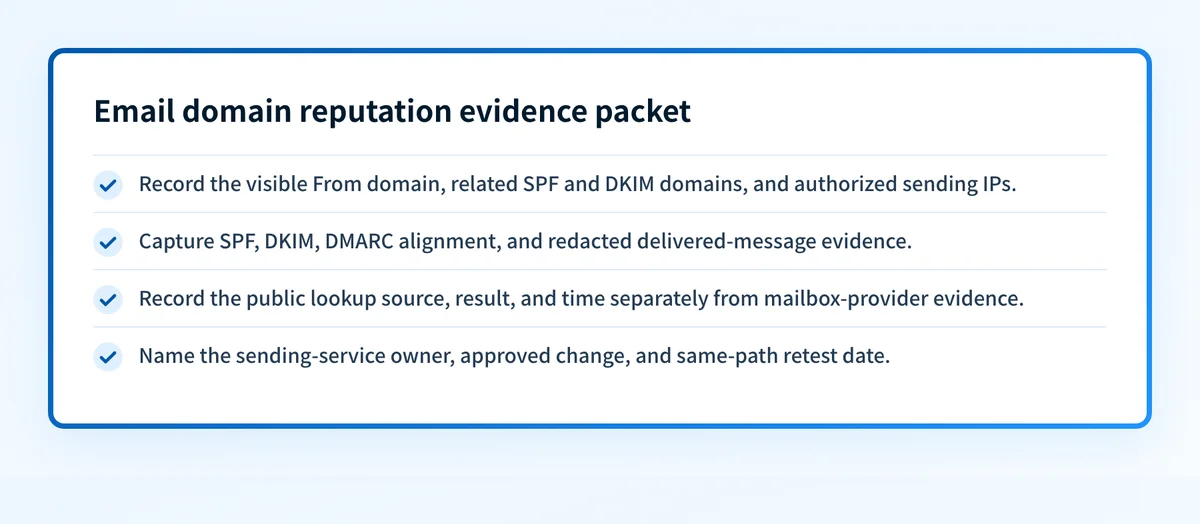
3. Build an evidence packet before changing anything
Create one record for the affected domain and sending path. This prevents unrelated mail streams from being combined into one diagnosis.
- Sending domain: the visible From domain and any related envelope or DKIM domain.
- Sending IPs: only IPs you lawfully administer or can see in authorized message, provider, or log evidence.
- Authentication: SPF and DKIM pass or fail results from the delivered message.
- DMARC alignment: whether the visible From domain aligns with a passing SPF or DKIM identifier.
- Mailbox evidence: inbox, spam, bounce, complaint, or provider-dashboard evidence you are authorized to access.
- Public lookup: result, source, and time of the check.
- Sending-service ownership: the accountable application, ESP, business unit, or MSP customer.
- Change and retest date: what changed, who approved it, and when the same path was retested.
Sending domain: yourdomain.com
Sending IPs: 192.0.2.25 (redacted example)
Authentication: spf=pass smtp.mailfrom=mail.yourdomain.com;
  dkim=pass header.d=yourdomain.com
DMARC alignment: pass, DKIM aligns with From: yourdomain.com
Mailbox evidence: Gmail recipient reported spam placement, 2026-08-12
Public lookup: no listed public signal returned, checked 2026-08-12 13:00 UTC
Sending-service ownership: transactional-email service, owned by operations team
Change and retest date: pending approval, no DNS change made
Do not place credentials, private keys, full message headers, customer addresses, or unredacted recipient data in the packet.
4. Check provider evidence separately
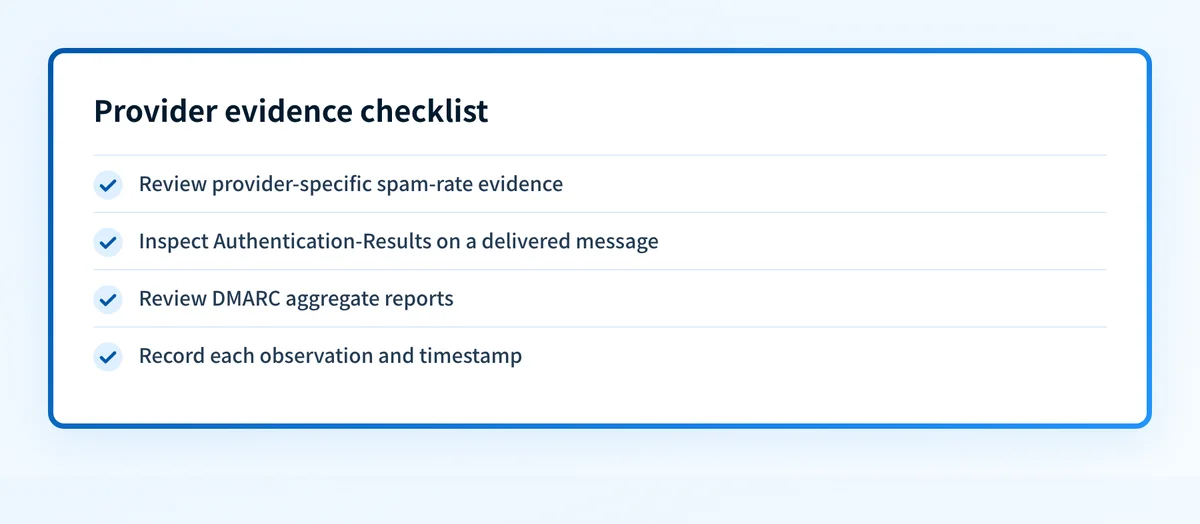
If you are eligible to use Google Postmaster Tools, review the spam rate for the authenticated domain. Google's Email sender guidelines tell bulk senders to keep reported spam rates below 0.10% and avoid reaching 0.30%.
Microsoft and Yahoo publish their own sender expectations separately: Microsoft documents the services external senders can use to manage reputation and delivery to Microsoft 365 recipients, and Yahoo publishes its Sender Best Practices.
A low spam rate is Gmail-specific evidence, not a universal reputation grade. It does not prove that every production source authenticates correctly or that another provider will make the same placement decision.
5. Inspect a delivered message
Send a fresh message through the affected production path. Open the raw message and find Authentication-Results. Check SPF and DKIM independently, then determine whether a passing SPF or DKIM identifier aligns with the visible From domain for DMARC.
DMARC policy processing is defined in RFC 9989. A valid public DMARC record does not prove that an application is using aligned identifiers in a delivered message.
6. Review DMARC aggregate reports
After reports accumulate, review the sources that send using the domain and their SPF, DKIM, and alignment outcomes. This can reveal a forgotten marketing platform, a newly added transactional service, or unauthorized traffic that a public reputation lookup cannot identify.
For the relationship between authentication and delivery, see how DMARC protects your domain and supports email delivery.
How to interpret the results
No public issue is returned
A clean result means the public sources checked by the tool did not return a listed signal during that run. It does not mean the domain has a positive reputation at every receiver or that the production path is authenticated.
If placement problems continue, prioritize the delivered message, the provider-specific dashboard where available, and DMARC aggregate reports. Compare the evidence packet with the exact sender that produced the affected mail.
A public listing or signal is returned
A returned listing means a public source matched the submitted domain. First confirm that the queried domain is relevant. The visible From domain, redirect domain, link-tracking domain, SPF envelope domain, and DKIM signing domain can differ.
Read the named list operator's current removal guidance. Investigate the source, recipient-consent evidence, complaint pattern, authentication results, and account security before requesting removal. A removal request does not repair compromised credentials, unwanted acquisition practices, or unexpected mail from an application.
Authentication or alignment fails
An SPF or DKIM failure in a delivered message is evidence about that message path. A DMARC failure can occur when neither passing SPF nor passing DKIM aligns with the visible From domain.
Return to the sending service that owns the path and obtain the records it generated for your domain. Publish only those account-specific values at the required DNS owner names. Do not copy selectors, CNAME targets, or SPF values from another tenant.
Changing SPF, DKIM, or DMARC records without confirming the sender's current configuration can interrupt legitimate mail. Keep the prior record, the approved change, and a rollback path before publishing DNS.
Retest with a new message from the same application and recipient path. Public DNS evidence is useful, but it does not prove that the application signs mail or uses the intended envelope sender.
No public issue exists, but messages still reach spam
This pattern points away from a public listing as the sole explanation. Review provider-specific evidence, authentication and alignment, audience permission, complaint trends, unsubscribe processing, and changes in mail volume or source ownership.
Google's sender guidelines require applicable bulk senders to support one-click unsubscribe for marketing and subscribed messages, and to process unsubscribe requests within two days. Follow the Google bulk-sender requirements for the affected stream rather than applying a generic DNS change.
How to act on the result
Correct the exact authentication failure
Fix the sender that failed in the delivered-message evidence. SPF authorizes the envelope sender, DKIM signs with a selected domain and key, and DMARC evaluates alignment with the visible From domain.
Use a DNS lookup or authentication checker only for the public input it can inspect. A passing public record cannot confirm the production signing path, continuous state, private receiver reputation, or future placement.
Investigate a returned public signal
Identify the accountable sending service in the evidence packet. Pause or contain suspicious traffic if your incident process requires it, then correct the underlying account, list, or configuration issue before following the public source's removal process.
Do not treat the listing as a universal diagnosis. Compare it with the actual affected recipient provider and message path.
Improve sending practices where placement remains poor
Confirm that recipients gave appropriate permission, unsubscribe requests are processed, and hard bounces are suppressed. Review abrupt volume changes and imported or inactive audiences before resending campaigns.
Keep transactional and marketing mail operationally distinguishable when your setup supports it. This can make evidence easier to interpret, but it does not isolate a domain from every delivery issue.
For Gmail-specific placement questions, see why Gmail marks new-domain emails as spam.
How to retest
Repeat the same public domain lookup after the underlying issue is corrected, and record the new source and timestamp in the evidence packet. Then send a fresh message through the same application, sender identity, routing path, and recipient provider.
Validate the four applicable layers separately:
- DNS: query the authoritative record and at least one public resolver.
- Vendor: check the sending service's current authentication or domain status.
- Message: inspect
Authentication-Resultson a newly delivered message. - DMARC: review aggregate reports after data accumulates.
Track the sending sources behind repeated reputation issues
A public lookup can reveal an external signal, but it cannot show which production sources later fail SPF, DKIM, or DMARC alignment. Palisade is DMARC software that analyzes DMARC aggregate-report data, identifies sending sources and authentication or alignment issues, and creates prioritized remediation tickets.
Palisade can propose the next DMARC policy step after a human reviews the evidence and applies the change. It does not access a receiver's private reputation decision, delist a domain, or guarantee delivery or inbox placement.
Evidence
Sources and further reading
Questions readers ask
Frequently asked questions
Can I see my email domain reputation score?
No. Mailbox providers use their own private delivery and reputation systems. Public checks can identify visible blocklist or reputation signals, while provider dashboards, delivered-message evidence, and DMARC reports answer different parts of the diagnosis.
Does a clean public reputation check mean my messages will inbox?
No. It means the checked public sources did not return a listed signal at that time. It does not prove the sending application authenticates mail correctly or reveal a receiver's private placement decision.
What should I check first when a domain has a public listing?
First confirm that the listed domain belongs to the affected mail path. Then identify the responsible sending service, inspect recent authentication results, investigate the underlying cause, and follow the list operator's documented removal process only after correction.
Can SPF, DKIM, and DMARC improve email reputation?
Yes. SPF, DKIM, and DMARC support email reputation because stronger authentication helps receivers identify authorized mail and detect impersonation. It does not guarantee inbox placement, because providers also consider their own signals and recipient interactions.
Why do emails still go to spam when authentication passes?
Authentication is one layer of evidence. A message can pass SPF, DKIM, and DMARC while a provider still considers recipient complaints, engagement, list practices, volume patterns, or other private signals when deciding placement.
How long should I keep evidence after a reputation issue?
Keep the evidence packet through the investigation, change approval, and same-path retest. Retain the public lookup time, message results, provider evidence you are authorized to access, sending-service owner, and rollback information according to your organization's mail and incident records policy.

Written by
Dominic LandryDeliverability & DNS
Dominic Landry works on email deliverability and DNS configuration at Palisade, from SPF and DKIM records through to DMARC enforcement.
More from Dominic →