How do you warm up a new sending domain safely?
 ChatGPT
 Claude
 Gemini
 Perplexity
 Grok
GrokIn brief
Warm up a new sending domain safely by authenticating mail first, increasing wanted mail gradually, and pausing when delivery signals worsen.
Warm up a new sending domain safely by authenticating mail before sending, starting with recipients who expect and want the mail, then increasing volume only while provider feedback remains healthy. There is no universal daily schedule that proves a domain is ready. Google advises senders facing delivery problems to lower volume, test, and increase gradually after successful delivery. The safe pace depends on the exact sending path and recipient response.
At a glance
Quick takeaways
- Publish SPF, DKIM, and DMARC before sending production mail from a new domain.
- Start with mail that recipients expect, rather than adding inactive or unengaged addresses early.
- Increase volume gradually and pause increases when deferrals, complaints, or bounces worsen.
- Google asks senders to keep spam rates below 0.10% and avoid reaching 0.30%.
- Check delivered-message authentication results, not only DNS records or an ESP status indicator.
- A warmup supports reputation development but cannot guarantee inbox placement.
How safe domain warmup works
A sending domain earns delivery signals through the mail it sends and the response it receives. For Gmail, Google's Email sender guidelines require senders to authenticate mail with SPF or DKIM and recommend SPF, DKIM, and DMARC for all senders. Google also requires bulk senders to authenticate with SPF, DKIM, and DMARC, keep spam rates below its thresholds, and support one-click unsubscribe for subscribed marketing mail.
Authentication establishes a verifiable identity for the message. It does not establish that recipients want the message. Send only mail your recipients expect, use clear consent and unsubscribe handling for marketing mail, and keep list quality under review. Yahoo's sender best practices likewise ask senders to authenticate mail, keep complaint rates low, and make unsubscribing easy.
A safe warmup therefore has two parts:
- Technical identity: SPF and DKIM pass, and at least one passes with alignment to the visible From domain for DMARC.
- Controlled audience expansion: volume grows only after the same sending path produces healthy delivery and complaint signals.
When the answer changes
The correct ramp changes with the traffic type and sending infrastructure.
A domain sending transactional messages should begin with real, expected events such as password resets, receipts, or account notices. Do not create artificial messages solely to manufacture engagement. A marketing domain should begin with the people most likely to recognize the sender and expect the campaign, then add less-recently engaged segments only after results remain stable.
A dedicated IP adds a separate reputation variable. Google explains that IP reputation and domain reputation are distinct, so successful history on one does not prove the other is ready. On a shared IP pool, the provider manages the shared IP reputation, but your new From domain still needs authenticated, wanted traffic.
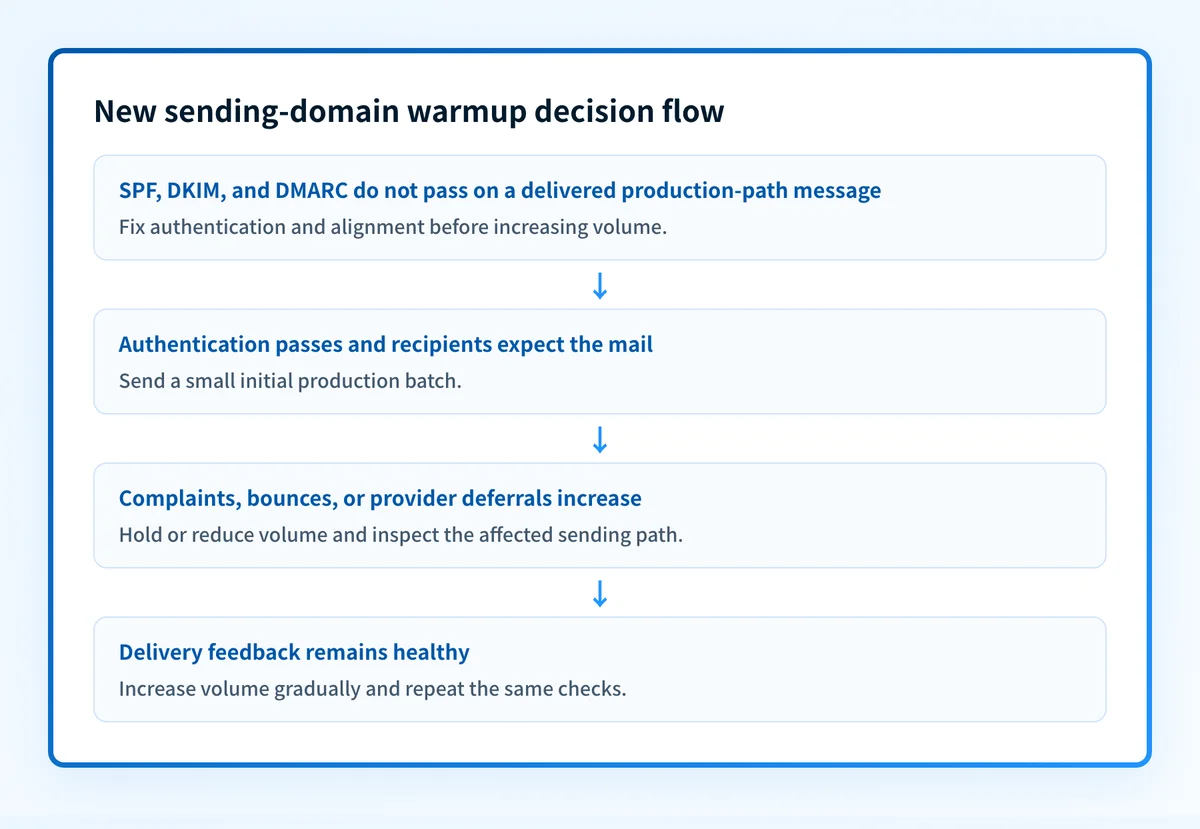
Use this decision rule:
- If DNS, vendor status, and a delivered test message all show authentication passing, begin with a small production volume to expected recipients.
- If a receiving provider defers mail or complaints increase, stop increasing volume. Reduce the next batch if the problem persists, then investigate the affected provider and sending path.
- If authentication fails in delivered headers, fix authentication and alignment before raising volume. A healthy-looking DNS record alone is insufficient.
- If the domain sends at bulk volume to Gmail, follow the Gmail bulk sender requirements for the entire sending program.
Do not move a production sending domain to a larger audience because an ESP dashboard is green. Validate the exact message path through a delivered message and provider feedback first.
Worked warmup decision example
This is an illustrative operating record, not an official provider schedule. Replace the volumes and observation window with values appropriate to your audience, ESP limits, and business-critical mail. The email warmup calculator lays out a day-by-day version between any starting and target volume, and checks the target against the daily sending limits Google Workspace and Microsoft 365 publish.
Sending domain: mail.yourdomain.com
Audience for first batch: recipients who recently requested or expect this mail
Authentication check: SPF pass, DKIM pass, DMARC pass in a delivered message
Increase condition: no new provider deferrals and complaint rate remains below provider guidance
Hold condition: rising complaints, hard bounces, or deferrals at a receiving provider
Next action after a hold: keep volume flat or reduce it, inspect the exact sending path, then retest
The four layers matter during each increase:
- DNS: query the authoritative DNS provider and a public resolver for the SPF, DKIM, and DMARC records.
- Vendor: confirm the sending platform reports the domain as authenticated, using its current verification status.
- Message: send a real test through the production application and inspect its headers. RFC 8601 defines the
Authentication-Resultsheader field, which can show the receiver's SPF, DKIM, and DMARC evaluation. - DMARC: review aggregate reports after they accumulate to find sending sources and alignment failures that a single test message may miss.
What to do next, based on the evidence you have
If you only have the domain name, inspect the public DMARC record with the Palisade DMARC checker. Confirm that the record exists and compare it with the policy your team intended to publish. You can also use the Palisade DKIM checker to inspect the signing record for a selected selector.
If you have access to the sending platform, verify its current authentication status and send a real message through the same application, return path, and From domain that production mail will use. Review the delivered message's Authentication-Results values. A provider dashboard can confirm its setup state, while the delivered message shows what the receiving system evaluated.
If volume is already increasing, use provider feedback to decide whether to hold or expand. Google Postmaster Tools provides Gmail-specific data for eligible domains, including spam rate and domain reputation. Check the provider where signals are degrading rather than assuming Gmail results apply to every mailbox provider.
After enough DMARC aggregate-report data exists, compare every observed source with the intended sending inventory. Palisade autonomously analyzes DMARC aggregate-report data, identifies sending sources and authentication or alignment issues, and creates prioritized remediation tickets. It can propose the next policy step when the evidence supports it, while your team reviews the evidence and applies any DNS change.
Inspect the DMARC record before you raise volume
A public DMARC lookup is a useful first check when the only evidence you have is the sending domain. Inspect the published record before increasing a new domain's audience, then compare it with a delivered production-path message.
Check the new domain's DMARC record
A public-record check cannot prove that the sending platform signs every message, identify every production source, monitor future DNS changes, or guarantee a receiver's inbox placement. For ongoing DMARC-report analysis across your sending inventory, Start with Palisade.
Evidence
Sources and further reading
Questions readers ask
Frequently asked questions
How long does it take to warm up a new sending domain?
There is no official universal duration. Increase only as fast as the domain can send expected, authenticated mail without worsening complaints, bounces, or provider deferrals. Higher target volume and weaker recipient engagement usually require a longer observation period.
Should I send test messages to coworkers first?
Yes, sending a small number of real production-path tests to internal recipients can help validate authentication and message handling. Internal tests do not prove how external mailbox providers will treat larger production traffic, so continue validating with expected external recipients and provider feedback.
Can I warm up a sending domain with artificial engagement?
No. Artificial engagement does not validate whether your real recipients expect or want your mail. Use legitimate traffic tied to an actual recipient relationship and monitor the same sending path you intend to scale.
Does SPF and DKIM passing mean the domain is warmed up?
No. SPF and DKIM passing show authentication for that message. Warmup also depends on recipient response and provider delivery signals over time. DMARC aggregate reports can help identify sources that still fail alignment.
Do I need DMARC before warming up a new sending domain?
Yes, DMARC should be published before production sending begins. Google requires DMARC for bulk senders, and a DMARC record also provides a reporting and alignment framework for understanding authenticated sending sources.

Written by
Dominic LandryDeliverability & DNS
Dominic Landry works on email deliverability and DNS configuration at Palisade, from SPF and DKIM records through to DMARC enforcement.
More from Dominic →