What is a domain reputation?
 ChatGPT
 Claude
 Gemini
 Perplexity
 Grok
GrokIn brief
Domain reputation is a mailbox provider's assessment of a sending domain. Learn which signals you can check, what providers keep private, and how to.

Domain reputation is a mailbox provider's assessment of mail associated with a sending domain. It can influence spam filtering and inbox placement alongside authentication, message content, recipient feedback, and provider-specific signals. There is no universal domain-reputation score. You can inspect public signals and your own sending evidence, but only the receiving mailbox provider can see its full reputation decision.
At a glance
Quick takeaways
- Domain reputation is provider-specific, so Gmail and another mailbox provider can assess the same domain differently.
- SPF, DKIM, and DMARC help establish domain identity, but passing authentication does not guarantee inbox placement.
- A public domain-reputation lookup is a point-in-time signal, not a receiver's private filtering decision.
- Provider reporting and delivered-message headers are stronger evidence for a specific delivery problem.
- A sender can measure its sending practices and recipient feedback, but cannot inspect every receiver's reputation model.
- Retest an issue through the same sending application, domain, recipient provider, and message path.
What this tool checks
The Palisade Domain Reputation Checker accepts a domain and checks publicly available reputation information associated with that domain. Use it to find a public signal that may justify a closer investigation.
The check is an outside-in observation. It cannot see a mailbox provider's private reputation calculation, recipient engagement, the exact production sender, an individual message's authentication result, or why one recipient received mail in spam. It also cannot prove continuous state or future inbox placement.
Google's Email sender guidelines require bulk senders to authenticate mail with SPF and DKIM, publish a DMARC record, and keep reported spam rates below 0.3%. Those are Gmail requirements. They do not define a universal formula for domain reputation.
Domain reputation and IP reputation are related but distinct. A domain can send through several IP addresses, while shared sending infrastructure can introduce IP-level factors that a domain lookup cannot separate.
The domain-reputation evidence framework
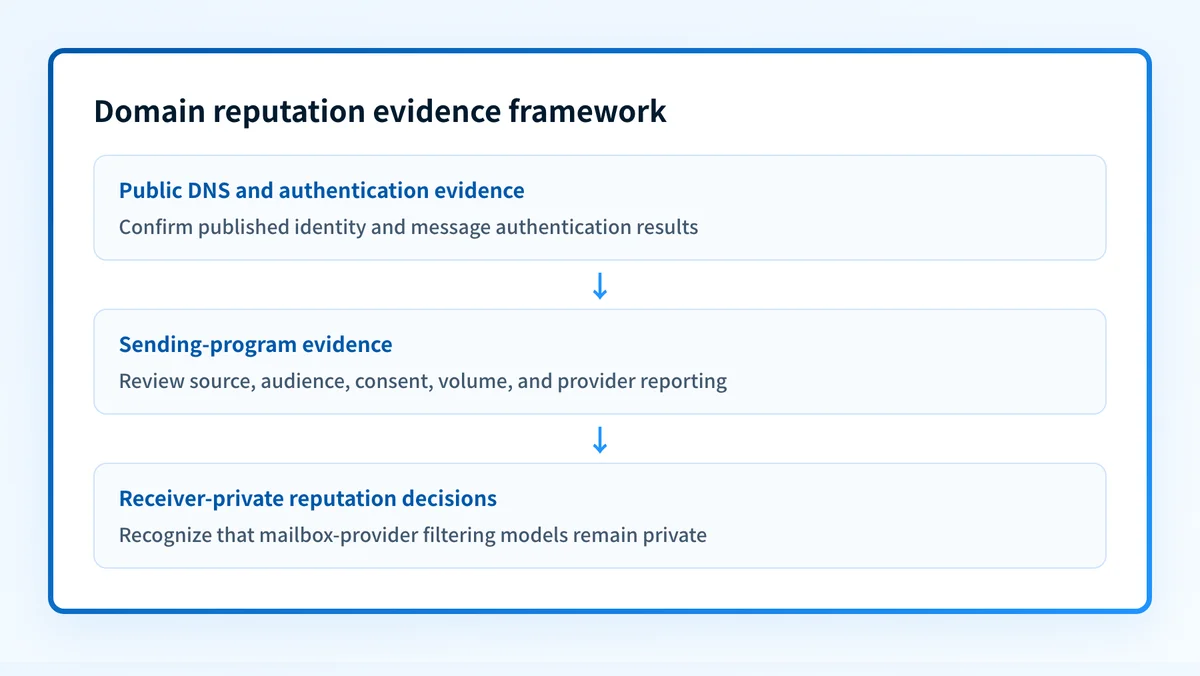
Keep three kinds of evidence separate. Each answers a different question.
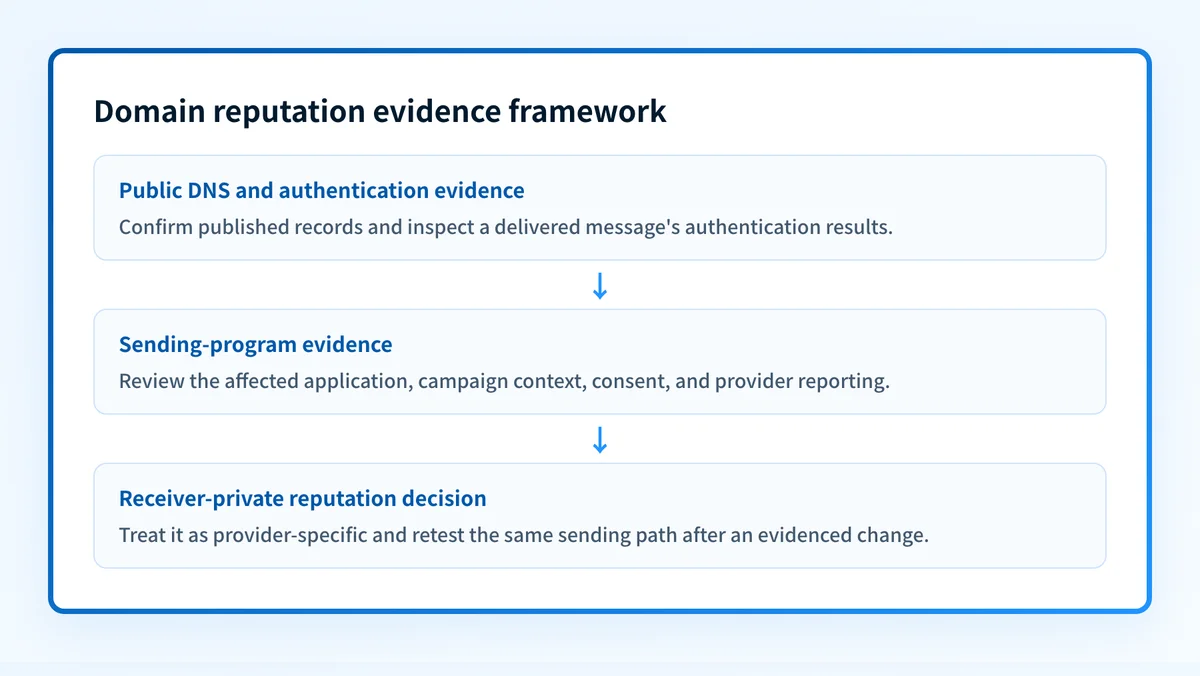
- Reader-controlled authentication and DNS evidence: public SPF, DKIM, and DMARC records, plus the authentication result on a delivered message. This evidence can show whether a record is published and whether a receiver reported authentication for one message. It does not reveal private reputation.
- Sending-program evidence: campaign source, audience, consent records, unsubscribe handling, sending volume, and provider reporting available to the domain owner. For personal Gmail recipients, Google Postmaster Tools provides data about mail sent to personal Gmail accounts when the domain is eligible and verified.
- Receiver-private reputation decisions: a mailbox provider's filtering models, recipient-level signals, and final placement choices. Senders cannot inspect these completely. A public checker and even provider reporting do not expose every signal behind one mailbox decision.
Use a compact record for each investigation. It prevents a broad reputation concern from being mistaken for a configuration diagnosis.
Illustrative redacted evidence record
Domain: yourdomain.com
Authenticated identifiers: From=yourdomain.com; DKIM d=mail.yourdomain.com
Source and time: Campaign application, 2026-08-12 14:00 UTC
Sending context: Transactional password-reset message to a personal Gmail inbox
Observed signal: Message was placed in spam; public lookup showed no public concern
Next review date: 2026-08-19
The record is illustrative only. Do not store unredacted customer addresses, message bodies, private keys, tokens, or full message headers in a shared investigation log.
How to run the check
1. Identify the visible From domain
Start with the domain recipients see in the message's From address. If the issue concerns one campaign or application, record the application, approximate send time, recipient mailbox provider, and any bounce or spam-folder evidence.
Do not substitute the return-path domain, DKIM signing domain, or IP address unless the investigation concerns that identifier. Those values can differ from the visible From domain.
2. Run the public domain lookup
Open the Palisade Domain Reputation Checker and submit the domain without an email address or URL path. Save the result with the queried domain and the time of the check.
For a repeatable public DNS observation, query the DMARC owner for the same visible domain:
dig +short TXT _dmarc.yourdomain.comThis command does not measure reputation. It confirms whether a public DMARC record answers at the expected DNS owner name. Google requires bulk senders to publish DMARC, but the presence of a record does not establish reputation or inbox placement.
3. Check provider-specific evidence
When Gmail delivery is the concern, review the relevant verified domain in Google Postmaster Tools. Google documents its dashboards as data about mail sent to personal Gmail accounts, including spam-rate and domain-reputation data where available.
A Gmail observation does not prove how Outlook.com, Yahoo, or another mailbox provider treated the same message. Keep the provider, mailbox type, and observation date in the evidence record.
4. Inspect a delivered message from the affected path
Open the raw headers for a message sent through the same application and campaign path. Find the receiver-added Authentication-Results field. RFC 8601 defines Authentication-Results as a message header field for reporting message authentication status.
Check the reported SPF, DKIM, and DMARC outcomes and the identifiers they reference. A public lookup may identify a concern worth investigating. A delivered message shows what the receiving system evaluated for that specific message.
How to interpret the results
The lookup shows no public concern
This means the public lookup did not identify a concern it can report for the queried domain at that time. It is not a clearance for all mailbox providers, messages, or future sends.
If affected mail still goes to spam, move to message and provider evidence. Check the authentication results, then compare the affected mail stream with the Gmail new-domain spam-placement guidance when Gmail is the receiving provider.
The lookup indicates a public reputation signal
A public signal is a reason to investigate the sending program. It does not identify the mailbox provider, campaign, application, or message that caused the signal.
First confirm that the queried domain is the visible From domain used by the affected mail. Then separate authentication from reputation. Inspect the delivered message, review provider reporting where available, and determine whether the affected traffic came from one application or several.
Do not assume that changing an authentication record will repair a reputation issue. Authentication helps receivers verify identity. It does not reverse a receiver's private filtering decision or make unwanted mail wanted.
The lookup is unavailable or inconclusive
An unavailable or inconclusive result is not evidence of good or bad reputation. Public services have different data coverage and may not return an observable result for every domain.
Use the evidence that is available. A delivered message can establish authentication for the production path. Provider reporting can show provider-specific signals for eligible domains. DMARC aggregate reports can help identify sources that use the visible From domain after reports accumulate, but they do not expose a receiver's complete reputation model.
A mailbox observation shows spam placement
Spam placement is evidence about that message, recipient path, and time. It does not prove that every recipient saw the same result or reveal every factor behind the receiver's decision.
Compare the message's authentication results with the sending-program record. If authentication passed, focus the next review on the evidenced application, campaign, consent, unsubscribe handling, content, audience selection, and sending pattern. If authentication failed, repair the exact sender configuration or DNS record used by that message before drawing reputation conclusions.
How to act on the result
Start with the evidence closest to the observed delivery problem.
- If the delivered message fails SPF, DKIM, or DMARC, repair the exact sender configuration or DNS record that message used. Do not copy values from another account or domain. The DKIM checker domain guide explains how to validate the public key record after you identify the selector in the message.
- If authentication passes but Gmail data shows a concerning spam rate or weak domain reputation, review the affected mail stream against Google's bulk sender guidance. Keep the review scoped to the application and campaign evidenced in the data.
- If the public lookup shows a signal but message and provider evidence are missing, collect a newly delivered message before changing DNS. Public reputation information alone does not identify the configuration to alter.
- If DMARC reports show unfamiliar sources using the visible From domain, investigate those sources before increasing DMARC enforcement. If report addresses are rejected as unauthorized, see why DMARC says an rua or ruf domain is not authorized.
Do not remove SPF, DKIM, or DMARC records to test whether they caused spam placement. Removing authentication can disrupt legitimate mail and makes the next test harder to interpret.
How to retest
Repeat the public lookup for the same visible From domain after correcting an evidenced issue. Record the result, date, and provider context.
Then send a new message through the same application, authenticated domain, recipient provider, and intended recipient path. Inspect its Authentication-Results header and compare it with the earlier evidence record. For Gmail-specific concerns, allow enough eligible traffic for Postmaster Tools to show relevant data, then compare the same domain and sending context.
A changed public lookup result does not prove that a receiver changed its private reputation decision. A passing delivered-message authentication result does not guarantee inbox placement.
Track the sources that still use your domain
A public reputation lookup can identify a signal, but it cannot inventory every production source that sends as your domain or show which sources still fail DMARC alignment after a change. Palisade is agentic DMARC software that analyzes DMARC aggregate-report data, identifies sending sources and authentication or alignment issues, and creates prioritized remediation tickets.
Palisade proposes the next DMARC policy step from the evidence, while a human reviews the evidence and applies any change. It does not change a receiver's private reputation decision, guarantee inbox placement, or prove that every future message will authenticate.
For broader delivery investigation, use the email deliverability learning hub.
Evidence
Sources and further reading
Questions readers ask
Frequently asked questions
Is domain reputation the same as IP reputation?
No. Domain reputation concerns mail associated with a domain, while IP reputation concerns the sending IP address. A message can be affected by both, especially when a domain sends through shared or changing infrastructure.
Does a good public reputation result mean messages will reach the inbox?
No. A public result does not reveal a mailbox provider's private filtering decision, recipient-specific signals, or future placement. Inspect a real delivered message and provider-specific reporting when available.
Can SPF, DKIM, and DMARC improve domain reputation?
Only indirectly. Authentication lets receivers verify domain identity and is required for many bulk-sender scenarios, but it does not guarantee inbox placement or reverse a private reputation decision.
Why does Gmail show a different reputation signal than another provider?
Mailbox providers use their own data and filtering systems. Gmail reporting describes eligible mail sent to personal Gmail accounts, so it should not be treated as evidence for another provider.
What should I check first when messages go to spam?
Check the visible From domain, a newly delivered message's Authentication-Results header, and evidence from the affected sending application. Then review provider data for the same mailbox provider if it is available.

Written by
Dominic LandryDeliverability & DNS
Dominic Landry works on email deliverability and DNS configuration at Palisade, from SPF and DKIM records through to DMARC enforcement.
More from Dominic →