What is an IP reputation?
 ChatGPT
 Claude
 Gemini
 Perplexity
 Grok
GrokIn brief
IP reputation is a receiving provider's assessment of an email-sending IP. See what affects it, its limits, and how to investigate delivery.

An IP reputation is a receiving mail provider's assessment of the email traffic it sees from a particular sending IP address. It is not a universal score that every provider shares or applies the same way. Reputation can affect whether a provider accepts a message, filters it, or places it in spam, alongside domain reputation, authentication, content, and the provider's own local policies.
At a glance
Quick takeaways
- IP reputation is receiver-assessed, so one provider's view may differ from another's.
- An IP address is only one signal in an email-delivery decision.
- Spam complaints, sending patterns, recipient engagement, and authentication can affect provider trust.
- A shared IP can reflect traffic from multiple senders, while a dedicated IP concentrates responsibility with one sender.
- Passing SPF, DKIM, or DMARC does not guarantee inbox placement.
- Public reputation checks provide a point-in-time signal, not a receiver's complete private decision.
How IP reputation works
A mailbox provider receives SMTP traffic from an IP address and evaluates the behavior associated with that traffic over time. Google tells senders that it considers factors such as spam reports, user engagement, and IP and domain reputation when classifying mail. Google's email sender guidelines also require bulk senders to authenticate messages and keep spam rates low.
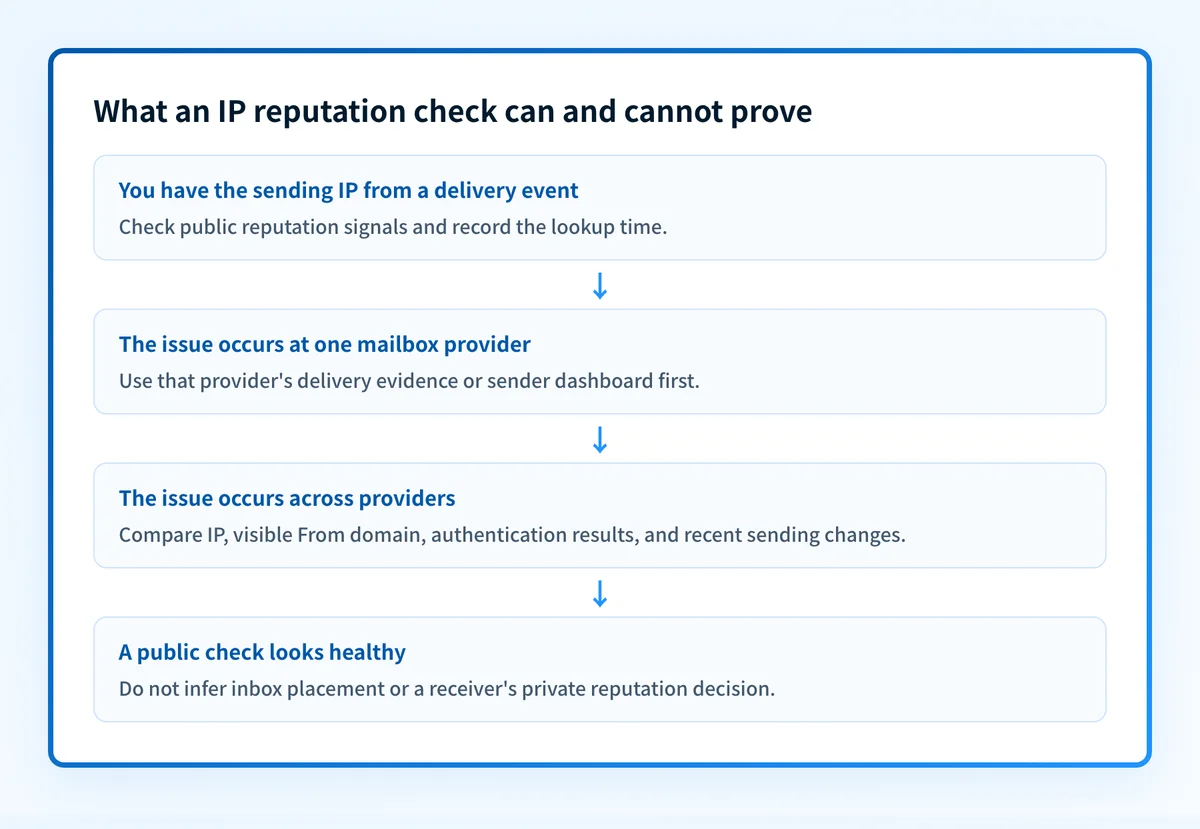
The result is an operational assessment, not a portable number. A provider can use its own complaint data, traffic patterns, authentication results, recipient signals, and local anti-abuse controls. That is why a positive result in one public lookup does not prove that Gmail, Outlook, or another provider will accept or place a particular future message in the inbox.
Microsoft similarly provides Smart Network Data Services so qualifying senders can view data related to traffic sent to Outlook.com. That visibility is provider-specific. It does not expose every filtering rule or turn the provider's delivery decision into a universal IP score.
The IP reputation signal usually appears alongside the sending domain. For the related domain-side concept, see what is a domain reputation?. Both signals matter in the broader email deliverability process.
When the answer changes
The practical meaning of an IP reputation changes with the sending arrangement and the evidence available.
- Shared IP address: Multiple customers or applications may send through the same IP. Your own program still affects how providers assess the traffic they receive, but you do not control every sender using that address. Ask the email service provider how it manages shared infrastructure and abuse.
- Dedicated IP address: One organization has more direct control over the traffic sent from the IP. That also means inconsistent volume, poor list quality, or unwanted mail can become associated with that IP's history.
- New IP address: A new dedicated IP has limited provider history. Twilio SendGrid's IP warmup guidance recommends gradually increasing volume and starting with engaged recipients rather than sending a full program immediately.
- Different mailbox providers: A blocklist listing, provider dashboard, or public checker can be useful evidence, but each covers only its own data or method. Do not treat any one result as a complete explanation for all delivery outcomes.
Do not move traffic abruptly to a new IP to bypass filtering. Changing infrastructure does not resolve unwanted-mail practices, authentication failures, or a damaged domain reputation.
A worked IP reputation evidence object
An IP reputation investigation needs a concrete sending-path record. Record the IP from the delivery event or SMTP logs, then keep the domain and provider context with it.
Sending IP: 192.0.2.44
Visible From domain: yourdomain.com
Recipient provider: example mailbox provider
Observed result: deferred or spam placement
Authentication evidence: SPF pass, DKIM pass, DMARC pass
Traffic change: volume increased on 2026-08-10
Public lookup time: 2026-08-11T12:00:00Z
This is an illustrative evidence format only. Do not publish customer IP addresses, recipient addresses, message content, or unredacted headers.
The record separates facts that are often confused:
- The sending IP identifies the infrastructure the receiver observed.
- The visible From domain identifies the domain the recipient saw.
- SPF, DKIM, and DMARC results show authentication evidence for that message path. They do not reveal a provider's private reputation weighting.
- A delivery result shows what happened for that provider and message. It does not establish a rule for every recipient.
- A time-stamped public lookup can support an investigation, but it cannot prove the production path, continuous reputation state, or future inbox placement.
What to do next with the evidence you have
If you only have an IP address, run a Palisade IP reputation check to inspect the public signals available for that address. Save the lookup time and compare it with the delivery event. Then identify whether the IP is shared or dedicated through the provider that sends your mail.
If you have a delivered message, inspect its raw headers and the provider's delivery outcome. Confirm the sending IP and compare the Authentication-Results evidence with the visible From domain. A passing result supports an authorized sending path, but it does not explain every spam-folder decision.
If you manage a dedicated IP, review recent volume changes, recipient permission practices, hard bounces, and complaint data before changing infrastructure. For a domain-wide delivery issue, also review how to check and improve email domain reputation.
For ongoing DMARC work, aggregate reports can identify sending sources and authentication or alignment issues across domains. Palisade provides DMARC software that analyzes DMARC aggregate-report data, creates prioritized remediation tickets, and proposes the next policy stage for human review. It does not control a mailbox provider's private reputation decision, delist an IP, or guarantee inbox placement.
Evidence
Sources and further reading
Questions readers ask
Frequently asked questions
Is IP reputation a score?
No. Providers can assess IP reputation internally, but they do not use one shared public score. A public tool or provider dashboard may expose useful signals, yet it cannot fully reproduce another provider's filtering decision.
Can a good IP reputation guarantee inbox placement?
No. Inbox placement can also depend on domain reputation, authentication, message content, recipient signals, and the receiver's local policies. A strong IP reputation supports delivery, but it does not guarantee placement.
Should a low-volume sender use a dedicated IP?
Only if the sending provider and the sender's actual traffic pattern justify it. Dedicated IPs need a stable, permission-based sending program so providers can develop meaningful history for that IP.
Can SPF, DKIM, and DMARC fix a poor IP reputation?
No. Authentication establishes evidence that a message is authorized by relevant domains, but it does not erase complaint history, poor recipient engagement, or unwanted-mail patterns. It is one part of a healthy sending program.

Written by
Dominic LandryDeliverability & DNS
Dominic Landry works on email deliverability and DNS configuration at Palisade, from SPF and DKIM records through to DMARC enforcement.
More from Dominic →