What DNS records does a business email domain need?
 ChatGPT
 Claude
 Gemini
 Perplexity
 Grok
GrokIn brief
DNS records for business email include MX for receiving mail, plus SPF, DKIM, and DMARC to authenticate the domain's outgoing messages and DMARC policy.
A business email domain normally needs an MX record to receive mail, plus SPF, DKIM, and DMARC records to authenticate mail sent with that domain. MX publishes where receiving servers should deliver messages. SPF, DKIM, and DMARC address different parts of sender authentication. The exact MX and DKIM values come from the mail provider or sending service that operates the relevant mail path.
At a glance
Quick takeaways
- An MX record identifies the hostnames that accept inbound mail for a domain.
- SPF is a DNS TXT record that authorizes sending hosts for the envelope domain.
- DKIM publishes a public key or provider-managed key reference for a specific selector.
- DMARC publishes a policy and reporting instructions for mail using the visible From domain.
- A domain can have multiple DKIM selectors, especially when it uses more than one sending service.
- A public DNS lookup shows published records, but it does not prove that a production application sends or signs mail correctly.
How the four main business email DNS records work
An MX record defined by RFC 1035 tells other mail systems which hosts handle mail addressed to the domain. MX records use a preference value. Sending systems generally try the lowest numerical preference first.
SPF is defined in RFC 7208. It is normally published as a TXT record at the sending domain and begins with v=spf1. SPF evaluates the SMTP envelope sender domain, which can differ from the visible From domain that recipients see.
DKIM is defined in RFC 6376. A sending service adds a DKIM signature to a message, and receivers retrieve the corresponding public key through a DNS name that includes a selector. Your provider may ask for a TXT record with the public key or a CNAME record that delegates the lookup to the provider. Use the exact selector and value the provider generates.
DMARC, defined in RFC 9989, evaluates whether SPF or DKIM passes with an identifier aligned to the visible From domain. Its DNS TXT record is normally published at _dmarc.yourdomain.com. DMARC can request aggregate reports through rua and state a requested policy for messages that fail evaluation.
The four records have separate jobs. An MX record does not authorize outgoing mail. An SPF record does not route inbound mail. A DKIM key in DNS does not prove that an application is signing messages. A DMARC record does not make a failing SPF or DKIM result pass.
For broader context, the Palisade learning center covers the surrounding DNS and email-authentication topics.
When the answer changes
The required record set changes with the mail services your domain actually uses.
If the domain receives mail, publish the MX records supplied by the service receiving that mail. If the domain sends mail through one or more platforms, include each legitimate sending path in the SPF design and enable DKIM for each platform where available. A marketing platform, support system, transactional sender, and employee mailbox service can each use different authorization and DKIM settings.
A domain that never receives mail may not need MX records for that domain. It can still need SPF, DKIM, and DMARC if it sends mail or if the organization wants to publish DMARC policy for the visible From domain.
Use this decision rule:
- Mail addressed to
person@yourdomain.commust arrive: publish the receiving provider's MX records. - A service sends with
yourdomain.comin the SMTP envelope: account for that service in the single SPF record for that domain. - A service signs mail with
yourdomain.comor an aligned subdomain: publish the provider-generated DKIM selector record. - Recipients see
yourdomain.comin the From field: publish and maintain a DMARC record for that domain.
Do not copy MX, DKIM, CNAME, or SPF values from another organization. Provider-generated values can be tenant-specific, and an incorrect record can interrupt mail delivery or authentication.
A DNS change also has a timing component. The published answer can differ across resolvers until cached data expires. See how long DNS propagation takes for email records before judging a newly published record as missing.
Worked business email DNS record set
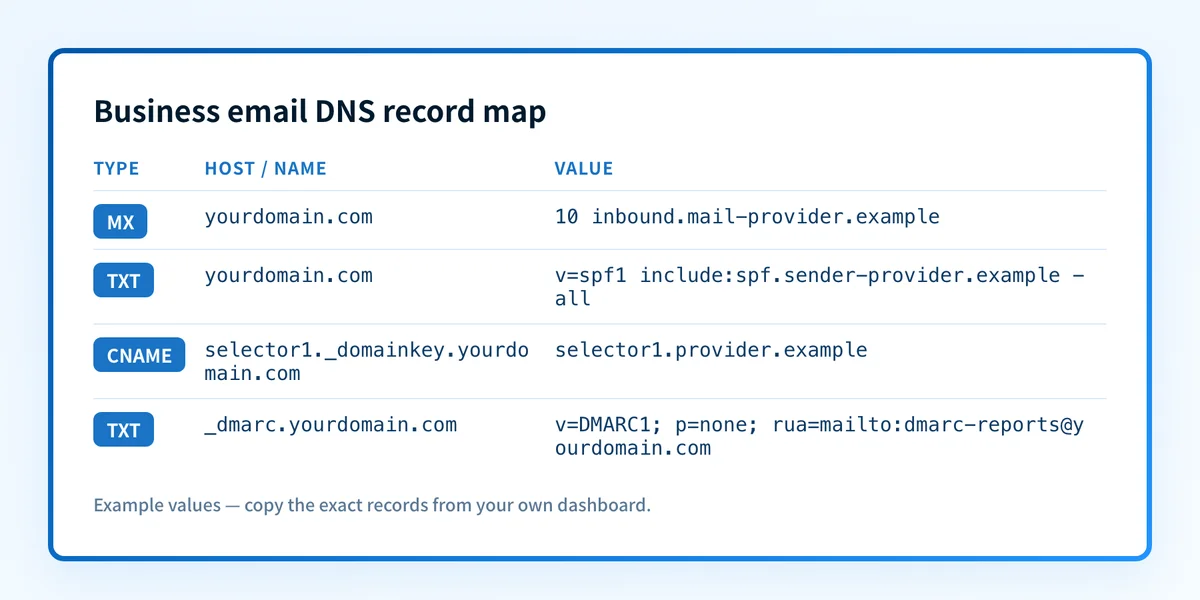
The following is illustrative only. It shows record shapes, not values to publish. Obtain your real MX destinations, DKIM selector, DKIM target or public key, and SPF includes from the providers that send or receive mail for your domain.
yourdomain.com.                 MX    10 inbound.mail-provider.example
yourdomain.com.                 TXT   "v=spf1 include:spf.sender-provider.example -all"
selector1._domainkey.yourdomain.com. CNAME selector1.provider.example
_dmarc.yourdomain.com.          TXT   "v=DMARC1; p=none; rua=mailto:dmarc-reports@yourdomain.com"
In this example, the MX record identifies one inbound destination. The SPF record has one v=spf1 policy. RFC 7208 specifies that multiple SPF records at the same domain create an SPF permanent error, so combine authorized mechanisms into one SPF policy rather than publishing separate records for each service.
The DKIM hostname contains selector1._domainkey. A selector lets a domain publish multiple DKIM keys. The actual selector comes from the service that signs the message. The DMARC record is at _dmarc.yourdomain.com, not at the bare domain.
DMARC policy choice is separate from record publication. A p=none record requests reporting without a handling preference for DMARC failures. Before requesting quarantine or reject, identify legitimate sources and confirm that important production messages achieve aligned SPF or DKIM authentication. How a DMARC record protects a domain and supports email delivery explains that relationship in more detail.
What to check after publishing the records
Start with the evidence you have.
If you have only a domain name, use a public DNS lookup to inspect the published MX, TXT, CNAME, and DMARC records. Look up the domain's DNS records and compare the response with the provider instructions and your approved DNS change. The MX lookup shows inbound routing, and the DKIM checker can look up the exact selector your provider gave you. Public results do not prove which application sent a message, whether DKIM signing occurred, or how a receiver handled the mail.
If the provider has a domain-authentication or verification page, confirm its current status after DNS has propagated. That status is provider-specific evidence, not a message-level result.
Then send a real test message from each important production path and inspect the delivered message headers. The Authentication-Results header is standardized by RFC 8601 and can show receiver-reported SPF, DKIM, and DMARC evaluation results. Check that the message came from the exact application, branded domain, and return-path configuration that matters.
Finally, review DMARC aggregate reports after data accumulates. DNS confirms publication. Provider status confirms what that provider sees. A delivered message confirms one real mail path. Aggregate reports help reveal the sending sources and authentication results observed over time.
Record length can also matter when providers issue long DKIM keys or layered SPF policies. The DNS record length limit for email records explains the DNS constraints that can affect how a value is published.
Check the DNS records behind your business email
Use a domain DNS lookup to compare the records visible on public DNS with the values your mail and sending providers instructed you to publish. Follow that with a provider-status check and a delivered-message header check for each production sending path.
Inspect business email DNS records
A public lookup cannot prove that every sender is authorized, that a service is signing with the expected DKIM selector, or that a recipient will deliver a future message to the inbox. Palisade is agentic DMARC software that analyzes DMARC aggregate-report data, identifies sending sources and authentication or alignment issues, and proposes prioritized remediation work. A human reviews the evidence and applies any DNS or DMARC policy change.
For a provider-specific implementation of these authentication checks, see What is DANE and does your email need it?.
Evidence
Sources and further reading
Questions readers ask
Frequently asked questions
Do I need an MX record to send business email?
No. An MX record identifies where a domain receives mail. A sending-only domain can send mail without MX records, but it should still publish the appropriate SPF, DKIM, and DMARC records for its sending and visible From domains.
Can a business domain have more than one DKIM record?
Yes. DKIM records use selectors, so different email services can publish different selector records under the same domain. Each service must sign with the selector whose public key or CNAME record is published in DNS.
Can I publish multiple SPF records for different email providers?
No. RFC 7208 treats multiple SPF records at one domain as a permanent error. Publish one SPF record and combine the authorized sending mechanisms within that one policy.
Does a DMARC record replace SPF and DKIM?
No. DMARC relies on SPF and DKIM evaluation and alignment with the visible From domain. DMARC publishes policy and reporting instructions, while SPF and DKIM provide the underlying authentication signals.
Does a correct DNS lookup prove that email will be delivered?
No. A correct lookup confirms the public DNS response at that time. Validate the provider's status, inspect headers from a real message sent through the production path, and review DMARC aggregate reports as they become available.
Look up the published DNS answer before changing it
Enter your domain and record.

Written by
Dominic LandryDeliverability & DNS
Dominic Landry works on email deliverability and DNS configuration at Palisade, from SPF and DKIM records through to DMARC enforcement.
More from Dominic →