What is a TXT record? DNS text records explained
 ChatGPT
 Claude
 Gemini
 Perplexity
 Grok
GrokIn brief
TXT records store DNS text used for SPF, DKIM, DMARC, verification, and other domain policies. Learn their format, limits, validation, and uses.
A TXT record is a DNS record that publishes one or more character strings at a domain name. Email systems use DNS TXT records to find SPF authorization policies, DKIM public keys, and DMARC policies. Domain owners also use them to prove control of a domain to services. The record type is defined by RFC 1035, while each protocol defines how it uses the text.
At a glance
Quick takeaways
- A DNS TXT record associates text with a DNS owner name.
- The owner name identifies the record's job, such as
_dmarc.yourdomain.comfor DMARC. - One TXT character-string is limited to 255 octets, but one TXT record can contain multiple character-strings.
- SPF, DKIM, DMARC, and domain-verification values can coexist when their names and protocol rules permit it.
- A public DNS lookup shows what is published now. It does not prove that a production sender is using the intended configuration.
Who is affected?
TXT records affect anyone who controls DNS for a domain and needs another system to read domain metadata. That includes IT teams publishing email-authentication records, administrators verifying a domain with a SaaS provider, and MSPs maintaining DNS for several customer domains.
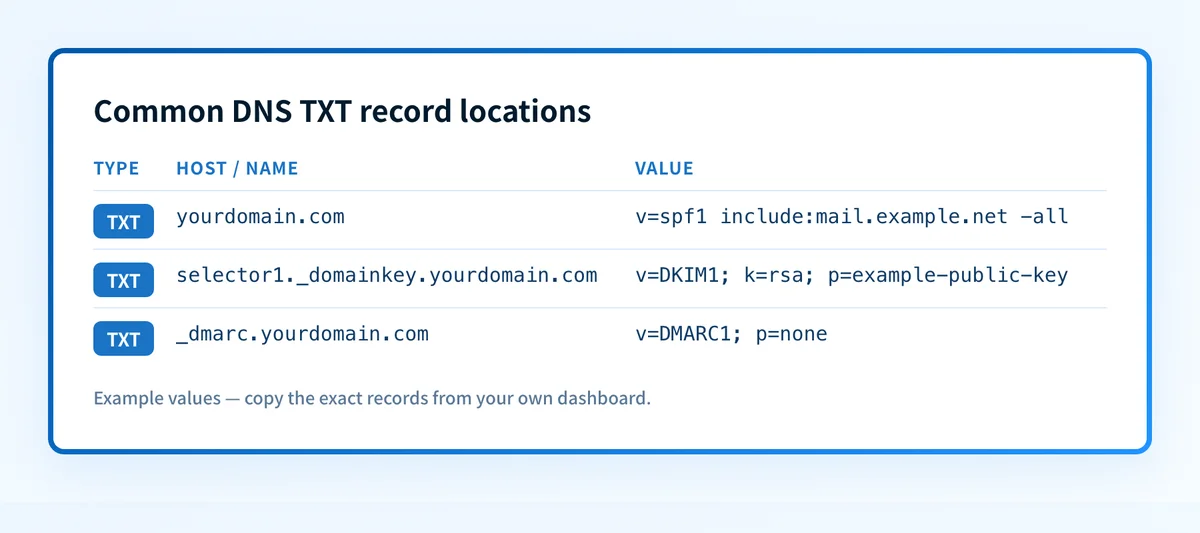
For email authentication, the record name determines which system queries it:
- SPF is normally published as a TXT record at the domain used in the SMTP
MAIL FROMidentity. - DKIM public-key information is published below a selector name, such as
selector1._domainkey.yourdomain.com. - DMARC is published at
_dmarc.yourdomain.com. - Domain-verification services commonly provide a unique name or value to publish as TXT.
A TXT record also differs from a DNS alias. A CNAME record points one DNS name to another canonical name. A TXT record contains text returned directly in the DNS response.
What are the requirements?
A TXT record contains one or more character-strings
RFC 1035 defines TXT RDATA as one or more character-strings. Each individual string starts with a length octet, so it can hold no more than 255 octets.
yourdomain.com. 3600 IN TXT "example domain-verification value"The example is illustrative only. Publish the exact hostname and value supplied by the service that needs the verification record.
Long values are often displayed as adjacent quoted strings by DNS software. DNS resolvers return those strings as parts of the same TXT record. A DKIM public key can therefore appear split in a zone file or DNS interface without becoming multiple DKIM records.
selector1._domainkey.yourdomain.com. 3600 IN TXT (
  "v=DKIM1; k=rsa; p=example-public-key-part-one"
  "example-public-key-part-two"
)
This is an illustrative structure, not a usable DKIM key. Generate the real selector and public key in the sending service that signs mail. Do not copy another organization's selector, key, or CNAME target.
SPF uses a TXT record with one SPF policy
SPF uses DNS TXT records to publish a domain's SPF policy. RFC 7208 states that a domain name must not have multiple records that would cause multiple SPF records to be selected. If more than one applicable v=spf1 record is present, SPF processing returns permerror.
yourdomain.com. 3600 IN TXT "v=spf1 include:mail.example.net -all"The example is illustrative only. include: mechanisms and the final qualifier must match the sources authorized for your own sending domain.
Other TXT records at the same owner name can exist for unrelated purposes, but avoid treating two v=spf1 values as a way to combine sender lists. Merge authorized mechanisms into the one SPF policy after confirming that the resulting lookup count remains within SPF's limits.
DKIM publishes a public key at a selector name
DKIM lets a receiving system retrieve public-key information from DNS. The sender places the selector in the s= tag of its DKIM-Signature field. The receiver queries:
selector._domainkey.yourdomain.comThe TXT record at that name carries a DKIM key record, commonly beginning with v=DKIM1;. The selector is service-specific. A published key only makes verification possible. It does not prove that the application is currently signing mail with that selector.
DMARC publishes a policy at _dmarc
DMARC uses a TXT record at _dmarc to publish policy and reporting instructions for a domain.
_dmarc.yourdomain.com. 3600 IN TXT "v=DMARC1; p=none; rua=mailto:dmarc-reports@yourdomain.com"This is an illustrative DMARC record. The reporting address and policy must be chosen for your domain and approved by the responsible operator. A DMARC record can be syntactically present while production mail still fails SPF or DKIM alignment.
For more context on these related controls, visit the email authentication learning hub.
When does the requirement take effect?
TXT records have been part of DNS since RFC 1035, published in November 1987. RFC 1035 is a final Internet Standard, not a draft.
There is no single effective date for all TXT-record uses. Each protocol has its own controlling document and deployment rules:
- SPF is specified in RFC 7208, published in April 2014. It obsoleted RFC 4408.
- DKIM is specified in RFC 6376, published in September 2011.
- DMARC is specified in RFC 9989, published in May 2026.
How do I implement the requirement?
1. Identify the protocol and owner name
Start with the system that needs the record. It should state the exact record type, hostname, and value it expects.
For email authentication, confirm which domain is used for the visible From address, SMTP envelope sender, and DKIM selector. A record at the wrong DNS name is not discovered by the intended protocol.
2. Obtain the exact value from the responsible service
Copy the generated value from the provider that owns the verification or signing configuration. Preserve quoted-string boundaries only when your DNS provider requires them.
Do not replace an existing SPF record by adding a second v=spf1 TXT record. Combine the authorized mechanisms into the existing SPF policy after reviewing all active senders.
Record the current value before changing it. This gives the operator a rollback reference if a typo or omitted sender breaks authentication.
3. Publish the record in the authoritative DNS zone
Add the TXT record at the hostname supplied by the protocol or service. Set a TTL that fits the change process used by the organization.
DNS dashboards differ in how they display the zone origin. A dashboard might ask for _dmarc, while another asks for _dmarc.yourdomain.com. Check the provider's field guidance so the zone origin is not appended twice.
4. Wait for cached answers to expire
DNS changes become visible as authoritative servers serve the new zone data, but recursive resolvers can retain an earlier answer until its TTL expires. The prior TTL controls how long an already cached answer may remain available.
Do not use a fixed propagation promise. Check the authoritative answer and public resolver results instead.
5. Confirm the service uses the published record
A DNS result is only the first layer. For a domain-verification record, confirm the provider's verification status. For email authentication, send a real message through the exact production sender and inspect its Authentication-Results header.
How do I validate compliance?
Use the TXT record lookup to inspect the public TXT response for the hostname you configured. Compare the returned owner name and text with the generated value before changing any policy.
For copyable terminal commands and resolver comparisons, use the dig and nslookup TXT command guide.
Then validate the applicable layers:
- DNS: Query the authoritative DNS service and at least one public resolver. Confirm the expected record name and complete value.
- Vendor: Check the sending or verification provider's current status. A green indicator does not prove that a production message uses the configuration.
- Message: Deliver a test message through the actual production path and inspect
Authentication-Results. RFC 8601 defines the header field that reports authentication results. - DMARC: After reports accumulate, inspect aggregate-report data for the domain's authorized and unauthorized sources.
Track the email sources behind your TXT records
A TXT lookup is useful for confirming the published value. It does not show which production senders still fail authentication or alignment after the record is live.
Palisade is agentic DMARC software that analyzes DMARC aggregate-report data, identifies sending sources and authentication or alignment issues, and creates prioritized remediation tickets. It can propose the next DMARC policy step when evidence supports it, while a human reviews the evidence and applies the change.
Palisade does not autonomously change your DMARC policy, prove every future message will authenticate, or guarantee delivery or inbox placement.
Evidence
Sources and further reading
Questions readers ask
Frequently asked questions
What is the difference between a TXT record and a CNAME record?
A TXT record returns text at a DNS name. A CNAME record makes one DNS name an alias for another name. Protocol documentation determines which record type and owner name to publish.
Can a domain have more than one TXT record?
Yes. A domain can have multiple TXT records, including records for domain verification and email authentication. SPF is the key exception: publishing multiple applicable v=spf1 records causes an SPF permanent error.
Why is a DKIM TXT record split into quoted strings?
A single DNS TXT character-string can contain at most 255 octets. DNS software can publish a longer TXT record as multiple quoted character-strings within one record, which allows a DKIM public key to be represented without creating multiple DKIM key records.
Does a TXT record prove that email authentication works?
No. A TXT lookup proves only that a public DNS response contains a value. Validate a real delivered message's authentication results and then review DMARC aggregate reports to confirm production behavior.
How long does a TXT record change take to appear?
It depends on the prior DNS TTL and resolver caching. Query the authoritative DNS service and public resolvers after the change instead of relying on a fixed number of minutes or hours.
Read the TXT records that are actually published
Enter the domain, or the exact hostname such as _dmarc.yourdomain.com.

Written by
Dominic LandryDeliverability & DNS
Dominic Landry works on email deliverability and DNS configuration at Palisade, from SPF and DKIM records through to DMARC enforcement.
More from Dominic →