What Is an A Record? How DNS A Records Work
 ChatGPT
 Claude
 Gemini
 Perplexity
 Grok
GrokIn brief
An A record is the DNS record that maps a hostname to an IPv4 address. Learn its syntax, TTL, multiple A records, how mail uses it, and how to check yours.
An A record (address record) is the DNS record that maps a hostname to an IPv4 address. When a browser, mail server, or any other client looks up a name like example.com, the A record supplies the 203.0.113.10-style address it actually connects to, so every site and service you reach by name over IPv4 depends on one. Google Workspace's DNS basics guide describes the same record as a host record that links a domain to the IP address of the computer hosting that domain's services.
At a glance
Quick takeaways
- An A record maps a hostname to one 32-bit IPv4 address. IPv6 addresses go in a separate AAAA record.
- A hostname can carry several A records, one per address, and all of them share one TTL.
- The TTL controls how long resolvers cache the answer, so lower it before you change where a name points.
- Mail depends on A records: the hostname an MX record names must return at least one address record.
- An A record can sit at the domain apex. A CNAME cannot, and a name with a CNAME cannot also hold an A record.
How does DNS use an A record?
DNS uses an A record to finish a name lookup with an address. RFC 1035 section 3.4.1 defines the record's data as a single 32-bit internet address, and section 3.2.2 assigns it type value 1. A lookup that ends at an A record runs like this:
- A client, such as a browser, asks its resolver for the A record of
example.com. - The resolver walks the DNS hierarchy until it reaches the authoritative name server for the domain.
- The authoritative server returns the A record, for example
203.0.113.10. - The resolver caches that answer for the record's TTL and hands the address to the client, which opens a connection to it.
DNS A record syntax
A DNS A record in a zone file has five fields:
example.com. 3600 IN A 203.0.113.10| Field | Example | Meaning |
|---|---|---|
| Owner name | example.com. | The hostname the record answers for. The trailing dot marks a fully qualified name. |
| TTL | 3600 | How many seconds resolvers may cache the answer; here, one hour. |
| Class | IN | The internet class, used by almost every record you will publish. |
| Type | A | The record type. |
| Address | 203.0.113.10 | The IPv4 address the name resolves to. |
Most registrar and DNS host dashboards hide the zone-file line and ask for three values: a host (@ for the root domain, or a label such as www), the IPv4 address, and a TTL. The dashboard builds the line above from them.
Note:203.0.113.10sits in one of the blocks RFC 5737 section 3 reserves for documentation (192.0.2.0/24,198.51.100.0/24and203.0.113.0/24). Publish the real public address your host assigns.
A record examples
A record examples follow a few patterns. Every address below is a documentation address; replace it with your own.
| Host | Record | What it does |
|---|---|---|
example.com (@) | A 203.0.113.10 | Points the root domain at the web server |
www.example.com | A 203.0.113.10 | Serves www from the same server as the root |
mail.example.com | A 198.51.100.25 | Gives the mail server a name an MX record can use |
app.example.com | A 192.0.2.40 and A 192.0.2.41 | Spreads one hostname across two servers |
How do I create a DNS A record?
Creating a DNS A record takes a few minutes in your DNS host's control panel.
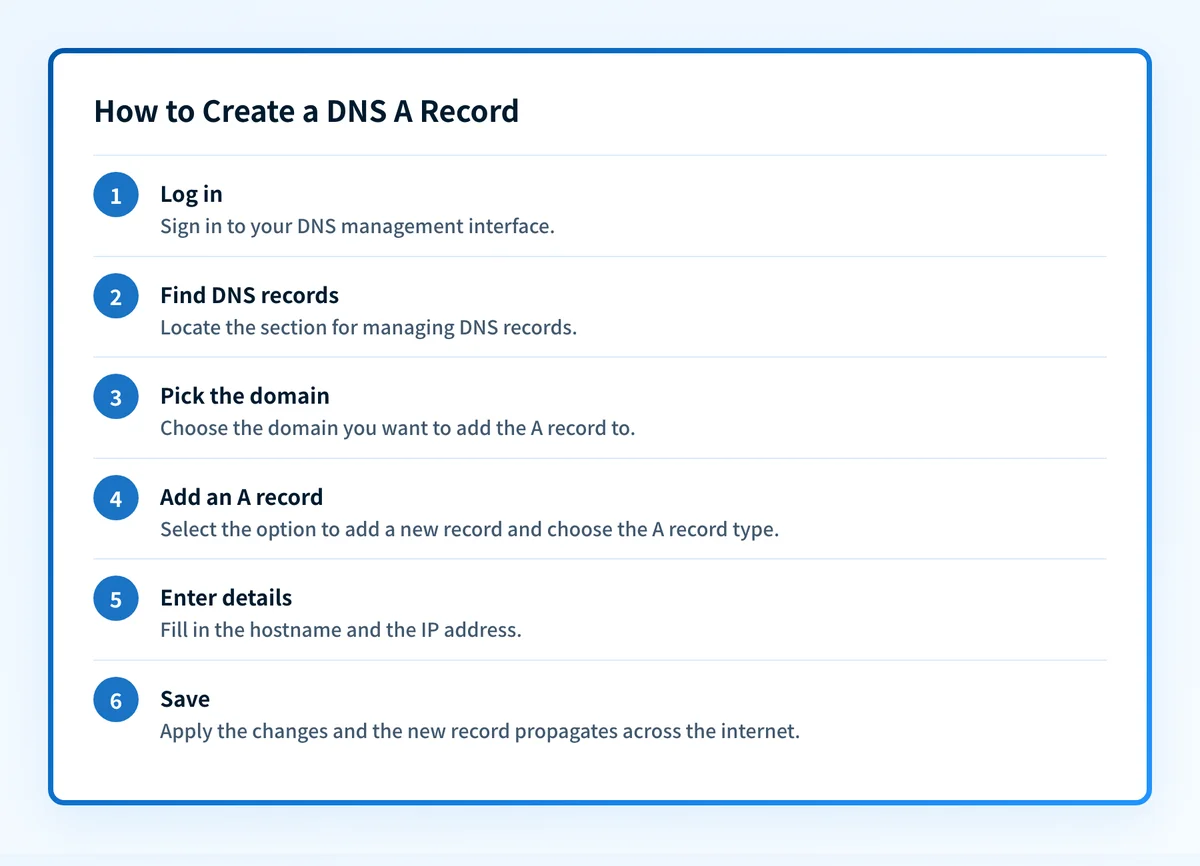 Exact menus vary by provider: check your DNS provider's documentation for specifics.
- Log in to the DNS management interface at your registrar or DNS host.
- Open the DNS or zone-editor section for the domain.
- Choose the domain you want to change.
- Add a new record and choose the A type.
- Enter the host (
@for the apex, or a label such aswww) and the IPv4 address. - Set a TTL, lower if you expect to change the address soon, then save. The record reaches users as resolvers refresh their caches.
Can a hostname have more than one A record?
Yes. A hostname can have several A records, one for each IPv4 address. RFC 1035 section 3.4.1 states that hosts with multiple internet addresses have multiple A records. Together those records form one record set, and RFC 2181 section 5.2 requires every record in a set to carry the same TTL.
Many DNS servers rotate the order of the addresses between answers, which spreads new connections across servers. That rotation is a convention, not a guarantee: RFC 1034 section 3.6 says the order of records in a set is not significant and need not be preserved, and DNS does no health checking, so a client can still be handed the address of a server that is down. For real failover, use a load balancer or a DNS service that removes unhealthy addresses.
How does TTL affect an A record?
The TTL (time to live) on an A record sets how long resolvers may cache it before asking again. RFC 1035 section 3.2.1 defines it as the interval a record may be cached before the source should be consulted again, and section 4.1.3 gives that interval in seconds.
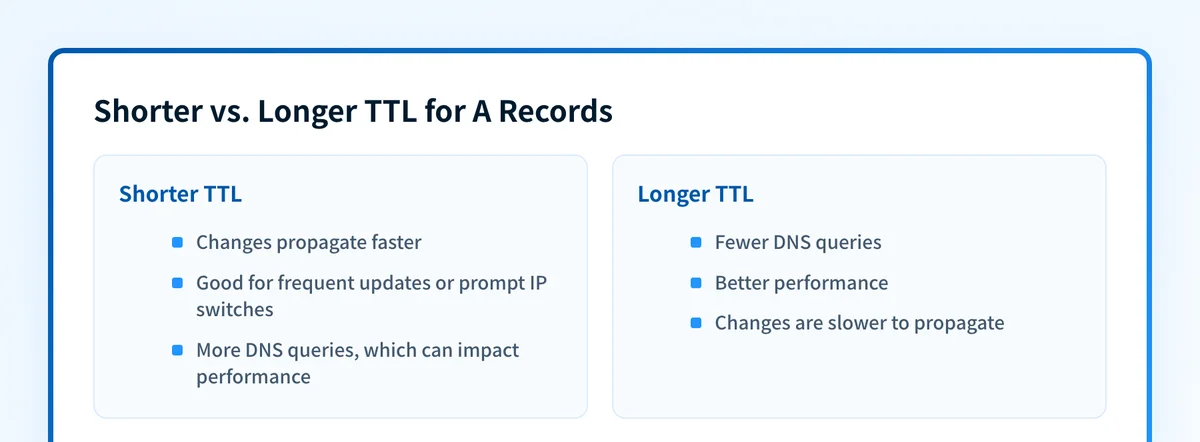 A shorter TTL trades query volume for faster changes.
A short TTL, such as 300 seconds, lets an address change reach users quickly. A long TTL, a day or more, cuts query volume and suits records that rarely change. The common pattern for a server move is to lower the TTL at least one old TTL ahead of the change, switch the address, confirm it, then raise the TTL again. When you move hosting, the new provider assigns a new public IP, and pointing the A record at it is what moves the traffic.
Do A records matter for email?
A records matter for email in three places, even though mail routing itself is set by MX records.
- MX targets must resolve to addresses. RFC 5321 section 5.1 requires the hostname an MX record names to return at least one address record, such as an A or AAAA record, and places a target that returns a CNAME outside the standard. RFC 2181 section 10.3 states the same prohibition on aliases.
- A domain with no MX falls back to its own address. Under RFC 5321 section 5.1, when a domain exists but returns no MX records, a sender treats the domain itself as an implicit MX, so the domain's own A or AAAA records decide where delivery is attempted. A domain that does not exist is reported as an error instead, which is one of the failures behind a no MX record found bounce.
- Sending IPs need forward and reverse DNS that agree. Gmail's email sender guidelines (checked 2026-09-15) require, for all senders, that a sending server's public IP have a PTR record resolving to a hostname, and that the same hostname have an A (IPv4) or AAAA (IPv6) record resolving back to that same IP. That A record is the forward half of the check.
example.com.       3600 IN MX 10 mail.example.com.
mail.example.com.  3600 IN A     198.51.100.25
Authentication is a separate layer: SPF, DKIM, and DMARC are TXT records, and a correct A record does not make any of them pass. For the mail-routing record itself, see what an MX record is.
What is the difference between an A record and an AAAA record?
An A record holds an IPv4 address and an AAAA record holds an IPv6 address. RFC 3596 section 2 defines AAAA as type 28, carrying a 128-bit address, and the two records can sit at the same hostname so clients on either network can connect. For when to publish one or both, see A record vs AAAA record and what an AAAA record is.
What is the difference between an A record and a CNAME record?
An A record points a name straight at an IPv4 address, while a CNAME record points a name at another hostname that the resolver then looks up. Use an A record when you know the address, including at the domain apex. Use a CNAME to follow a hostname a provider manages. The two cannot share a name, because RFC 2181 section 10.1 allows an alias no other data. The full decision is in CNAME vs A record.
Common issues with DNS A records
My A record change hasn't taken effect yet
An A record change can look stuck because resolvers keep serving the old address until the TTL that was in place before your edit expires, which can be minutes or a full day. Query the authoritative answer with a DNS lookup rather than your browser, then clear your operating system's DNS cache if your own machine still shows the old address.
The site loads on one network but not another
A site that loads on one network but not another usually has an A record that differs between your authoritative name servers, or a resolver still caching an old address. Confirm every authoritative server returns the same value, and check whether an AAAA record is sending IPv6 clients to a different, broken address.
I pointed the A record at a private IP and nothing works
An A record pointing at a private address cannot be reached from the public internet. RFC 1918 section 3 reserves 10.0.0.0/8, 172.16.0.0/12 and 192.168.0.0/16 for private networks and forbids routing them between enterprises. Replace the value with the public IP your host assigned.
I need a CNAME and an A record on the same name
An A record and a CNAME record cannot share a hostname, and the domain apex cannot be a CNAME at all. Use an A record at the apex, or your DNS provider's ALIAS or CNAME-flattening feature where it offers one.
Where Palisade fits
An A record lookup confirms one address at one moment. It cannot show which of your real sending sources still fail SPF, DKIM, or DMARC alignment. Palisade is agentic DMARC software for IT teams and MSPs: it analyzes DMARC aggregate reports, finds every sender, and identifies SPF, DKIM, and alignment problems as prioritized tickets. The agent investigates every sender, drafts every fix, and proposes each policy step, and you approve before anything ships.
Start with a free Email Security Score to see where your domain stands.
Evidence
Sources and further reading
- RFC 1034: Domain Names - Concepts and Facilities, section 3.6
- RFC 1035: Domain Names - Implementation and Specification, sections 3.2, 3.4.1 and 4.1.3
- RFC 1918: Address Allocation for Private Internets, section 3
- RFC 2181: Clarifications to the DNS Specification, sections 5.2, 10.1 and 10.3
- RFC 3596: DNS Extensions to Support IP Version 6, section 2
- RFC 5321: Simple Mail Transfer Protocol, section 5.1
- RFC 5737: IPv4 Address Blocks Reserved for Documentation, section 3
- Google Workspace Admin Help: DNS basics
- Gmail Help: Email sender guidelines
Related reading
Questions readers ask
Frequently asked questions
What does the A in A record stand for?
The A in A record stands for address. An A record holds the IPv4 address for a hostname, and RFC 1035 lists it as type 1, a host address.
Can one domain have both an A record and an AAAA record?
Yes. A domain can publish an A record for IPv4 clients and an AAAA record for IPv6 clients at the same hostname, and most dual-stack services do. Publish an AAAA record only for an address that actually serves the site or mail.
Can an A record point to another domain name?
No. An A record holds only an IPv4 address. To point a hostname at another hostname, use a CNAME record, and never at the domain apex or at a name that already has other records.
Does an A record affect my email?
Yes, indirectly. An A record does not route mail, but the hostname an MX record names must resolve to an A or AAAA record, a domain with no MX record falls back to its own address, and Gmail requires the hostname in a sending IP's PTR record to have an A or AAAA record pointing back to that IP. SPF, DKIM, and DMARC are separate TXT records.
How long does an A record change take?
An A record change takes as long as the old TTL on that record. Resolvers that cached the previous address keep using it until that TTL expires, so a record that had a one-day TTL can take up to a day to change everywhere.
How do I check my current A record?
Check an A record with a DNS lookup tool, or run dig +short example.com A in a terminal. Both read the live DNS answer, which is more reliable than a browser that may have cached an older address.
Look up the published DNS answer before changing it
Enter your domain and record.

Written by
Dominic LandryDeliverability & DNS
Dominic Landry works on email deliverability and DNS configuration at Palisade, from SPF and DKIM records through to DMARC enforcement.
More from Dominic →