Why You Should Use Cloudflare for DNS Management and How to Set It Up
 ChatGPT
 Claude
 Gemini
 Perplexity
 Grok
GrokIn brief
Why use Cloudflare for DNS: faster resolution, easy SPF/DKIM/DMARC record management, and free DNSSEC, with a step-by-step setup guide.

Understanding DNS and Its Importance for Websites
Before we delve into the benefits of using Cloudflare for DNS management, let's take a moment to understand what DNS is and why it's crucial for websites. DNS, or Domain Name System, acts as the internet's address book. It translates human-readable domain names, like example.com, into IP addresses that computers use to communicate with each other.
When you type a website's URL into your browser, the DNS system resolves that domain name to the corresponding IP address of the server hosting the website. This process allows your browser to establish a connection and load the website's content.
Effective DNS management plays a significant role in optimizing website performance, ensuring security, and maintaining uninterrupted availability. That's where Cloudflare DNS comes in.
What is Cloudflare DNS and Why Choose It for DNS Management
Cloudflare DNS is a robust and reliable solution for managing your DNS records. It offers a range of advantages that make it a top choice for website owners and administrators. Let's explore why you should consider using Cloudflare for DNS management:
Enhanced Performance and Global Coverage
Cloudflare operates one of the largest and fastest DNS networks worldwide. By leveraging their vast infrastructure, Cloudflare DNS ensures faster response times for DNS queries, resulting in improved website performance. Additionally, Cloudflare has an extensive global presence with strategically located data centers. This enables them to provide fast and reliable DNS resolution to visitors from any geographic location.
Robust Security Features
Security is paramount for any website, and Cloudflare DNS excels in this aspect. With advanced DDoS protection, Cloudflare DNS helps mitigate and prevent malicious attacks, ensuring your website stays online and accessible. Their DNS firewall protects against DNS amplification attacks and filters out malicious traffic. By routing your DNS queries through Cloudflare's secure network, you also gain protection against DNS spoofing and cache poisoning attempts.
DNS Propagation Management
Cloudflare DNS provides efficient DNS propagation management. When you make changes to your DNS records, Cloudflare's global network allows these changes to propagate quickly across its data centers. This reduces the time it takes for your updated DNS records to become active, minimizing potential downtime during DNS updates. As a result, you can ensure a seamless transition and uninterrupted website availability.
Simplified DNS Configuration and Management

Cloudflare offers a user-friendly interface that simplifies DNS configuration and management. Whether you need to add, edit, or delete DNS records, you can effortlessly do so through the Cloudflare DNS dashboard. Even if you're new to DNS management, the intuitive controls and clear instructions make it easy to navigate the platform. Cloudflare also provides helpful documentation and support resources, enabling you to troubleshoot any DNS-related issues that may arise.
Cost-Effective Solution
Cloudflare DNS offers a free plan that includes robust DNS management features. This free plan allows you to manage your DNS records effectively without incurring any additional costs. For websites that require additional performance enhancements or advanced features, Cloudflare offers premium plans with added benefits.
With its superior performance, robust security features, efficient DNS propagation management, user-friendly interface, and cost-effective options, Cloudflare DNS emerges as a reliable choice for managing your DNS records. By leveraging Cloudflare's global infrastructure, you can optimize your website's performance, ensure its security, and simplify the management of your DNS configuration.
In the following sections, we will delve deeper into how to get started with Cloudflare DNS, configure DNS records, switch nameservers, explore advanced features, troubleshoot common issues, and more. Let's dive in!
Detailed Step-by-Step Guide for Cloudflare DNS
To help you get started with Cloudflare DNS, let's provide a detailed step-by-step guide covering the key processes:
Creating a Cloudflare Account for DNS Management
- Visit the Cloudflare website and sign up for their DNS services. - Fill in the required details to create your Cloudflare DNS account.
Adding Your Site to Cloudflare DNS
- Once you've created your Cloudflare DNS account, navigate to the dashboard. - Click on "+ Add Site" to add your website to Cloudflare DNS.
Choosing the Right CDN Plan for DNS Optimization
- Evaluate the available CDN plans in Cloudflare DNS. - Select the most suitable plan that aligns with your DNS optimization needs.
Setting Up DNS Records with Cloudflare DNS
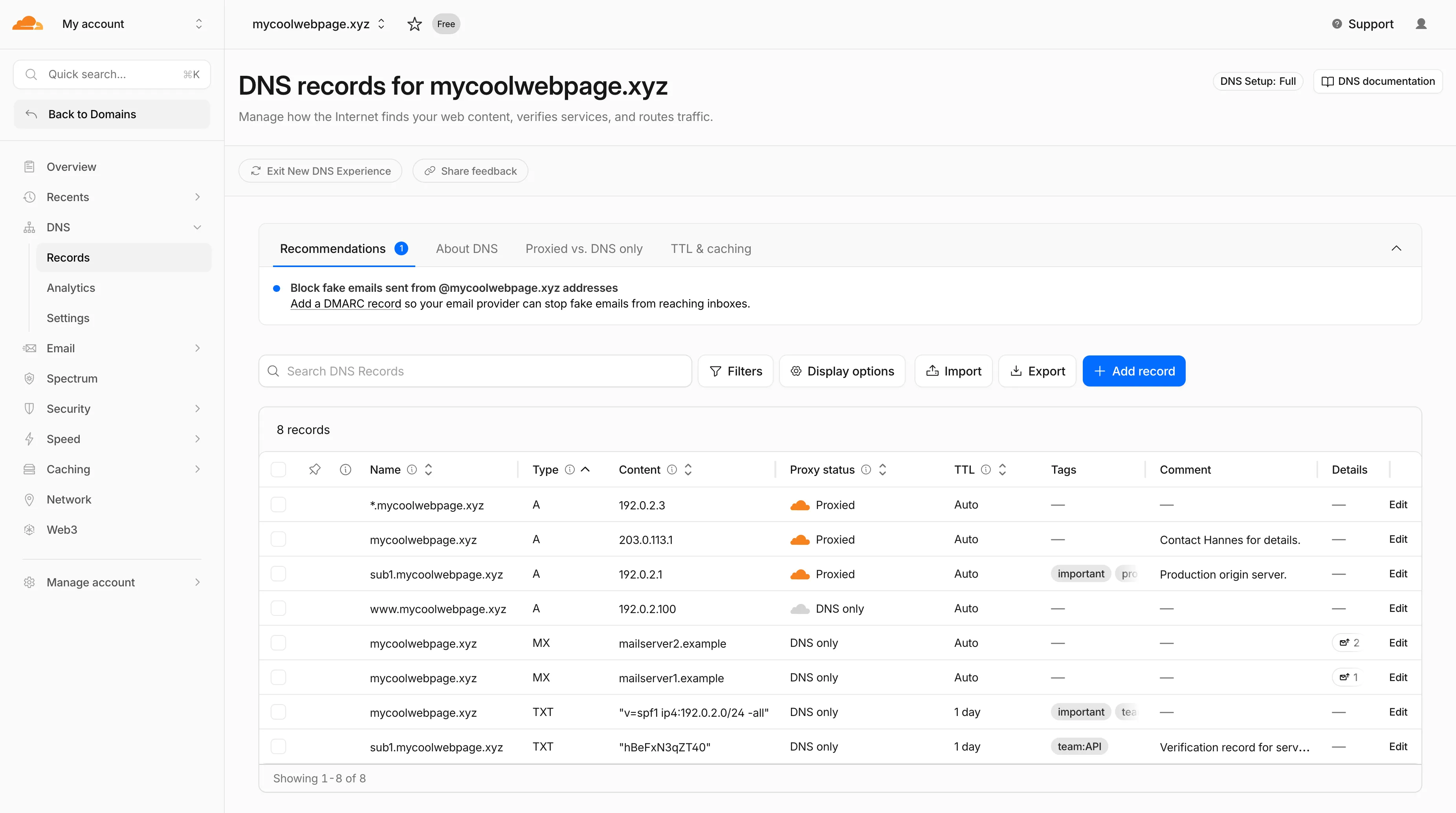
- After adding your site, Cloudflare DNS will automatically scan and detect your existing DNS records.
- Verify and manage your DNS records, including adding, editing, and deleting records in Cloudflare DNS.
Switching Nameservers to Cloudflare DNS
- Cloudflare DNS will provide you with specific nameservers to replace the existing ones.
- Log in to your domain registrar's account and update the nameservers with the Cloudflare DNS nameservers provided.
- Confirm the nameserver change in Cloudflare DNS after updating.
Verifying the Nameserver Change in Cloudflare DNS
- Cloudflare DNS will verify the nameserver change and send you a confirmation email once the process is complete.
Setting Up DNS Records with Cloudflare DNS
DNS records are essential components that define how your domain name is associated with various services and resources. With Cloudflare DNS, you can easily add, edit, and delete DNS records. Here's a quick guide on setting up DNS records with Cloudflare DNS:
Understanding Different Types of DNS Records for Cloudflare DNS
Before configuring DNS records, it's essential to understand the different types available. Common types include A records (for mapping domain names to IP addresses), CNAME records (for aliasing one domain to another), MX records (for email routing), and TXT records (for adding additional information).
How to Add, Edit, and Delete DNS Records in Cloudflare
After adding your site to Cloudflare DNS, the platform automatically scans and detects your existing DNS records. You can verify and manage these records through the Cloudflare DNS dashboard. Adding new records is as simple as providing the necessary information, such as the record type, name, and value. Editing and deleting records can also be done effortlessly.
Handling DNS Propagation Delays with Cloudflare DNS
When you make changes to your DNS records, it may take some time for these changes to propagate across the internet. Cloudflare DNS minimizes propagation delays by leveraging their global network. However, in some cases, delays may still occur. It's crucial to understand propagation times and employ strategies to minimize any potential impact on your website's availability.
Switching Nameservers to Cloudflare DNS
Nameservers are a fundamental part of DNS management. To switch your nameservers to Cloudflare DNS, follow these steps:
What are Nameservers and Why Change Them to Cloudflare DNS
Nameservers are specialized servers that handle DNS queries for a specific domain. By changing your nameservers to Cloudflare DNS nameservers, you delegate the responsibility of managing your DNS records to Cloudflare's infrastructure. This allows you to take advantage of their performance, security, and management features.
Step-by-Step Guide to Changing Nameservers in Your Domain Registrar for Cloudflare DNS
To change your nameservers, log in to your domain registrar's account. Locate the section for managing your domain's nameservers and replace the existing ones with the Cloudflare DNS nameservers provided. Save the changes, and the update will propagate across the internet over time.
Verifying the Nameserver Change in Cloudflare DNS
After updating the nameservers in your domain registrar's account, Cloudflare DNS will automatically verify the change. You'll receive a confirmation email from Cloudflare once the verification is complete. It's essential to ensure the verification is successful to ensure that your DNS records are managed by Cloudflare DNS.
Advanced Features of Cloudflare DNS
Cloudflare DNS offers advanced features that can further optimize your DNS management and website performance. Here are a few notable features:
Exploring the Cloudflare Proxy Service for DNS Management
Cloudflare's proxy service acts as a reverse proxy, allowing you to protect your origin server's IP address while benefiting from Cloudflare's performance and security features. By utilizing the proxy service, you can enhance your website's speed, mitigate DDoS attacks, and gain additional security benefits.
Benefits of Using Cloudflare's CDN for DNS Performance
Cloudflare's Content Delivery Network (CDN) can significantly improve your website's performance by caching and delivering your content from data centers located worldwide. By leveraging Cloudflare's CDN alongside their DNS management, you can optimize both the DNS resolution process and content delivery to your visitors.
Enhancing Security with Cloudflare DNS Features
In addition to the robust security features mentioned earlier, Cloudflare DNS offers additional security measures. These include DNSSEC (DNS Security Extensions) for securing DNS transactions, TLS (Transport Layer Security) encryption for secure communication, and rate limiting to protect against abusive requests.
Troubleshooting Common DNS Issues
While Cloudflare DNS provides reliable DNS management, you may encounter common DNS issues from time to time. Here are a few troubleshooting steps to help you address these issues:
Dealing with DNS Propagation Delays and Solutions
If you're experiencing DNS propagation delays despite using Cloudflare DNS, it's important to understand the factors that can contribute to delays. You can implement strategies such as reducing TTL (Time-to-Live) values, utilizing Cloudflare's Page Rules, or considering DNS pre-fetching to minimize the impact of propagation delays.
Troubleshooting Steps When Your Site Can't Be Reached via DNS
If your site becomes unreachable due to DNS-related issues, there are several troubleshooting steps you can take. These include verifying DNS records, checking the correct configuration of nameservers, and reviewing any DNS-related error messages or logs.
Handling Errors in DNS Records with Cloudflare DNS
In case you encounter errors or inconsistencies in your DNS records, Cloudflare DNS provides a user-friendly interface for managing and rectifying these issues. Double-check the accuracy of the record values, ensure proper configuration, and consult Cloudflare's documentation or support resources for specific error resolution guidance.
DNS and Cloudflare DNS
In conclusion, Cloudflare DNS offers numerous benefits for efficient DNS management. It provides enhanced performance, robust security features, efficient DNS propagation management, simplified configuration, and cost-effective options. By leveraging Cloudflare's global infrastructure, you can optimize your website's performance, ensure its security, and simplify the management of your DNS configuration.
While Cloudflare DNS is a reliable choice, it's always good to explore other DNS management options and compare their features and capabilities to make an informed decision that aligns with your specific needs.
Simplify Your DNS Management with GetVerified.Email
Understanding and managing the technical aspects of DNS can be complex and overwhelming. At GetVerified.Email, we recognize the challenges you may face. That's why we're here to help assess where you are in the process and guide you towards the next steps.
Ready to streamline your DNS management? Take the first step by filling out our quick 2-minute questionnaire. Our experts will provide personalized recommendations tailored to your specific needs. Let us simplify the process for you.
Fill out the questionnaire now and unlock the full potential of your DNS management with GetVerified.Email.
Related reading
Look up the published DNS answer before changing it
Enter your domain and record.

Written by
Dominic LandryDeliverability & DNS
Dominic Landry works on email deliverability and DNS configuration at Palisade, from SPF and DKIM records through to DMARC enforcement.
More from Dominic →