Reverse DNS for email server
 ChatGPT
 Claude
 Gemini
 Perplexity
 Grok
GrokIn brief
Reverse DNS for email server setup requires the IP owner to publish a PTR record and a matching forward DNS record for the sending hostname.
Reverse DNS for an email server requires the organisation that allocated the sending IP address, usually an ISP, hosting provider, or cloud provider, to create a PTR record in its reverse DNS zone. The PTR hostname must resolve back to that same sending IP through an A record for IPv4 or AAAA record for IPv6. Google requires valid forward and reverse DNS records for all senders from February 1, 2024.
At a glance
Quick takeaways
- A domain owner usually cannot add a PTR record in its normal DNS zone.
- The IP address owner controls the reverse DNS zone and must publish the PTR record.
- A PTR record maps a sending IP address to a hostname.
- The PTR hostname needs a matching A or AAAA record that returns the original IP address.
- IPv4 reverse DNS uses
IN-ADDR.ARPA; IPv6 reverse DNS uses the separateIP6.ARPAtree. - RFC 5321 says an SMTP client MUST use a primary hostname in EHLO or HELO when possible.
Who is affected?
This requirement affects organisations that send email directly from a server, virtual machine, appliance, or dedicated outbound IP address. It also affects teams using an email service where they control the sending IP or are responsible for its mail-server configuration.
The party that owns the domain is not necessarily the party that controls reverse DNS. Microsoft documents that reverse zones are "typically" maintained by the ISP, which is why a server operator must ask the IP provider to create or delegate the PTR record rather than adding it beside the domain's MX or SPF records in ordinary DNS.
This ownership model follows the DNS design. RFC 1035 defines the IPv4 reverse namespace as address-structured, with reversed octets below IN-ADDR.ARPA. That structure lets DNS operators delegate reverse zones by network allocation. Control therefore follows the assigned address space.
If a third-party email platform sends all production mail from its own shared addresses, that provider may operate the reverse DNS. Confirm the actual outbound IP before opening a request. A hostname configured on an application server does not establish what IP receivers see during SMTP delivery.
For background on the DNS layers involved, see Palisade's infrastructure learning hub.
What are the requirements?
The IP owner publishes a PTR record
A PTR record maps an IP address to a domain name. RFC 1035 defines PTR RDATA as one PTRDNAME, a domain name pointing to a location in the DNS namespace.
For an IPv4 mail server at 192.0.2.25, the reverse query reverses the address octets:
25.2.0.192.in-addr.arpa. IN PTR mail.yourdomain.com.The example is illustrative only. Ask the IP owner to publish the actual reverse record for the production sending address. Do not copy example values into a live DNS zone.
The request should include:
- The exact outbound IPv4 or IPv6 address.
- The hostname you want the PTR record to return.
- Confirmation that the hostname already has a matching forward record.
- The purpose of the address, such as outbound SMTP.
The PTR hostname resolves back to the sending IP
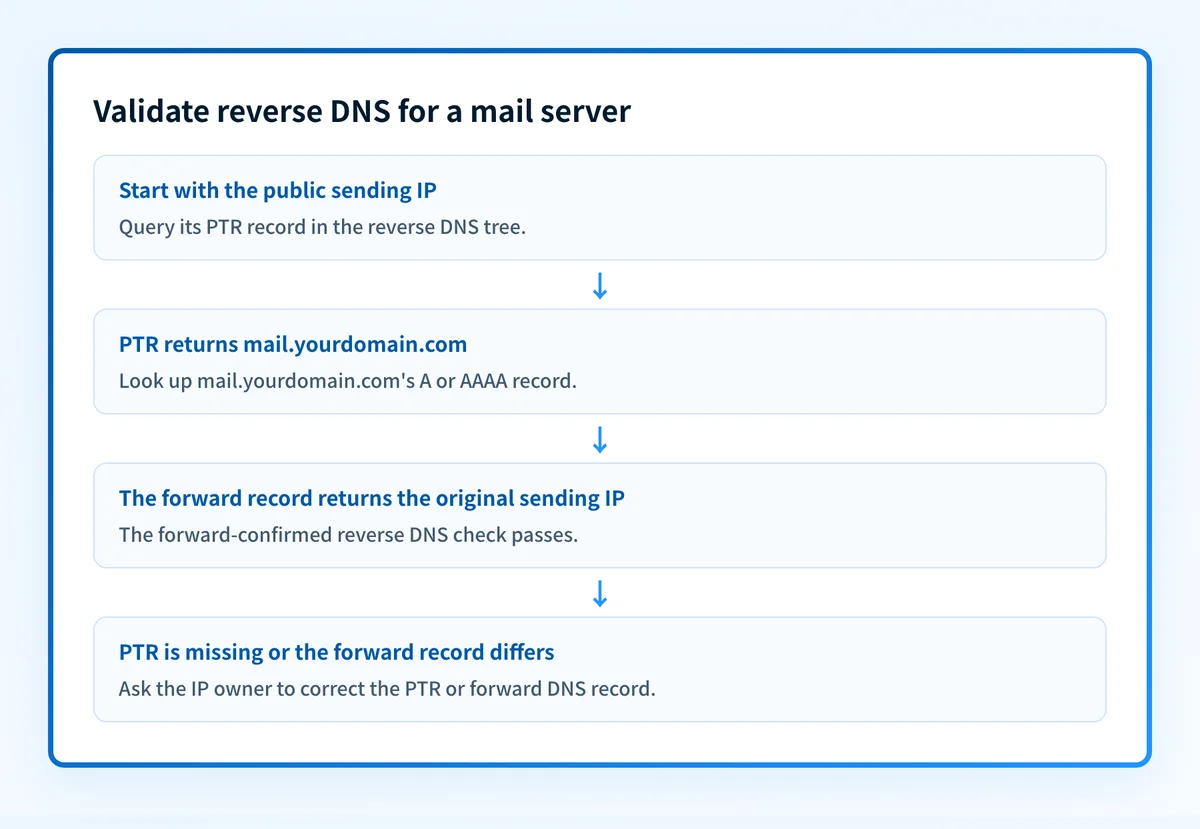
Google's Email sender guidelines require all senders to have valid forward and reverse DNS records. The guidance says the PTR record must resolve to the sending server's hostname, and that hostname must resolve back to the same IP address.
This two-way relationship is often called forward-confirmed reverse DNS. RFC 8601 describes the iprev method as a reverse lookup followed by a forward lookup that confirms the original address.
For the preceding IPv4 example, the forward record needs to return 192.0.2.25:
mail.yourdomain.com. IN A 192.0.2.25For an IPv6 sending address, use an AAAA record instead:
mail.yourdomain.com. IN AAAA 2001:db8:25::25A PTR record by itself does not complete the check. A hostname that resolves to a different IP, or does not resolve at all, does not meet Google's stated forward and reverse DNS condition.
IPv6 needs its own reverse DNS request
An IPv4 PTR record does not cover an IPv6 address. RFC 3596 specifies that IPv6 reverse mapping uses nibble-reversed labels beneath IP6.ARPA.
An IPv6 address such as 2001:db8::25 has a structurally different reverse name:
5.2.0.0.0.0.0.0.0.0.0.0.0.0.0.0.0.0.0.0.8.b.d.0.1.0.0.2.ip6.arpa. IN PTR mail.yourdomain.com.This is illustrative only. The IP provider must create or delegate the real reverse record. If your mail system can send from both IPv4 and IPv6, validate each address separately.
EHLO or HELO should identify the server hostname
Reverse DNS and the SMTP greeting are related operational checks, but they are not the same DNS record. RFC 5321 says an SMTP client "MUST, if possible, ensure that the domain parameter to the EHLO command is a primary host name."
Use the PTR hostname as the EHLO or HELO name when your mail-server software allows it and the hostname is a valid primary hostname for that server. This makes the server identity easier to inspect across DNS and SMTP evidence.
RFC 5321 also says a receiving SMTP server that verifies the EHLO name against the client IP "MUST NOT refuse to accept a message on that basis" if the verification fails. A mismatch alone is not a universal protocol-level rejection rule. It can still create an operational problem for receiver checks or policy rules, so investigate a mismatch with the guidance in reverse DNS that does not match an SMTP banner.
When does the requirement take effect?
Google's Email sender guidelines set the operative date: valid forward and reverse DNS records are required for all senders starting February 1, 2024.
That date applies to Google's published sender guidance. It is not a universal date created by RFC 1035, RFC 3596, RFC 5321, or RFC 8601. Those RFCs define DNS, SMTP, and the iprev method, rather than a mailbox-provider enforcement schedule.
The reverse DNS mechanism is older than Google's sender rule. RFC 1035 specifies IPv4 reverse mapping, while RFC 3596 specifies IPv6 reverse mapping. Neither RFC requires a provider to accept a particular reverse-DNS request or says every receiving system will reject mail when reverse DNS is missing.
How do I implement the requirement?
1. Identify every production sending IP
Collect the public IP addresses used by the exact SMTP path that sends mail. Include separate IPv4 and IPv6 addresses.
Check production message headers, mail-transfer-agent logs, or the outbound relay configuration. Do not use a private address from an application host or a load balancer's internal network.
2. Choose the mail-server hostname
Choose a hostname under a domain you control, such as mail.yourdomain.com. Publish its A record for IPv4 and its AAAA record for IPv6 where applicable.
Confirm that the record resolves to the same public address that sends the mail. Do this before asking the IP owner to create the PTR record.
3. Ask the IP owner to create the reverse record
Open a request with the ISP, host, or cloud provider that allocated the sending IP. Provide the IP address and the fully qualified hostname.
Ask whether the provider will publish the PTR record or delegate control of the applicable reverse zone. Do not ask the registrar for your domain unless it also allocated the sending address.
Do not change an existing PTR record until you know every service using that IP. A shared address can support more than one workload, and an unplanned change can disrupt another service's hostname checks.
4. Set the SMTP EHLO or HELO hostname
Configure the sending mail-transfer agent to use its primary hostname in EHLO or HELO where possible, as RFC 5321 requires.
Send a controlled test message through the same production path. Compare the greeting name, the observed sending IP, and the PTR hostname. If the SMTP banner does not match the reverse DNS name, follow the remediation guidance for reverse DNS that does not match an SMTP banner.
5. Repeat for IPv6
If the server sends over IPv6, ask the IPv6 address owner for the separate IP6.ARPA reverse mapping. Confirm that the chosen hostname has an AAAA record returning the same IPv6 address.
How do I validate compliance?
Start with the reverse lookup. Use the IP reputation checker with the public sending IP to inspect the PTR hostname returned for that address.
Then use the DNS lookup tool to query the PTR hostname's A record or AAAA record. Confirm that the forward response includes the original sending IP. This manual sequence follows the two steps described in RFC 8601's iprev method.
The reverse lookup is a point-in-time DNS check. A timeout or empty response does not prove the mail server has no PTR record, and a PTR result does not prove the hostname forwards back correctly. Public DNS checks also do not prove which IP a specific production message used, how a receiver evaluates SMTP, or future inbox placement.
Complete the operational validation with evidence from the same sending path:
- Check authoritative DNS and at least one public resolver for the PTR and matching A or AAAA record.
- Inspect the provider's reverse-DNS status or support confirmation if it offers one.
- Send a real message through the production server and inspect its headers, source IP, and SMTP identity.
- Review DMARC aggregate reports after data accumulates to confirm that expected sending sources appear in normal traffic.
Check the PTR record for the sending IP
A reverse lookup identifies the hostname currently published for a sending address. Use that result before requesting a change, then confirm the hostname's forward A or AAAA record separately.
Check the sending IP's PTR record
An IP reputation lookup is a public point-in-time check. It cannot confirm the production SMTP path, repair a PTR record, monitor future DNS changes, or guarantee how a mailbox provider will treat a message.
Evidence
Sources and further reading
Questions readers ask
Frequently asked questions
Can I add a PTR record in my own DNS?
No, you cannot add it yourself in most cases, because the reverse zone belongs to whoever owns the IP address. Microsoft's missing-PTR guidance says reverse zones are typically maintained by the ISP or other IP-address provider. Your own DNS provider can publish the forward A or AAAA record, but the IP owner has to publish or delegate the reverse one.
Who do I ask to set up reverse DNS for my mail server?
Ask the organisation that allocated the sending IP address, such as an ISP, hosting provider, or cloud provider. Give it the public sending IP and the hostname that should become the PTR target. Confirm first that the hostname resolves back to that same IP.
Does reverse DNS have to match the EHLO or HELO name?
Matching is good practice rather than a hard SMTP rule. RFC 5321 says the SMTP client MUST use a primary hostname in EHLO or HELO where possible, and it also says a receiver MUST NOT refuse a message purely because verifying that name against the client IP failed. Individual receivers can still weigh a mismatch as they choose.
How do I check whether reverse DNS is set up correctly?
Check the sending IP's PTR response, then resolve the returned hostname's A or AAAA record and compare it with the original IP. RFC 8601 describes this reverse-then-forward confirmation method. Also inspect a message sent through the real production path.
When did reverse DNS become a Google sender requirement?
Google's Email sender guidelines require valid forward and reverse DNS records for all senders starting February 1, 2024. That is Google's documented requirement date. Other mailbox providers need their own current documentation.
Do I need separate reverse DNS for IPv6?
Yes, IPv6 needs its own reverse DNS. RFC 3596 puts IPv6 reverse mapping in a separate tree under IP6.ARPA, so an IPv4 PTR record does nothing for an IPv6 sending address. The hostname it points to also needs an AAAA record that returns that same IPv6 address.

Written by
Dominic LandryDeliverability & DNS
Dominic Landry works on email deliverability and DNS configuration at Palisade, from SPF and DKIM records through to DMARC enforcement.
More from Dominic →