Email reverse DNS best practices
 ChatGPT
 Claude
 Gemini
 Perplexity
 Grok
GrokIn brief
Email reverse DNS best practices: set a PTR for every sending IP, confirm forward DNS, match EHLO, and recheck after IP changes for production senders.
Email reverse DNS best practices are straightforward: publish a PTR record for every IP address that sends mail, make its hostname resolve back to that same IP address, use a consistent SMTP EHLO name, and repeat the check whenever the sending IP changes. Google requires valid forward and reverse DNS for senders. Reverse DNS is still a hygiene signal, not an email-authentication control.
Audience
This guidance is for teams that operate production email infrastructure, including internal IT teams, marketing teams, and service providers managing outbound mail for multiple domains.
At a glance
Quick takeaways
- Every IPv4 or IPv6 address that sends production email needs its own valid PTR record.
- A PTR record should return a hostname whose A or AAAA record resolves back to the sending IP.
- The hostname in the PTR record does not have to be your brand domain, but the forward and reverse DNS relationship must be consistent.
- The SMTP EHLO name should match the hostname used for the sending IP.
- Recheck reverse DNS after an IP migration, a new outbound relay, or a provider change.
- Use SPF, DKIM, and DMARC for email authentication. Reverse DNS does not authenticate a sender.
What good email reverse DNS looks like
Reverse DNS maps an IP address to a hostname through the in-addr.arpa tree for IPv4 addresses. RFC 1035's inverse query guidance explains that reverse zones are delegated by network address, which is why the organization that controls the IP allocation usually controls the PTR record.
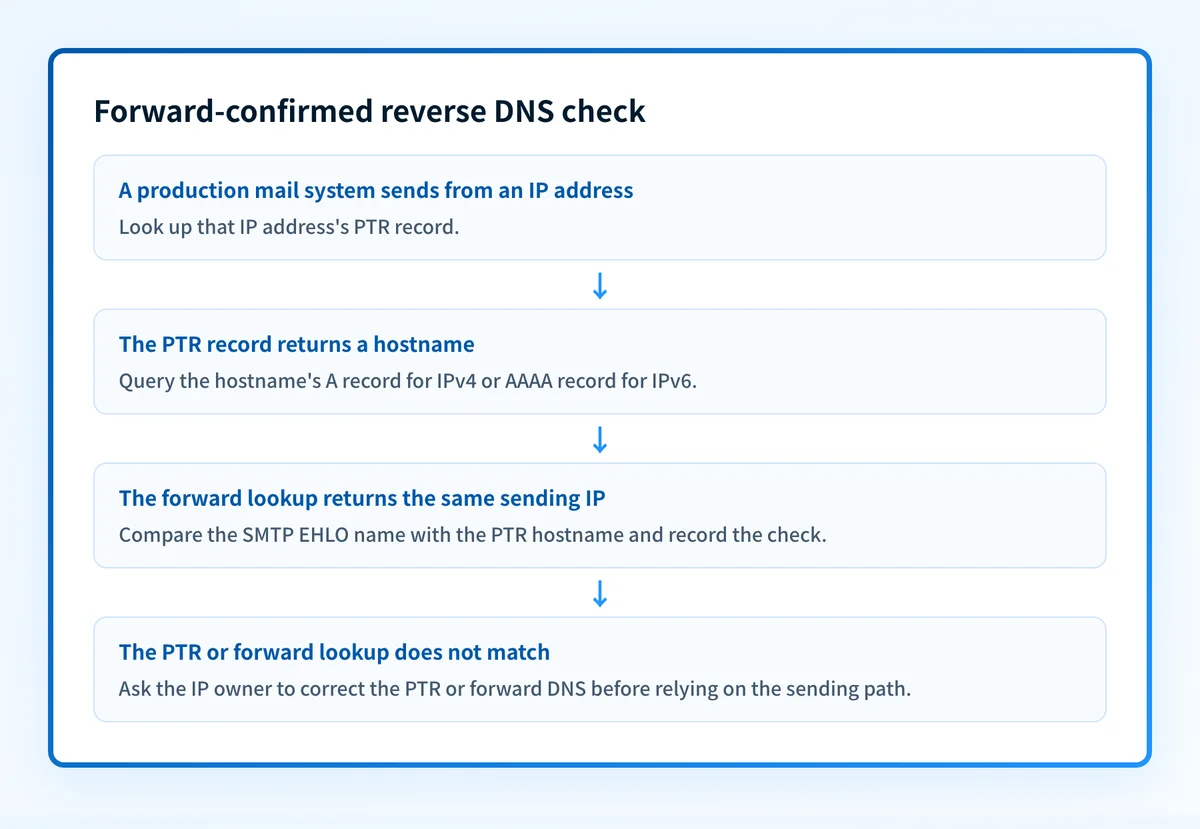
For an email sender, the operational target is forward-confirmed reverse DNS:
- The sending IP has a PTR record.
- The PTR record returns one hostname.
- That hostname has an A record for an IPv4 sender or an AAAA record for an IPv6 sender.
- The A or AAAA record returns the same sending IP.
- The SMTP server introduces itself with an EHLO name that is consistent with that hostname.
This does not mean the PTR hostname must be mail.yourdomain.com. A provider-owned hostname can meet the requirement if the forward and reverse lookup confirm each other. The practical question is whether the published DNS data describes the same sending IP in both directions.
Give every sending IP a PTR record
A sending domain can use more than one IP address. Each outbound IP needs its own reverse-DNS check. An IPv4 PTR record does not cover a separate IPv6 sending address.
IPv6 reverse DNS uses the IP6.ARPA domain and a nibble-reversed representation of the address, as defined in RFC 3596 section 2.5. If your mail platform sends over IPv6, ask the IP owner to publish and verify the IPv6 PTR record as well.
The records below are illustrative only. Do not publish these values. Your IP provider, cloud host, or email platform must generate or accept the real PTR hostname for its allocated IP space.
IPv4 sending IP: 192.0.2.25
PTR result: mailout.yourdomain.com
Forward A result for mailout.yourdomain.com: 192.0.2.25
IPv6 sending IP: 2001:db8:1234::25
PTR result: mailout6.yourdomain.com
Forward AAAA result for mailout6.yourdomain.com: 2001:db8:1234::25
Microsoft's Remote Connectivity Analyzer guidance for a missing PTR record says that reverse zones are typically maintained by an ISP. The same ownership model applies when a cloud provider, dedicated host, or email service controls the sending IP range.
If you do not control the reverse zone, do not attempt to add a PTR record in your domain's normal DNS zone. Request the PTR from the party that owns the IP address. For the DNS record anatomy, see what a PTR record is.
Keep the PTR, forward DNS, and EHLO name consistent
Forward confirmation is more useful than checking whether a PTR record merely exists. A PTR can return a hostname that no longer has a corresponding A or AAAA record, or it can point to a hostname that resolves to a different IP after an infrastructure change.
Use this check sequence:
1. Identify the actual outbound IP
Start with the IP address used by the system that delivers your production mail. A DNS record for a web server or inbound MX host does not prove that the outbound mail relay uses that address.
If you are investigating a specific message, inspect the delivered message headers and isolate the sending infrastructure before changing DNS. The email reverse DNS check guide covers the lookup and interpretation task in more detail.
2. Look up the PTR result
Use the Palisade IP Reputation Checker with the sending IP to inspect the PTR hostname returned for that address. This is a point-in-time public lookup. It has a 3,500 ms timeout that can return null, and it does not confirm the forward DNS result.
A null result can mean the check timed out or did not receive a PTR answer. Treat it as a prompt to query the authoritative owner or rerun the lookup. Do not treat it as proof that a receiver rejected mail.
3. Check the forward A or AAAA record
Take the hostname returned by the PTR lookup and query its matching address record. Use the DNS Lookup tool for this forward half of the check.
For example, if 192.0.2.25 returns mailout.yourdomain.com, the A record for mailout.yourdomain.com should return 192.0.2.25. For an IPv6 sender, query the hostname's AAAA record and compare it with the IPv6 sending address.
Do not publish a PTR hostname that resolves to a different IP after a migration. That mismatch can leave a valid-looking reverse record attached to the wrong sending path.
4. Compare the SMTP EHLO name
The SMTP server's EHLO name should be consistent with the hostname published in reverse DNS. This is an operational practice, not a rule that lets a receiver reject mail solely because the names differ.
RFC 5321 section 4.1.4 states that a server that receives an EHLO argument that does not match the client's IP address "MUST NOT" refuse the connection for that reason alone. That standards limit matters. A mismatch can indicate a configuration issue, but it does not document the cause of a particular rejection.
If you have a concrete banner mismatch, use the narrower reverse DNS does not match SMTP banner guide rather than assuming reverse DNS alone explains the result.
Recheck reverse DNS after every sending-path change
No cited standard sets a mandatory recheck interval. The sound operational rule is to recheck after any change that can alter the outbound IP or hostname:
- Moving an application to a new hosting provider
- Enabling a new transactional-email relay
- Changing a cloud egress IP
- Adding IPv6 delivery
- Moving an SMTP service to a new host
- Replacing an email platform's dedicated IP assignment
For teams that operate several domains or manage client portfolios, keep a small change record with the sender, IP, PTR hostname, forward result, EHLO name, and the date checked. That record makes an IP migration easier to review without treating a one-time DNS lookup as continuous monitoring.
Do not use reverse DNS as authentication
Reverse DNS can identify a hostname associated with an IP address. It does not prove that a message is authorized to use a visible From domain.
RFC 8601 section 3 describes the iprev method for reporting an IP-address reverse check in Authentication-Results. The RFC also notes that the referenced guidance recommends avoiding this test as an authentication or security mechanism, and says that including iprev is not an endorsement.
Use these controls for sender authentication:
- SPF evaluates whether the sending IP is authorized for the envelope sender domain.
- DKIM verifies a cryptographic signature associated with a signing domain.
- DMARC evaluates alignment between the visible From domain and SPF or DKIM.
Check the reverse DNS behind your sending IP
If you have the sending IP address, start by checking its current PTR result with the Palisade IP Reputation Checker. Then use a forward DNS lookup to confirm that the returned hostname resolves back to the same address.
This check can show the public DNS state for one IP at one moment. It cannot prove the production system used that IP for a particular message, confirm the SMTP EHLO value, monitor later infrastructure changes, or predict a receiver's placement decision.
For an ongoing DMARC workflow, Start with Palisade. Palisade autonomously analyzes DMARC aggregate-report data, identifies sending sources and authentication or alignment issues, and creates prioritized remediation tickets. It does not change your DNS or DMARC policy without human review, and it cannot control a mailbox provider's private filtering decision.
Evidence
Sources and further reading
Questions readers ask
Frequently asked questions
Is reverse DNS required for sending email?
Google's sender guidelines require valid forward and reverse DNS records for all senders. SMTP itself does not make reverse DNS universally mandatory, and RFC 5321 says an EHLO and IP mismatch alone MUST NOT cause a server to reject a connection. Receiver requirements and local filtering policies can still make correct reverse DNS operationally necessary.
Should the PTR name match my sending domain?
No. The PTR hostname does not need to use your brand domain. It must resolve forward through an A or AAAA record to the same sending IP address. Keep the SMTP EHLO name consistent with that hostname so the published identity and server introduction do not conflict.
Who sets up a PTR record?
The organization that controls the IP address or its reverse DNS zone sets the PTR record. Microsoft notes that ISPs typically maintain reverse zones. For a cloud IP or email-platform IP, request the record from that provider rather than adding it to your ordinary domain DNS zone.
Do I need reverse DNS for IPv6 email?
Yes, if the system sends mail from IPv6. IPv6 reverse DNS uses the separate IP6.ARPA tree defined by RFC 3596. An IPv4 PTR record does not cover an IPv6 address, and the returned hostname should resolve through an AAAA record to the same IPv6 address.
How often should I recheck reverse DNS?
Recheck after any change to the outbound IP address, mail relay, hosting provider, or IPv6 configuration. No primary source sets a fixed review interval. This is operational guidance because the PTR record follows the IP allocation, so a migration can change reverse DNS even when the sending domain stays the same.
Is reverse DNS an email-authentication method?
No. Reverse DNS identifies a hostname associated with an IP address. RFC 8601 describes iprev reporting but does not endorse it as an authentication or security method. Use SPF, DKIM, and DMARC to authenticate domain use and evaluate alignment.

Written by
Dominic LandryDeliverability & DNS
Dominic Landry works on email deliverability and DNS configuration at Palisade, from SPF and DKIM records through to DMARC enforcement.
More from Dominic →