Reverse DNS lookup email validation
 ChatGPT
 Claude
 Gemini
 Perplexity
 Grok
GrokIn brief
Reverse DNS lookup email validation checks whether an IP address has a PTR hostname. Learn what PTR results show and what they cannot validate.

Reverse DNS lookup email validation starts with an IP address and checks its PTR record. A PTR record can map that IP address to a hostname, which helps identify the host associated with an address. It does not validate that a particular email address, person, or mailbox exists. Treat reverse DNS as one piece of email infrastructure, then compare it with evidence from the actual sending path.
At a glance
Quick takeaways
- Reverse DNS uses a PTR record to map an IP address to a hostname.
- A PTR lookup is different from looking up an email address or validating a mailbox.
- MX records describe where a domain receives mail, while PTR records answer an IP-to-hostname question.
- A public DNS result does not prove which server sent a message or how a receiver handled it.
- Use a delivered message header when you need evidence about the actual sending IP.
What this tool checks
A reverse DNS check asks DNS for the PTR record associated with an IP address. DNS Checker describes a PTR record as a record used in a reverse IP lookup to map an IP address to a domain name.
That is a narrower test than email validation. A PTR result can identify a hostname associated with an IP address, but it does not show whether an email address accepts mail, whether a mailbox is active, or whether a message from that address was sent through the IP.
The Palisade IP reputation checker returns the reverse DNS (PTR) answer for a public IP address. Palisade DNS Lookup takes a domain rather than an IP, so it is not a PTR checker; use it for the forward half of the evidence, such as the A or AAAA record of a returned hostname. A public lookup cannot prove the production sending path, message signing, continuous DNS state, or why one receiver rejected one message.
How to run the check
1. Get the sending IP from message evidence
Start with a message that travelled through the path you are investigating. Open its raw headers and identify the sending IP from the received-message trace or another receiver-provided field.
Do not begin with the visible From address. Reverse DNS does not turn an email address into a hostname. If the incident concerns a sender's authentication result, keep a copy of the redacted headers so you can compare the IP, sending domain, and authentication evidence later. The email header analysis guide can help separate visible address fields from transport evidence.
2. Query the PTR record for that IP
Use a public DNS query with the IP address you collected. The following command is illustrative only. Replace 192.0.2.25 with the IP from your own message evidence.
dig +short -x 192.0.2.25An IPv4 reverse query uses the special reverse-DNS namespace automatically when you use dig -x. The returned hostname, if one exists, is the PTR answer for that IP.
You can run the same reverse query in the Palisade IP reputation checker, which reads the PTR record for the IP you enter. Keep the input type matched to the question you are asking. A domain lookup in Palisade DNS Lookup can help with MX or TXT records, but an IP-to-hostname question requires the reverse lookup, and that tool does not accept an IP as input.
3. Record the result with its context
Save the IP address, the PTR response or absence of one, the resolver used, and the time of the query. Then record where the IP came from: a delivered message, a mail-server log, or a provider dashboard.
This context matters because an IP can belong to shared infrastructure, an outbound relay, or an intermediate service. A PTR hostname alone does not establish that the hostname is the same as the visible From domain.
4. Compare the PTR result with the message path
Check whether the PTR hostname is consistent with the transport path you observed. If the delivered message points to a different sending IP than the one you queried, stop and resolve that mismatch before drawing a conclusion.
For a routing question, inspect the receiving domain's MX records separately. MXToolbox explains that an MX test lists MX records for a domain in priority order. MX records and PTR records answer different DNS questions.
How to interpret the results
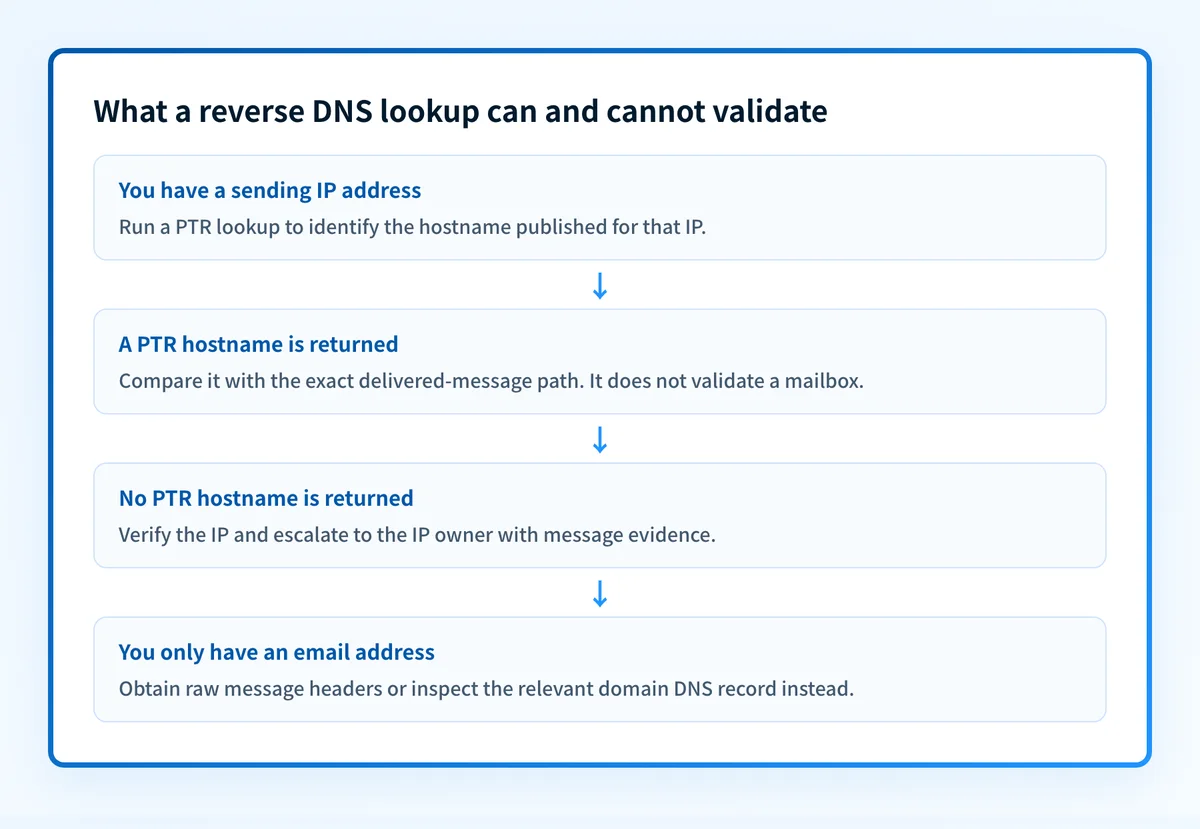
A PTR hostname is returned
A hostname was published for the queried IP address. This identifies the host associated with that reverse-DNS answer at the time of the lookup.
It does not validate an email address. It also does not prove that the host sent the message you are investigating. Compare the result to the actual message trace before assigning the IP to a sender or service.
If the hostname is unfamiliar, collect more evidence rather than changing DNS. Review the message headers, confirm the IP through the sending platform or server logs, and identify whether a relay altered the path.
No PTR hostname is returned
The lookup did not return a PTR hostname for the IP through the resolver you used. Recheck the IP copied from the message and query again against an authoritative source where you have access.
Do not convert this result into a claim that the mailbox is invalid or that all mail from the IP will fail. The PTR definition supports an IP-to-hostname lookup only. It does not establish a mailbox-validation rule or a receiver's acceptance decision.
The PTR hostname does not match the domain you expected
A mismatch can mean the IP belongs to shared infrastructure, a relay, or another host in the path. It can also mean that the domain you expected is not the hostname published for that IP.
This is an investigation threshold, not a repair instruction. Confirm the actual sender with delivered-message evidence and the sending service's own records before requesting a DNS change. Do not publish a hostname copied from another account or tenant.
You only have an email address
An email address is insufficient input for a reverse DNS lookup. Reverse DNS begins with an IP address and returns a hostname when a PTR record exists.
For a message-specific problem, obtain the raw headers from a delivered message. For a domain configuration question, inspect the relevant DNS record type instead. DKIM setup for Salesforce is an example of a different DNS task: it concerns DKIM key publication and message signing, not PTR records.
How to act on the result
Use the smallest next action that matches the evidence.
- If a PTR hostname is returned and it matches the sending IP in the delivered message, keep the result as transport-identification evidence. Continue with the message's authentication results if the issue is DMARC, SPF, or DKIM.
- If no PTR hostname is returned, verify the IP and resolver first. Escalate to the party that controls the IP address only after you have evidence that this is the production sending IP.
- If the PTR hostname is unexpected, identify whether a relay or shared service sent the message. Ask the service provider or network operator which hostname, if any, they publish for that IP.
- If the concern is inbound routing, inspect MX records for the receiving domain. Do not use a PTR result as evidence of where a domain receives mail.
- If the concern is message reputation or a listed sending IP, use the actual IP as the starting evidence. A blocklist check answers a different question from reverse DNS.
Do not change a PTR record based only on a public lookup. The party that controls the IP address also controls the reverse-DNS zone, and a change can affect systems that share that address.
How to retest
Repeat the reverse lookup for the same IP after the network operator confirms a change. Use the same command and record the new answer with the query time.
dig +short -x 192.0.2.25Then send a new message through the same production path and inspect its headers again. The expected change is a PTR result that reflects the confirmed hostname for the exact sending IP. The delivered message remains separate evidence: it shows whether that IP was actually part of the path you tested.
Validate the DNS evidence against the sending path
After a PTR lookup, compare the hostname to a new delivered message and the sender's own configuration. This is the next useful step when an IT team or MSP needs to distinguish one public DNS answer from an ongoing inventory of sending sources and authentication issues.
Palisade is agentic DMARC software that analyzes DMARC aggregate-report data, identifies sending sources and authentication or alignment issues, and creates prioritized remediation tickets. It can propose the next DMARC policy step for human review, but it does not change a DMARC policy or prove that every future message will authenticate.
A PTR lookup does not validate a mailbox, continuously monitor a sending path, repair DNS, or guarantee receiver acceptance.
Evidence
Sources and further reading
Questions readers ask
Frequently asked questions
Is it possible to reverse lookup an email address?
No, not with reverse DNS. Reverse DNS uses a PTR record to map an IP address to a hostname, and nothing in it maps an email address to a person, a mailbox, or a confirmed recipient.
Can I do a reverse DNS lookup?
Yes, anyone can run one. Start with an IP address and query its PTR record. If a PTR record exists, the answer maps that IP address to a hostname or domain name.
What is the best free reverse email lookup?
No reverse DNS tool answers this, because reverse DNS looks up an IP address rather than an email address. Pick the tool that matches the evidence you actually hold: an IP for a PTR check, a domain for its DNS records, or the raw headers when you need to trace a message path.
What is reverse DNS in email?
Reverse DNS in email is a PTR-based lookup that maps an IP address to a hostname. It can help identify a host associated with an observed sending IP, but it does not validate a specific mailbox.
Does a PTR record prove that an email will be delivered?
No, a PTR record proves nothing about delivery, because it only shows a public DNS mapping for an IP address. It says nothing about the production message path, a receiver's filtering, the authentication results on a message, or where future mail lands.
Are MX and PTR records the same thing?
No, they point in opposite directions. MX records name the mail exchangers that accept mail for a domain, listed in priority order. PTR records map an IP address back to a hostname in reverse DNS.

Written by
Dominic LandryDeliverability & DNS
Dominic Landry works on email deliverability and DNS configuration at Palisade, from SPF and DKIM records through to DMARC enforcement.
More from Dominic →