How does reverse DNS work for email?
 ChatGPT
 Claude
 Gemini
 Perplexity
 Grok
GrokIn brief
How does reverse DNS work for email? Learn how PTR records map sending IP addresses to hostnames, and how forward confirmation works for email delivery.
Reverse DNS for email starts with a sending server's IP address and looks up the hostname published for that address in a special DNS branch. The lookup uses a PTR record, then a receiver can look up that hostname's A or AAAA record to see whether it points back to the same IP address. This matters to anyone operating outbound SMTP infrastructure or assessing a sending IP's identity.
At a glance
Quick takeaways
- Reverse DNS maps an IP address to a hostname through a PTR record.
- IPv4 reverse lookups use the
in-addr.arpaDNS tree with reversed address octets. - IPv6 reverse lookups use the
ip6.arpatree with reversed hexadecimal nibbles. - A PTR result alone does not prove forward-confirmed reverse DNS.
- The IP owner or its provider usually controls the reverse DNS zone.
- SMTP does not require an EHLO name to match the connecting IP address.
Who is affected?
Reverse DNS affects organizations that send email directly from public SMTP server IP addresses, along with the MSPs and infrastructure teams that manage those servers. It also affects receivers that inspect connection details as part of their mail processing.
A domain owner does not necessarily control its reverse DNS entry. Microsoft explains that reverse zones are typically maintained by the ISP. In practice, the public IP owner, hosting provider, or upstream network operator publishes the PTR record. Managing a website domain's normal DNS zone does not automatically give an administrator control over the reverse zone for a mail server IP.
Reverse DNS is part of the wider set of DNS and transport dependencies covered in the email infrastructure learning hub. For a closer explanation of the DNS record itself, see what a PTR record is.
What are the requirements?
A PTR record maps the address to a domain name
RFC 1035 defines a PTR record's data as a domain name that points to a location in the DNS namespace. For reverse mapping, that location is constructed from the address rather than from a normal hostname.
For IPv4, RFC 1035 defines the reverse namespace under IN-ADDR.ARPA. Each address octet becomes a label in reverse order. The reversal lets DNS operators delegate reverse zones along network boundaries.
Illustrative only. Do not publish this as a production record.
52.0.2.10.in-addr.arpa.  IN  PTR  mail.yourdomain.com.
For the IPv4 address 10.2.0.52, RFC 1035 places reverse data at 52.0.2.10.IN-ADDR.ARPA. A PTR query for that reverse name can return mail.yourdomain.com.
The record does not authenticate a sender by itself. It states what hostname the reverse DNS zone publishes for an IP address.
IPv6 uses reversed hexadecimal nibbles
IPv6 reverse DNS uses a separate IP6.ARPA tree. RFC 3596 specifies that an IPv6 address is represented as dot-separated hexadecimal nibbles, followed by .IP6.ARPA.
Illustrative only. Do not publish this as a production record.
8.b.d.0.1.0.0.2.ip6.arpa.  IN  PTR  mail.yourdomain.com.
The full reverse name for a production IPv6 address contains all 32 hexadecimal nibbles in reverse order. RFC 3596 also records that IP6.ARPA replaced the older IP6.INT domain.
Forward confirmation checks the returned hostname
A common receiver check has two DNS stages:
- Query the IP address for PTR records and collect the returned hostnames.
- Query each returned hostname for A records, AAAA records, or both, then check whether the original IP address appears in those results.
iprev. If the client IP is I, PTR results are set N, and the corresponding forward DNS addresses are set L, the test passes when I is a member of L.
Illustrative only.
198.51.100.25
  PTR query -> mail.yourdomain.com
  A query for mail.yourdomain.com -> 198.51.100.25
  Result -> forward-confirmed reverse DNS passes
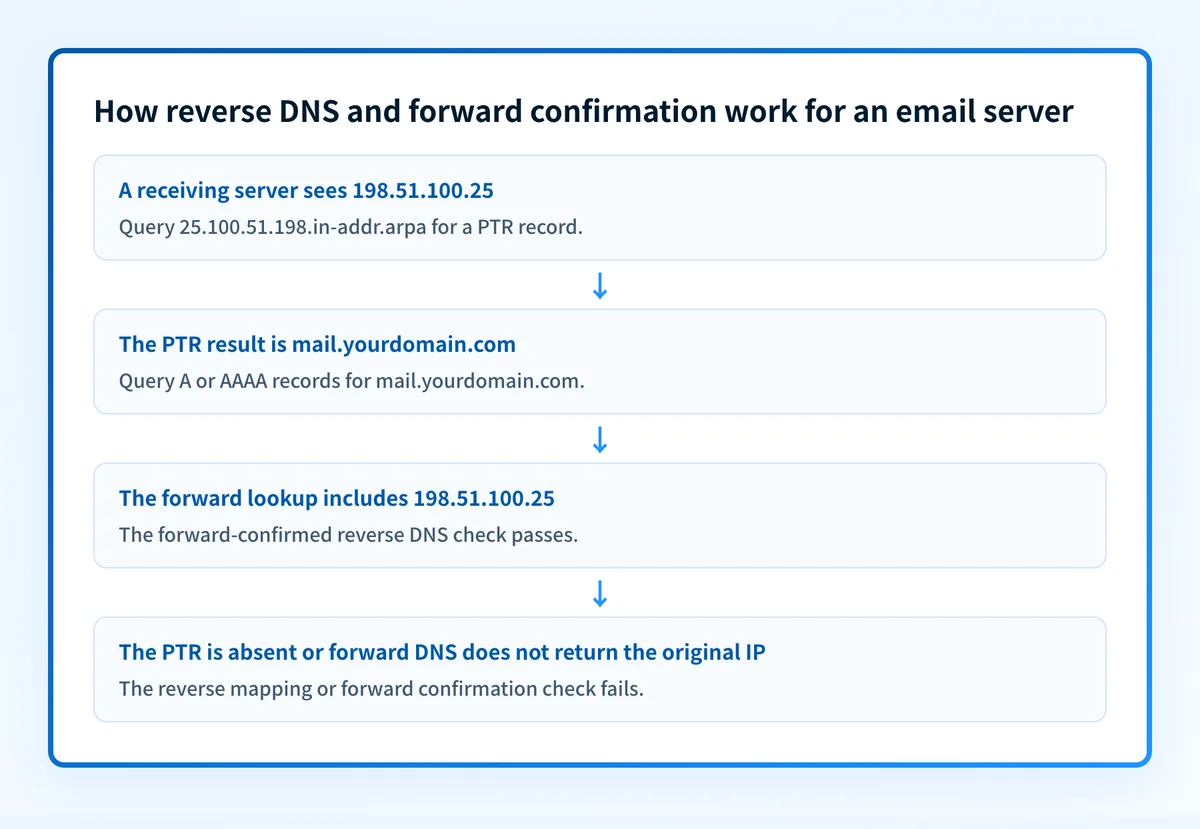
This is why a PTR result is only half the mechanism. A PTR can exist while the returned hostname resolves to a different address, has no usable A or AAAA record, or encounters a DNS error.
RFC 8601 registers pass, fail, temperror, and permerror result values for iprev in the Authentication-Results header field. A receiver can report such a result, but the RFC also cautions that applications should avoid treating reverse mapping as authentication or a security control. The method remains common, yet it does not establish ownership of a message's From domain or replace SPF, DKIM, and DMARC.
EHLO and PTR are related signals, not the same requirement
An SMTP client identifies itself with EHLO or HELO. That name is often compared with connection information, but RFC 5321 section 4.1.4 does not require a server to reject mail because the EHLO domain does not correspond to the client IP.
The RFC states:
An SMTP server MAY verify that the domain name argument in the EHLO command actually corresponds to the IP address of the client. However, if the verification fails, the server MUST NOT refuse to accept a message on that basis.A mismatch can still be useful for logging and tracing. It is not a universal SMTP rule that makes the message invalid. For the specific operational case where these names disagree, see when reverse DNS does not match the SMTP banner.
When does the requirement take effect?
The underlying DNS mechanism has no single new operative date. RFC 1035, which defines IPv4 reverse mapping and PTR records, was published in November 1987. RFC 3596, published in October 2003, specifies IPv6 address mapping in IP6.ARPA. RFC 8601, published in May 2019, defines the iprev result method for Authentication-Results.
Mailbox providers can add their own sender requirements. Google's Email sender guidelines state that all senders must have valid forward and reverse DNS from February 1, 2024. Google requires the sending SMTP server's public IP to have a PTR record resolving to a hostname, and that hostname to have an A record for IPv4 or AAAA record for IPv6 resolving back to the same public IP.
That is a Google sender requirement, not a new universal SMTP requirement. A receiver can also apply private filtering policies that are not published as an RFC.
How do I implement the requirement?
1. Identify the public IP used for the SMTP connection
Use the IP that connects to recipient mail servers. This can differ from a web server address, a NAT gateway, or an internal mail host address.
For a hosted sending service, determine whether the provider assigns the public IP and controls its reverse DNS. Do not assume a domain's normal DNS administrator can change the PTR record.
2. Find the reverse DNS owner
Identify the provider that owns or delegates the reverse zone for the sending IP. The provider may be an ISP, cloud platform, hosting company, or dedicated IP service.
Ask that owner to publish the desired PTR hostname if its documented process allows it. The hostname should be one the organization can also publish in forward DNS.
3. Publish the corresponding forward record
Publish an A record for IPv4 or AAAA record for IPv6 so that the hostname returned by the PTR lookup resolves to the same public sending IP.
This guidance creates the two-way DNS relationship that Google's sender guidance describes. It does not make reverse DNS an identity standard or guarantee a receiver will accept a message.
4. Keep SMTP identity evidence separate
Inspect the actual SMTP exchange and delivered message headers separately from DNS. An EHLO name, a PTR hostname, an SPF identity, DKIM signing domain, and DMARC alignment can be related but are different protocol fields and checks.
A correct PTR record does not prove that an application sent through that IP, that the message was signed correctly, or that a receiving mailbox provider accepted the message.
How do I validate compliance?
Start with the authoritative reverse lookup for the public sending IP. Confirm that it returns the intended hostname. Then query that hostname's A record or AAAA record and verify that the original IP appears in the answer.
Use the IP reputation checker to inspect the PTR hostname returned for a public IP. It can show a published PTR result, but it does not perform the follow-up A or AAAA lookup needed to establish an iprev result. A timeout or empty result also needs careful interpretation because public DNS responses can vary with resolver reachability and timing.
For a full mail-path validation, gather evidence at separate layers:
- DNS: confirm the PTR record and matching forward A or AAAA record through the authoritative DNS path and a public resolver.
- Vendor: review the sending provider's current verification status when it manages the SMTP service.
- Message: inspect a delivered message from the exact production path, including relevant
Authentication-Resultsand SMTP tracing headers. - DMARC: review aggregate-report data after mail has accumulated to understand the domains and sources actually using the organization’s identity.
Check the PTR hostname for your sending IP
A reverse lookup can show which hostname the IP owner currently publishes before you investigate a mismatch or contact the provider that controls the reverse zone.
Check the IP's published PTR record
This check returns a PTR result for an IP address. It does not forward-confirm the hostname, repair a mismatch, monitor the production sending path, or predict how a mailbox provider will treat a future message.
Evidence
Sources and further reading
- RFC 1035: Domain names, implementation and specification
- RFC 3596: DNS extensions to support IP version 6
- RFC 8601: Message header field for indicating message authentication status
- RFC 5321: Simple Mail Transfer Protocol
- Google Email sender guidelines
- Microsoft guidance for an IP address without a PTR record
Questions readers ask
Frequently asked questions
What are common problems with reverse DNS?
Common reverse DNS problems include no PTR record for the sending IP and a PTR hostname that does not resolve back to that same IP through A or AAAA records. The reverse zone is usually controlled by the ISP or IP owner, so a domain administrator may need to request the correction from that provider. For server-side remediation, see the provider-focused reverse DNS setup guidance.
What is reverse DNS in email?
Reverse DNS in email is a DNS lookup from an IP address to a hostname. For IPv4, it queries a reversed address name in in-addr.arpa, such as 52.0.2.10.in-addr.arpa for 10.2.0.52, and reads the PTR record returned there. IPv6 uses the ip6.arpa equivalent.
Is it legal to do a reverse email lookup?
Yes. Reverse email lookup usually refers to finding information about a person from an email address, which can raise jurisdiction-specific privacy and legal issues. This article covers DNS lookups from server IP addresses to hostnames, not people-search services.
How do I fix SMTP reverse DNS mismatch?
Request a PTR correction from the provider that controls the public sending IP, then ensure the returned hostname has an A or AAAA record back to that same IP. An EHLO and IP mismatch alone is not a universal reason for SMTP rejection because RFC 5321 says a server must not refuse a message on that basis alone. See the SMTP banner mismatch guide for the operational case.
Does a PTR record authenticate email?
No. A PTR record publishes a hostname for an IP address. RFC 8601 warns against using reverse mapping as authentication or a security mechanism. SPF, DKIM, and DMARC evaluate different parts of a message and domain identity.

Written by
Dominic LandryDeliverability & DNS
Dominic Landry works on email deliverability and DNS configuration at Palisade, from SPF and DKIM records through to DMARC enforcement.
More from Dominic →