What is a PTR record and how does reverse DNS use it?
 ChatGPT
 Claude
 Gemini
 Perplexity
 Grok
GrokIn brief
PTR records map an IP address to a hostname. Learn how reverse DNS works, validate forward confirmation, and troubleshoot email sending IPs.
A PTR record is a DNS record that maps a public IP address back to a hostname through reverse DNS. Mail receivers can use that hostname to identify the server that opened an SMTP connection, then check whether it resolves forward to the same IP address. A valid PTR record supports sender identity, but it does not prove SPF, DKIM, DMARC, reputation, or inbox placement.
At a glance
Quick takeaways
- A PTR record maps an IP address to a hostname through reverse DNS.
- IPv4 reverse DNS uses the
in-addr.arpanamespace with the IP address octets reversed. - The organization that controls an IP address or address range normally controls its PTR record.
- Forward-confirmed reverse DNS checks whether the PTR hostname resolves back to the original IP address.
- Google requires bulk senders to use sending IP addresses with valid forward and reverse DNS records.
- A valid PTR record does not prove that a production message passes SPF, DKIM, or DMARC.
What this tool checks
The Palisade IP reputation checker returns the reverse DNS (PTR) answer for a public IP address. Enter the public sending IP to see its PTR hostname, then query that hostname forward in the DNS lookup tool with an A record for IPv4 or an AAAA record for IPv6.
RFC 1034 defines PTR records as domain-name pointers. For an IPv4 address such as 192.0.2.25, the reverse DNS owner name is 25.2.0.192.in-addr.arpa. A public query can return a hostname, or it can return no PTR answer.
A public record check cannot identify the application that sent a particular message, prove the SMTP banner presented during a connection, confirm message signing, monitor future DNS changes, or explain one receiver's private reputation decision. Use the result with sender configuration, a delivered message, and DMARC aggregate-report data.
Build a reverse DNS evidence packet
Keep a labelled evidence packet for each sending path you investigate. It helps separate public DNS evidence from message and provider evidence.
- Sending IP address: The public IP seen by the receiving server.
- Exact PTR owner queried: For IPv4, the reversed address under
in-addr.arpa. - PTR result: The returned hostname, or the exact no-record result.
- Forward-confirmation result: Whether the hostname's A or AAAA answer includes the original IP.
- SMTP banner hostname: The hostname presented in the SMTP greeting, when logs or a message trace expose it.
- Sending-service owner: The team, cloud provider, relay, or email service that controls the sending IP.
- Source and time: Where the IP came from and when the DNS queries ran.
- Change and retest date: When the IP owner changed the PTR record and when the same checks were repeated.
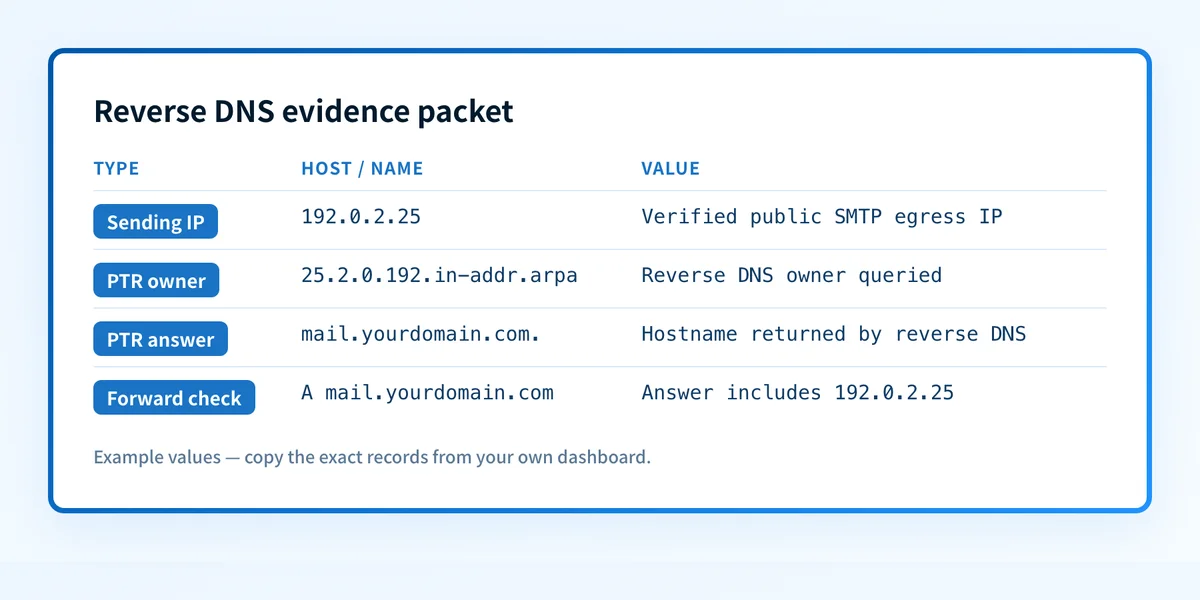
Sending IP: 192.0.2.25
PTR owner queried: 25.2.0.192.in-addr.arpa
PTR result: mail.yourdomain.com.
Forward confirmation: A mail.yourdomain.com includes 192.0.2.25
SMTP banner hostname: mail.yourdomain.com
Sending-service owner: hosting provider
Source/time: recipient connection log, 2026-08-12 12:00 UTC
Change/retest date: no change requested
How to run the check
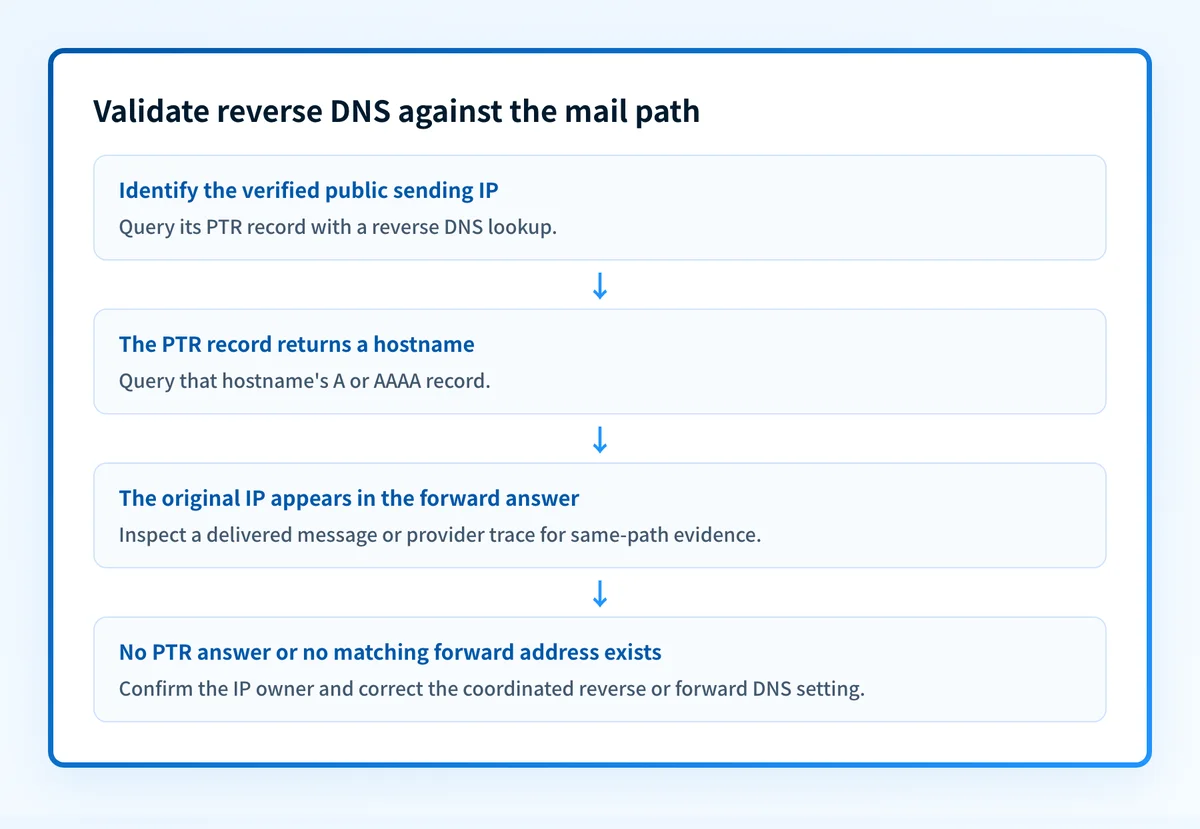
1. Identify the actual public sending IP
Start with the address that handled the SMTP connection for the message under investigation. A receiving-server trace, trusted mail log, or sending-provider activity record is stronger evidence than an application hostname.
Do not test a private address such as 10.0.0.5. Private addresses are not delegated in public reverse DNS. If you have only a hostname, resolve its A or AAAA records first, then match the result to the production message path.
2. Query the reverse DNS owner
Enter the public IP address in the Palisade IP reputation checker and read the Reverse DNS (PTR) row. The tool checks the public DNS evidence for that exact input.
Repeat the lookup independently with this example:
dig +short -x 192.0.2.25192.0.2.25 is reserved documentation space. Replace it with the verified public sending IP from your evidence packet.
3. Query the returned hostname forward
If the PTR response returns mail.yourdomain.com., query that hostname forward. Use an A query for an IPv4 sending IP and an AAAA query for an IPv6 sending IP.
dig +short A mail.yourdomain.comThe original IP should appear in the relevant forward answer. RFC 1912 recommends matching PTR and A records for Internet hosts.
4. Compare DNS with the message path
A matching PTR and A record is DNS evidence only. If an email issue prompted the test, inspect a newly delivered message through the same application, relay, provider account, and recipient path. Compare the public sending IP with connection details available in the message trace or receiver logs.
The email authentication learning center explains why DNS identity checks and message authentication answer different questions. A receiver records its authentication evaluation in the Authentication-Results header field defined by RFC 8601.
How to interpret the results
A PTR hostname resolves back to the sending IP
This is a forward-confirmed reverse DNS result. The reverse query returned a hostname, and a forward query for that hostname includes the original IP address.
For an outbound mail server, this supports a consistent public relationship between the address and hostname. It does not prove that the SMTP server used the same hostname in its HELO or EHLO greeting. It also does not prove an SPF pass, a DKIM signature, DMARC alignment, or placement in a recipient inbox.
No PTR record is returned
A no-record response means the public resolver did not return a PTR record for the IP queried. First, confirm that the IP is the actual egress address. A cloud gateway, relay, or email provider may send from a different address than the server you manage.
If the address is correct, identify its owner. The owner of a dedicated IP range normally manages reverse DNS. Google states in its email sender guidelines that bulk senders must use sending IP addresses with valid forward and reverse DNS records. A missing PTR record is a sender-configuration issue to resolve, but the lookup alone does not prove that Gmail rejected a message for that reason.
The PTR hostname does not resolve to the original IP
This is a forward-confirmed reverse DNS mismatch. Query the hostname exactly as returned by the PTR answer and compare the correct record type with the original address.
A stale PTR record, IP reassignment, a changed A or AAAA record, or a wrong test IP can cause this result. Confirm who controls both the IP's reverse zone and the hostname's authoritative forward DNS before requesting a change.
The returned hostname has multiple forward addresses
A hostname can have several A or AAAA records. If the original sending IP appears in the corresponding answer, the forward lookup supports the reverse mapping. If it is absent, treat the mapping as a mismatch until the IP owner confirms the intended setup.
Do not infer that every address associated with the hostname sends mail. The delivered message or provider trace identifies the path used for the event under investigation.
How to act on the result
For a missing PTR record, ask the sending-service owner whether the IP is dedicated or shared.
- Dedicated provider IP: Ask the provider that owns the address range to set the PTR hostname. Then make sure the hostname's A or AAAA record includes the same IP.
- Forward mismatch: Correct the PTR record through the IP owner, or correct the hostname's authoritative A or AAAA record through the DNS operator. Treat these as one coordinated change.
- Shared provider IP: Do not attempt to publish a PTR record for the shared IP. The provider controls that reverse DNS zone. Confirm whether the provider documents valid reverse DNS for its shared infrastructure, then focus on the authenticated message path for your domain.
Do not point a PTR record at a domain you do not control or at a hostname whose forward DNS does not include the sending IP. That creates a mismatch and makes sender troubleshooting harder.
Before a production test, confirm that the SMTP greeting hostname is appropriate for the configured server identity when that setting is under your control. A PTR record is different from a DNS alias. Read what a CNAME record does before using an alias as part of a hostname change. For TXT-based sender settings such as SPF and DMARC, see what a TXT record does.
How to retest
Repeat the reverse lookup after the IP owner confirms that it changed the PTR record. Query the returned hostname forward with the matching A or AAAA record type, then record whether the original IP now appears.
Next, validate the message layer. Send a new message through the same application, relay, provider account, and recipient path. Check the actual egress IP where the receiving system or provider trace exposes it. Inspect the receiver-added Authentication-Results header for SPF, DKIM, and DMARC results. A DNS checker cannot prove that the application used the expected sending path or hostname.
Once messages are flowing, review DMARC aggregate reports or Palisade monitoring to identify sending sources and authentication or alignment issues across the domain. DNS validity today does not show whether a later sender, IP change, or new service changes the production path.
Track the sender inventory after the PTR check
A corrected PTR record answers one public DNS question for one IP. It does not inventory every source that sends as your domain or show which sources still fail DMARC alignment.
Palisade is agentic DMARC software that analyzes DMARC aggregate-report data, identifies sending sources and authentication or alignment issues, and creates prioritized remediation tickets. It can propose the next DMARC policy step when the evidence supports it, while your team reviews the evidence and applies the change.
Palisade does not change your DMARC policy without human review, repair every sender automatically, or prove why a receiver made a private reputation decision about one message.
For a provider-specific implementation of these authentication checks, see How do you fix 'Reverse DNS does not match SMTP banner'?.
Evidence
Sources and further reading
- RFC 1034: Domain names, concepts and facilities
- RFC 1912: Common DNS operational and configuration errors
- RFC 8601: Message Authentication Status
- Google email sender guidelines
- Palisade IP reputation checker: reverse DNS (PTR) for a sending IP
- Palisade DNS lookup tool: forward A and AAAA records for the returned hostname
Questions readers ask
Frequently asked questions
Is a PTR record the same as an A record?
No. An A record maps a hostname to an IPv4 address. A PTR record maps an IP address to a hostname through the reverse DNS namespace. Forward-confirmed reverse DNS compares both directions.
Can I create a PTR record in my normal DNS provider?
Only if that provider also controls the public IP address range. Reverse DNS is normally managed by the ISP, cloud provider, hosting provider, or email provider that owns the address allocation.
Does a valid PTR record make email pass DMARC?
No. DMARC evaluates SPF or DKIM authentication and alignment with the visible From domain. A valid PTR record can support server identity checks, but it does not replace SPF, DKIM, or DMARC.
Does forward-confirmed reverse DNS guarantee inbox placement?
No. A matching PTR and forward record show a consistent public DNS relationship. Mailbox providers can apply additional authentication, content, reputation, and recipient-specific checks that public DNS cannot reveal.

Written by
Dominic LandryDeliverability & DNS
Dominic Landry works on email deliverability and DNS configuration at Palisade, from SPF and DKIM records through to DMARC enforcement.
More from Dominic →