What is an AAAA DNS record (Quad-A explained)?
 ChatGPT
 Claude
 Gemini
 Perplexity
 Grok
GrokIn brief
AAAA DNS records map host names to IPv6 addresses. Learn the Quad-A record format, when to publish it, and how to validate IPv6 DNS for services.
An AAAA DNS record, pronounced "Quad-A", maps a host name to an IPv6 address. It is the IPv6 equivalent of an A record, which maps a name to an IPv4 address. Publish an AAAA record only when the named service can accept connections at that IPv6 address. For a dual-stack service, publish both record types so IPv4-only and IPv6-capable clients can resolve the same host.
At a glance
Quick takeaways
- An AAAA record is a DNS resource record that stores an IPv6 address for a host name.
- The AAAA record type is defined by RFC 3596, a Standards Track RFC that obsoleted RFC 1886.
- An IPv6 address is 128 bits and is normally written as hexadecimal groups separated by colons.
- A dual-stack service can publish both A and AAAA records for the same name.
- DNS resolution proves the published record, but it does not prove that the destination host accepts IPv6 connections.
- Email systems that send from IPv6 need separate evidence for reverse DNS, authentication, and delivered-message behavior.
Who is affected?
AAAA records affect domain owners, hosting teams, network operators, and application teams that make a website, API, mail host, or other internet-facing service reachable over IPv6.
The record applies to a specific DNS owner name. For example, an AAAA record for www.yourdomain.com does not create IPv6 service for mail.yourdomain.com. Each hostname needs the appropriate record and a reachable service behind it.
A domain does not need an AAAA record merely because it has DNS or sends email. If the destination has no configured, routable IPv6 address, publishing one can direct IPv6-capable clients to a path that fails. Teams using an alias should also understand the difference between an address record and a CNAME record, which points one DNS name at another name rather than directly storing an IP address.
For email-authentication work, AAAA records are adjacent infrastructure rather than an SPF, DKIM, or DMARC control. The email authentication learning hub covers the records and message evidence that authenticate mail.
What are the requirements?
An AAAA record contains an IPv6 address
RFC 3596 defines the AAAA record type as a resource record that stores one IPv6 address in its RDATA. RFC 3596 also specifies that its type value is 28.
An IPv6 address has 128 bits. RFC 4291 defines IPv6 address text representation, including hexadecimal groups separated by colons and the :: compression convention for one contiguous sequence of zero-valued groups.
; Illustrative only. Publish the IPv6 address assigned to your own service.
www.yourdomain.com. 3600 IN AAAA 2001:db8:1234:5678::10
Do not copy the example address into a live zone. 2001:db8::/32 is reserved for documentation, and your provider or network team must supply the routable IPv6 address for the service.
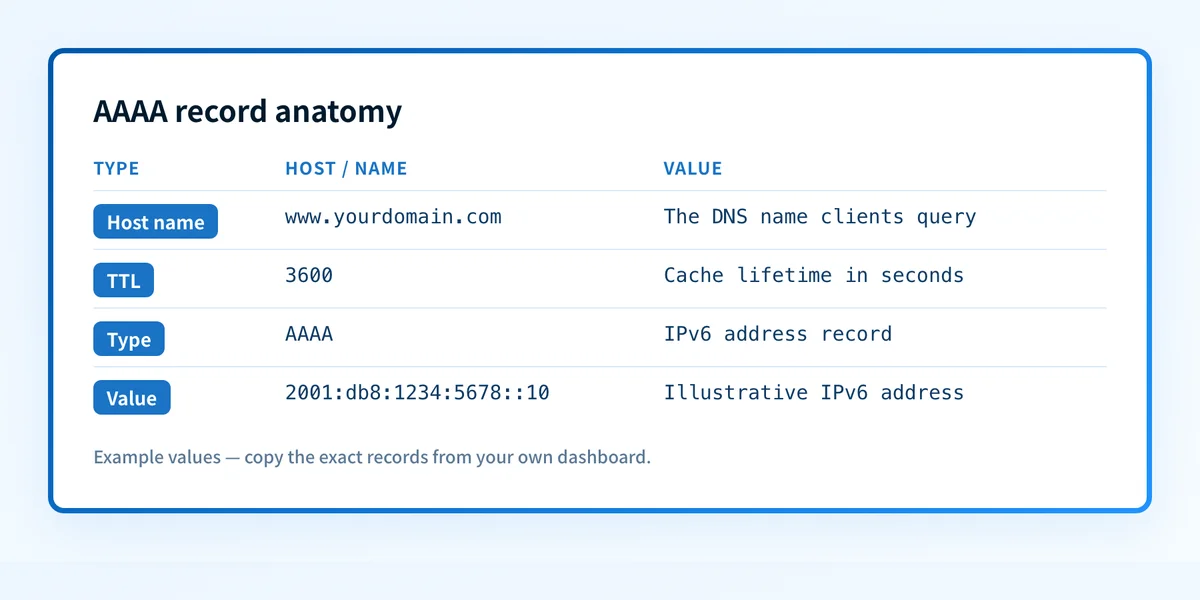
The record owner name must match the service name
The left side of the record identifies the DNS name clients query. A zone editor may display the zone apex as @, but @ is a provider-editor shorthand, not a literal DNS label sent to resolvers.
For example, a record for www.yourdomain.com can direct clients to an IPv6 web endpoint, while a record for smtp.yourdomain.com can direct clients to a distinct IPv6 SMTP endpoint. Do not assume that an AAAA record for one name applies to every host beneath the domain.
A service may have multiple AAAA records. DNS can return more than one IPv6 address for the same owner name, and the client chooses how to use the returned addresses. That DNS result does not establish that each address has the same application configuration or health.
A dual-stack service can publish A and AAAA records together
An A record contains an IPv4 address, while an AAAA record contains an IPv6 address. A host can publish both:
; Illustrative only.
www.yourdomain.com. 3600 IN A    192.0.2.10
www.yourdomain.com. 3600 IN AAAA 2001:db8:1234:5678::10
Publishing both records does not make IPv4 and IPv6 interchangeable. Each address must route to a host that can serve the intended protocol, certificate name, and application behavior. Test the actual hostname on both address families after a change.
An AAAA record is forward DNS, not reverse DNS
An AAAA record maps a name to an IPv6 address. Reverse DNS maps an address back to a name through the ip6.arpa namespace. The reverse mapping uses a PTR record, which is a separate administrative control. See the related guide to PTR records and reverse DNS before treating a forward AAAA record as evidence that reverse DNS is configured.
This distinction matters for outbound email. A public AAAA lookup can show the address a hostname publishes. It cannot show which IP address a production mail platform uses to send a specific message, whether the address has an appropriate PTR record, or whether a receiving mailbox provider accepts that mail.
When does the requirement take effect?
There is no mailbox-provider enforcement date for publishing an AAAA record. It is a DNS and IPv6 mechanism, not a sender-volume requirement.
RFC 3596 was published in October 2003 as a Standards Track RFC and obsoleted RFC 1886. It remains the controlling RFC for the AAAA resource record type. RFC 4291, published in February 2006, defines the IPv6 addressing architecture and standard textual representation used for IPv6 addresses.
A DNS provider may have its own interface labels and validation rules. Those are implementation details, not changes to the AAAA record standard. Confirm the current path in the provider's documentation before editing a production zone.
How do I implement the requirement?
1. Confirm that the target service supports IPv6
Get the exact public IPv6 address from the hosting, network, or platform owner. Confirm that the service is configured to listen on IPv6 and that firewall and routing rules allow the intended traffic.
Do not create the AAAA record first and use it to discover whether the service is ready.
2. Identify the exact hostname
Choose the hostname clients will use, such as www.yourdomain.com, api.yourdomain.com, or smtp.yourdomain.com.
Check existing A, AAAA, and CNAME records for that name. A name with a CNAME has DNS constraints that require the alias target to provide the address response. Do not add conflicting records without understanding the existing zone design.
3. Add the AAAA record in the authoritative DNS zone
Create an AAAA record for the hostname and enter the assigned IPv6 address as the value. Select a TTL that fits the operational change window and your normal DNS caching policy.
Record the prior DNS state before replacing an existing AAAA value. An incorrect IPv6 address can affect clients that prefer or select IPv6 even when the IPv4 service remains healthy.
4. Query the authoritative DNS servers
Find the authoritative nameservers for the zone, then query one directly. This separates a zone-publishing problem from cache behavior at a public resolver.
dig @ns1.example-dns.net AAAA www.yourdomain.com +shortThe response should contain the intended IPv6 address. Replace ns1.example-dns.net with an authoritative nameserver for your own zone.
5. Test the hostname over IPv6
Use an IPv6-capable test network or monitoring location to request the exact hostname and protocol. For a web service, test HTTPS with the hostname so certificate and virtual-host configuration are included.
curl -6 --verbose https://www.yourdomain.com/A successful DNS answer alone does not prove this request will succeed.
How do I validate compliance?
Validate an AAAA deployment in layers.
First, query the authoritative server and at least one public resolver. Confirm that both return the intended IPv6 address after caches expire.
Second, test the actual service over IPv6 using the hostname. For a website, verify the HTTPS request, certificate name, redirect behavior, and expected application response. For SMTP or another protocol, use a controlled test that exercises that protocol rather than a web request.
Third, compare IPv4 and IPv6 behavior if the service is dual-stack. The same hostname can resolve correctly on both families while one path points to an old application release, a different certificate, or a blocked port.
For email infrastructure, inspect the headers of a real message sent through the production path and then review aggregate reporting when it is available. A correct AAAA record does not prove that the sending source passes SPF, that DKIM signs the message, or that DMARC aligns. DNS text-based authentication controls have their own requirements, including TXT records.
Check the published IPv6 record before changing production traffic
If you have the hostname and need to inspect its public DNS response, use the Palisade DNS lookup tool to check the published record before redirecting production traffic. Compare the result with an authoritative-server query and an IPv6 service test.
A public DNS lookup does not prove that the destination accepts connections, that the production mail path uses that IPv6 address, or that a receiver will accept a future message.
If your organization needs to track which sending sources still fail authentication or alignment across domains, Start with Palisade. Palisade is agentic DMARC software that analyzes DMARC aggregate-report data, identifies sending sources and authentication or alignment issues, and proposes the next policy step for human review. It does not change your DNS or DMARC policy automatically, and it cannot prove IPv6 application reachability from a published AAAA record.
Evidence
Sources and further reading
Questions readers ask
Frequently asked questions
Is an AAAA record the same as an A record?
No. An A record stores an IPv4 address, while an AAAA record stores an IPv6 address. Both map a DNS name to an address, but clients use them for different IP address families.
Do I need an AAAA record if my domain sends email?
No. A domain needs an AAAA record only for a hostname that should be reachable over IPv6. If an outbound mail server sends from IPv6, validate that server's actual IPv6 path, reverse DNS, message authentication, and receiver results separately.
Can I publish both A and AAAA records for one hostname?
Yes. A dual-stack service can publish an A record and an AAAA record for the same hostname. Test both paths because each address family can reach different network or application configuration.
Does an AAAA record create reverse DNS?
No. An AAAA record is forward DNS. Reverse DNS uses PTR records in the ip6.arpa namespace and is normally controlled by the organization that manages the address allocation.
Why does an AAAA record resolve but my site still fail over IPv6?
The DNS record may be correct while IPv6 routing, a firewall, the application listener, TLS configuration, or the destination host is incorrect. Query DNS first, then test the exact hostname and protocol over IPv6.
Look up the published DNS answer before changing it
Enter your domain and record.

Written by
Dominic LandryDeliverability & DNS
Dominic Landry works on email deliverability and DNS configuration at Palisade, from SPF and DKIM records through to DMARC enforcement.
More from Dominic →