How do you fix 'Reverse DNS does not match SMTP banner'?
 ChatGPT
 Claude
 Gemini
 Perplexity
 Grok
GrokIn brief
Reverse DNS does not match SMTP banner means the tested server greeting and PTR hostname differ. Compare the route, repair the owning layer, and retest.
Reverse DNS does not match SMTP banner means a check reached one SMTP endpoint and found that its opening 220 greeting identifies a different hostname than the PTR record for that IP address. Test the same IP address and port, verify that the PTR hostname resolves back to that IP, then align the SMTP greeting and intended hostname through the teams that own those layers. This warning does not prove a DMARC, SPF, or DKIM failure.
At a glance
Quick takeaways
- The SMTP banner is the server's opening
220greeting, not the laterHELOorEHLOcommand from the client. - Capture the exact public IP address, port, timestamp, and opening greeting before changing DNS or MTA settings.
- A PTR hostname and its forward A or AAAA record should resolve to the same public sending IP when sending mail to personal Gmail accounts.
- The IP-block owner usually controls PTR records, while the SMTP-service owner controls the greeting.
- A matching PTR and banner do not prove message authentication, receiver reputation, or inbox placement.
- Changing a DMARC policy does not repair a PTR, forward-DNS, or SMTP-banner mismatch.
What does the failure mean?
An SMTP server starts a session with a 220 greeting. The client sends HELO or EHLO afterward, so the client identity and the server greeting are separate fields in the SMTP exchange. RFC 5321's SMTP session sequence defines the server greeting separately from the client commands.
cPanel documents this exact warning as a comparison between the hostname in an SMTP banner and the PTR configuration for the tested IP. Its example concerns Exim, so treat the result as evidence about the endpoint tested, not as a universal receiver rule.
Observed health-check warning: Reverse DNS does not match SMTP banner
Evidence to collect: public IP, SMTP port, PTR answer, A or AAAA answer, opening 220 greeting
The warning shows an identity mismatch for one reachable SMTP path. It does not establish which hostname is correct, whether a message will pass DMARC, whether the IP has a reputation problem, or whether a receiver will place a message in the inbox. It also does not establish a TLS certificate problem. Certificate validation is separate evidence.
DMARC evaluates message authentication and identifier alignment. The DMARC policy does not require a particular SMTP banner, so changing p= cannot correct this infrastructure warning.
What usually causes it?
The PTR points to a hostname different from the SMTP greeting
This is the direct cause suggested by the warning. For example, the listener can greet with mail.yourdomain.com while the tested IP's PTR returns server.provider.example. cPanel notes that its Exim SMTP banner normally returns the server hostname, and a differently configured PTR can trigger the warning.
The mismatch alone does not say whether the PTR or greeting should change. First determine which public hostname the sending service is intended to use.
The PTR hostname does not resolve forward to the tested IP
A PTR record can exist but still fail forward confirmation. Google's sender guidelines require public sending SMTP IP addresses that send to personal Gmail accounts to have a PTR record whose hostname resolves through A or AAAA DNS to the same public sending IP.
This is a separate check from the banner comparison. A greeting can match the PTR hostname while that hostname points forward to another IP address.
The checker reached a different listener than expected
A sending environment can have multiple public IP addresses, SMTP listeners, load balancers, or virtual interfaces. The intended hostname may be configured on one listener while the IP and port named in the warning return another greeting.
This is an inference that must be tested with route-specific evidence. Preserve the tested IP, port, and exact opening line before changing a server-wide hostname.
The reverse-DNS setting is still provider-controlled
PTR records use the in-addr.arpa and ip6.arpa reverse-DNS hierarchy, not the ordinary DNS zone for your domain. Microsoft's reverse-DNS overview explains that reverse-zone authority follows the assigned IP block or a provider-managed arrangement.
Changing an A record in yourdomain.com does not update the PTR for a provider-owned public IP. The cloud, hosting, relay, or email provider may need to make the PTR change through its own control plane or support process.
How do I diagnose the failure?
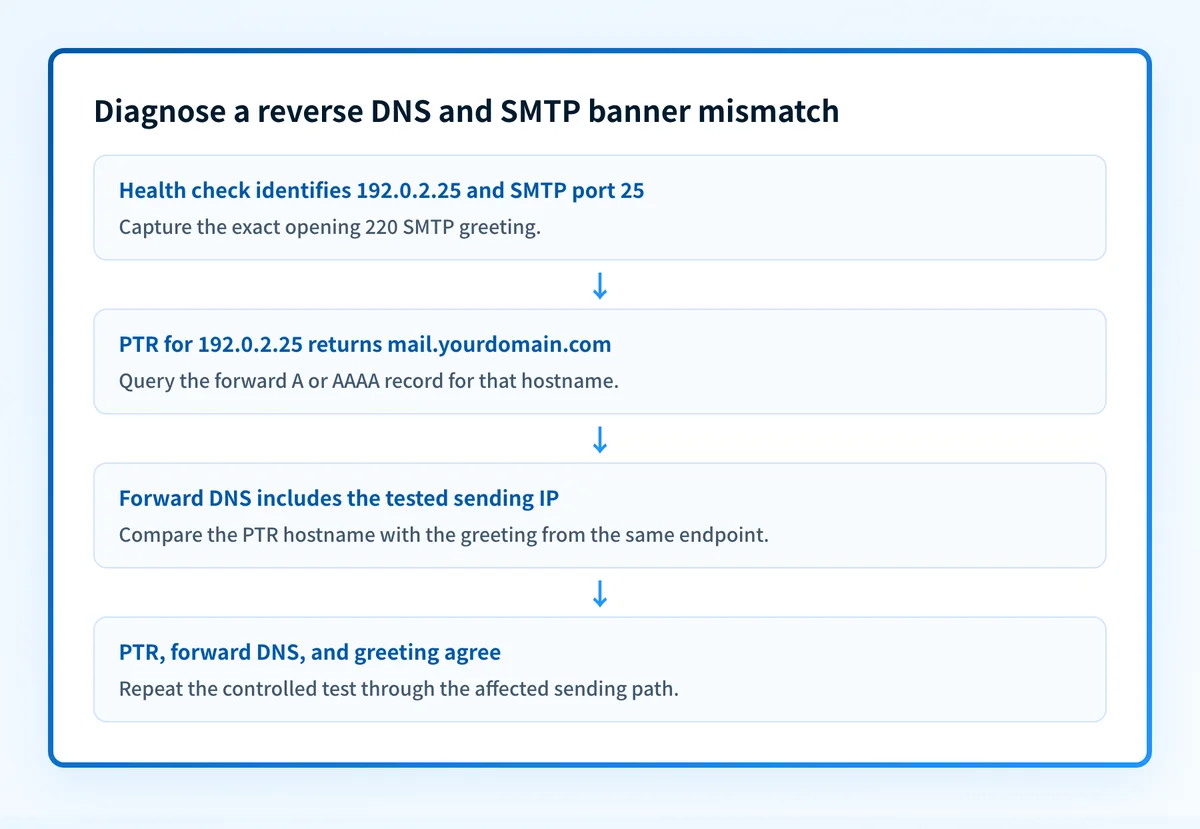
1. Capture the exact endpoint and opening greeting
Record the public IP, SMTP port, test time, source of the warning, and complete opening 220 line. If you make a controlled connection, use the same IP address and port identified by the health check.
openssl s_client -connect 192.0.2.25:25 -starttls smtp -crlfThe IP address is illustrative only. Do not place production IPs, customer hostnames, credentials, or message content in a shared ticket.
Do not substitute an application hostname, outbound trace, or client EHLO value from another route. The useful comparison is the greeting emitted by this listener.
2. Query the PTR record for that public IP
Resolve reverse DNS for the exact tested address:
dig -x 192.0.2.25 +shortSave the returned hostname exactly, including a trailing dot if the resolver displays one. If there is no PTR answer, preserve that result. A missing PTR must be addressed before a banner comparison can be meaningful.
For background on the record and reverse lookups, see what a PTR record is. The relevant answer is the PTR for this sending IP, not a hostname shown in a hosting dashboard.
3. Confirm the PTR hostname resolves forward
Query the hostname returned by the PTR. Use an A record for an IPv4 sending IP and an AAAA record for an IPv6 sending IP.
dig A mail.yourdomain.com +short
dig AAAA mail.yourdomain.com +short
For an IPv4 sender, the A response should include the tested IPv4 address. For an IPv6 sender, the AAAA response should include the tested IPv6 address. Check the authoritative DNS response and at least one public resolver.
This confirms published DNS, not the live production sending path or a receiver's private decision.
4. Build an identity evidence packet
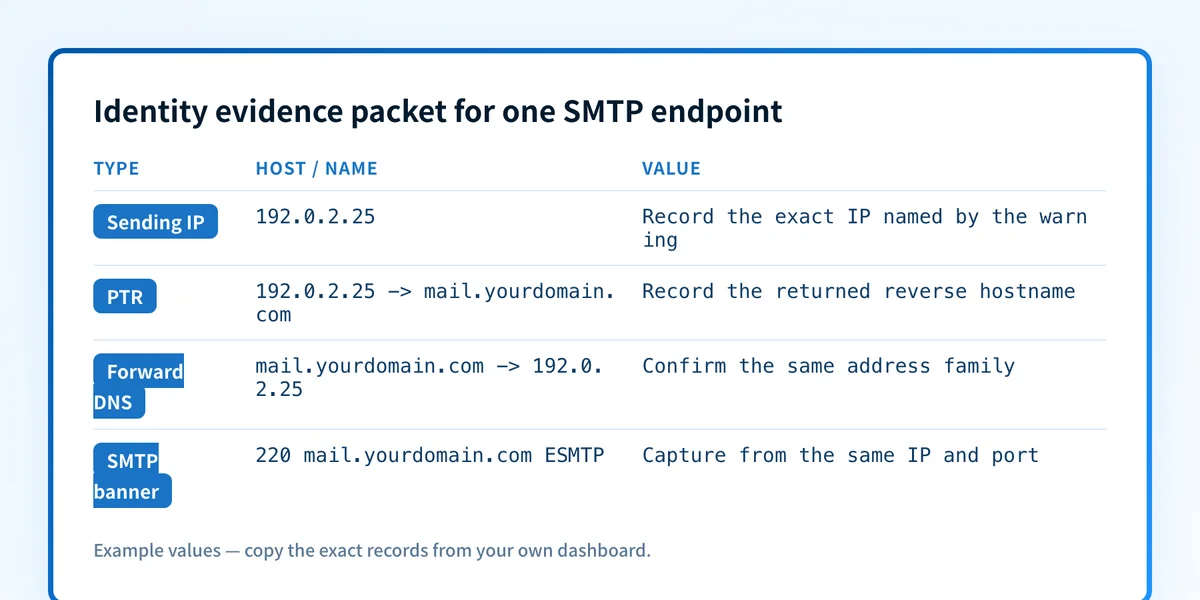
Use one labelled packet for the incident. It keeps the route-specific evidence together and makes handoff between DNS, infrastructure, and email teams less ambiguous.
Sending IP: 192.0.2.25
Exact PTR owner and returned hostname: provider or reverse-zone owner, mail.yourdomain.com.
Forward-confirmation result: A mail.yourdomain.com -> 192.0.2.25
Observed SMTP banner: 220 mail.yourdomain.com ESMTP
Observed HELO or EHLO name: client.example, if captured
Source and time: health check or controlled connection, UTC timestamp
Sending-service owner: internal MTA team or named provider
Controlled retest result: same IP and port return matching PTR and banner
The values are illustrative only. Redact customer hostnames, recipient details, message content, and account identifiers before sharing the packet.
The SMTP banner and client EHLO have different roles. Record both when available, but do not treat a client EHLO value as proof of the server greeting.
5. Identify the owner of each failed layer
Assign a responsible owner before editing:
- The IP-block owner or its provider controls the PTR or reverse-zone delegation.
- The DNS operator controls the forward A or AAAA record.
- The local MTA, relay, or load-balancer owner controls the greeting for the tested listener.
- The certificate owner controls TLS deployment, which is separate from this warning.
How do I fix it?
Repair the PTR through the IP owner
Choose the intended public hostname only after confirming the sending route. Ask the organization that controls the reverse DNS for the tested IP to set the PTR to that hostname. This changes reverse DNS, not message authentication or DMARC enforcement.
For a provider-owned IP, use the provider's documented reverse-DNS setting or support process. Do not add a PTR-style record to the normal forward DNS zone and expect it to affect a reverse lookup.
Do not request a PTR change until the intended hostname has a correct forward A or AAAA answer. A reverse record that points to a hostname without forward confirmation can create a different compliance problem.
Repair a forward-confirmation mismatch
If the PTR already names the intended host but its A or AAAA record does not include the tested IP, correct the forward DNS record through the domain's DNS operator. This repair changes forward DNS only.
Use the matching address family. Do not remove another address from a multi-address hostname unless the sending architecture confirms it is unused. The requirement is that the PTR hostname resolve to the tested sending IP, not that it have only one address.
Configure the greeting on the local MTA or listener
If your team owns the SMTP listener and the PTR is the intended hostname, configure that listener to present the same hostname in its opening greeting. Confirm the setting applies to the exact interface and port in the evidence packet.
A local MTA hostname change can affect other listeners and mail flows. Test it in an approved scope, keep the previous configuration available, and verify that every expected sending path still reaches the intended listener. This repair changes the SMTP greeting, not the PTR, DMARC policy, or receiver reputation.
Escalate a provider-controlled banner safely
If a relay, cloud platform, or hosted email service produces the banner, do not attempt to modify a provider-controlled host. Send the provider the redacted identity evidence packet and ask which public hostname it supports for the tested IP and port.
A provider may use shared IP space or a provider hostname by design. The provider's answer determines whether a customer-controlled PTR is possible. Do not claim a mismatch is repaired until the same endpoint returns the expected values.
How do I validate the repair?
Repeat the same check against the same public IP address and SMTP port. Capture the new 220 greeting, query the PTR again, and query the corresponding A or AAAA record. Update the identity evidence packet with the controlled retest result.
For mail sent to personal Gmail accounts, confirm that the PTR hostname resolves forward to the same public sending IP as required in Google's sender guidelines. Then send a new message through the affected production path and retain the received message's trusted Authentication-Results header if message authentication is also in scope.
A passing DNS and banner test does not prove that all production mail uses that listener, that every message authenticates, or that a receiver will accept or place future mail. For broader transport controls and related checks, use the email transport security learning hub.
Continue monitoring the sending paths behind the warning
After the repair, use the Email Security Score to inspect the domain's public email-security configuration. Compare its public findings with the route-specific PTR, forward-DNS, and SMTP evidence you collected.
A public score cannot prove the production SMTP route, a receiver's policy decision, or future delivery. If the unresolved problem is recurring visibility into which sources send for one or more domains, Start with Palisade. Palisade's DMARC Agent analyzes DMARC aggregate-report data, identifies sending sources and authentication or alignment issues, and creates prioritized remediation tickets for review. It does not change PTR records, MTA identity, DMARC policy, or a receiver's private reputation decision.
Evidence
Sources and further reading
Questions readers ask
Frequently asked questions
Can I fix this by changing the DMARC policy to p=none?
No. Changing p= changes requested DMARC enforcement. It does not change the PTR record, the forward DNS record, or the SMTP greeting.
Can I create the PTR record in my normal DNS zone?
Only if you control the delegated reverse DNS for the public IP block. Most domain DNS zones do not control the relevant in-addr.arpa or ip6.arpa reverse zone.

Written by
Dominic LandryDeliverability & DNS
Dominic Landry works on email deliverability and DNS configuration at Palisade, from SPF and DKIM records through to DMARC enforcement.
More from Dominic →