SMTP vs IMAP vs POP3: what's the difference?
 ChatGPT
 Claude
 Gemini
 Perplexity
 Grok
GrokIn brief
SMTP vs IMAP vs POP3: SMTP sends mail, while IMAP syncs server mail and POP3 downloads it. Learn the secure ports and validation steps clearly.
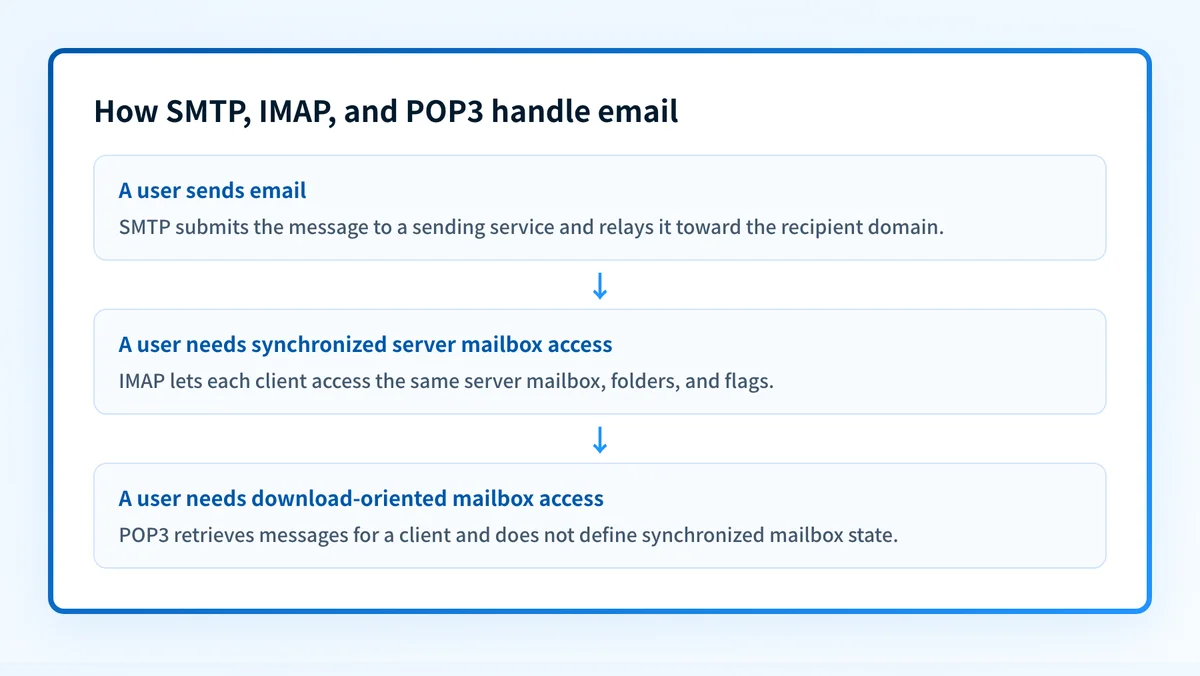
SMTP sends and relays email. IMAP and POP3 let a mail client retrieve email from a mailbox. SMTP is required for message submission and server-to-server transfer, while an account normally uses either IMAP or POP3 for access to received mail. These are IETF protocols, not a single provider rule, so there is no shared enforcement date. Use SMTP with TLS for sending, then choose IMAP for synchronized server mail or POP3 for download-oriented access.
At a glance
Quick takeaways
- SMTP submits outgoing email and relays it between mail servers.
- IMAP keeps the mailbox state on the server and synchronizes that state with clients.
- POP3 retrieves messages for a client and does not define multi-device folder synchronization.
- RFC 8314 recommends implicit TLS services for mail access and submission.
- Port 587 is the message-submission port, while ports 993 and 995 are the registered implicit TLS ports for IMAP and POP3.
- SMTP, IMAP, and POP3 transport mail. They do not replace sender authentication controls such as SPF, DKIM, and DMARC.
Who is affected?
Anyone configuring an email client, mailbox service, help-desk workflow, or managed email environment is affected. The sending client needs SMTP submission settings. The receiving client needs an access protocol, commonly IMAP or, in some environments, POP3.
SMTP is used both by a mail user agent submitting a message and by mail transfer agents relaying it toward a destination. RFC 5321 defines SMTP, while RFC 6409 defines the Message Submission protocol used when a client hands mail to a submission server.
IMAP and POP3 apply after a mailbox service has accepted mail for a user. RFC 9051 defines IMAP4rev2, and RFC 1939 defines POP3. Neither protocol decides where another domain should receive SMTP mail. That adjacent DNS task belongs to MX records and related email transport security guidance.
A webmail user may not see these settings because the browser talks to the provider's web application instead. The provider still uses mail protocols and storage systems behind that interface, but the user is not necessarily configuring IMAP or POP3 directly.
What are the requirements?
SMTP submits and relays messages
SMTP is a push protocol. A sending client or server opens a connection, identifies itself, supplies an envelope sender and recipient, and transfers the message data. SMTP does not provide mailbox browsing or synchronize a user's read state.
EHLO mailclient.yourdomain.com
MAIL FROM:<sender@yourdomain.com>
RCPT TO:<recipient@example.net>
DATA
From: sender@yourdomain.com
To: recipient@example.net
Subject: Illustrative SMTP message
Example message content.
.
QUIT
The commands above are illustrative only. Do not use a production server without its required authentication and TLS settings.
For end-user submission, RFC 6409 assigns port 587 and says a submission server MUST support the STARTTLS extension. A submission server can require authentication according to its local policy. Port 25 remains the SMTP relay port defined for message transfer, but it is not the normal client-submission choice.
IMAP accesses a server mailbox
IMAP lets a client access messages and mailbox state held by the server. RFC 9051 defines operations for selecting mailboxes, fetching messages, searching, and changing flags. That server-side state is why multiple IMAP clients can observe the same folders and message flags when they synchronize with the same mailbox.
a001 LOGIN user@example.com password
a002 SELECT INBOX
a003 FETCH 1:* (FLAGS)
a004 LOGOUT
The commands are illustrative only. Do not place real passwords in a terminal transcript, ticket, or documentation.
IMAP does not guarantee that every client has identical local cache behavior at every instant. A client can work from cached data while disconnected, then reconcile with the server later. The protocol's useful distinction is that the mailbox and its state remain available to clients through the server.
POP3 retrieves messages for a client
POP3 is a mailbox-access protocol with a smaller model. RFC 1939 describes authorization, transaction, and update states. A client typically lists and retrieves messages, then can mark messages for deletion before ending the session.
USER user@example.com
PASS password
STAT
LIST
RETR 1
QUIT
The commands are illustrative only. Do not use real credentials in test scripts or shared logs.
POP3 does not define IMAP-style server mailbox folders, flags, or synchronized read state. A client may choose to leave retrieved messages on the server, but that is a client and server configuration decision, not equivalent to IMAP synchronization. If a team needs consistent folders and read status across laptops, phones, and webmail, IMAP is usually the better fit.
TLS protects the protocol connection
RFC 8314 recommends cleartext-free access to mail. It updates the registered service ports for implicit TLS: 465 for submissions, 993 for IMAP, and 995 for POP3. It also describes STARTTLS as an upgrade mechanism for existing cleartext ports.
Use the settings published by the mailbox or submission provider. The RFC registration does not prove a particular provider supports every port or authentication method. A provider can require an approved TLS version, a specific hostname, OAuth-based authentication, or another local setting.
Do not change a working mail client from IMAP to POP3 without confirming retention and backup behavior. A POP3 client can be configured to delete messages from the server after retrieval, which can make those messages unavailable to other clients.
When does the requirement take effect?
There is no one-time rollout date for SMTP, IMAP, and POP3. Each protocol is an established IETF specification used by services that choose to support it.
The controlling SMTP specification is RFC 5321, published in October 2008. RFC 6409, published in November 2011, defines message submission and updates RFC 4409. IMAP4rev2 is defined by RFC 9051, published in August 2021, which obsoletes RFC 3501. POP3 remains defined by RFC 1939, published in May 1996. RFC 8314, published in January 2018, updates the TLS service-port registrations for mail access and submission.
A provider can change its supported client settings independently of these publication dates. Check the provider's current setup documentation before changing hostnames, ports, TLS modes, or authentication methods.
How do I implement the requirement?
1. Identify the account's sending and receiving roles
Record the outgoing submission hostname and the incoming mailbox hostname supplied by the provider. Do not assume they are the same host.
Use SMTP for the outgoing role. Select IMAP or POP3 only for the incoming role. An account can use SMTP plus IMAP, or SMTP plus POP3.
2. Select IMAP or POP3 based on mailbox behavior
Choose IMAP when users need shared mailbox state across devices, server-side folders, or access through webmail and native clients.
Choose POP3 only when the provider supports it and the operational intent is download-oriented access. Decide explicitly whether the client leaves messages on the server. Test that choice with a non-production mailbox first.
3. Configure TLS and provider-supported authentication
Use the provider's documented hostname, port, TLS mode, and authentication method. RFC 8314 registers port 465 for submissions, 993 for IMAP over TLS, and 995 for POP3 over TLS.
Do not disable certificate validation to work around a hostname or trust error. Correct the configured server name or resolve the provider-side certificate problem through the provider's support path.
4. Separate mailbox access from domain authentication
SMTP transport settings do not prove that mail sent with a domain authenticates successfully. Sender authentication depends on DNS records, signing behavior, alignment, and receiver evaluation.
For DNS context, review how a CNAME differs from an A record and how an A record differs from an AAAA record. Those records may support mail-service configuration, but they do not replace an MX record or a sender-authentication record.
How do I validate compliance?
Validate the configured service at four separate layers.
- DNS: Resolve the provider hostname from the intended network and confirm it returns the expected address. This proves a current public name resolution result, not that the service accepts the account's credentials.
- Vendor: Confirm the provider's current client-settings documentation and any account-level status page. This confirms the documented path, not a successful delivered message.
- Message: Send a test message through the exact production SMTP submission path. Inspect the receiving mailbox and its raw headers to confirm the message arrived through the expected route.
- DMARC: After aggregate reports accumulate, inspect the sending domain's authentication and alignment results. This identifies whether production sources are passing DMARC, which SMTP connectivity alone cannot establish.
A public email security score can inspect a domain's published email-authentication posture. It cannot test your mail-client credentials, prove a specific SMTP submission succeeded, inspect private mailbox state, or show a receiver's private delivery decision. For the distinction between a one-time check and an ongoing observation process, see active vs passive monitoring.
Check the domain authentication behind SMTP sending
SMTP can submit a message, but a successful connection does not show which production services pass SPF, DKIM, and DMARC alignment for the sending domain.
Palisade is agentic DMARC software that analyzes DMARC aggregate-report data, identifies sending sources and authentication or alignment issues, and proposes the next policy step for human review. It does not change your mail-client protocol settings, automatically change DMARC policy, or guarantee delivery or inbox placement.
Evidence
Sources and further reading
Questions readers ask
Frequently asked questions
Is SMTP used to receive email?
No. SMTP transfers and submits email. A mailbox service receives SMTP-delivered mail, then a user accesses that mailbox through IMAP, POP3, webmail, or another provider interface.
Is IMAP better than POP3?
Yes. IMAP is usually the better choice when the same mailbox is used on multiple devices because it supports server mailbox state and synchronization. POP3 can fit a deliberate local-download workflow, but it does not define synchronized folders and flags across clients.
Can I use SMTP with IMAP?
Yes. This is a common configuration. SMTP handles outgoing message submission, and IMAP provides access to received mail held in the server mailbox.
Are ports 465, 993, and 995 always required?
No. RFC 8314 registers those implicit TLS ports, but the provider's current documentation controls which connection settings its service accepts. Some services also support STARTTLS on their applicable cleartext ports.
Does TLS make SMTP mail authenticate with DMARC?
No. TLS protects the connection between participating endpoints. DMARC evaluation depends on SPF and DKIM authentication, identifier alignment, and the receiver's DMARC processing of the delivered message.

Written by
Ian BussieresCTO & Co-Founder, Palisade
Ian Bussieres is the CTO and co-founder of Palisade, agentic DMARC software for IT teams and MSPs.
More from Ian →