What is ghost phishing and can DMARC stop it?
 ChatGPT
 Claude
 Gemini
 Perplexity
 Grok
GrokIn brief
Ghost phishing hides a phishing page until browser-side code renders it. DMARC can stop domain spoofing, but cannot inspect a rendered payload.
Ghost phishing is a label for phishing that hides its final lure until code running in the recipient's browser renders or decrypts it. DMARC can reduce one part of the risk: it helps stop attackers from sending mail that falsely uses your protected From domain. DMARC cannot determine whether a message from an attacker-controlled domain is safe, inspect all browser-rendered content, or stop a user from approving a fraudulent sign-in request.
At a glance
Quick takeaways
- Ghost phishing describes an evasion technique, not a separate email-authentication standard.
- An encrypted or encoded message body can still pass DKIM if it has not changed after signing.
- DMARC evaluates domain authentication and alignment, not whether a rendered page is trustworthy.
- An enforced DMARC policy helps prevent direct spoofing of the protected From domain.
- Device-code phishing can abuse a legitimate Microsoft authorization flow when a victim enters and approves an attacker-supplied code.
- Browser, identity, and user controls remain necessary when the lure comes from an attacker-controlled domain.
How ghost phishing works
The term "ghost phishing" is not defined by an RFC or a mailbox-provider standard. It is commonly used for a phishing flow where the email or initial web content appears harmless to a static inspection, while browser-side code later reconstructs the credential lure.
The important distinction is timing. A secure email gateway can inspect the message delivered to it. A browser can later execute page code and render content that was not readable in its final form during that initial inspection. That does not mean every encrypted attachment or encoded page is malicious. It means authentication and content inspection answer different questions.
DMARC is built around domain authentication. RFC 9989 defines DMARC as a mechanism that uses SPF and DKIM results aligned with the visible Header From domain to determine whether a message passes DMARC. It also lets the domain owner publish a requested policy for messages that fail.
DKIM does not classify content as safe. RFC 6376 describes DKIM body integrity: a valid signature confirms that the signed message content has not been altered in transit. If an attacker signs an encrypted or encoded payload using a domain they control, the signed message can remain intact while the later-rendered page is deceptive.
For the wider domain-protection model, see the DMARC learning hub.
When DMARC can and cannot help
DMARC helps when the attacker attempts to impersonate a domain that has a correctly deployed and enforced DMARC policy. If a message uses your visible From domain but fails aligned SPF and DKIM, p=quarantine or p=reject asks the receiving system to apply stronger handling. The receiver still makes its own final decision under RFC 9989.
DMARC does not stop a ghost-phishing campaign merely because the campaign uses email. It cannot block an attacker from sending from a domain the attacker legitimately controls. It also cannot inspect every page a recipient opens after delivery, reverse a user approval, or guarantee inbox placement.
Use this decision rule:
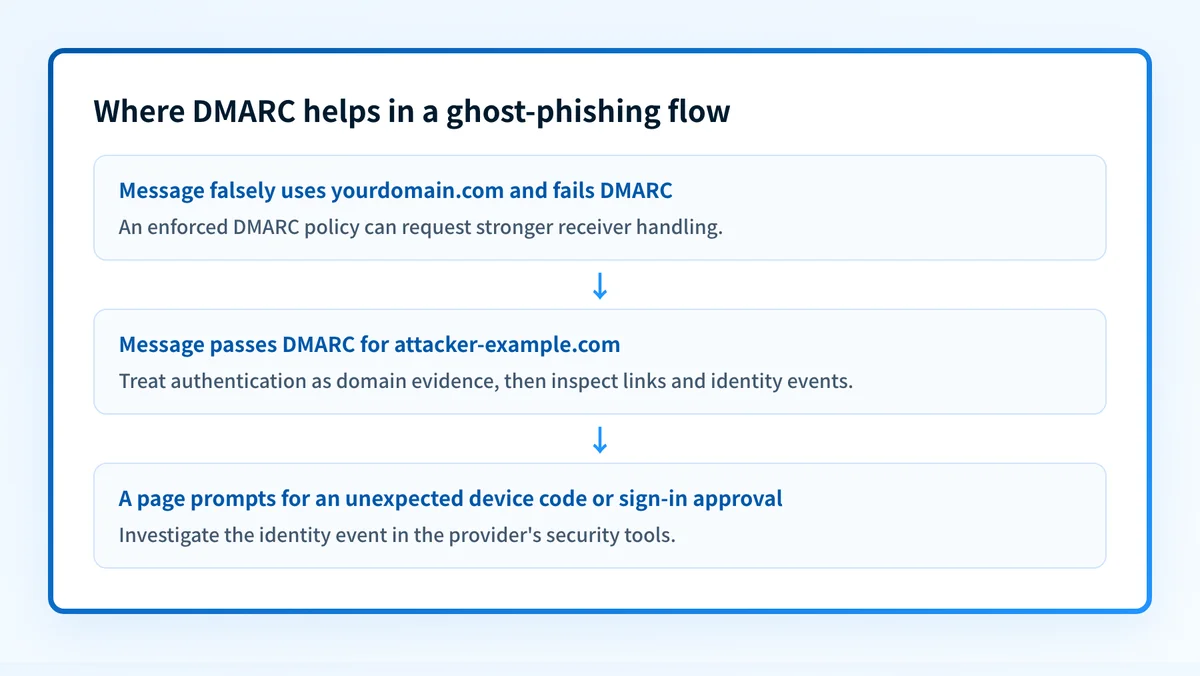
- If the suspicious message claims to be from your domain and fails DMARC, an enforced policy can help reduce spoofed delivery.
- If the suspicious message passes DMARC from an unfamiliar or attacker-controlled domain, DMARC has confirmed domain authentication, not the sender's intent.
- If the attack leads to a sign-in approval or device-code prompt, investigate the identity event in the provider's security tools. A DNS record cannot explain that authorization decision.
Do not move a production domain to p=reject solely because of one phishing incident. First identify legitimate sending sources and verify that important mail passes SPF or DKIM with DMARC alignment.
Does DMARC stop phishing? covers the broader boundary between spoofing protection and phishing defense. For approval-based attacks, phishing-resistant MFA can reduce reliance on a user recognizing a deceptive prompt.
A worked ghost-phishing decision example
Consider a message that links to a page which appears blank or unreadable until the recipient opens it in a browser. The email headers show a DMARC pass for mailer.attacker-example.com.
Visible From: notices@mailer.attacker-example.com
DMARC result: pass
DKIM d=: mailer.attacker-example.com
Link destination: https://login.attacker-example.com/
Browser behavior: page renders a sign-in or authorization prompt
This example does not show a DMARC bypass. It shows a message that authenticated for the attacker-controlled domain. A DMARC pass means that aligned SPF or DKIM authenticated the visible From domain under the receiver's evaluation. It does not mean the domain is known to the recipient, that its content is legitimate, or that the linked page is safe.
If the same lure instead claims to be from yourdomain.com and does not have aligned authentication for yourdomain.com, your enforced DMARC policy can request stronger handling. The exact result still depends on the receiving system.
When reviewing a delivered message, use the Authentication-Results header as message-level evidence. RFC 8601 defines the Authentication-Results field, including result methods such as SPF and DKIM. Preserve the original message and inspect it in the security system approved by your organization. Do not paste unredacted headers, tokens, or customer data into public tools.
What to do next with the evidence you have
Start with the evidence closest to the event:
- If you have a suspicious message, preserve the original message and review its authentication results, visible From domain, links, and any identity-provider alerts.
- If a user entered a device code or approved an unexpected request, investigate the authorization event in Microsoft Entra ID and follow your incident-response process. Microsoft recommends restricting device-code flow where it is not needed and using Conditional Access controls where appropriate.
- If the message impersonated your domain, check the public DMARC record and compare it with the policy your team intended to publish.
- If you are planning enforcement, validate four layers: authoritative and public DNS, the sending vendor's status, headers from a real production message, and DMARC aggregate reports after they accumulate.
Check the DMARC policy behind a spoofing concern
If the suspicious message used your domain in the visible From address, inspect the currently published DMARC record before proposing a DNS change. Compare the result with the message's authentication evidence and your approved sender inventory.
A public DMARC check does not inspect a browser-rendered phishing page, repair an identity compromise, monitor every sender, or prove why a receiving mailbox accepted or rejected one message.
For teams that need to move beyond one public lookup, Palisade is agentic DMARC software that analyzes DMARC aggregate-report data, identifies sending sources and alignment issues, and creates prioritized remediation tickets. It can propose the next policy stage, while your team reviews the evidence and applies the change. It does not control browser content, automatically change your DMARC policy, or guarantee delivery.
Evidence
Sources and further reading
Questions readers ask
Frequently asked questions
Is ghost phishing a type of malware?
No. Ghost phishing is a label for an evasion and delivery technique. The final objective may be credential theft, session theft, fraudulent authorization, or another phishing outcome.
Can a message pass DKIM and still be phishing?
Yes. DKIM can show that signed content was not altered after signing. It does not determine whether the sender's content, link, or requested sign-in action is legitimate.
Does a DMARC pass mean a sender is trustworthy?
No. A DMARC pass means the receiver obtained aligned SPF or DKIM authentication for the visible From domain. Attackers can authenticate mail for domains they own or control.
Can p=reject stop ghost phishing?
Only when an attacker attempts to spoof the protected From domain and fails DMARC. p=reject does not block messages from attacker-controlled domains or inspect what a browser renders after delivery.
Should we disable Microsoft device code flow?
Only if your organization does not require it or can restrict it safely. Review Microsoft's documented mitigations, current business use cases, and your identity team's change process before changing access controls.

Written by
Ian BussieresCTO & Co-Founder, Palisade
Ian Bussieres is the CTO and co-founder of Palisade, agentic DMARC software for IT teams and MSPs.
More from Ian →