SSL vs TLS: what's the difference for email?
 ChatGPT
 Claude
 Gemini
 Perplexity
 Grok
GrokIn brief
SSL vs TLS for email: TLS is the modern protocol for SMTP encryption, while SSL is obsolete. Learn how to configure and validate TLS for email.
SSL and TLS both describe encrypted network connections, but TLS is the current protocol and SSL is obsolete. For email, SMTP servers use TLS to encrypt a connection between mail systems or between a mail client and its submission server. TLS protects a transport hop. It does not authenticate the visible sender or provide end-to-end encryption of a message.
At a glance
Quick takeaways
- SSL 2.0 and SSL 3.0 are obsolete protocols and should not be enabled for email services.
- TLS 1.0 and TLS 1.1 are deprecated by RFC 8996.
- TLS 1.2 and TLS 1.3 are the current baseline versions for secure email transport.
- SMTP can upgrade an existing connection to TLS with the
STARTTLScommand defined in RFC 3207. - Opportunistic SMTP TLS does not require every sender to encrypt delivery to your domain.
- MTA-STS can tell supporting sending servers to require authenticated TLS before delivering mail to your domain.
Who is affected?
This distinction affects any team operating an SMTP submission service, mail server, secure mail gateway, or application that sends email through SMTP. It also affects administrators publishing email transport controls for a domain.
TLS is relevant in two different paths:
- A mail client or application connects to its outbound submission service.
- One SMTP server transfers a message to another SMTP server.
TLS also has limits. It encrypts one network connection at a time. A message can be decrypted when a receiving mail server accepts it, then encrypted again on a later connection. TLS does not establish whether the visible From domain is authorized. That is a separate email-authentication task covered by SPF, DKIM, and DMARC.
For related transport controls and records, use the email transport security learning hub.
What are the requirements?
TLS 1.0 and TLS 1.1 must not be used
RFC 8996 formally deprecates TLS 1.0 and TLS 1.1. The RFC states that implementations "MUST NOT negotiate TLS version 1.0" and "MUST NOT negotiate TLS version 1.1."
For new and maintained email services, disable SSL 2.0, SSL 3.0, TLS 1.0, and TLS 1.1. Support TLS 1.2, then enable TLS 1.3 where the mail software and operational dependencies support it. RFC 9325 gives current TLS deployment guidance and recommends TLS 1.3.
Supported protocol baseline for a maintained SMTP service
TLS 1.2: enabled
TLS 1.3: enabled where supported
TLS 1.1: disabled
TLS 1.0: disabled
SSL 3.0: disabled
SSL 2.0: disabled
The label "SSL certificate" remains common, but it does not mean an endpoint should permit SSL. X.509 certificates can authenticate a TLS server. The protocol version is negotiated separately.
SMTP uses STARTTLS to upgrade a connection
RFC 3207 defines the SMTP STARTTLS extension. An SMTP server that offers the extension advertises it in response to EHLO. The client then sends STARTTLS and begins the TLS handshake if the server accepts it.
S: 250-example.net
S: 250-STARTTLS
S: 250 SIZE 52428800
C: STARTTLS
S: 220 Ready to start TLS
After a successful TLS negotiation, RFC 3207 requires the client to issue EHLO again. SMTP capabilities available before TLS are not assumed to remain available after the secure channel begins.
STARTTLS is often opportunistic for server-to-server delivery. RFC 3207 allows a sending server to proceed without TLS when the receiving server does not offer it. That behavior improves encryption coverage, but it does not guarantee encryption for every delivery attempt.
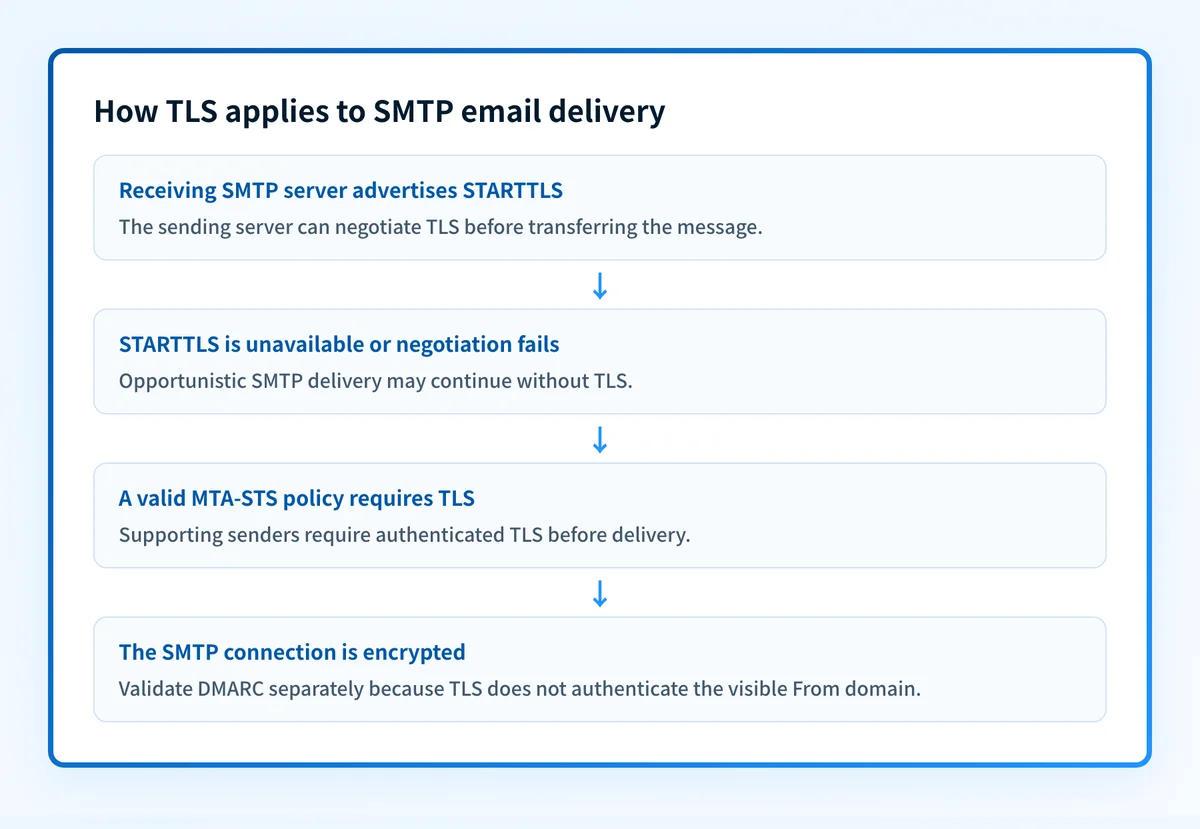
MTA-STS can require authenticated TLS for a domain
RFC 8461 defines SMTP MTA Strict Transport Security, known as MTA-STS. A domain can publish an MTA-STS DNS record and host an HTTPS policy. A sending server that supports and successfully retrieves the policy can require TLS and validate the receiving server's certificate before delivery.
An illustrative MTA-STS DNS record has this shape:
Illustrative only. Publish the version and identifier generated for your domain.
_mta-sts.yourdomain.com. IN TXT "v=STSv1; id=20260811T120000"
Do not publish a copied policy identifier or MX hostname from another organization. Your policy must name the receiving MX hosts for your own domain.
MTA-STS is a domain-level control for inbound SMTP delivery. It does not turn every sender on the internet into an enforcing sender, and it does not secure submission traffic from your applications. A related CNAME versus A record guide can help when you are checking the DNS record type a provider asks you to publish.
When does the requirement take effect?
TLS 1.0 and TLS 1.1 were deprecated when RFC 8996 was published in March 2021. RFC 8996 updates RFC 5246 and RFC 4346, the specifications for TLS 1.2 and TLS 1.1 respectively. It is a final RFC, not an Internet-Draft.
TLS 1.3 is specified by RFC 8446, published in August 2018. RFC 8446 obsoletes RFC 5246 as the current TLS protocol specification.
SMTP STARTTLS remains defined by RFC 3207, published in February 2002. MTA-STS is defined by RFC 8461, published in September 2018. These standards do not impose one universal migration deadline on every email domain. A mailbox provider, customer contract, or internal security policy can impose additional requirements with separate dates.
How do I implement the requirement?
1. Inventory SMTP endpoints and dependencies
List every SMTP submission endpoint, relay, gateway, appliance, printer, and application that sends through your mail environment. Record the hostname, port, supported TLS versions, certificate name, and whether the path is client submission or server-to-server delivery.
Do not remove an old TLS version before identifying dependencies. A legacy device may stop sending when its only supported protocol is disabled.
2. Configure TLS 1.2 and TLS 1.3
Set each maintained SMTP service to permit TLS 1.2 and, where supported, TLS 1.3. Disable SSL 2.0, SSL 3.0, TLS 1.0, and TLS 1.1.
Use a certificate whose presented hostname matches the hostname clients use. Confirm the service sends the full certificate chain required by its clients. RFC 9325 recommends current TLS configurations, but exact cipher and configuration settings depend on the SMTP software and operating system.
3. Confirm STARTTLS advertisement and policy
Connect through the same hostname and port used in production, then inspect the EHLO response for STARTTLS. Test a real TLS negotiation and confirm the client sends a new EHLO after the upgrade.
For inbound mail, decide whether opportunistic TLS is sufficient for the domain. If your domain needs supporting senders to require authenticated TLS, publish and maintain an MTA-STS policy under RFC 8461. Check DNS ownership and hostnames carefully. An incorrect policy can defer or prevent delivery from senders that enforce it.
An A record versus AAAA record guide can help when a mail hostname resolves differently over IPv4 and IPv6.
4. Separate transport encryption from sender authentication
Keep TLS configuration work separate from DMARC deployment. TLS encrypts the SMTP connection. SPF, DKIM, and DMARC evaluate sender authorization and alignment.
A TLS-protected message can still fail DMARC, and a DMARC-aligned message can still cross an SMTP hop without enforced TLS. Both controls matter, but their evidence is different.
How do I validate compliance?
Start with DNS evidence. Query the MTA-STS TXT record from authoritative DNS and at least one public resolver, then retrieve the HTTPS policy URL specified by RFC 8461. Verify that the policy version, mode, maximum age, and MX patterns match the receiving infrastructure.
Next, test the server path. Use an SMTP client or mail-server diagnostic that connects to the same hostname and port as the production sender. Confirm the offered protocol versions, certificate chain, certificate hostname, and STARTTLS negotiation. A public DNS check cannot prove that every SMTP endpoint presents the expected certificate or accepts the expected protocol version.
Then send a real message through the production path and inspect its raw headers or mail-server logs. Record whether the actual submission or delivery connection used TLS. A successful test from one location does not prove that all sending applications, relays, or recipient paths behave the same way.
Finally, validate the authentication layer after reports accumulate. DMARC aggregate reports can identify sources that are sending as the domain and show SPF or DKIM alignment outcomes. That evidence does not prove the TLS status of every SMTP hop. The active versus passive monitoring guide explains why a point-in-time test and ongoing operational evidence answer different questions.
Check the MTA-STS record before enforcing transport policy
If you have a domain name and need to inspect its public MTA-STS DNS record, use the MTA-STS checker before changing your policy. Compare the result with the HTTPS policy and the SMTP certificate presented by your production MX hosts.
A public record check cannot prove a specific SMTP delivery used TLS, validate every production mail path, or show a receiver's private enforcement decision. Once transport controls are in place, Palisade can analyze DMARC aggregate-report data, identify sending sources and alignment issues, and create prioritized remediation tickets. It does not change your MTA-STS policy or SMTP configuration for you.
For an ongoing DMARC workflow across domains, Start with Palisade.
Evidence
Sources and further reading
Questions readers ask
Frequently asked questions
Is SSL the same as TLS?
No. TLS replaced SSL. "SSL" often remains in product labels and certificate terminology, but an actively maintained email service should negotiate TLS rather than SSL.
Is TLS 1.2 still acceptable for email?
Yes. TLS 1.2 remains a current protocol version. TLS 1.3 is the newer standard and is preferred where the mail software and connected systems support it.
Does STARTTLS guarantee that email is encrypted?
No. SMTP STARTTLS can be opportunistic, so a sender may deliver without TLS when it cannot negotiate the upgrade. MTA-STS can require authenticated TLS for supporting senders that retrieve and apply the policy.
Does MTA-STS replace DMARC?
No. MTA-STS addresses TLS protection for SMTP delivery to a domain. DMARC evaluates whether SPF or DKIM aligns with the visible From domain and tells receivers how to handle failures.
Does TLS encrypt an email end to end?
No. TLS encrypts a connection between two systems. Mail can be decrypted at a receiving server and encrypted again on a later hop. End-to-end message confidentiality requires a separate message-level encryption design.

Written by
Ian BussieresCTO & Co-Founder, Palisade
Ian Bussieres is the CTO and co-founder of Palisade, agentic DMARC software for IT teams and MSPs.
More from Ian →