CNAME vs A record: what's the difference?
 ChatGPT
 Claude
 Gemini
 Perplexity
 Grok
GrokIn brief
CNAME vs A record: learn how A records map names to IPv4 addresses, how CNAME aliases work, and where DNS rules prohibit CNAME use for common DNS setups.
An A record maps a DNS name directly to an IPv4 address. A CNAME record maps one DNS name to another DNS name, so the resolver follows the alias before retrieving the requested data. Use an A record when you have the host's IPv4 address. Use a CNAME when a service gives you a hostname to alias, provided that hostname does not need other DNS records.
At a glance
Quick takeaways
- An A record returns an IPv4 address for the exact DNS name queried.
- A CNAME record aliases one DNS name to a canonical target hostname.
- A standard CNAME owner name cannot also hold A, AAAA, MX, TXT, or other DNS data.
- A zone apex normally cannot use a standard CNAME because it must contain SOA and NS records.
- An MX or NS record target must not be a CNAME alias.
- DKIM selectors can use CNAME records when the email provider explicitly supplies a CNAME target.
Who is affected?
These DNS rules affect anyone publishing website, email-routing, domain-verification, or email-authentication records. They matter to internal IT teams and MSPs because a record that looks harmless in a DNS control panel can break mail routing or prevent an email service from verifying a domain.
The controlling standards are RFC 1034, Domain Names Concepts and Facilities and RFC 2181, Clarifications to the DNS Specification. Both are final RFCs, not drafts. RFC 2181 clarifies the CNAME restrictions that affect operational DNS changes.
An A record covers IPv4. Its IPv6 counterpart is an AAAA record, explained in A record vs AAAA record: what's the difference?. A CNAME is different because it does not contain an IP address. It identifies another DNS name as the canonical target.
The restrictions apply to standard DNS CNAME records. Some DNS providers offer apex aliasing, ALIAS records, ANAME records, or CNAME flattening. For example, Cloudflare documents CNAME flattening as provider behavior, not as a replacement for the DNS standard's CNAME rules. Confirm the behavior before moving a domain to another DNS provider.
What are the requirements?
An A record contains an IPv4 address
RFC 1034 defines an A record as an address record with a 32-bit Internet address. Operationally, it gives a resolver an IPv4 address for the name it queried.
; Illustrative only. Replace with values for your own domain and service.
app.yourdomain.com. IN A 192.0.2.25
The value in an A record is an IP address, not another hostname. An A record can coexist with other record types at the same owner name unless another record's rule prevents it.
A CNAME record identifies a canonical hostname
RFC 1034 defines a CNAME record as a canonical name for an alias. If a resolver receives a CNAME while requesting another record type, it restarts the query using the canonical target.
; Illustrative only. Do not publish another service's target hostname.
www.yourdomain.com. IN CNAME app.provider.example.
The trailing dot is zone-file notation for a fully qualified domain name. DNS control panels often add it automatically. Follow the DNS provider's input format, but copy the hostname supplied by the service exactly.
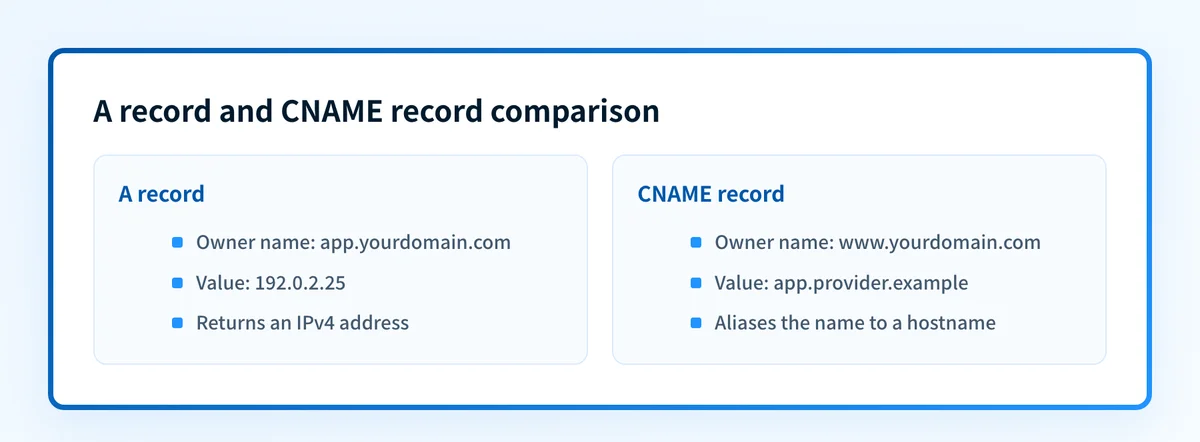
A CNAME can let a provider change the target hostname's A or AAAA records without requiring you to edit the alias. It does not mean the alias itself has a fixed IP address.
A CNAME owner name cannot hold other DNS data
RFC 2181 section 10.1 states: "If a CNAME RR is present at a node, no other data should be present".
A DNS name used as a CNAME therefore cannot also publish an A, AAAA, MX, TXT, or other record at that same name. This is a DNS rule, not a registrar preference.
The zone apex, such as yourdomain.com, normally cannot be a standard CNAME because it must contain SOA and NS records. Use an address record, a redirect, or a documented provider-specific apex feature instead.
MX and NS targets must not be aliases
RFC 2181 section 10.3 states: "The domain name used as the value of a NS or MX record must not be an alias."
; Illustrative only.
yourdomain.com. IN MX 10 mail.provider.example.
mail.provider.example. IN A 192.0.2.50
Do not replace a mail provider's MX target with a CNAME to make DNS records look consistent. The MX target is part of the production mail-routing path.
This rule concerns the hostname named in the MX or NS record's value. It does not prevent a separate DKIM selector from using a CNAME when an email provider directs you to publish one. See what a DKIM CNAME record is and how to set it up.
When does the requirement take effect?
RFC 1034 was published in November 1987. RFC 2181 was published in July 1997 and clarifies CNAME exclusivity plus the prohibition on alias targets for MX and NS records.
There is no rollout date or sender-volume threshold. These are DNS protocol rules whenever you publish the records. Provider-specific features such as CNAME flattening have their own current behavior, limits, and cache handling, so the provider's documentation controls those implementation details.
How do I implement the requirement?
1. Identify the exact hostname and supplied value
Start with the owner name that needs a record. Publish an A record if you have an IPv4 address. Publish a CNAME only when the service gives you a target hostname.
Do not derive a target from another account, a similar domain, or an old setup guide. Obtain the current value from the service that owns the destination.
2. Inspect records already published at that name
Before creating a CNAME, inspect all records at the same owner name. A CNAME cannot coexist there with a TXT verification record, an A record, an MX record, or another record type.
This is especially relevant for email authentication. A provider might assign a name such as selector1._domainkey.yourdomain.com for DKIM. That selector can be a CNAME, but only if it does not also need other DNS data.
3. Keep the zone apex separate
Do not publish a standard CNAME at the zone apex. If a website provider requires apex routing, use the provider's documented approach and record that dependency for the next DNS administrator.
A provider-specific alias feature may behave differently after a DNS migration. Treat it as implementation guidance, not as evidence that standard CNAME rules no longer apply.
4. Preserve mail-routing targets
Copy MX records exactly as the receiving mail provider specifies, then check the domain's MX records to confirm the published set matches. If you control the target zone, verify that each MX target is a real host name with address records rather than a CNAME alias.
A DKIM CNAME at a selector is separate from the MX requirement. One does not justify changing the other.
5. Publish the change and allow caching to expire
Publish one focused DNS change, then allow for the configured TTL and resolver caching. Avoid combining an alias conversion with unrelated SPF, DMARC, or MX changes. Separate changes give you clearer evidence if delivery or verification later fails.
How do I validate compliance?
Use a DNS lookup to inspect the public answer for the exact hostname. For an A record, compare the returned IPv4 address with the intended service address. For a CNAME, compare the returned canonical target with the provider-supplied hostname and verify that the alias owner name has no other data.
For a mail-routing change, inspect every MX target and verify it is not an alias. Then validate at four layers where email is affected:
- DNS: Query the authoritative DNS provider and at least one public resolver after the expected cache period.
- Vendor: Check the provider's current verification status if it offers one.
- Message: Send a real message through the affected production path and inspect the delivered headers.
- DMARC: Review aggregate-report data after it accumulates to identify sources or alignment issues that DNS answers alone cannot show.
Inspect the published DNS record, then track the mail path
Check the exact hostname before changing records or asking a provider to reverify the domain.
A DNS lookup can show the public A or CNAME answer for the name you enter. It cannot prove which production senders use the domain, monitor later DNS drift, or confirm future inbox placement.
For domains with ongoing DMARC aggregate-report data, Palisade is DMARC software that analyzes reporting data, identifies sending sources and authentication or alignment issues, and creates prioritized remediation tickets. A human reviews the evidence and applies any DNS or DMARC policy change.
Evidence
Sources and further reading
Questions readers ask
Frequently asked questions
Is a CNAME record the same as an A record?
No. An A record contains an IPv4 address. A CNAME record contains another hostname, and the resolver follows that hostname to obtain the requested DNS data.
Can a CNAME and TXT record use the same hostname?
No. RFC 2181 says that if a CNAME record exists at a node, no other DNS data should be present there. Use a different hostname when both a CNAME and TXT record are required.
Can the root domain use a CNAME record?
No. Normally, the zone apex must contain SOA and NS records, which conflicts with the standard CNAME exclusivity rule. A DNS provider may offer an apex-specific alias feature, but that is provider behavior rather than a standard CNAME.
Can an MX record point to a CNAME?
No. RFC 2181 states that the hostname used as the value of an MX record must not be an alias. Use the mail provider's specified MX target without substituting a CNAME.
Does a DKIM record use a CNAME or TXT record?
Yes. Either can be used, depending on the email provider's instructions. A provider-managed DKIM selector often uses a CNAME, while other providers publish the DKIM public key in a TXT record. Follow the provider's current setup value for the exact selector name.
Look up the published DNS answer before changing it
Enter your domain and record.

Written by
Dominic LandryDeliverability & DNS
Dominic Landry works on email deliverability and DNS configuration at Palisade, from SPF and DKIM records through to DMARC enforcement.
More from Dominic →