What is MTA-STS and how does it secure SMTP with TLS?
 ChatGPT
 Claude
 Gemini
 Perplexity
 Grok
GrokIn brief
MTA-STS is an SMTP transport policy that requires supporting senders to use authenticated TLS with a domain's authorized MX hosts. Learn how to deploy it.
MTA-STS, or Mail Transfer Agent Strict Transport Security, lets a receiving email domain tell supporting SMTP senders to use authenticated TLS when delivering mail to its authorized MX hosts. A domain publishes a DNS discovery record and an HTTPS policy file. In enforce mode, a supporting sender must treat mail as undeliverable if it cannot make a compliant TLS connection to a policy-authorized MX host.
At a glance
Quick takeaways
- MTA-STS protects the SMTP connection to a receiving domain. It does not authenticate the visible sender of an email.
- RFC 8461 is an IETF Proposed Standard published in September 2018.
- A working deployment needs both an
_mta-stsDNS TXT record and an HTTPS policy file. - The policy names permitted MX host patterns, a policy mode, and a cache lifetime.
testingrecords failures without requesting enforcement, whileenforcerequests compliant TLS from supporting senders.- TLS-RPT is separate from MTA-STS and can provide reports about TLS and policy failures.
Who is affected?
MTA-STS applies to inbound SMTP delivery for a domain that receives email and publishes an MTA-STS policy. The receiving domain owner publishes the DNS record and hosts the HTTPS policy. A sending mail transfer agent decides whether it supports RFC 8461, retrieves the policy, and applies it before delivery.
The protocol addresses SMTP transport security. Historically, SMTP commonly used opportunistic TLS: a sender could continue delivery without TLS if TLS negotiation failed. Under an MTA-STS enforce policy, a supporting sender must require authenticated TLS and a destination MX host that matches the policy.
MTA-STS does not replace SPF, DKIM, or DMARC. Those protocols help a receiving system assess whether a message is authorized by the purported sending domain. MTA-STS helps a sending system protect its connection to the receiving domain. The infrastructure hub covers the related transport controls.
The policy does not compel SMTP software that does not implement MTA-STS to retrieve it. It also does not control a mailbox provider's filtering, spam classification, or inbox-placement decision.
What are the requirements?
The domain publishes an MTA-STS DNS discovery record
RFC 8461 defines a TXT record at _mta-sts below the policy domain. The record contains v=STSv1 and an id value. The id signals that the policy may have changed, so a sender can decide whether to fetch a replacement.
_mta-sts.yourdomain.com. IN TXT "v=STSv1; id=20260811"This is illustrative only. Do not copy the example id as an operating process. Change the id when the policy content changes, and account for DNS and policy caching before assuming every supporting sender has retrieved the new policy.
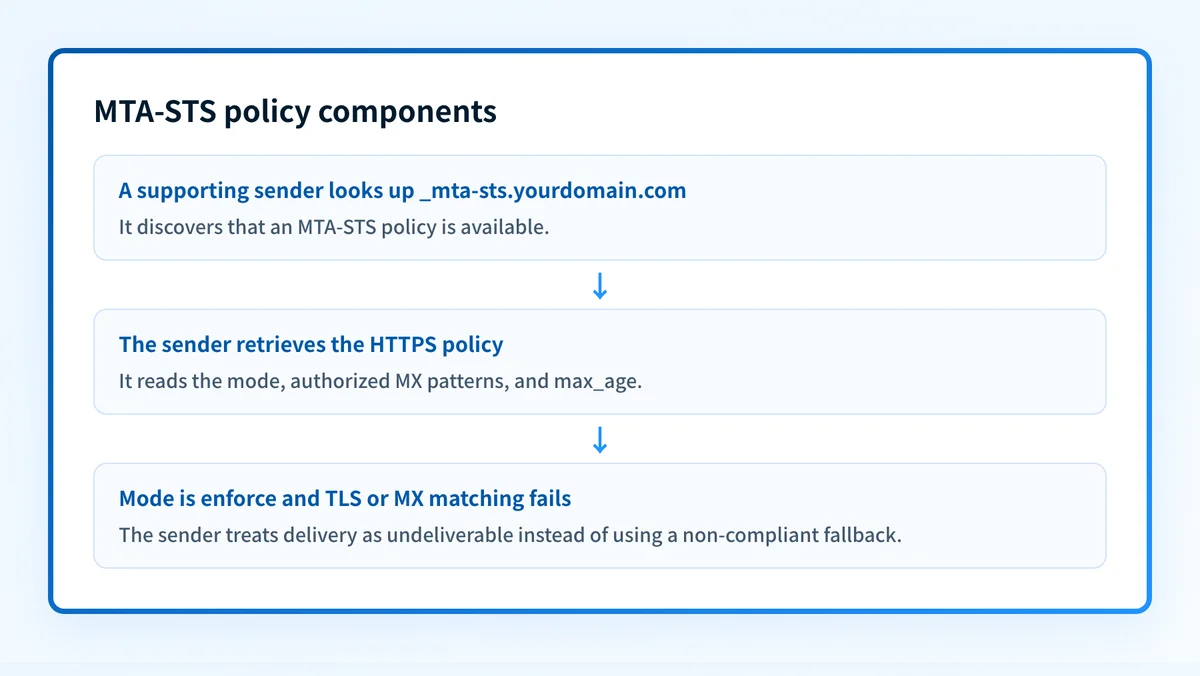
A DNS record alone is insufficient. The record tells a sender where MTA-STS exists, but the enforcement mode, MX patterns, and cache duration are in the HTTPS policy.
The domain hosts a policy file over HTTPS
RFC 8461 specifies a fixed HTTPS retrieval URL:
https://mta-sts.yourdomain.com/.well-known/mta-sts.txtThe policy file contains version, mode, one or more mx fields, and max_age.
version: STSv1
mode: testing
mx: mail.yourdomain.com
max_age: 86400
This policy is illustrative only. Replace the example MX hostname with the real receiving MX hostname or supported wildcard pattern after confirming the production mail infrastructure.
The policy host needs HTTPS that a supporting sender can validate. The mx fields identify the hosts permitted to receive mail under the policy. They do not create mail routing records and do not replace the domain's DNS MX records.
The policy mode controls requested sender behavior
RFC 8461 defines enforce, testing, and none policy modes.
enforcetells a supporting sender that delivery requires a valid TLS connection to an MX host matching the MTA-STS policy.testingtells a supporting sender to evaluate the policy and report failures, while continuing normal delivery behavior.nonetells a supporting sender that the domain does not request MTA-STS enforcement through the current policy.
enforce, RFC 8461 requires a supporting sender to validate the destination server certificate and confirm that the destination MX host matches the policy. If it cannot establish a compliant connection, the sender treats the message as undeliverable rather than falling back to unauthenticated SMTP.
Do not move to enforce until every active production MX host presents a certificate that validates for its SMTP hostname. A mismatch can delay or prevent delivery from supporting senders.
For a closer explanation of the mode field, see what mode means in an MTA-STS policy.
Supporting senders cache the policy
The max_age field tells a supporting sender how long it may cache a retrieved policy. RFC 8461 uses cached policy data to preserve transport protections when a later policy lookup fails.
A policy update is therefore not an immediate global switch. Plan MX changes, certificate renewals, and policy edits around the published cache lifetime. The DNS id indicates a changed policy, but it does not guarantee that every supporting sender has refreshed at the same time. See what max_age means in an MTA-STS policy for the cache-specific behavior.
When does the requirement take effect?
RFC 8461 was published in September 2018 as an IETF Proposed Standard. It is the controlling MTA-STS specification. It did not replace an earlier MTA-STS RFC, and it does not set a universal enforcement date for all email domains.
A domain's policy becomes relevant when that domain publishes the required DNS record and policy file, and when a sending system that supports RFC 8461 delivers mail to it. The effective behavior also depends on the policy's mode and any cached policy held by the sender.
What is SMTP TLS Reporting?
SMTP TLS Reporting, or TLS-RPT, is defined in RFC 8460, published in September 2018 as a Proposed Standard alongside MTA-STS. It is the mechanism that gathers information about the TLS connections senders establish when delivering mail to a domain: a reporting sender generates a report that identifies which TLS sessions succeeded and which failed, along with the reasons behind failed connections, such as failed TLS negotiation, DNS-related issues, or problems with the MTA-STS policy itself. TLS-RPT does not make MTA-STS mandatory, and the TLS-RPT specification guide covers the standard in full.
To receive reports, the domain publishes a DNS TXT record at _smtp._tls that specifies where they should be delivered, including the URI that receives them. Reviewing the reports shows whether supporting senders are reaching the domain over secure connections and points at the failures to investigate.
The TLS report structure
TLS reports are JSON documents, delivered gzipped as application/tlsrpt+json. A report contains these components:
- Report ID: a unique identifier assigned to each report, used to track and reference it.
- Date range: the start and end dates of the period the report covers.
- Organization name: the reporting party that generated the report.
- Contact info: how to reach the reporting party with questions.
- Policies: the policies the sender evaluated for the domain. RFC 8460 defines three policy types:
sts(MTA-STS),tlsa(DANE), andno-policy-found. For MTA-STS, this section repeats the policy file string. - Summary: the total counts of successful and failed TLS sessions during the reporting period.
- Failure details: the type of each failure, such as failed TLS negotiation, a DNS-related issue, or an MTA-STS problem, plus the sending server, receiving IP, and MX hostname involved in the failed connection.
enforce.
How do I implement the requirement?
1. Inventory every production receiving MX host
Retrieve the domain's MX records and identify every hostname that can receive production email. Include active failover hosts and any provider-operated host that receives mail for the domain.
Compare the list with the certificate names presented during SMTP TLS negotiation. An MTA-STS policy must authorize the real destination hosts that supporting senders use.
2. Verify TLS and certificate behavior on each host
Test each production MX host for SMTP TLS availability and certificate validation. Confirm that the certificate identity covers the hostname a sender reaches.
A public DNS result can show published MX records, but it cannot prove the live certificate behavior seen from every SMTP sending path. Keep message delivery tests and mail-server logs when investigating a TLS failure.
3. Publish the DNS record and HTTPS policy
Publish the _mta-sts TXT record with v=STSv1 and a new id. Serve the policy at the RFC-defined HTTPS path.
Begin with testing while you compare the policy's mx fields against active MX records, TLS certificates, and operational failover paths. Update the DNS id whenever the policy changes.
4. Add TLS-RPT when failure reports are needed
Publish TLS-RPT separately according to RFC 8460's SMTP TLS reporting requirements. Route reports to a monitored mailbox or processing endpoint that the team can review.
Use reports to investigate policy retrieval failures, certificate failures, and MX mismatches. The absence of reports does not prove that all sending systems reached the domain successfully.
5. Change to enforce after the evidence supports it
Move to enforce only after each active MX host has passed the TLS and certificate checks, the HTTPS policy is reachable, and the policy's MX patterns match the production path.
Keep a rollback plan. If an MX migration or certificate issue appears after enforcement, restore a safe policy mode only after identifying the affected hosts and the impact on mail delivery.
How do I validate compliance?
Validate MTA-STS compliance in five separate layers, working outward from the DNS record to evidence from real sending:
- Check DNS: confirm the authoritative DNS response and at least one public resolver return the intended
_mta-stsTXT record. - Check the policy host: retrieve
/.well-known/mta-sts.txtover HTTPS and confirm that its syntax, mode, MX patterns, andmax_agematch the intended policy. - Check SMTP TLS: test every active MX host for TLS negotiation and certificate validation under its delivery hostname.
- Check sender evidence: inspect TLS-RPT reports when configured, plus SMTP logs or delivery records from the actual sending path.
- Check ongoing changes: repeat the checks after MX, certificate, DNS, or mail-provider changes.
A public checker can identify published MTA-STS configuration issues. It cannot prove every production sender supports MTA-STS, continuously test each SMTP path, or establish how a specific mailbox provider handled an individual message.
Check the published MTA-STS policy before enforcing it
Run the receiving domain through the MTA-STS checker to inspect the published DNS record and HTTPS policy. Compare the result with the domain's real MX inventory and SMTP TLS evidence before moving from testing to enforce.
For teams responsible for many domains, Palisade is agentic DMARC software that analyzes DMARC aggregate-report data, identifies authentication and alignment issues, and creates prioritized remediation tickets. It can help organize the sender-authentication work that accompanies a broader domain-security program, while a human reviews the evidence and applies policy changes.
Palisade can also host a domain's MTA-STS policy through CNAME delegation, with the agent proposing changes and a human approving them before anything is applied. It does not prove SMTP TLS behavior for every sender or guarantee future mail delivery.
Evidence
Sources and further reading
Questions readers ask
Frequently asked questions
Is MTA-STS the same as DMARC?
No. MTA-STS protects the SMTP transport connection to a receiving domain's authorized MX hosts. DMARC evaluates whether a message's visible From domain aligns with SPF or DKIM authentication.
Does MTA-STS require every sender to use TLS?
No. MTA-STS applies only when a sending mail system supports RFC 8461 and retrieves the receiving domain's policy. Non-supporting SMTP systems are not compelled by the policy to enforce it.
Does testing mode block email delivery?
No. RFC 8461 defines testing mode for evaluating the policy and reporting failures while a supporting sender continues normal delivery behavior. enforce is the mode that requests compliant TLS before delivery.
Can an MTA-STS policy use wildcard MX patterns?
Yes. RFC 8461 permits an mx value with a wildcard only in the left-most label, such as *.yourdomain.com. The wildcard matches exactly one label before the policy domain suffix: *.yourdomain.com covers mail.yourdomain.com but not a.b.yourdomain.com, so it should cover only legitimate receiving hosts.
Does TLS-RPT prove that all email delivery is working?
No. TLS-RPT provides evidence from senders that generate and send reports. It cannot prove that every sender attempted delivery, that every SMTP path is healthy, or that every message reached the inbox.

Written by
Ian BussieresCTO & Co-Founder, Palisade
Ian Bussieres is the CTO and co-founder of Palisade, agentic DMARC software for IT teams and MSPs.
More from Ian →