What does SMTP connection refused mean?
 ChatGPT
 Claude
 Gemini
 Perplexity
 Grok
GrokIn brief
SMTP connection refused means a TCP connection was rejected before SMTP began. Diagnose the endpoint, listener, firewall, DNS, and retry path.
SMTP connection refused means the sending system reached an IP address, but that host rejected the TCP connection before an SMTP session began. There is no SMTP 220 banner and no SMTP reply code yet. Check the selected MX host, resolved IP address, TCP port, receiving listener, and network controls from the same path as the affected sender before changing SPF, DKIM, or DMARC.
At a glance
Quick takeaways
- SMTP connection refused is a TCP-layer result that occurs before SMTP commands or message authentication.
- A timeout, a reachable
220banner, and a later SMTP4xxor5xxresponse are different failures with different evidence. - Server-to-server SMTP delivery normally connects to the recipient MX host on TCP port
25. - Test every current MX target and each advertised IPv4 or IPv6 address from the affected sending network.
- A public MX lookup can identify published destinations, but it cannot prove a production sender's route or a recipient's private filtering decision.
- SPF, DKIM, and DMARC do not open a closed listener or permit a blocked TCP connection.
What does the failure mean?
A TCP refusal means the connection attempt was actively rejected before the receiving host opened an SMTP conversation. RFC 9293 describes TCP reset behavior for connection attempts that do not match an accepting connection state. The operating system or mail software may report that result as connection refused.
This illustrative redacted connection-log fragment shows the evidence pattern:
2026-08-12T09:14:27-04:00 smtp-client[12345]:
connect to mx1.recipient.example[192.0.2.25]:25: Connection refused
The fragment identifies a TCP failure against one address and port. It does not prove why that host rejected the connection, whether another MX host works, or how a mailbox provider would handle a later accepted message.
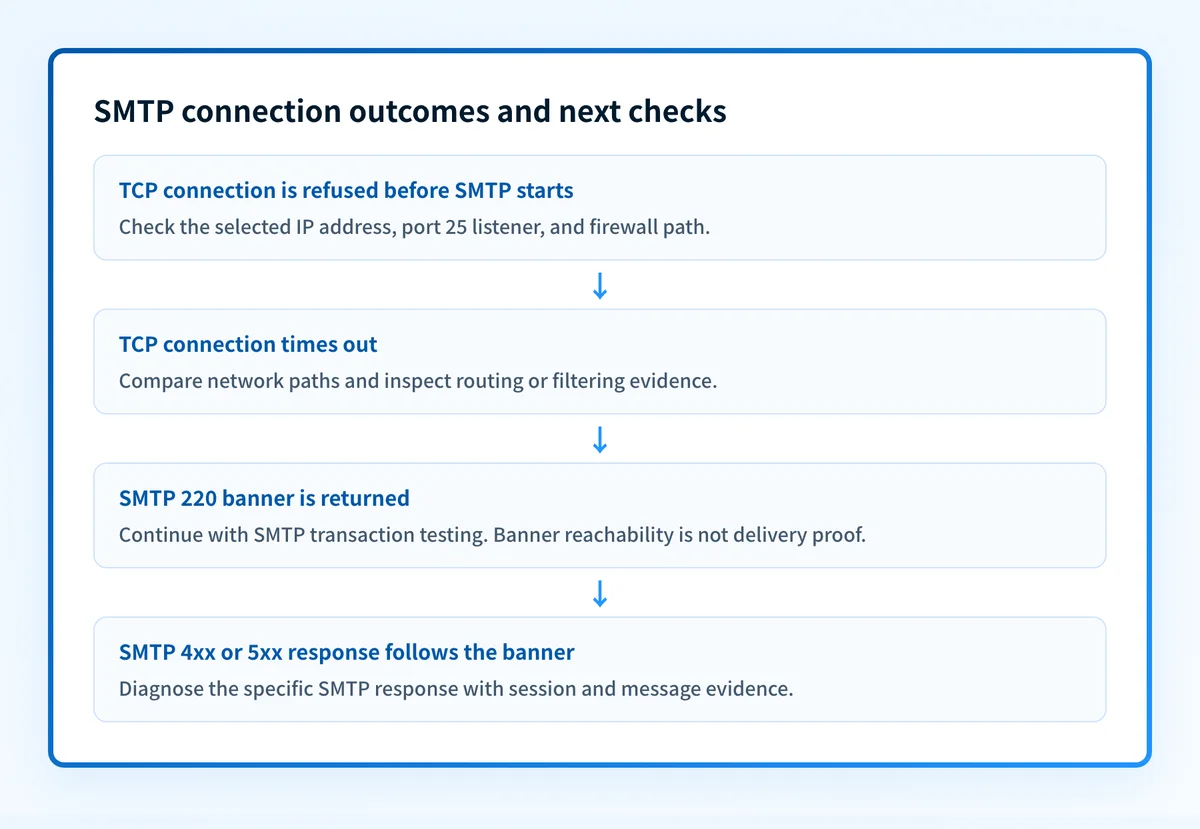
Keep these outcomes separate:
- TCP refusal: the destination or an intervening control actively rejects the connection before SMTP starts.
- TCP timeout: the sender does not receive a usable connection response before its timer expires. A timeout can indicate filtering, routing loss, or an unreachable host, but it is not evidence of an active refusal.
- SMTP banner reachability: a
220greeting means the TCP connection reached an SMTP listener. It does not prove that the server will accept a sender, recipient, or message. - Later SMTP response: an SMTP
4xxor5xxreply occurs after the session starts. For example, SMTP 550 permanent failure is an SMTP-level result, not a connection refusal.
What usually causes it?
The sender selected the wrong endpoint or port
A sender can connect to a stale IP address, a host that is not a published MX target, or a message-submission port instead of the recipient's server-to-server SMTP port. RFC 5321 assigns TCP port 25 to SMTP relay, while RFC 6409 reserves port 587 for message submission.
This is especially likely when an application bypasses normal MX resolution or when a relay configuration contains a hard-coded host. Port 465 is also a message-submission service port for implicit TLS under RFC 8314. It is not the normal target for MX delivery.
No SMTP listener is accepting connections on the advertised address
The recipient MTA may be stopped, bound only to a private interface, still starting, or configured to listen on an address different from the one DNS advertises. A TCP refusal is consistent with a host that has no listener for the attempted address and port. The exact listener state requires recipient-side system or service evidence.
A firewall or edge control rejects the connection
A host firewall, network firewall, load balancer, cloud security rule, or anti-abuse control can reject a TCP attempt before it reaches the SMTP service. If one source network receives a refusal and another reaches the same host and port, the cause is an inference about the network path until the relevant firewall or provider logs confirm it.
Do not treat this as a message-authentication failure. The SMTP server has not received the message data required to evaluate SPF, DKIM, or DMARC.
An MX target or address record is stale
A domain migration can leave an MX target, A record, or AAAA record pointing to retired infrastructure. RFC 5321 allows multiple MX hosts and address candidates, so test each published candidate rather than relying on the first failed connection.
A stale IPv6 address can create a failure that appears only when the sender attempts IPv6. Compare address families only when the MX hostname publishes both A and AAAA records.
The sending network cannot make outbound TCP port 25 connections
An egress firewall or cloud-network policy can reject direct outbound SMTP while other networks can reach the recipient. The correct repair may be to use the organization's authorized relay, not to bypass the restriction or repeatedly retry the same blocked path.
How do I diagnose the failure?
1. Preserve the connection evidence from the affected sender
Start with the sending MTA queue record, application error, or network log from the failed attempt. Record the hostname and IP address the sender selected, the destination hostname and IP address, the port, timestamp with timezone, address family, and exact operating-system error.
Build a connection evidence packet before changing DNS or transport settings:
- Client hostname and source IP address, if available.
- Recipient MX hostname and destination IP address attempted.
- TCP port and transport purpose, such as server-to-server delivery or authenticated submission.
- Timestamp and timezone.
- Exact connection error, copied from the queue or log.
- Network path and scope, including the sender's network, relay, VPN, cloud region, or egress gateway.
- TLS mode if the TCP connection reached SMTP. For a refusal before the banner, record
not reached. - Relevant MX, A, and AAAA answers captured at the time of the test.
- A controlled test result from the same path, including whether it was refused, timed out, or returned a
220banner.
2. Resolve the current recipient route
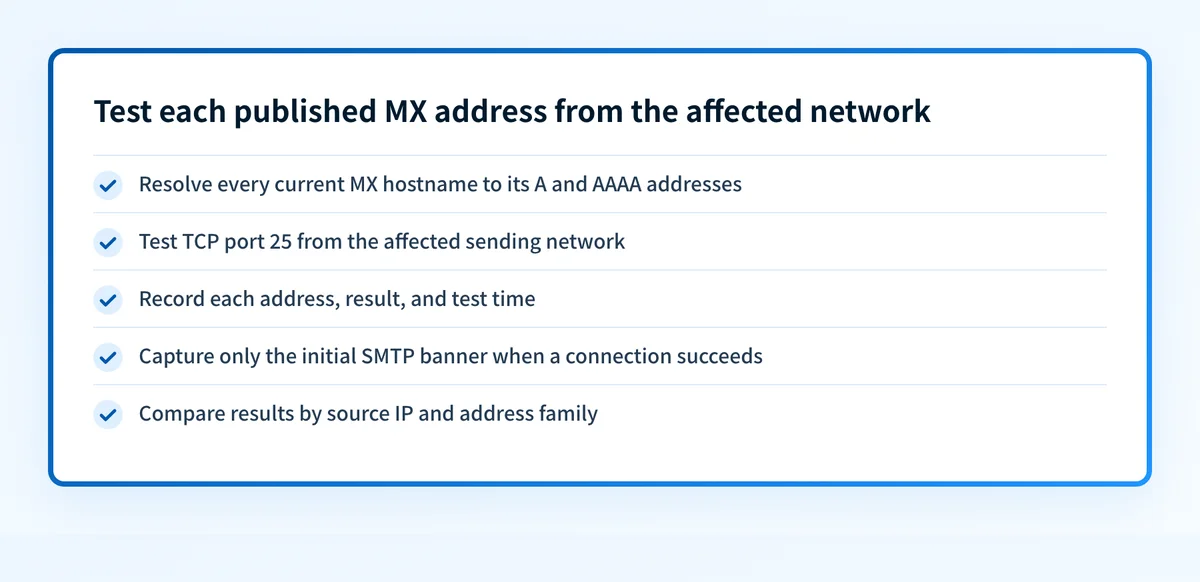
Query the recipient domain's MX records, then resolve every MX hostname to its A and AAAA addresses. Use the MX records lookup to inspect publicly visible MX records before comparing them with the sender's queue evidence.
A public lookup is useful when the queue log lacks the selected MX target or when you suspect stale public DNS. It cannot show which address your production MTA selected, confirm the receiving SMTP listener, or prove a receiver's later message decision.
If the sender uses a configured relay instead of direct MX delivery, inspect that relay configuration first. The recipient's public MX records may be irrelevant to the failed connection.
3. Test each published address from the affected network
From the sending network, test TCP port 25 for every intended destination address. Record the address, result, and time. Use an approved network diagnostic method for your environment.
nc -vz mx1.recipient.example 25This command is illustrative only. It tests TCP reachability to one hostname and port. It does not send a message, authenticate to a submission service, or prove that the recipient will accept mail after the SMTP banner.
If a connection succeeds, capture only the initial SMTP banner. Do not use manual SMTP commands against systems you do not administer unless you are authorized to test them.
Do not change the recipient domain's MX records or relax a DMARC policy to respond to one refused connection. First establish whether the sender selected an incorrect endpoint, the listener is unavailable, or a network control rejected the route.
4. Compare a controlled network path
Repeat the same test from a second approved network or relay, then compare the result by source IP and address family. A refusal from every tested network points toward the recipient endpoint, listener, or recipient-side edge control. A refusal only from one network points toward that sender's egress path or source-specific treatment.
This comparison narrows the scope. It does not establish the recipient's private policy without evidence from the recipient's administrator or provider.
5. Check the receiving listener when you manage the destination
If your team manages the recipient infrastructure, confirm that the MTA is running and listening on TCP port 25 on every public address advertised through MX resolution. Then inspect host firewalls, network firewalls, load balancers, cloud security controls, and any service health evidence.
Check each layer independently. A service process marked healthy does not prove that the public interface is reachable, and a public TCP test does not prove that the server will accept a message for a particular recipient.
How do I fix it?
Correct the selected endpoint or port
Replace a hard-coded stale hostname or IP address with the intended route. For normal server-to-server delivery, use the recipient's MX resolution process and TCP port 25 as defined by RFC 5321. For an application submitting mail to its own authorized provider, use the provider's documented submission endpoint and port.
This repair changes transport routing. It does not alter SPF, DKIM, DMARC, or recipient mailbox filtering.
Restore the listener on the published recipient address
When you manage the destination, start or repair the SMTP service and bind it to the correct public interface. Confirm that each MX hostname resolves only to addresses where the service accepts TCP port 25.
Remove obsolete A or AAAA records if retired infrastructure cannot accept mail. Keep an MX host in DNS only when it is intended to receive mail for the domain.
Permit the intended network path
Adjust the confirmed host, network, load-balancer, or cloud rule so that intended server-to-server SMTP traffic reaches the listener. Make the narrowest rule change supported by the evidence. Preserve a rollback plan that restores the earlier control if it creates an unexpected exposure or delivery interruption.
If an outbound control blocks direct port 25, configure the sender to use the approved relay. Do not bypass organizational egress policy with an unreviewed direct route.
Repair stale MX or address records
Update the authoritative MX, A, or AAAA records only after confirming the correct target and public listener. Then allow time for DNS caches to refresh according to the published TTL.
This repair changes DNS routing. It does not prove that the receiving application accepts all recipients or that later SMTP, authentication, or mailbox checks will pass.
How do I validate the repair?
Repeat the original sending path. Start from authoritative DNS and compare its MX, A, and AAAA answers with at least one public resolver. Confirm that each intended recipient destination accepts TCP port 25 and returns an SMTP 220 banner when tested from the affected sender network.
Send a controlled message through the same application, relay, source network, recipient domain, and content path that produced the refusal. Preserve the new queue result, SMTP transcript, and delivered-message headers where available. A 220 banner proves listener reachability only. A successful SMTP transaction requires the relevant later SMTP responses, including acceptance after message data.
If the message is sent using your domain, inspect the delivered message's trusted authentication results and review DMARC aggregate-report data after it accumulates. Those checks validate message authentication after transport succeeds. They do not explain the original TCP refusal.
For related post-connection errors, see SMTP error 421 4.7.0 for deferrals and rate-limiting behavior.
Check the MX route before investigating ongoing sender issues
Use the MX records lookup to inspect the public MX route behind a refused connection and compare it with the destination recorded in the sender's queue. This can expose a stale MX target or an unexpected public hostname before you change infrastructure.
A public MX lookup cannot test the affected sender's network path, repair a listener, monitor SMTP availability, or prove why a specific recipient system refused the TCP connection. Once transport works, Palisade's DMARC Agent can analyze DMARC aggregate-report data, identify sending sources and authentication or alignment issues, and create prioritized remediation tickets. A human reviews the evidence and applies any DNS or DMARC policy change.
Evidence
Sources and further reading
Questions readers ask
Frequently asked questions
Is SMTP connection refused a DNS error?
No. SMTP connection refused is a TCP connection result. DNS can contribute when it returns a stale or incorrect MX target or address, but the refusal occurs when the sender attempts the resulting IP address and port.
Is a timeout the same as SMTP connection refused?
No. A refusal is an active TCP rejection before SMTP begins. A timeout means the sender did not receive a usable response before the connection timer expired. Test both outcomes from the same sender path because they indicate different network behavior.
Can DMARC cause SMTP connection refused?
No. DMARC evaluation requires message authentication evidence after the SMTP session has progressed far enough for the receiver to process the message. A TCP refusal happens before that stage.
Should I retry a refused SMTP connection?
Only while there is evidence that the failure may be temporary or alternate MX destinations remain to test. Persistent refusal needs an endpoint, listener, DNS, firewall, or approved-relay repair before repeated retries can succeed.

Written by
Samuel ChenardCEO & Co-Founder, Palisade
Samuel Chenard is the CEO and co-founder of Palisade, agentic DMARC software for IT teams and MSPs, from one domain to thousands.
More from Samuel →