What does SMTP 550 permanent failure mean?
 ChatGPT
 Claude
 Gemini
 Perplexity
 Grok
GrokIn brief
SMTP 550 permanent failure means a receiving server rejected an SMTP action. Use the enhanced code, response text, and command stage to diagnose it.
SMTP 550 permanent failure means the receiving server rejected the requested SMTP action and considers that exact request unsuccessful until its underlying condition changes. It is a reply class, not one universal diagnosis. Preserve the complete reply, enhanced status code, SMTP command stage, and recipient context before deciding whether to correct an address, repair authentication, or escalate a receiver-specific policy decision.
At a glance
Quick takeaways
- SMTP
550is a permanent negative completion reply for the request as sent. - The enhanced status code, such as
5.1.1or5.7.1, narrows the type of failure. - A
550response afterRCPT TOhas different likely causes than one afterDATA. - A bare
550does not prove an invalid address, spam classification, blocklist listing, or DMARC failure. - Retry only after changing the condition identified by the response and recipient context.
- SMTP acceptance after a repair does not guarantee inbox placement.
What does the failure mean?
RFC 5321 defines 5xx replies as permanent negative completion replies. For 550, the server did not perform the requested action. The sending system should not keep retrying the unchanged transaction as though it were a temporary connection failure.
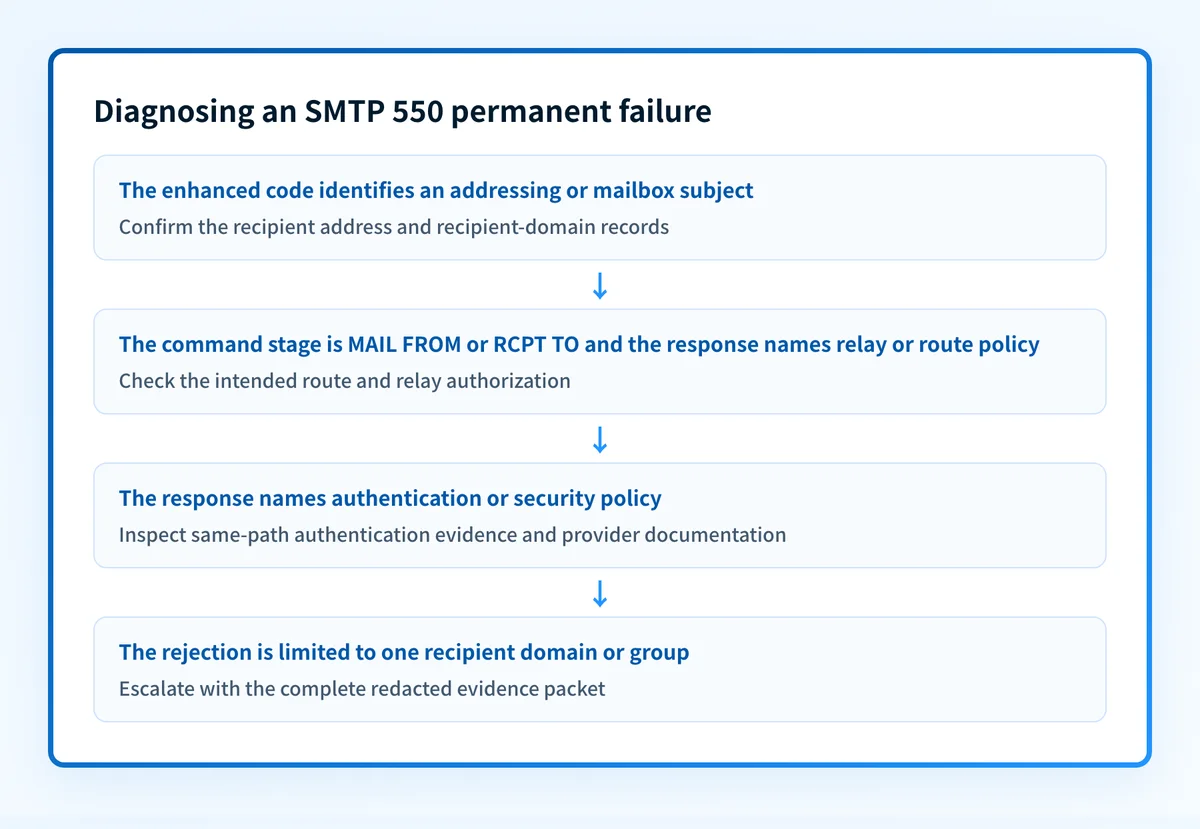
The reply becomes useful when paired with the enhanced status code and the command that received it. RFC 3463 defines enhanced status codes as a class, subject, and detail. The subject can identify addressing, mailbox, mail-system, routing, protocol, content, or security and policy concerns. The IANA enhanced-status-code registry model permits additional registered details, so retain the complete response rather than reducing it to 550.
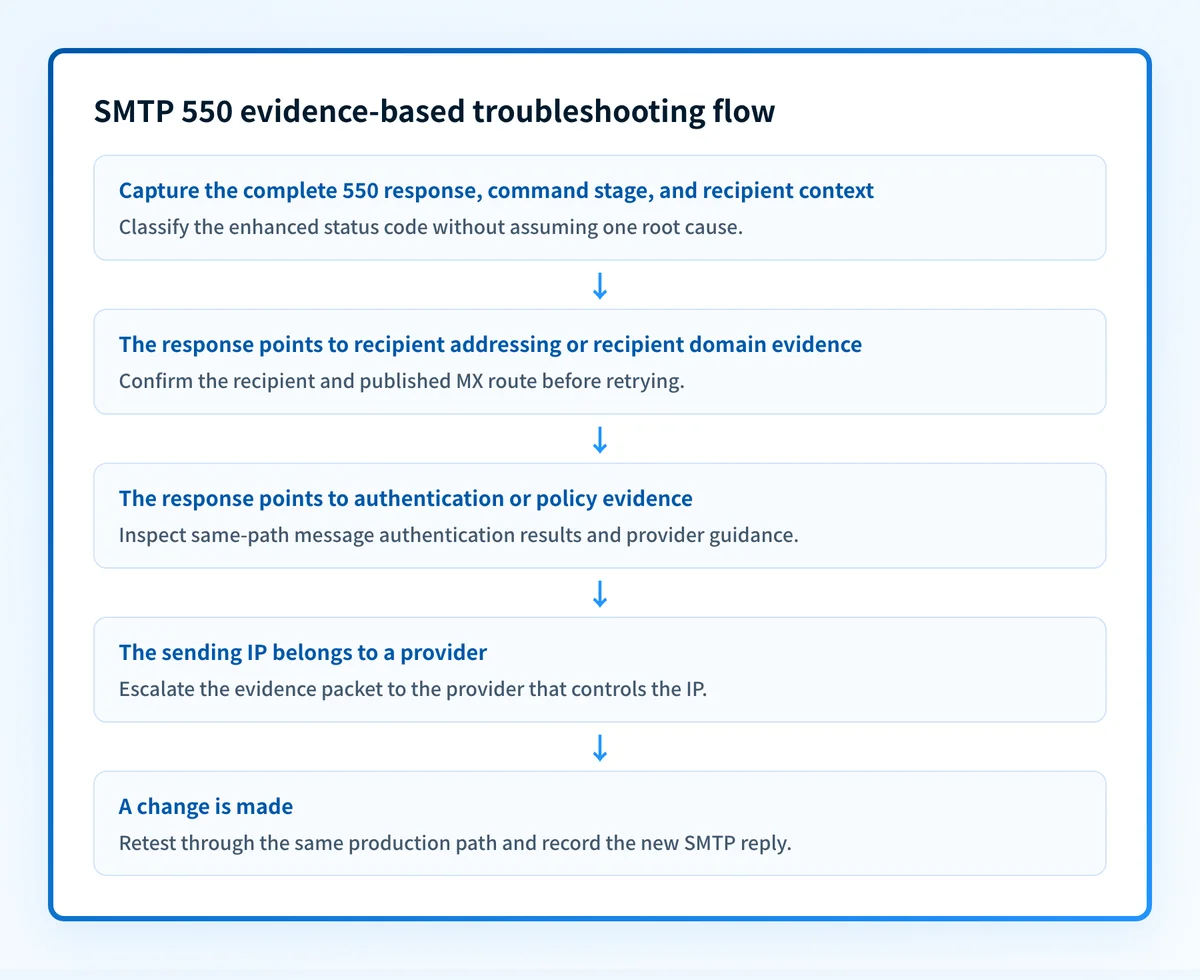
550 5.1.1 <redacted-recipient@example.com>: <receiver-supplied response text>This illustrative redacted response fragment shows the evidence shape to save. It does not state a universal receiver message. 550 5.1.1 can establish that the responding server returned a permanent failure in the addressing subject area. Without the full text, the SMTP stage, and recipient-domain context, it cannot establish whether a mailbox was deleted, an alias changed, a recipient system rejected the address, or the message reached the intended recipient organization.
What usually causes it?
The recipient address or recipient domain is wrong
A reply with an addressing subject, including 5.1.1, can point to a destination mailbox that does not exist. The exact response and recipient organization's records determine the next action. An address can also fail after an alias removal, domain migration, or recipient-side provisioning change.
Confirm the recipient through an authoritative business source before suppressing it. Do not treat an address-shaped error as proof that every address at the domain is invalid.
The receiving server will not relay or accept the route
A server can reject mail when it is not responsible for the destination or when a relay path lacks the required authorization. The SMTP command stage matters. A failure at RCPT TO may concern recipient acceptance or relay permission, while a failure earlier at MAIL FROM may concern the submitted sender or relay policy.
Check that the sending service connected to the intended recipient route. A separate SMTP connection refused troubleshooting guide covers a connection failure, which occurs before an SMTP 550 reply can be returned.
The receiver applied sender authentication or policy rules
A 5.7.x enhanced code can indicate a security or policy subject under RFC 3463. It does not, by itself, identify SPF, DKIM, DMARC, IP reputation, content, or a private provider rule. Treat a connection between the response text and a particular policy as an inference unless the responding provider documents that exact mapping.
When the receiver's response names authentication, inspect a real message from the same production path. Its trusted authentication results and the sender service's status are stronger evidence than a public DNS lookup alone.
The policy applies only to that recipient or recipient group
Some rejections depend on recipient tenancy, recipient configuration, consent state, or a receiver decision that is not published. The sender may deliver successfully to other recipients while one destination rejects the same message.
A recipient-specific result does not prove a domain-wide sender defect. Ask the recipient organization for its remediation path when the response or provider documentation directs you there.
The provider-owned sending IP needs provider action
If a hosted email service or ESP owns the sending IP and the response points to that IP, do not attempt an IP change yourself. Collect the queue ID, timestamp, response, recipient domain, and sending path, then open a support case with the provider that controls the IP.
A public reputation check can provide context, but it cannot expose a receiver's private reputation decision or prove the cause of this one 550 response.
How do I diagnose the failure?
1. Capture the SMTP evidence packet
Start with the non-delivery report, sending-service event, or MTA log for the exact failed delivery. Save the evidence before retrying or changing configuration.
Use this labelled packet in the incident record:
Complete SMTP response: 550 <enhanced-code> <full receiver text>
Message or queue ID: <redacted-id>
Timestamp and timezone: <YYYY-MM-DDThh:mm:ssZ>
Recipient domain and scope: <domain and affected recipient or group>
SMTP command stage: <MAIL FROM | RCPT TO | DATA>
Remote hostname: <receiving host>
Sending IP or service: <provider-owned IP or sending service>
Authenticated identifiers: <From domain, envelope sender, DKIM d= domain>
Sender application: <application or workflow name>
Controlled retest outcome: <same path, changed condition, resulting SMTP reply>
Redact local parts, customer identifiers, tokens, and message content before sharing the packet outside the team. Keep access-controlled originals where they are needed for provider support.
2. Identify the command stage and enhanced status code
Record whether the server rejected MAIL FROM, RCPT TO, or the message after DATA. Then retain all three parts of the enhanced code. The first part identifies success or failure class, the second identifies the subject, and the final part adds detail under RFC 3463's enhanced status-code structure.
Do not convert every 5.1.x result into "bad address" or every 5.7.x result into "spam." The remote server's complete response is the evidence that narrows the branch.
3. Confirm the recipient domain route
For a recipient-domain or routing concern, inspect the current public MX records before changing the sender. Use the MX records checker to look up the recipient domain's published mail exchangers, then compare the result with the remote hostname recorded in the SMTP evidence packet.
A public MX lookup cannot prove the receiver accepted the recipient, expose private routing controls, or show the production delivery path used by a particular sending provider.
4. Inspect the same-path authentication evidence
When the response names authentication or security policy, send a controlled test through the same application, provider, sender identity, and recipient domain. Preserve the delivered message headers if it is accepted elsewhere. Compare trusted Authentication-Results with the visible From domain, envelope sender, and DKIM signing domain.
Do not use a passing DNS record as proof that the application signed the message or used that authenticated path. The SMTP 550 5.1.1 guide is the narrower next reference when the response specifically identifies a nonexistent recipient account.
5. Separate a sender-wide issue from a recipient-specific decision
Test one approved control recipient at the same destination domain if the recipient organization permits it. Also test a known-good destination outside that organization. Keep message content and sending path stable unless the response directs a specific change.
This comparison is evidence, not a workaround. A pass to another provider does not overrule the original receiver's policy. A failure at only one recipient can support escalation to that recipient organization or the sending provider.
How do I fix it?
Correct or suppress a confirmed bad recipient
Correct a typo, restore a documented alias, or suppress a recipient that the owning organization confirms is no longer valid. Update the source application or CRM so the address is not reintroduced on later sends.
Do not repeatedly retry an unchanged 550 5.1.1 response. Repeated attempts can create unnecessary traffic and do not repair a recipient that the receiver will not accept.
This repair changes recipient data. It does not change DNS, authentication, or DMARC enforcement.
Repair the confirmed sender authentication condition
If the receiver's response and same-path message evidence point to SPF, DKIM, or DMARC, repair the named condition at the sending service and DNS layer. Confirm the vendor's authentication status, then send a new message through the same production route.
Keep the repair narrow. Do not loosen a DMARC p= policy as a substitute for correcting a sender's authentication or alignment problem. A DMARC policy change affects requested enforcement and reporting. It does not make a failed sender authenticate.
Escalate recipient-specific policy with the evidence packet
When the rejection applies to one recipient domain or group and no published remediation exists, provide the recipient organization's mail administrator with the redacted evidence packet. Ask which sender identity, recipient rule, or documented condition triggered the rejection.
The sender cannot inspect private receiver rules or override the receiver's decision. Do not alter message content, routing, or identities blindly to search for an acceptance path.
Open a case with the sending provider for a provider-owned IP
When a provider owns the sending IP, send it the complete SMTP response, queue ID, timestamp, recipient domain, authenticated identifiers, and controlled retest outcome. Ask the provider to inspect the exact outbound transaction.
The provider owns any IP-level remediation. Changing public DNS records does not repair a private receiver decision about a provider-managed sending IP.
How do I validate the repair?
Repeat the same sending path after the underlying condition changes: the same sender application, authenticated identity, provider, recipient domain, and representative message type. Record the SMTP response at the stage that previously failed. A 250 response at that stage shows that the receiving server accepted responsibility for the message in that transaction.
Validate across the applicable layers:
- Check DNS through the authoritative source and a public resolver when the repair changed MX, SPF, DKIM, or DMARC records.
- Confirm the sending vendor's current authentication or domain-verification state when its configuration changed.
- Inspect a real delivered message from the same production path and preserve its trusted authentication results.
- Review DMARC aggregate-report data after it accumulates when the failure involved a domain's authentication posture.
Track the authentication gaps behind repeated policy failures
If repeated 550 responses point to SPF, DKIM, or DMARC issues across domains or sending sources, Palisade's DMARC Agent domain overview explains how it analyzes DMARC aggregate-report data, identifies sources and authentication or alignment issues, and creates prioritized remediation tickets. It can propose the next DMARC policy stage when evidence supports it, while your team reviews the evidence and applies the change.
Palisade does not control a receiving server's private rejection decision, repair an individual recipient address, or guarantee that a future message will be accepted or placed in the inbox.
Evidence
Sources and further reading
Questions readers ask
Frequently asked questions
Is every SMTP 550 failure a bad email address?
No. SMTP 550 can cover recipient addressing, relay, mailbox, routing, content, or security-policy failures. Use the complete response, enhanced status code, and SMTP command stage to identify the supported branch.
Should a sender retry SMTP 550?
No, not without changing the underlying condition. SMTP 550 is permanent for the request as sent. Correct the address, configuration, route, or documented policy condition before a controlled retest.
What is the difference between SMTP 450 and 550?
SMTP 450 is a transient negative completion reply, while 550 is a permanent negative completion reply for the request as sent. A transient failure may be retried later. A 550 response needs evidence-based correction before retrying.
Does SMTP 550 prove the message was spam?
No. A 550 response alone does not establish a spam classification or blocklist listing. Only the complete provider response and applicable provider evidence can narrow a policy decision.
Can an MX lookup fix an SMTP 550 response?
No. An MX lookup can help verify a recipient domain's public mail route when routing is relevant. It cannot prove why a receiver rejected a specific recipient, message, or sender identity.
Can a hosted email provider fix a 550 tied to its sending IP?
Only the provider that controls the sending IP can investigate or change its outbound IP configuration. Give that provider the exact SMTP response, queue ID, timestamp, recipient scope, and same-path retest result.

Written by
Dominic LandryDeliverability & DNS
Dominic Landry works on email deliverability and DNS configuration at Palisade, from SPF and DKIM records through to DMARC enforcement.
More from Dominic →