Microsoft SMTP 5.4.1 Relay Access Denied
 ChatGPT
 Claude
 Gemini
 Perplexity
 Grok
GrokIn brief
Diagnose Microsoft SMTP 5.4.1 Relay Access Denied from the full NDR. Identify the rejecting host, check destination acceptance and connectors, then retest.

550 5.4.1 Relay Access Denied means the server named in the complete rejection refused to accept or relay mail for the recipient domain as presented. Preserve the full NDR, identify that rejecting host, and trace the destination path before changing DNS or authentication. If the response instead says Recipient address rejected: Access denied. AS(201806281), use the exact Microsoft DBEB guide.
At a glance
Quick takeaways
- Microsoft SMTP
5.4.1needs the full rejection text, remote server, and message context for a useful diagnosis. Recipient address rejected: Access denied. AS(201806281)is a separate DBEB branch covered by the recipient-address guide.Relay Access Deniedcan indicate that the receiving server will not accept or relay mail for the recipient domain as presented.- SPF, DKIM, and DMARC changes do not create a missing recipient object or configure an onward relay route.
- A public MX lookup can identify the advertised destination, but it cannot prove the production route or a Microsoft tenant's private decision.
- Validate any repair with a new message sent through the same application, sender, recipient, and route.
What does the failure mean?
Microsoft's Exchange Online non-delivery report guidance recommends using the complete response, generating server, remote server, recipient, and original headers when investigating a non-delivery report. The final three digits alone are insufficient.
This page owns relay and ambiguous full-NDR variants. Separate them from the exact recipient-address branch before investigating:
550 5.4.1 Recipient address rejected: Access denied
550 5.4.1 Relay Access Denied
Microsoft documents Directory-Based Edge Blocking as rejecting messages for invalid recipients in accepted domains. The exact Recipient address rejected: Access denied. AS(201806281) branch belongs in the DBEB troubleshooting guide. Continue here when the NDR says Relay Access Denied, names another gateway, or does not contain enough text to assign the branch yet.
RFC 3463's enhanced status code definitions classify 5.x.x responses as permanent failures. A configuration, recipient, or routing change is normally needed before the same message can succeed. The RFC does not map 5.4.1 to one Microsoft tenant condition.
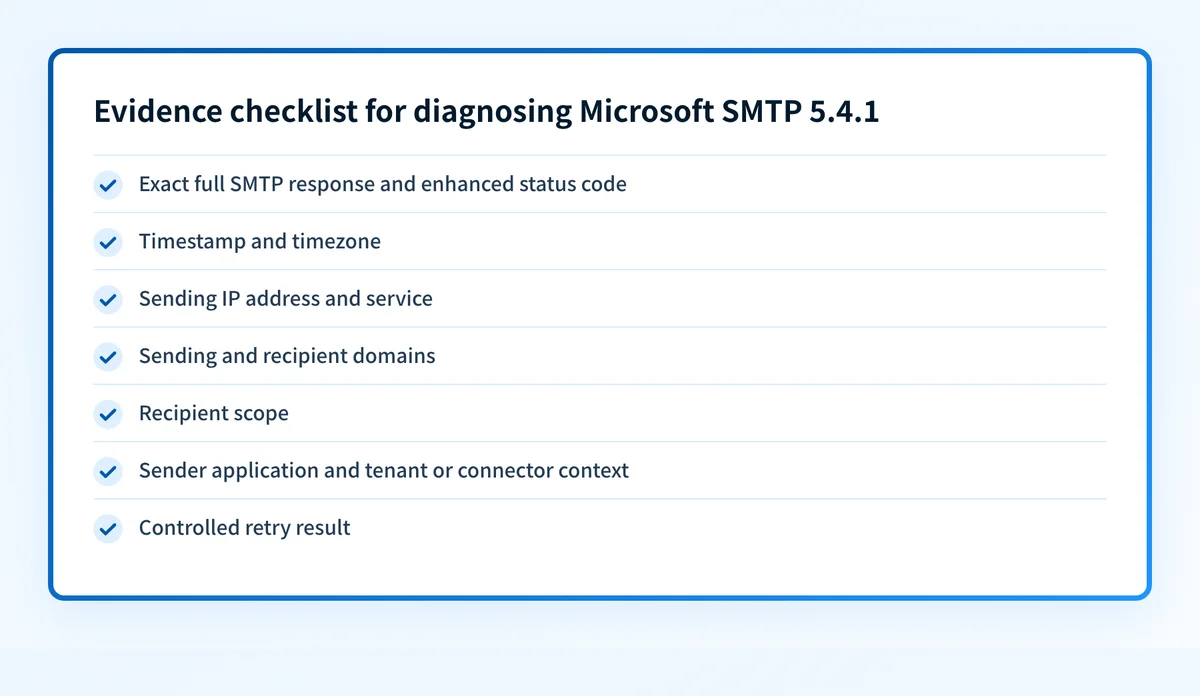
Create a response evidence packet before retrying. It should contain:
- Exact full SMTP response and enhanced status code.
- Timestamp and timezone.
- Sending IP address and sending service or provider.
- Sending domain and authenticated identifiers, such as the SMTP envelope sender and visible From domain.
- Recipient domain and the intended recipient scope, such as one mailbox, group, alias, or external routing destination.
- Sender application and relevant tenant or connector context.
- The result of one controlled retry through the same approved path.
Illustrative redacted SMTP response fragment
Timestamp: 2026-08-12 14:32:18 UTC
Remote server: recipient-mail.example
Sending service: approved-mail-provider.example
Recipient scope: mailbox-alias@example.com
Response: 550 5.4.1 Recipient address rejected: Access denied
Controlled retry: same response
The sender-side packet can show the sending path and authentication evidence. It cannot reveal Microsoft recipient policy, directory state, connector configuration, or another tenant's private evaluation. Those items need evidence from the organization that controls the receiving domain.
What usually causes it?
The NDR is actually the recipient-address DBEB variant
For 550 5.4.1 Recipient address rejected: Access denied. AS(201806281), Exchange Online may not find a valid recipient for the address in an accepted domain. That exact variant has its own recipient-object, accepted-domain, and directory-sync procedure.
Do not diagnose that DBEB branch from this broader relay page. The complete Microsoft suffix and rejecting hostname are the evidence that decides the handoff.
The accepted-domain design does not match the recipient architecture
Microsoft distinguishes Authoritative and Internal relay accepted domains. An Authoritative domain accepts delivery for recipients known to Exchange Online. An Internal relay domain can send unknown recipients onward to another mail system through a connector.
If recipients remain outside Microsoft 365 but the domain is configured as Authoritative, an unknown address can be rejected. Changing the domain type is a routing change, not a shortcut for one bounce.
An onward relay connector is missing or mismatched
An Internal relay configuration needs a connector that can deliver unknown recipients to the intended downstream mail system. A Relay Access Denied response can also come from a gateway that is not configured to accept the recipient domain.
That second mapping is an inference until the NDR's remote server, message trace, and gateway logs identify the rejecting host. Do not assume Microsoft 365 issued the response because the sender or recipient uses Microsoft 365.
The message reached an unintended receiving host
If the NDR names an unexpected remote server, inspect the public MX records and any application or connector routing that can override them. The email transport security hub has related guidance for SMTP transport controls and delivery failures.
A public DNS result shows the advertised route for a new sender. It does not prove the route used by the failed message, continuous DNS state, or the receiving service's private policy decision.
How do I diagnose the failure?
1. Preserve the original non-delivery report
Save the complete NDR or delivery-status notification before resending. Record the rejected address, Message-ID, timestamp, generating server, remote server, full SMTP response, and original message headers.
Keep a redacted copy for escalation and an access-controlled original for the responsible administrators. The Exchange Online NDR reference identifies the response and server details needed for diagnosis.
2. Separate recipient rejection from relay rejection
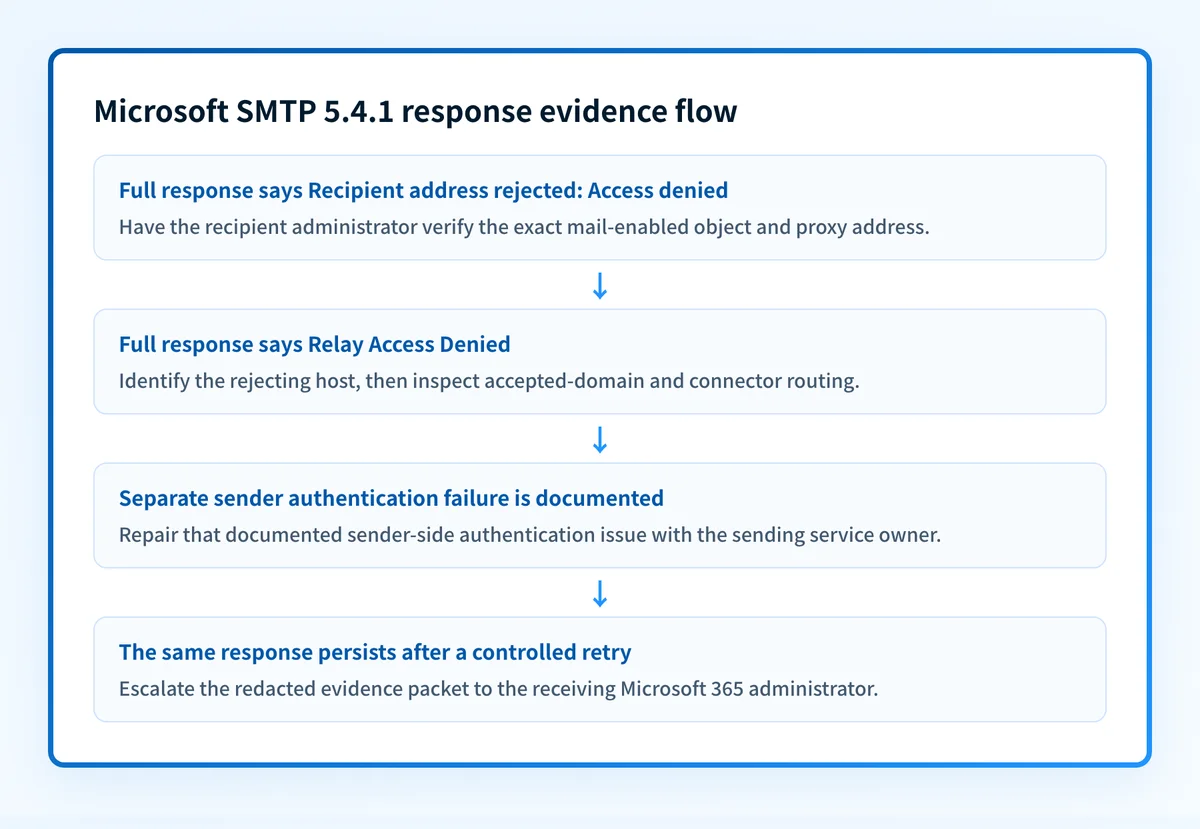
Treat 550 5.4.1 Recipient address rejected: Access denied as a recipient-directory branch. Treat 550 5.4.1 Relay Access Denied as a destination acceptance and routing branch.
Do not merge them because both include 5.4.1. SPF, DKIM, and the DMARC policy do not make an absent recipient appear or authorize a server to relay mail.
3. Check sender-side authentication and service ownership
Confirm which provider submitted the message, the sending IP, envelope sender, visible From domain, and application that generated it. If the NDR or headers identify an authentication failure separate from 5.4.1, repair that documented authentication problem with the sending service owner.
For a sender-owned DNS question, use the Palisade DNS lookup to inspect public records. A DNS lookup cannot inspect Microsoft tenant policy, production connector routing, raw message content, or why this individual recipient was rejected.
Only investigate SPF lookup limits when an SPF evaluator directly reports that condition. Do not add Hosted SPF or rewrite SPF records as a response to a recipient-directory or relay rejection.
4. Verify the recipient scope outside autocomplete
Compare the rejected address with a known-good address obtained through a trusted channel. Check the local part, domain, punctuation, aliases, and copied whitespace.
If another recipient at the same domain receives the same message from the same sender, the public route likely reaches that domain. That result still does not prove the rejected mailbox, alias, group, or contact exists.
5. Ask the receiving administrator to inspect the exact object
For the recipient-address branch, the receiving organization's administrator should verify that the exact address belongs to the intended mailbox, shared mailbox, group, mail contact, mail user, or public folder. They should also check for duplicate proxy-address conflicts and, for synchronized users, the source directory and cloud representation.
Do not create a duplicate mailbox or proxy address to clear one rejection. Duplicate addresses can produce ambiguous delivery and synchronization failures.
6. Trace the destination acceptance path
For a relay-related response, ask the administrator responsible for the recipient domain to review its accepted-domain type, connectors, message trace, and any gateway named in the NDR. If the full response instead contains Microsoft's DBEB wording and AS(201806281), hand it to the 550 5.4.1 recipient-address owner.
If the remote server is outside the recipient's expected environment, compare the failed route with the intended MX route and any application-specific smart host or connector configuration.
How do I fix it?
Hand off the exact recipient-address variant
If the full NDR says Recipient address rejected: Access denied. AS(201806281), stop the relay investigation. The sender should verify the address and give the NDR to the recipient's Microsoft 365 administrator, who can follow the exact DBEB repair sequence.
That handoff preserves query ownership: this page diagnoses relay and ambiguous routes; the exact page diagnoses missing recipients, proxy addresses, accepted-domain state, and directory synchronization.
Repair the accepted-domain and connector path
If a valid recipient must be delivered to another mail system, the receiving administrator should confirm the accepted-domain type and connector route against Microsoft's accepted-domain guidance. Correct the connector or destination configuration that the trace identifies.
Do not change an accepted domain from Authoritative to Internal relay without confirming every downstream recipient route. That change can affect mail flow for the whole domain.
This repair changes routing and destination acceptance. It does not repair message authentication.
Escalate a persistent response with receiving-side evidence
If the same response persists after the sender verifies its address, service ownership, and route, provide the receiving Microsoft 365 administrator with the evidence packet and controlled retry result. They can inspect recipient objects, message trace, accepted domains, connectors, and Microsoft support options available to their tenant.
The sender cannot determine a recipient tenant's unpublished policy from a public DNS lookup or a single bounce.
How do I validate the repair?
Send a new message through the same application, sending service, sender domain, recipient address, and intended route. Compare the new result with the saved evidence packet.
Validate at the applicable layers:
- DNS: confirm public MX or sender DNS only when the repair involved those records.
- Vendor: have the receiving administrator confirm the relevant recipient object, accepted domain, or connector state.
- Message: inspect the NDR or delivered message from the same production path.
- DMARC: if the sending domain uses DMARC, review aggregate-report data after it accumulates to confirm the sending source's authentication and alignment pattern.
Check the public route, then close the ongoing sender gap
If the failed message may have reached the wrong host, inspect the recipient domain's public MX records before changing sender configuration.
An MX check cannot prove the production sending route, inspect a Microsoft tenant's recipient directory, or explain a private relay decision. If your team needs to identify sending sources and recurring DMARC authentication or alignment issues across domains, Start with Palisade. Palisade analyzes DMARC aggregate-report data and proposes remediation work for human review. It does not change Microsoft recipient settings, configure a third-party relay, or guarantee delivery.
Evidence
Sources and further reading
Questions readers ask
Frequently asked questions
Does Microsoft SMTP 5.4.1 always mean the recipient does not exist?
No. 5.4.1 is an enhanced status code, not a complete diagnosis. Recipient address rejected: Access denied points toward recipient validation, while Relay Access Denied points toward destination acceptance or routing evidence.
Can SPF, DKIM, or DMARC fix 550 5.4.1 Recipient address rejected: Access denied?
No. Those controls authenticate sending domains and messages. They do not create a mail-enabled recipient, restore a missing alias, or change a receiving tenant's directory decision.
Can an MX lookup explain Relay Access Denied?
Only partly. An MX lookup can show the domain's public advertised mail exchangers. It cannot prove that the failed message used MX delivery, that no connector overrode the route, or why the receiving server refused relay.
Should the sender create a new mailbox for the failed address?
No. The receiving administrator should first confirm whether the exact address belongs on an existing mail-enabled object and whether a duplicate proxy address or synchronization issue exists.
Can changing an accepted domain to Internal relay fix the error?
Only when the recipient architecture requires unknown recipients to be routed to another mail system and the required connector path is configured. It is a domain-wide routing decision that needs receiving-side evidence, not a general response to one rejection.

Written by
Dominic LandryDeliverability & DNS
Dominic Landry works on email deliverability and DNS configuration at Palisade, from SPF and DKIM records through to DMARC enforcement.
More from Dominic →