SMTP error code · permanent failure (5xx)
SMTP 550 5.1.1: recipient address rejected, user unknown

By Samuel Chenard · CEO & Co-Founder, Palisade · Reviewed September 20, 2026
550 5.1.1 means the receiving server has no mailbox for the address you sent to: the classic user unknown bounce. It's permanent: the address is misspelled, deleted, or the domain's MX records point at a server that doesn't know it. Verify the address and re-send; retrying unchanged fails forever.
550 5.1.1 at a glance | |
|---|---|
| Code | 550 5.1.1 |
| Class | Permanent (5xx): the message was refused and will not retry |
| Category | Recipient |
| Side at fault | Either side |
| Auth-related | No |
What the bounce actually says
The exact wording varies by provider. These are the documented strings, verbatim. Match yours to pin down which variant you hit.
Gmail (Google Workspace)
550 5.1.1 The email account that you tried to reach does not exist. Please double-check the recipient's email address for typos or unnecessary spaces.Source: knowledge.workspace.google.com
Microsoft 365 (Exchange Online): the NDR reference's description for enhanced status 5.1.1
Bad destination mailbox addressSource: learn.microsoft.com
RFC 3463 section 3.2, under the heading "X.1.1 Bad destination mailbox address": the standard definition receivers map this code to
The mailbox specified in the address does not exist. For Internet mail names, this means the address portion to the left of the "@" sign is invalid. This code is only useful for permanent failures.Source: datatracker.ietf.org
Why you're seeing 550 5.1.1
550 5.1.1 is the receiving server saying it looked up the mailbox (the part of the address left of the @) and found nothing. The connection worked and DNS resolved; the server refused the address at the door because no account matches it. Unlike authentication or reputation bounces, this code says nothing about your sending setup. Read it in one of two directions: if you sent the mail, the address is wrong, stale, or deleted; if people emailing your domain are getting it, your MX records or mailbox provisioning are pointing deliveries at a server that doesn't know the account.
Likely causes, ranked
| Likely cause | What's happening |
|---|---|
| The address has a typo | By far the most common trigger, and the one Gmail's bounce text calls out directly. A misspelled name, a stray space, j.smith when the mailbox is jsmith, or a guessed address that was never right. The receiving server can't fuzzy-match: one wrong character is a nonexistent mailbox. |
| The mailbox was deleted or deactivated | The address used to work: an employee left and IT removed the account, a free-mail account was closed for inactivity, or an alias was retired. Old contact lists and CRMs keep these addresses alive long after the mailbox is gone. |
| A stale autocomplete or cached entry | Outlook's autocomplete cache stores internal identifiers alongside the address. After a mailbox migration those identifiers change, so the cached entry keeps bouncing even though the visible address is correct. Microsoft's own 5.1.1 troubleshooting dedicates a full solution to clearing it. |
| The recipient forwards to a dead address | The mailbox you wrote to exists, but a forwarding rule on the recipient's side re-sends your message to an address that doesn't. Tell-tale sign: the address in the NDR isn't the one you typed. |
| Your own domain's MX records point at the wrong server | If senders emailing your domain hit 550 5.1.1, deliveries may be landing on an old mail host, or on a new one where the mailbox was never provisioned. That's common mid-migration, when MX flips before every account and alias is created on the new platform. |
| Backscatter: you never sent the original message | A spammer forged your address into the From field, their spam bounced, and the useless NDR came to you. If your Sent folder has no matching message, there's nothing to fix and the bounce can be ignored. |
How to fix 550 5.1.1
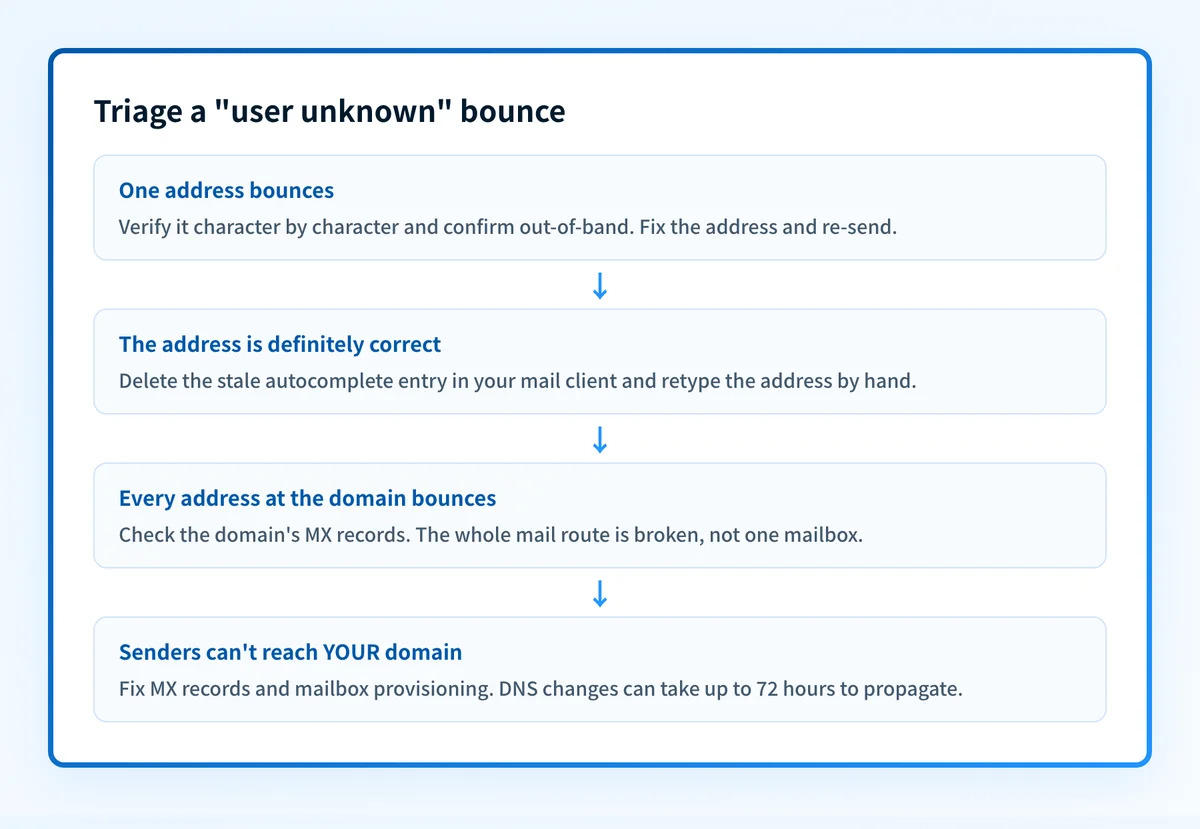
Check the recipient domain's MX records
Run the domain from the bounced address through the free MX lookup. If the domain has no MX records or they point at a dead or misconfigured host, no address at that domain can receive mail; the problem is bigger than one mailbox. If MX looks healthy, the issue is the address itself.
Run the check now
Enter the domain from the step above and the check runs instantly on the next page. Free, no signup.
Verify the address character by character
Check the local part for typos and stray spaces, and confirm the address with the recipient out-of-band: phone, chat, their website. Most 5.1.1 bounces end here. 550 is permanent, so nothing re-sends on its own: fix the address and send again.
Delete the stale autocomplete entry and retype the address
If the address is definitely correct but keeps bouncing, remove the recipient from your mail client's autocomplete suggestions and type the address by hand. Migrated mailboxes leave broken cached entries that fail even when what's on screen looks right.
If senders can't reach your domain, fix MX and provisioning
Confirm your MX records point at your current mail host (for Exchange Online that's a single record at a host derived from your domain with dots turned into dashes, like
contoso-com.mail.protection.outlook.com) and that the bounced mailbox or alias actually exists there. DNS changes can take up to 72 hours to propagate, so recently-flipped records may still serve stale answers.Remove dead addresses from your lists
Yahoo's guidance is explicit: "You should not retry delivery of the message. It will never complete successfully. You should remove the email address from your mailing list." Mailbox providers track unknown-user rates as a list-hygiene signal, and repeatedly hammering dead mailboxes erodes your sender reputation for the addresses that do exist.
Sources: Yahoo: SMTP error codes
If you never sent the message, treat it as backscatter
Check your Sent folder. No matching message means a spammer forged your From address and you're seeing the reject of their mail, not yours. Ignore the NDR. But if Sent contains messages you didn't write, reset your password and involve your admin.
Questions readers ask