SMTP error code · permanent failure (5xx)
SMTP error 552 5.2.2: the recipient's mailbox is full

By Samuel Chenard · CEO & Co-Founder, Palisade · Reviewed September 20, 2026
552 5.2.2 is a permanent rejection meaning the recipient's mailbox is full: the account is over its storage quota, so the receiving server refused your message. It's a recipient-side problem: you can only re-send after the recipient frees space or their admin raises the quota. The bounced message will not retry on its own.
552 5.2.2 at a glance | |
|---|---|
| Code | 552 5.2.2 |
| Class | Permanent (5xx): the message was refused and will not retry |
| Category | Recipient |
| Side at fault | Recipient |
| Auth-related | No |
What the bounce actually says
The exact wording varies by provider. These are the documented strings, verbatim. Match yours to pin down which variant you hit.
Gmail (Google Workspace): mailbox over quota and inactive
552 5.2.2 The recipient's inbox is out of storage space and inactive. Please direct the recipient to Manage files in your Google Drive storage.Source: knowledge.workspace.google.com
Microsoft 365: NDR body for a mail-enabled public folder, documented under the diagnostic line 554 5.2.2 mailbox full
The recipient's mailbox is full and can't accept messages now. Please try resending this message later or contact the recipient directly.Source: learn.microsoft.com
Dovecot (cPanel and many shared mail hosts): the quota_exceeded_message default
Quota exceeded (mailbox for user is full)Source: doc.dovecot.org
Generic MTA: RFC 5321 base wording for code 552
552 Requested mail action aborted: exceeded storage allocationSource: www.rfc-editor.org
Why you're seeing 552 5.2.2
The enhanced status 5.2.2 is RFC 3463's mailbox-full code: the account has exceeded its per-mailbox quota or the server's storage capacity. The receiving server found the address, tried to deliver, and refused because storing your message would push the mailbox past its limit. And because the class is 5 (permanent), your server bounced the message instead of queuing it. The wording tells you more than the number. Gmail only issues 552 5.2.2 when the account is over quota and inactive: an active-but-full Gmail inbox defers with the temporary sibling 452 4.2.2, which retries on its own. Microsoft is the exception worth knowing about: the only mailbox-full 5.2.2 it documents is for mail-enabled public folders, and even there the diagnostic line reads 554 5.2.2 mailbox full rather than 552. In Exchange Online's own NDR reference, 5.2.2 means something else entirely, "Submission quota exceeded", which is a sender-side rate limit rather than a full recipient mailbox. So if the bounce came from Microsoft, read the wording before assuming quota. On every other receiver, this is one of the few bounce codes where nothing about the sender (DNS, authentication, reputation) is involved.
Likely causes, ranked
| Likely cause | What's happening |
|---|---|
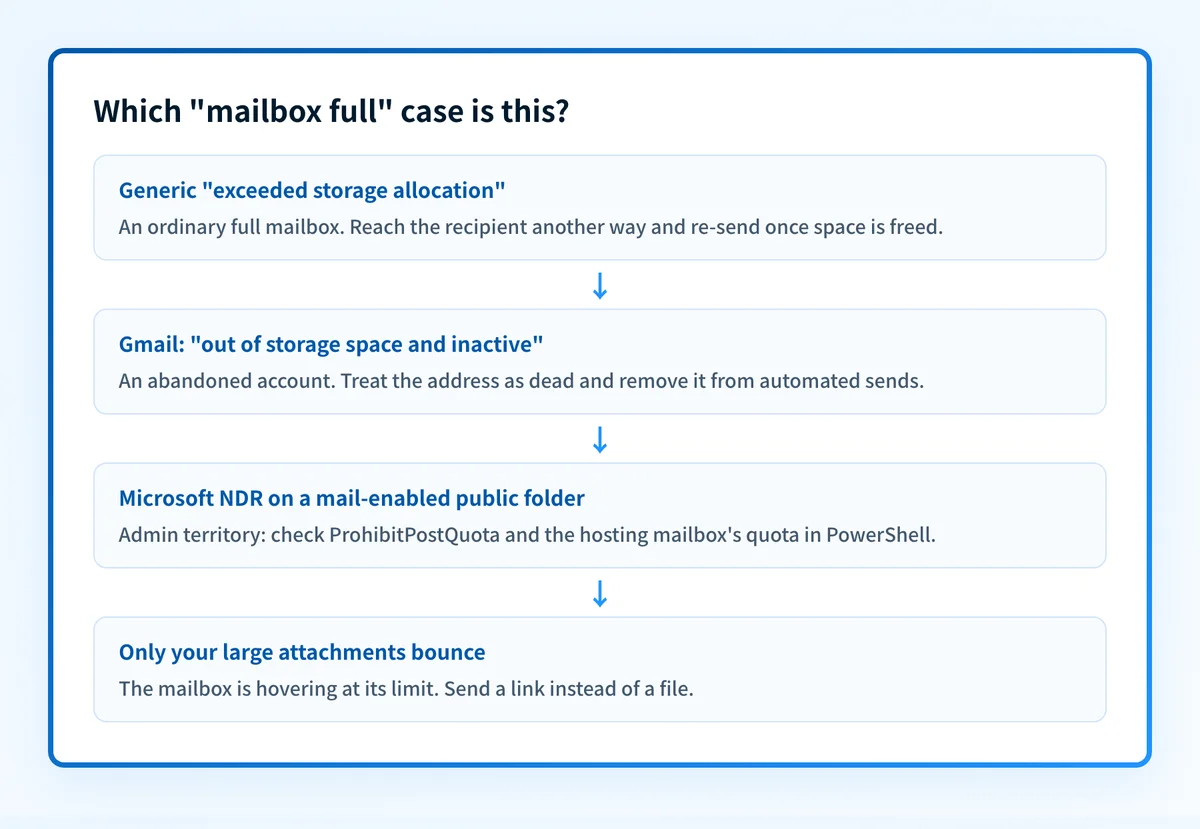
| The recipient's mailbox is over its storage quota | The plain case, and the most common. The account hit the storage cap set by its plan or admin, so the server refuses every inbound message until space is freed or the quota is raised. Smaller messages sent earlier may have squeezed in; quota is checked per delivery. |
| The account is abandoned or inactive | Gmail's 552 5.2.2 wording says it outright: out of storage and inactive. Nobody is reading the mailbox, so it filled up and stayed full. If the same address bounces for weeks, treat it as dead and find another channel: this variant does not fix itself. |
| A Microsoft mail-enabled public folder hit its post quota | In Microsoft 365, mail sent to a mail-enabled public folder bounces with the mailbox-full NDR when the default or per-folder post quota (ProhibitPostQuota) or the hosting mailbox's quota is reached; the diagnostic shows STOREDRV.Deliver.Exception:QuotaExceededException. Individual mailboxes on the domain keep working, which makes this one confusing to spot. |
| Pooled storage filled up, not the inbox itself | Google accounts share one storage pool across Gmail, Drive, and Photos. A recipient whose Drive is stuffed with video files can have a nearly-empty inbox that still refuses mail. That's why Google's bounce text points at Drive storage management rather than deleting email. |
| Your message tipped a nearly-full mailbox over | Quota is checked against the incoming message's size, so a 20 MB attachment can bounce while a plain-text note gets through minutes later. If only your large messages fail, the mailbox is hovering at its limit; send the file as a link instead. |
How to fix 552 5.2.2
Rule out a routing problem before blaming quota
Run the recipient's domain through the free MX checker below. If the MX records resolve and point somewhere sane, your message reached the real server and the
5.2.2verdict is genuine: the problem is on their side, not in your setup. Broken or missing MX produces different errors entirely.Run the check now
Enter the domain from the step above and the check runs instantly on the next page. Free, no signup.
Match the bounce text to the variant
The wording picks your next move. Generic
exceeded storage allocationor Dovecot'sQuota exceededis an ordinary full mailbox that may clear. Gmail's "and inactive" means nobody is minding the account. A Microsoft NDR reading554 5.2.2 mailbox fullpoints at a mail-enabled public folder over its post quota, and a Microsoft bounce that quotes5.2.2on its own is a sender-side submission limit, not a full mailbox at all.Sources: Microsoft: 554 5.2.2 mailbox full on a mail-enabled public folder · Microsoft: Exchange Online NDR reference (5.2.2 submission quota)
Reach the recipient another way
There's no sender-side fix, so tell them: phone, an alternate address, a colleague. Ask them to empty trash and delete large attachments, and on Gmail, to clear Drive and Photos too, since storage is pooled across all three.
Re-send manually once there's space
552 is a permanent (5xx) failure: your server already gave up when it handed you the bounce, and nothing is queued. Once the recipient confirms space is free, send the message again yourself.
If it's your domain bouncing, fix the quota, not the senders
Microsoft 365 admins: compare the mailbox's
TotalItemSizeagainst itsProhibitSendReceiveQuotain Exchange PowerShell, raise the quota or enable archiving, and checkProhibitPostQuotawhen the bounce named a mail-enabled public folder. Google Workspace admins: assign more storage or have the user clear the pooled Gmail/Drive/Photos usage.Suppress addresses that keep returning 552 5.2.2
For lists and CRMs, treat repeated
552 5.2.2as a hard bounce. An over-quota-and-inactive mailbox is abandoned; continuing to send wastes volume and drags down your sender reputation with mailbox providers that are watching your bounce rate.
Related free tools: DNS lookup
Questions readers ask