What is email spoofing and how can you prevent it?
 ChatGPT
 Claude
 Gemini
 Perplexity
 Grok
GrokIn brief
Email spoofing forges sender details to make mail look trusted. Stop spoof emails with SPF, DKIM, DMARC enforcement, header checks, and user reporting.
Email spoofing is the use of forged identity details to make a message appear to come from a person or domain that did not send it. To stop spoof emails reaching your users, check suspicious messages before acting on them. To stop spoofed mail going out under your name, publish SPF, DKIM, and DMARC for every domain you control and move DMARC to enforcement. These controls authenticate domain use, but they do not make every display name trustworthy or guarantee a receiver's final delivery decision.
At a glance
Quick takeaways
- Email spoofing can falsify a visible From address, an envelope sender, or both.
- A familiar display name is not proof that the sender controls the shown domain.
- SPF checks whether an IP is authorized to use the envelope sender domain.
- DKIM lets a receiver verify a signed message and the signing domain.
- DMARC ties aligned SPF or DKIM authentication to the visible From domain and publishes a requested policy for failures.
- A suspicious-message review and a public DNS lookup answer different questions.
How email spoofing works
SMTP separates several identities that readers often treat as one. The visible From: header identifies the author address presented to the recipient. The SMTP MAIL FROM command supplies the envelope sender used for delivery handling, including bounces. RFC 5321 defines the SMTP MAIL FROM command, but SMTP alone does not prove that a sender is authorized to use the address a recipient sees.
An attacker can therefore send a message with a trusted-looking display name or a forged visible From address. Some attempts use a lookalike domain instead of the real domain. Others use the real domain in the visible From field but fail authentication. The recipient needs message-level evidence, not the sender name alone.
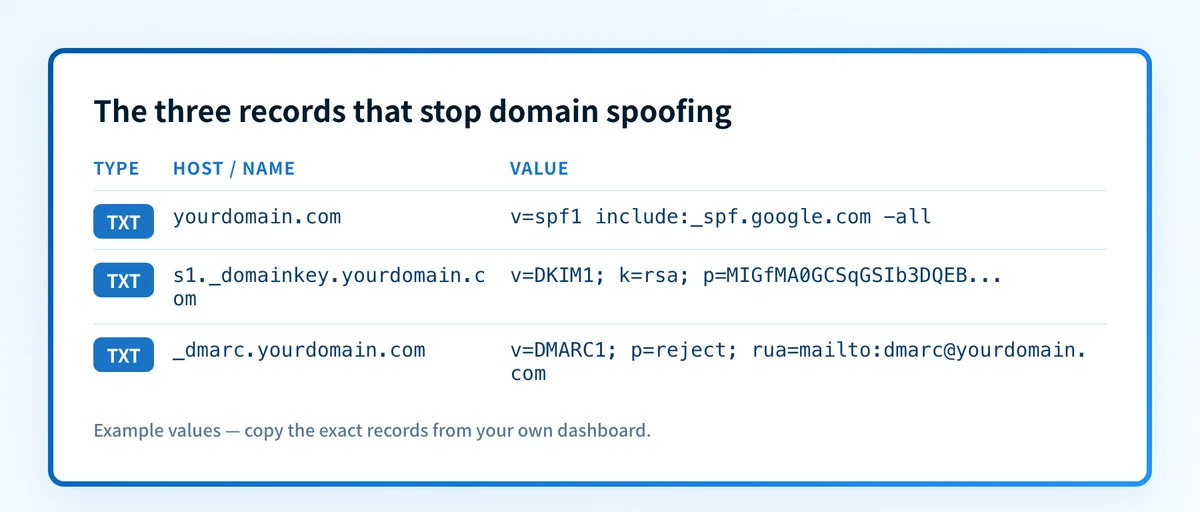
SPF publishes the IP addresses or mechanisms allowed to send for an envelope sender domain. RFC 7208 defines SPF evaluation, including its use of the SMTP MAIL FROM identity and the fallback to the SMTP HELO identity when the envelope sender is empty.
DKIM is different. A sending system adds a cryptographic signature to selected message fields, and a receiver retrieves the public key from DNS to verify it. RFC 6376 defines DKIM signatures and verification. A valid DKIM signature can establish that the signed content has not changed in transit after signing, subject to the protocol's verification result.
DMARC evaluates whether SPF or DKIM passed with a domain aligned to the visible From domain. RFC 9989 defines DMARC authentication, alignment, and policy discovery, with reporting split into RFC 9990 and RFC 9991. That aligned identity check is what makes DMARC useful against unauthorized use of a domain in the visible From field.
For the broader protocol context, see the DMARC learning hub.
When email spoofing prevention changes
The right response depends on the evidence you have and whose domain is involved.
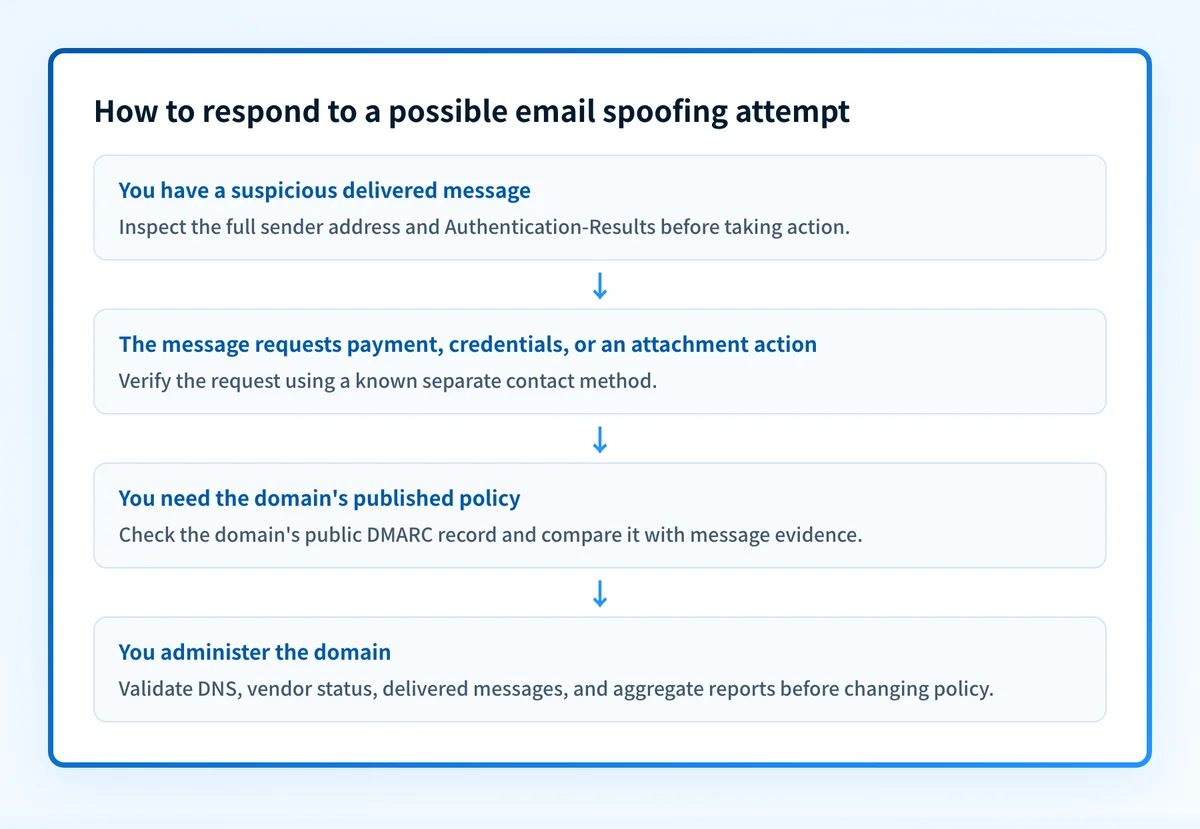
For a message you received, inspect the actual sender address and the delivered message's authentication results. A sender can use a legitimate third-party service, and a public DNS record cannot explain what happened to one delivered message. If the message requests money, credentials, a changed payment destination, or an unexpected attachment, verify the request through a known separate contact method before taking action.
For the header-by-header walkthrough and the visible signals that give a forgery away first, see how to spot an email sender spoof.
For a domain you operate, publish and maintain authentication records, then validate real traffic. DMARC protection is incomplete if a legitimate sending service lacks an aligned SPF or DKIM pass. A p=reject policy is also not a universal instruction that every receiver must apply identically. RFC 9989 allows receivers to apply local policy when handling DMARC results.
Use this decision rule:
- If you have a suspicious delivered email, preserve it and inspect its full headers or message source. Check the displayed address, reply address, and authentication results before replying, opening an attachment, or following a link.
- If you have a domain name and need to inspect its published authentication posture, look up the public DMARC record.
- If you administer the domain, validate four layers before treating spoofing controls as working: authoritative and public DNS, the sending vendor's status, a real delivered message from the production path, and DMARC aggregate reports once they accumulate.
- If the sender uses a different but confusingly similar domain, DMARC for your domain cannot authenticate that lookalike domain. Report and block the specific message through your mail provider's process, then investigate the impersonating domain separately.
Do not move a domain top=quarantineorp=rejectuntil important production senders have been identified and tested. A policy change can affect legitimate mail that still fails DMARC alignment.
A worked authentication result
A delivered message can contain an Authentication-Results header that records a receiver's authentication evaluation. RFC 8601 defines the Authentication-Results header field. The following is illustrative only, not evidence from a real message:
Authentication-Results: receiver.example;
  spf=pass smtp.mailfrom=mailer.yourdomain.com;
  dkim=pass header.d=yourdomain.com;
  dmarc=pass header.from=yourdomain.com
This example indicates that SPF passed for mailer.yourdomain.com, DKIM passed for a signature using yourdomain.com, and DMARC passed for the visible From domain yourdomain.com.
A result such as dmarc=pass is useful evidence for that message at that receiver. It does not prove every future message will pass, that every sender using the domain is authorized, or that the message belongs in the inbox. Inspect the whole message context, including the recipient's known relationship with the sender and the request being made.
What to do next
If you received a suspicious message, use the email client's reporting controls and contact the apparent sender through a known phone number, internal directory, or previously verified address. Do not use reply details supplied by the suspicious message to perform that verification. For context on impersonation that does not always involve a forged domain, read what email impersonation is and how to prevent it.
If you manage the visible From domain, inventory each service that sends mail for it. For each service, verify the vendor's current authentication status, send a test message through the exact production path, and inspect its delivered headers. Then use DMARC aggregate reports to identify sources and authentication or alignment failures over time. Email filtering can add another layer for inbound mail, but it does not replace domain authentication. See how email filtering prevents spam.
Use a public record check when your question is, "What DMARC policy does this domain publish right now?" It is not the right tool for proving the origin of an individual suspicious message.
Common issues when stopping email spoofing
Why is my own legitimate mail failing DMARC?
Almost always an alignment or missing-source problem. A stream can pass SPF or DKIM but use a different domain in the check than the one in the From address, so it fails alignment. Or a sender you forgot, such as a CRM or a payroll tool, was never added to SPF or given a DKIM key. Read the domain's aggregate reports, identify the source, and either authenticate it or route it through an authorized path before moving to p=reject.
Why does SPF keep returning a permerror?
The record exceeds the 10-DNS-lookup limit, or more than one SPF record exists on the domain. Each include, a, and mx mechanism costs a lookup. Consolidate providers, remove unused include entries, or use SPF flattening, and make sure exactly one v=spf1 record exists. The full fix is in How do I fix SPF permerror: too many DNS lookups.
Attackers are spoofing a lookalike domain, not mine. Does DMARC help?
DMARC only protects the exact domain it is published on. A cousin domain like yourdomaìn.com or yourdomain-support.com is a different domain and needs its own defenses: register obvious variants, monitor for new registrations, and pair enforcement with user training. DMARC stops exact-domain spoofing. It cannot police names you do not own. For the full picture, see how lookalike domains bypass DMARC.
I set p=reject and forwarded mail is bouncing. What happened?
Forwarding breaks SPF because the forwarder becomes the sender, and it can break DKIM if the forwarder rewrites the message. If DKIM survives forwarding intact, DMARC still passes through it, which is why DKIM matters so much. Check the headers of a bounced message to see which check failed, and confirm the forwarding path signs or re-signs correctly.
Check the DMARC record behind a spoofing concern
Run the domain that appears in the visible From address through Palisade's checker to inspect its currently published DMARC record and policy tags. Compare the result with the delivered message's authentication results before deciding whether the message is an unauthorized spoof or a separate impersonation attempt.
A public DNS check cannot prove who sent one message, repair an unauthenticated sender, show a receiver's private filtering decision, or monitor later changes to a domain's sending sources.
When an IT team or MSP needs to work through reports across domains, Palisade is agentic DMARC software. It analyzes DMARC aggregate-report data, identifies sending sources and authentication or alignment issues, and creates prioritized remediation tickets. It can propose the next policy step from the evidence, while a human reviews the evidence and applies any change.
Palisade does not autonomously change your DMARC policy, prove every future message will authenticate, or control a receiver's final mailbox decision.
For how spoofing extends beyond email (IP and caller-ID variants included) see What is Spoofing? Spoofing Attacks Explained.
Evidence
Sources and further reading
Questions readers ask
Frequently asked questions
Is email spoofing the same as phishing?
No. Email spoofing is the falsification or misuse of email identity details. Phishing is a broader social-engineering attack that tries to obtain information or prompt a harmful action. A phishing message may use spoofing, but it can also use a lookalike domain or a compromised legitimate account.
Can a display name be spoofed?
Yes. A display name is presentation text chosen by the sender. Check the full address and, for a delivered message, the authentication results and message headers before treating a familiar name as proof of identity.
Does SPF alone prevent email spoofing?
No. SPF evaluates authorization for the envelope sender or SMTP HELO identity. It does not by itself require alignment with the visible From domain. DMARC adds that alignment requirement when SPF or DKIM passes.
Does DKIM prevent someone from copying my display name?
No. DKIM verifies a signature on a message and identifies the signing domain. It does not prevent an attacker from choosing a similar display name or registering a lookalike domain.
Can DMARC stop all fraudulent email?
No. DMARC helps receivers detect unauthorized use of the domain in the visible From field when the message fails aligned SPF and DKIM. It cannot stop fraud sent from lookalike domains, compromised accounts, or domains outside your control.

Written by
Ian BussieresCTO & Co-Founder, Palisade
Ian Bussieres is the CTO and co-founder of Palisade, agentic DMARC software for IT teams and MSPs.
More from Ian →