What is URL spoofing and how can I stop it?
 ChatGPT
 Claude
 Gemini
 Perplexity
 Grok
GrokIn brief
URL spoofing uses deceptive web addresses to send people to attacker-controlled sites. Learn how to inspect links and reduce phishing risk safely.
URL spoofing is the use of a deceptive web address to make an attacker-controlled website appear trustworthy. The address may imitate a brand, hide the real domain in a subdomain or redirect, or use visually similar characters. Stop it with a layered approach: inspect unexpected links, use browser and mailbox protections, protect accounts with MFA, and use DMARC to reduce email impersonation of domains you control.
At a glance
Quick takeaways
- A URL's hostname identifies the server a browser contacts, while visible link text can say anything.
- In
account.example.com.login-check.badsite.test, the registered domain isbadsite.test, notexample.com. - HTTPS encrypts the connection to a site. It does not prove that the site belongs to the brand named in the URL.
- A phishing page can use its own domain and still pass SPF, DKIM, and DMARC for that domain.
- DMARC helps prevent unauthorized email that claims to use your real From domain. It does not inspect or block URLs inside messages.
- A public URL or DNS check is a point-in-time result. It cannot prove a receiver's private decision or protect future clicks.
How URL spoofing works
A URL has several components. RFC 3986 defines the URI syntax used for web addresses, including the authority component that contains a hostname. Attackers use the parts people tend to scan quickly, such as a familiar brand name in a subdomain or path, while registering a different domain that they control.
For example, this address can look plausible at a glance:
https://signin.example-bank.com.account-review.badsite.test/loginThe hostname ends before the next slash. Read its labels from right to left: the relevant registered domain in this illustrative example is badsite.test. signin.example-bank.com.account-review is only a subdomain controlled by whoever controls that domain.
Other common patterns include:
- A typo or character substitution, such as
examp1e.testinstead ofexample.test. - A brand name combined with extra words, such as
example-support.test. - A shortened or redirected link that conceals the final destination until it opens.
- An internationalized domain name that uses characters which resemble Latin letters. Chrome's IDN display guidance describes safeguards that can display suspicious names in an ASCII-compatible form, but visual similarity is still a reason to inspect an unexpected destination carefully.
A spoofed URL can arrive in email, text messages, chat, ads, or search results. The technique is about the destination, not the delivery channel. That distinction matters when deciding which control can help.
When URL spoofing changes from suspicious to dangerous
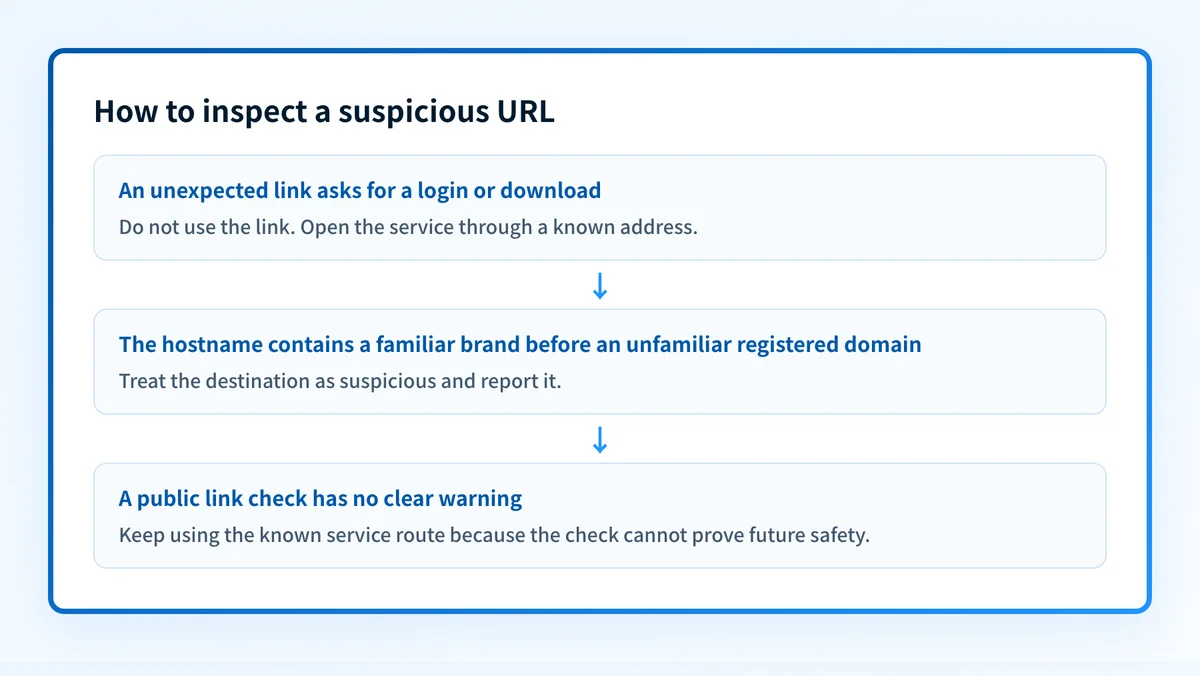
An unfamiliar URL is not automatically malicious. A link needs more scrutiny when the message is unexpected, asks for credentials or payment, or directs the recipient to act under time pressure. The UK National Cyber Security Centre's phishing guidance advises people to avoid using contact details supplied in a suspicious message and instead use a known route to contact the organization.
Use this decision rule:
- If you did not expect the message, do not sign in through its link.
- If the message names a company you use, open that company's known app, bookmark, or manually entered address instead.
- If you need to inspect a link, identify the hostname before opening it and treat lookalike spelling, unfamiliar suffixes, and misleading subdomains as warning signs.
- If a link has already been opened, do not enter credentials. Report it through your organization's process and change passwords only through the legitimate service if credentials were submitted.
- If the same brand is repeatedly impersonated, investigate both the spoofed destination and whether attackers are also sending mail that claims to be from your domain.
A worked URL-reading example
Consider this illustrative URL:
https://microsoft-login.security-review.badsite.test/session?return=portal.example.comThe destination hostname is:
microsoft-login.security-review.badsite.testThe query parameter return=portal.example.com does not make the link go to portal.example.com. It is data supplied to the destination. Likewise, a familiar name at the beginning of a hostname does not establish ownership of the domain at the end.
Inspect the link in this order:
- Find the hostname, between
https://and the next/. - Ignore the path and query string until you know who controls the hostname.
- Identify the domain registration boundary from the right, using your organization's approved browser, security tooling, or domain-review process.
- Compare it with the address you would normally use for that service.
- If the link is suspicious, do not use it to authenticate, download software, or provide information.
What stops URL spoofing in practice
Use controls that address the point where the risk appears.
For individual clicks, browsers and mailbox security products can warn on known unsafe destinations. Google Safe Browsing provides protections used across Google products and Chrome. Organizations using Microsoft 365 can review Microsoft Defender for Office 365 Safe Links documentation, which describes URL protection and time-of-click checks for supported workloads.
For account compromise, require MFA so a captured password is less likely to be enough for an attacker to access an account. For email impersonation, publish and enforce email authentication for domains your organization owns. The email authentication learning hub explains how SPF, DKIM, and DMARC work together.
DMARC has a clear boundary in this problem. It can help receivers identify mail that falsely claims to use a protected From domain when the message fails DMARC. It does not examine the destination URL, remove a link from a message, or prevent an attacker from registering and authenticating a lookalike domain. For the broader response process, see how to stop spoofing attacks and what spoofing is and how to stop it.
Do not change a DMARC policy in response to one suspicious link without first reviewing legitimate sending sources and their alignment. A policy change can disrupt real mail that is still failing DMARC.
Check a suspicious link before opening it
If you have an unexpected URL, inspect it with Palisade's phishing link checker before anyone uses it for a login or download. Compare the result with the full message context and your known contact route for the organization.
A link check cannot prove that a site is safe, explain a mailbox provider's private filtering decision, or prevent a later change to the destination.
If the recurring problem is mail impersonating domains you manage, Palisade is agentic DMARC software that analyzes DMARC aggregate-report data, identifies sending sources and authentication or alignment issues, and creates prioritized remediation tickets. It can propose the next policy step when evidence supports it, while your team reviews the evidence and applies the DNS change. It does not block URLs, change a receiver's decision, or autonomously change your DMARC policy.
Evidence
Sources and further reading
Questions readers ask
Frequently asked questions
Is URL spoofing the same as phishing?
No. URL spoofing is a technique that makes a destination appear trustworthy. Phishing is a broader attempt to obtain information, credentials, money, or access through deception. A phishing message may use a spoofed URL, but phishing can also use phone calls, attachments, or other methods.
Does HTTPS mean a URL is legitimate?
No. HTTPS means the browser has established an encrypted connection to the address it reached. It does not establish that the domain belongs to the organization named in the page, email, or link text.
Can DMARC stop a spoofed website?
No. DMARC applies to email authentication and the visible From domain. It can reduce unauthorized email impersonation of domains you control, but it does not inspect web pages or prevent registration of lookalike domains.
Should I click a suspicious shortened URL to see where it goes?
No. Use an approved security tool or inspect the message through your organization's process before opening an unexpected shortened URL. If you need the service named in the message, reach it through a known address instead.
What should I do if I entered my password on a spoofed site?
Change the password through the legitimate service immediately, follow your organization's incident-reporting process, and review active sessions and MFA settings. The exact response depends on the affected service and your organization's security procedures.

Written by
Ian BussieresCTO & Co-Founder, Palisade
Ian Bussieres is the CTO and co-founder of Palisade, agentic DMARC software for IT teams and MSPs.
More from Ian →