How can I take down lookalike domains targeting my business?
 ChatGPT
 Claude
 Gemini
 Perplexity
 Grok
GrokIn brief
Take down lookalike domains by preserving evidence, reporting the active service, and escalating phishing or trademark abuse safely, step by step.
To take down a lookalike domain targeting your business, preserve evidence first, identify the registrar and any service delivering harmful content, then report the case to the party able to investigate it. Escalate active credential or payment theft quickly through phishing-reporting channels. Use trademark or domain-dispute processes for bad-faith brand abuse. No report guarantees that a registrar, host, or browser-security service will remove a domain.
At a glance
Quick takeaways
- Preserve the exact URL, capture time, screenshots, redirect chain, original email, and full headers before reporting a lookalike domain.
- A registrar controls registration, while a hosting provider, CDN, or content platform may be able to remove a live harmful page.
- Public DNS and domain observations can help route an abuse report, but they do not prove ownership, malicious intent, or a takedown outcome.
- Treat active credential collection, payment fraud, and malware as urgent phishing incidents alongside any brand-protection case.
- A UDRP dispute can address certain bad-faith trademark registrations, but it is not an emergency process for removing a live phishing page.
- DMARC helps protect your legitimate domain from unauthorized spoofing. It does not remove mail or websites using a separately registered lookalike domain.
Scope and prerequisites
Use this process for one suspicious domain that appears to impersonate your organization, staff, products, or payment process. Start with an observable harm: a credential-collection page, fraudulent payment instructions, a copied brand page, or an email sent from a confusingly similar domain.
Assign an incident owner, an authorized reporter, and a legal contact for trademark or fraud escalation. Preserve the evidence in an access-controlled case location. The rollback condition is procedural: do not request suspension of a domain until a reviewer has confirmed the suspicious domain is not your own, a partner's, or an authorized campaign domain. A mistaken report can disrupt a legitimate business.
For broader guidance on reducing email-borne impersonation risk, see the Palisade email security learning hub.
Create a case record after triage
Create a labelled record before reports begin. It keeps evidence, ownership, and follow-up decisions tied to the same incident.
Case ID: LKD-2026-001
Suspected domain and URL: pay-yourdomain-example.com / https://pay-yourdomain-example.com/sign-in
Legitimate brand domain: yourdomain.com
Observed impersonation evidence: Redacted page screenshot uses our business name and asks for account credentials
Captured at: 2026-08-12T14:20:00Z
Registrar, hosting, and DNS evidence: Public NS and A-record observations retained with timestamps
Abuse or report destination: <provider or security reporting channel>
Case or reference ID: <submitted-report identifier>
Owner: <incident owner>
Escalation status: Evidence preserved, report pending review
Follow-up date: 2026-08-13
This example is fictional and redacted. Do not recreate a harmful page, submit credentials, download files, or interact with suspected malware.
Choose the implementation approach
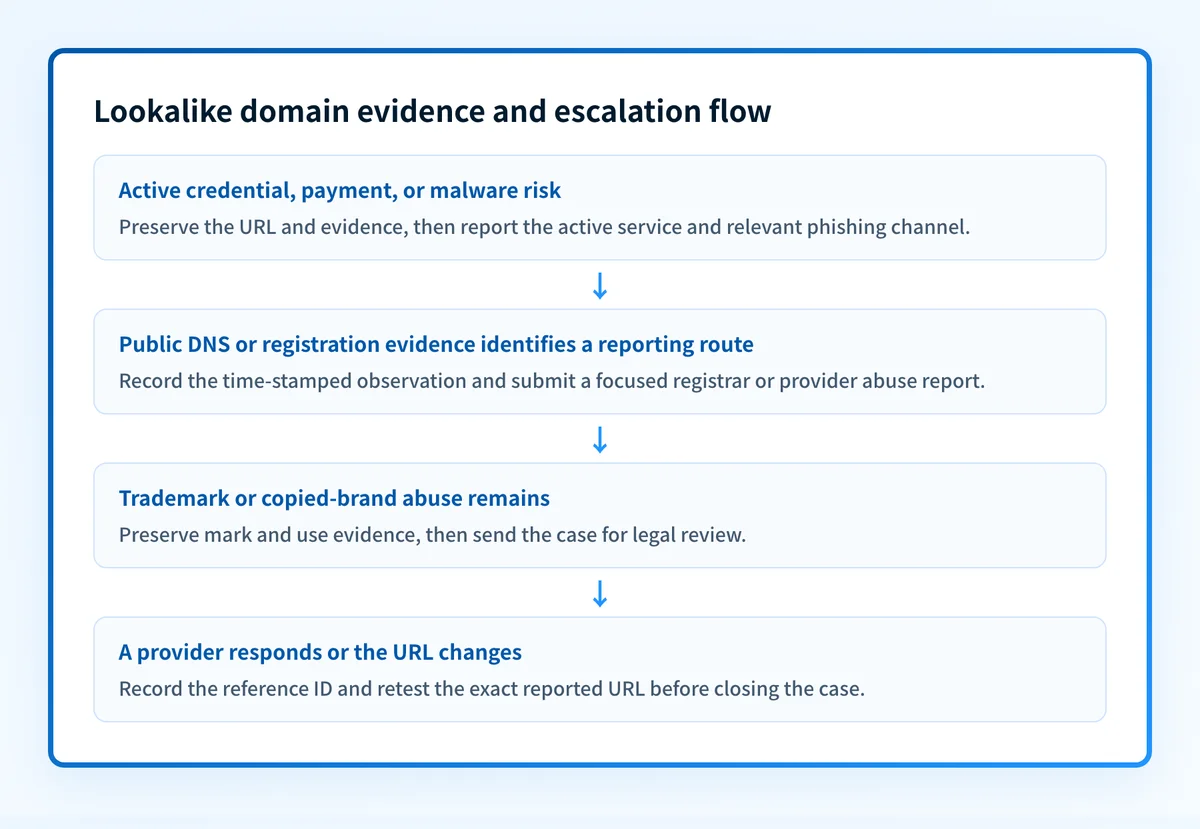
Choose the reporting route from the evidence you have.
- For active credential, payment, or malware risk, report the harmful URL to the hosting or platform provider when identifiable. Also use the relevant phishing-reporting channels. CISA phishing guidance recommends reporting suspected phishing and preserving evidence for investigation.
- For a domain where public registration or DNS evidence helps identify an abuse contact, use the registrar's published abuse process. ICANN SSAC report SAC-115 on DNS abuse describe DNS abuse categories that include phishing, malware, botnets, pharming, and spam when spam is used as a delivery mechanism for those threats.
- For trademark or brand abuse without an immediate safety threat, have legal counsel assess the evidence and available remedies. WIPO's UDRP overview explains the factors considered in Uniform Domain Name Dispute Resolution Policy cases.
How to configure the response
1. Preserve evidence before contacting providers
Capture the full suspicious URL, including its path and query string, plus the time observed in UTC. Save screenshots that include the browser address bar and the harmful content. Record every redirect destination. Keep customer reports in their original form where possible, but remove passwords, payment details, session cookies, private keys, API tokens, and other unnecessary private data before broad sharing.
For a phishing email, preserve the original message and full headers. Do not rely only on a screenshot if the original message is available. RFC 8601 defines the Authentication-Results header field and explains that it is receiver-generated information with a trust boundary. A header can help explain how a receiver evaluated a message, but it does not establish who registered a lookalike domain.
If a staff member opened a suspected credential or malware page, follow your organization’s incident-response procedure. Do not use the suspicious site to collect more evidence.
2. Confirm the legitimate domain and observe public infrastructure
Confirm that the suspicious domain is not an approved domain owned by your organization, a reseller, a campaign provider, or a business partner. Record the legitimate brand domain in the case record so reviewers can compare the names without relying on memory.
Then collect publicly available DNS evidence. A DNS observation can establish that a queried name returned a record at a particular time, and may identify name servers, mail exchangers, or an IP address. It cannot establish the registrant's identity, prove the operator's intent, reveal every service behind the domain, or require any provider to take it down.
Use a public lookup only with domain or DNS inputs you already have. The Palisade DNS lookup can inspect public DNS records for the suspicious domain, and the domain reputation checker can check public reputation signals. Save timestamps and observed results in the case record.
dig +short A suspicious-yourdomain.com
dig +short MX suspicious-yourdomain.com
dig +short NS suspicious-yourdomain.com
Do not treat an IP address or name server as proof of malicious ownership. Shared hosting, privacy services, CDNs, and infrastructure changes can make public observations incomplete or time-sensitive.
If the site redirects, record the final destination. Do not attempt to log in, submit forms, upload files, download samples, or contact the suspicious operator.
3. Route the report to the party that can act
Submit the smallest complete evidence package to the provider or channel that can investigate the reported behavior. State the affected brand, exact URL or domain, observation time, observed harm, and requested action. Keep the provider confirmation and case number.
For an active page, report the content to the identified host, CDN, or platform using its documented abuse route. For a registration concern, use the registrar’s published abuse contact. ICANN’s Registrar Accreditation Agreement requires accredited registrars to publish an abuse contact and investigate reports of abuse involving registered names. ICANN's registrar abuse-contact requirements provide the applicable policy context.
Use careful language. If your evidence supports suspected phishing, report suspected phishing. Do not state that a specific person committed a crime unless you have evidence and authority to make that claim.
Subject: Suspected phishing and brand impersonation at suspicious-yourdomain.com
We observed https://suspicious-yourdomain.com/sign-in at <UTC timestamp>.
The page appears to impersonate <business name> and requests credentials.
Affected legitimate domain: yourdomain.com
Evidence retained: <redacted screenshots, redirect chain, original email headers if applicable>
Requested action: Please investigate the reported content under your abuse process
and advise whether it has been disabled.
Contact for follow-up: <authorized business contact>
A report requests an investigation. It does not prove that the receiving provider hosts the content, controls the registration, or will remove the domain.
4. Escalate active credential or payment risk
If the page collects credentials, payment information, or malware downloads, prioritize reports that can reduce user exposure. Send the exact harmful URL and capture time to the relevant platform or security-reporting channel. Update the case record with the submission reference and a near-term follow-up date.
If a phishing email was sent to your organization, report it through the recipient mailbox provider’s available phishing-reporting path as well as the infrastructure route when known. Preserve the original message separately from the report package.
Tell affected employees, customers, or partners only through approved incident communications. Describe the known facts, the legitimate domain, and the safe action. Do not amplify the suspicious URL unnecessarily.
5. Escalate trademark or brand abuse
For a copied brand site or confusing registration without an immediate phishing threat, preserve the mark evidence, the domain’s use of the mark, and the timeline. Legal counsel can assess whether the facts support a trademark complaint, a registrar policy report, or a domain-name dispute.
Under the UDRP, a complainant generally must establish that the disputed domain is identical or confusingly similar to a mark in which it has rights, that the respondent lacks rights or legitimate interests, and that the domain was registered and is being used in bad faith. WIPO's UDRP overview of panel views explains these factors. This is a legal framework, not a conclusion about any individual case.
6. Recheck the reported URL and close only on evidence
Recheck the exact URL after the provider’s stated review period. Record whether the original content remains available, redirects elsewhere, returns an error, or has changed. Recheck from an approved and safe investigation environment.
Do not mark the incident resolved merely because a public DNS record still exists or because a page appears unavailable once. A domain can remain registered after content removal, and a public check cannot prove what every visitor or receiver sees.
How to validate the setup
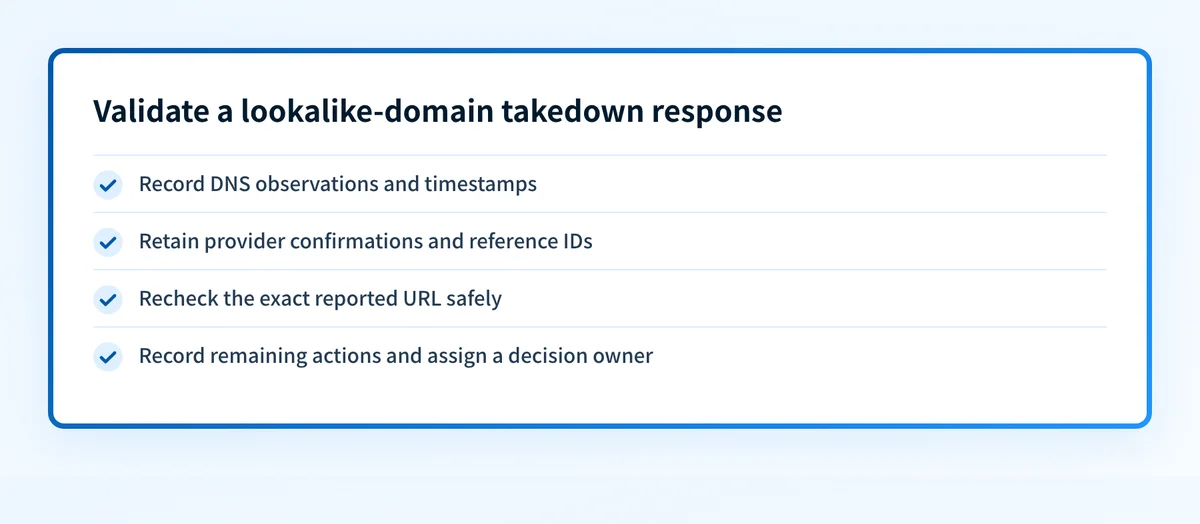
Validate the response at four layers.
- DNS: Query authoritative DNS and at least one public resolver when DNS evidence is relevant. Record the observed names, records, and timestamps.
- Provider: Retain submission confirmations, reference IDs, and written provider responses. A submitted report is not a completed takedown.
- Message or page: Recheck the exact email path or reported URL without interacting with the harmful service. Preserve the observed result and time.
- Ongoing review: Keep the case open until the incident owner records what changed, what remains, and whether legal, customer-support, or security follow-up is still required.
Troubleshooting
The registrar does not appear to host the harmful page
Report the registration concern to the registrar, then separately identify and report the provider delivering the active content. Registrars and hosts have different control points. Keep both report references in the same case record.
Public DNS records do not identify a clear hosting provider
Record the DNS answers and their timestamps, but do not infer ownership from them. Look for a documented abuse route from the registrar or a visible platform provider. If the incident includes active phishing, use relevant security-reporting channels while attribution remains incomplete.
The provider asks for more evidence
Provide the exact URL, observation time, redacted screenshots, redirect chain, and affected legitimate domain. Supply original email headers only through an approved secure route. Do not share customer credentials, tokens, or unrelated internal records.
The page is removed but the domain remains registered
Treat content removal and registration status as separate outcomes. Record the removed page, recheck for changed paths or redirects, and ask legal counsel whether the remaining registration warrants a trademark or domain-dispute review.
Check the public evidence before escalating
Before filing a registrar or hosting report, inspect the suspicious domain’s public DNS and reputation signals. This can help preserve a time-stamped record and identify a possible reporting route, but it cannot prove ownership, malicious intent, an active production path, or that a provider will remove the domain.
For recurring lookalike-domain incidents, Palisade is DMARC software that analyzes DMARC aggregate-report data, identifies unauthorized sending sources and alignment issues, and creates prioritized remediation tickets for your legitimate domains. It helps a team understand and improve DMARC enforcement. It does not take down separately registered lookalike domains, change a registrar’s decision, or guarantee inbox placement.
Evidence
Sources and further reading
Questions readers ask
Frequently asked questions
Can I force a registrar to take down a lookalike domain?
No. You can submit a documented abuse report or pursue an applicable legal process, but the registrar decides its response under its policies and obligations. A host or platform may be the faster route for an active harmful page.
Should I contact the operator of a suspicious lookalike domain?
No. Do not contact a suspicious operator directly as part of initial triage. Preserve evidence, use documented abuse channels, and follow your incident-response or legal process.
Does a DNS lookup prove who owns a lookalike domain?
No. A public DNS lookup can show records returned at the time of the query. It cannot reliably establish registrant identity, beneficial ownership, malicious intent, or control over every service associated with the domain.
Can DMARC stop a lookalike domain from sending email?
No. DMARC helps receivers evaluate mail that claims to come from your legitimate domain. It does not block a separately registered lookalike domain, although DMARC enforcement can reduce direct spoofing of your exact domain.
Is a UDRP complaint the right response to phishing?
Only when the facts and legal strategy support a domain-name dispute. For an active credential-harvesting or malware page, report the harmful URL through relevant provider and phishing-reporting channels immediately. A UDRP process is not an emergency takedown mechanism.

Written by
Johanie DupontBrand & Ecommerce Email
Johanie Dupont works on brand and ecommerce email at Palisade: BIMI and verified marks, sender requirements, and getting marketing mail into the inbox.
More from Johanie →