Why am I getting fake payment confirmation emails?
 ChatGPT
 Claude
 Gemini
 Perplexity
 Grok
GrokIn brief
Why am I getting fake payment confirmation emails? Verify the charge outside the email, preserve evidence safely, report it, and protect exposed accounts.
You are getting fake payment confirmation emails because scammers use an invented charge, renewal, invoice, or refund to make you act before checking the real account. Do not call a number, click a cancellation link, open an attachment, or reply. Open the payment provider, card issuer, or bank through an app or address you already trust, then verify whether the claimed transaction exists.
At a glance
Quick takeaways
- A payment confirmation email does not prove that a payment occurred.
- Verify a claimed charge in the official payment or banking account that you open yourself.
- A phone number, QR code, attachment, cancellation link, or reply request can be the scam's intended next step.
- Save a small, redacted incident evidence packet before reporting the message.
- Message headers can identify technical delivery and authentication details, but they cannot prove sender intent or whether an attachment contains malware.
- A legitimate payment platform can deliver a fraudulent invoice or money request created by a bad actor.
What does the failure mean?
The failure is an unexpected message that says, "Why am I getting fake payment confirmation emails?" It usually describes a charge or payment request that you cannot confirm through the real account. The claimed transaction is the lure. The requested action, such as calling a number to cancel, is the part that can expose your information.
Your payment has been confirmed. Call the number below immediately to cancel this charge.The wording alone does not prove the message is fraudulent. It does establish an observable pattern: an unexpected financial claim followed by an urgent request to use a contact method supplied by the message. CISA's phishing guidance advises verifying unexpected requests through independently obtained contact details rather than links or information in the message.
A sender can impersonate a bank, retailer, or payment provider through its display name, address, branding, or message content. The Federal Trade Commission explains how phishing scams impersonate organizations to obtain money or personal information. A technically delivered email is not proof that the payment request is honest.
What usually causes it?
A bulk phishing campaign used a familiar payment theme
Scammers can send payment-themed messages to many addresses without knowing which services each recipient actually uses. A receipt from a service you have never used is a warning sign. It is not evidence that you opened an account or incurred a charge. The FTC recommends independently verifying unexpected messages that appear to come from known organizations.
The email tries to move you to a phone call
A fake confirmation may contain a support or cancellation number instead of a link. The number is part of the message evidence, not an independent support channel. CISA warns that phishing can use several communication methods to obtain sensitive information. Use the contact information in the official app, on the back of your payment card, or on a statement you already possess.
A real payment platform delivered a fraudulent request
A message can originate from a legitimate platform while an invoice or money request inside it is deceptive. PayPal's guidance on invoice and money-request scams says users should review unexpected requests carefully and report suspicious activity through PayPal's official process. This differs from a forged sender address, but it needs the same independent account check.
A known vendor's identifiers do not match
A message may name a vendor you use but show a different merchant name, payment account, order number format, return address, reply-to address, or support process. Those inconsistencies are evidence to investigate. They do not, by themselves, prove fraud. Compare them with records in the vendor account you open directly.
For another impersonation pattern, see why you may receive fake law enforcement emails.
How do I diagnose the failure?
1. Check the payment source of truth
Open the payment provider's official app, type its known address into your browser, or open your card issuer's app. Review account activity, invoices, subscriptions, and order history. If the email claims a card charge, review the card statement or account activity.
Do not use an email button, QR code, phone number, attachment, or reply address to reach the account. If no matching transaction or request appears in the official account, the email has not established a real charge.
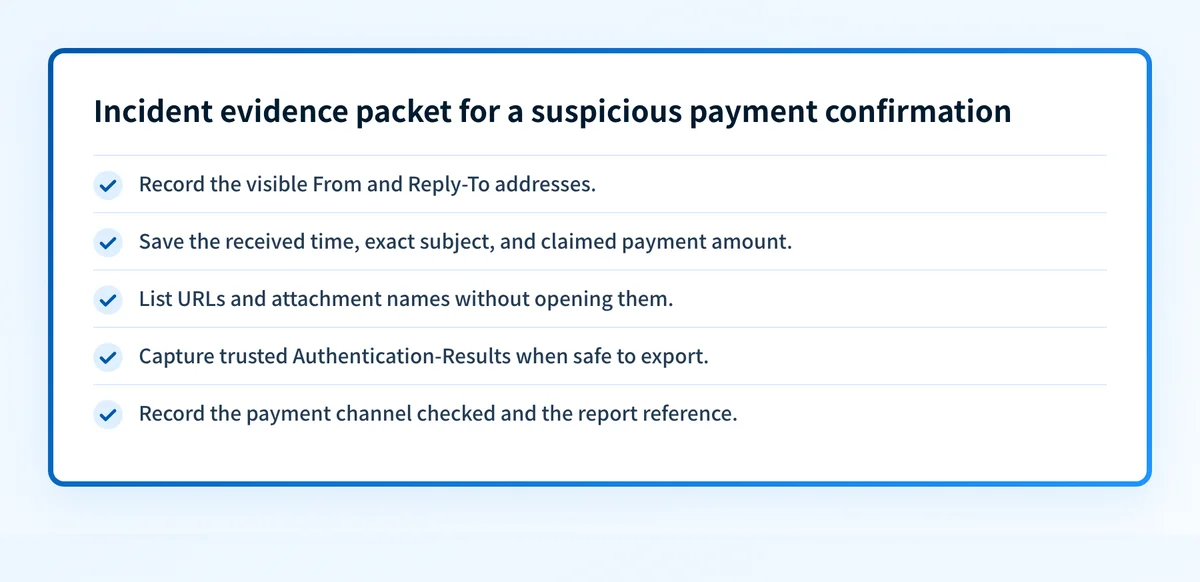
2. Capture a labelled incident evidence packet
Before deleting the email, record only the information needed for reporting or escalation. Do not open URLs or attachments to collect it.
- Visible sender details: Display name, visible From address, and Reply-To address if available.
- Message timing and claim: Received time, exact subject, claimed merchant, amount, renewal, refund, or invoice statement.
- Unopened artifacts: URLs as displayed, attachment names, and file extensions. Do not download, preview, or execute them.
- Technical message evidence: Full headers or trusted receiver-added
Authentication-Results, if you can safely export them. - Payment channel: The account, card issuer, bank, or payment platform the message claims to involve.
- Report reference: The ticket, abuse report, security-case number, or provider report confirmation.
Incident evidence packet, illustrative only
Visible From: Billing Notice <notice@unrelated-example.com>
Reply-To: help@different-example.net
Received: 2026-08-12 14:10 EDT
Subject: Payment confirmation: $249.99
Claim: Call the listed number to cancel an annual renewal.
Unopened artifact: hxxps://example.invalid/cancel
Payment channel checked: card issuer mobile app
Trusted receiver result: dmarc=fail header.from=payment-example.com
Report reference: security-ticket-12345
Authentication-Results is a receiver-added field for communicating message authentication status. It can help establish what the receiving system evaluated for the delivered message. It cannot prove a sender's intent, confirm that an attachment is safe or malicious, establish the legitimacy of an invoice, or explain a receiver's private filtering decision.
3. Choose the safe next action for the evidence you have
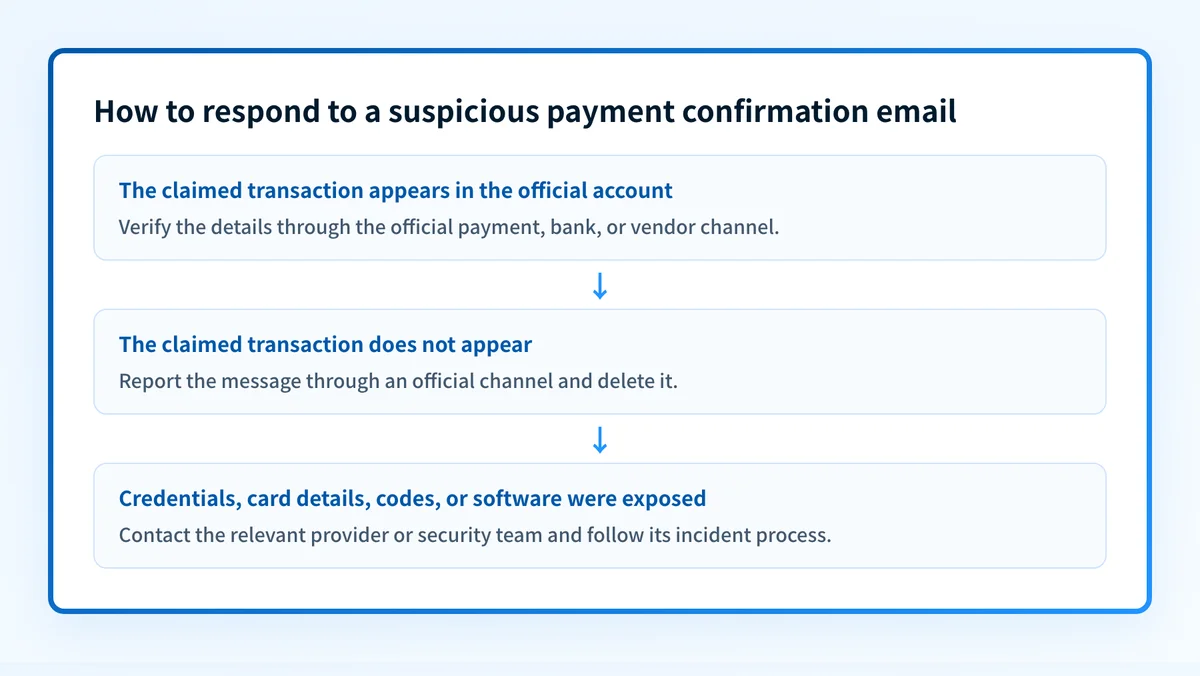
If the message contains a suspicious link or attachment, do not interact with it. Report the message through your mailbox provider or organizational security process, then delete it. If you opened an attachment, entered information, or installed software, tell your security team exactly what happened and follow its incident process.
If the notice relates to your bank, card, or payment account, verify it in the official account. For a confirmed unauthorized transaction, contact the issuer or payment platform through its independently verified dispute or fraud channel.
If the message names a vendor you know but its identifiers conflict with your records, use the vendor account or established support channel to ask about the transaction. Do not engage the sender directly.
4. Inspect a sender domain only when it is relevant
If you administer the domain named in the message, or need to document its publicly visible DNS posture, use the DNS lookup tool to inspect its published records. A public DNS result can establish what record is visible at the time of the check.
A DNS lookup cannot determine whether this email is phishing, inspect a private sending path, prove that a particular message came from the visible domain, detect malware, or predict a recipient's future inbox decision.
5. Escalate based on what was exposed
If you only viewed the message and did not interact with it, report and delete it. If you entered a password, change that password through the official service and review recent account activity, recovery options, and payment settings. If you shared card details, bank credentials, or a one-time code, contact the issuer through the number on the card or its official app.
If you granted remote access or installed software, disconnect the device from the network and contact your organization's IT or security team. Preserve the incident evidence packet for the responder, but do not include passwords, card numbers, private keys, or unredacted customer data.
How do I fix it?
Report the message through an official channel
Use the provider's account, your mail service's reporting control, or your organization's phishing-reporting process. For a suspicious PayPal invoice or money request, follow PayPal's official reporting guidance.
Reporting helps the relevant provider investigate the account or message. It does not reverse a confirmed charge. Use the card issuer's or payment provider's official dispute process for a real unauthorized transaction.
Repair an exposed account through a known-good path
If you entered credentials after following the email, open the affected service independently and change the password. Review sign-ins, recovery methods, forwarding settings, and payment settings that the service provides.
Do not reuse a password when resetting it. If the exposed password was used elsewhere, those accounts may also need separate password changes.
Treat a business-domain impersonation problem as a separate issue
If your organization is receiving reports that messages impersonate its own domain, preserve examples and review the exact domains and authentication results involved. The email security learning center covers the controls and evidence used to assess domain impersonation.
Do not weaken a DMARC policy to address one recipient's suspicious email. A DMARC policy changes requested handling for mail that claims to be from your domain. It does not validate a payment request or repair an external sender's scam.
How do I validate the repair?
Repeat the same account check through the official payment, bank, or vendor channel. Confirm whether the original claimed transaction exists, whether any account changes or unauthorized activity occurred, and whether the official report or incident ticket has a reference number.
For a work mailbox, verify that the security team received the original message or the approved evidence packet. If a payment provider confirms the notice was legitimate, compare the official transaction details with the message before taking further action. If it confirms the request is fraudulent, retain the report reference and delete the message.
For a domain your organization controls, record the DNS result separately from the message evidence. Public DNS can show the record published during the check. It cannot prove the production sending path or resolve the legitimacy of this payment notice.
Check public DNS evidence behind a claimed sender domain
When the sender domain is relevant to an internal impersonation investigation, inspect its published DNS records before drawing conclusions from a display name or visible address.
Look up the sender domain's DNS records
A DNS lookup cannot determine sender intent, inspect the original message, repair a phishing incident, monitor future changes, or guarantee why a receiving mailbox accepted the email. If your team needs to identify legitimate sending sources and authentication or alignment issues across domains it controls, Start with Palisade. Palisade analyzes DMARC aggregate-report data, identifies sending sources and authentication or alignment issues, and proposes next policy steps for human review. It does not determine whether an external payment email is fraudulent or automatically change your DMARC policy.
Evidence
Sources and further reading
Questions readers ask
Frequently asked questions
Is a payment confirmation email proof that I was charged?
No. Confirm the transaction in the official payment account, banking app, or card issuer account that you open independently.
Should I call the cancellation number in the email?
No. Use contact information from the official account, the back of your card, or an existing statement. A number in a suspicious message is part of the untrusted message.
Can a real payment service send a scam invoice?
Yes. A legitimate platform can deliver an invoice or money request created by a bad actor. Check the request in the official account and use the provider's official reporting process if it is suspicious.
Can email headers prove that a payment confirmation is fake?
No. Headers can provide delivery and authentication evidence for a received message. They cannot prove sender intent, validate an invoice, detect malware, or explain a receiver's private decision.
What should I do if I entered my card details?
Contact the card issuer or bank through an independently verified number or official app. Explain what information you shared, review account activity, and follow its fraud or dispute process.

Written by
Samuel ChenardCEO & Co-Founder, Palisade
Samuel Chenard is the CEO and co-founder of Palisade, agentic DMARC software for IT teams and MSPs, from one domain to thousands.
More from Samuel →