Email sender spoof: how to spot and stop it
 ChatGPT
 Claude
 Gemini
 Perplexity
 Grok
GrokIn brief
An email sender spoof forges a trusted domain in the visible From field. Spot one in the receiver's authentication results; DMARC limits it on your own domain.
An email sender spoof is a message forged to look like it came from an address you trust, because plain SMTP never verifies the visible From: field. To spot one, read the receiving server's authentication results in the headers. To limit it on your own domain, publish and operate DMARC with aligned SPF or DKIM, then use DMARC reports to find legitimate sources before requesting stronger handling for failures. That controls exact-domain spoofing only. It does not stop lookalike domains, deceptive display names, or mail from a genuinely compromised account.
At a glance
Quick takeaways
- The visible
From:address is the identity DMARC evaluates. - SPF or DKIM must pass with a domain aligned to the visible
From:domain for DMARC to pass. - DMARC lets a domain owner request handling for messages that fail that validation.
- A receiving mailbox provider makes the final handling decision.
- DMARC aggregate reports can reveal sources using a domain, but report delivery is not guaranteed.
- A DMARC pass does not prove that a message is safe or that the sender's mailbox was not compromised.
How an email sender spoof works
Email address spoofing usually concerns unauthorized use of a domain in the visible From: field. RFC 9989 defines DMARC around that author domain because SPF and DKIM alone can authenticate domains that are not directly associated with the visible From: domain.
DMARC connects those systems through identifier alignment. A message passes DMARC when SPF or DKIM passes and the authenticated SPF or DKIM domain aligns with the author domain. With relaxed alignment, related subdomains can align through their shared organizational domain. With strict alignment, the domains must be identical.
The domain owner publishes a DMARC DNS TXT record that states a requested handling policy for failures and may request aggregate reports. A receiver can use that policy when deciding how to handle incoming mail, but the DMARC specification leaves the final decision with the receiving organization.
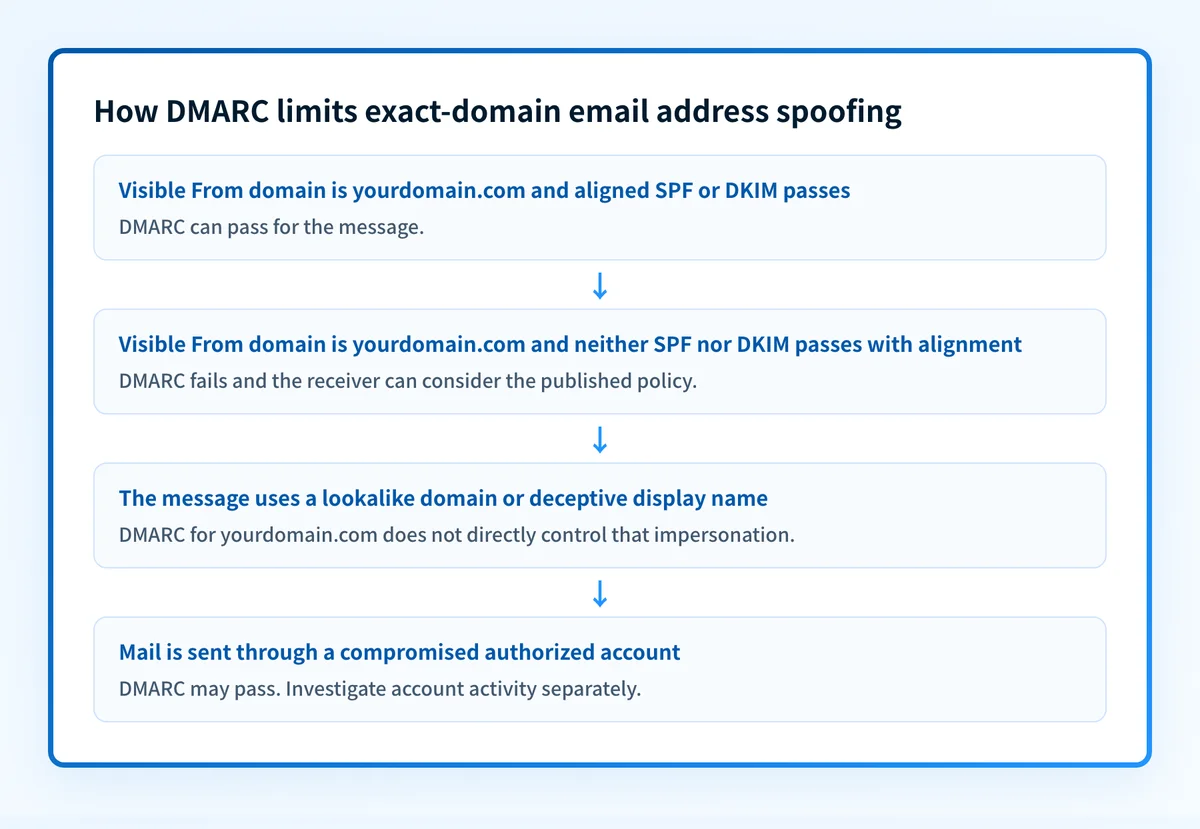
DMARC is designed to reduce successful exact-domain spoofing. It does not directly address a lookalike domain such as yourd0main.com, or a message that uses a trusted display name with a different address. Those are related threats, but they are not the same control problem. See spoofing versus phishing for the distinction between impersonating an identity and using that impersonation to obtain information or action.
How to tell whether a message is a sender spoof
You confirm a sender spoof by reading the receiving server's own authentication results, not the visible message. Two layers of checking apply: signals a reader can see without leaving the message, and the headers underneath it.
Start with what is visible, because most forgeries fail one of these before you open anything:
| Check | What gives a spoof away |
|---|---|
| The domain, character by character | A swapped letter (rn reading as m), a different suffix (.co for .com), or the real brand demoted into a subdomain of someone else's domain |
| Display name against the actual address | A familiar name attached to an address that has nothing to do with it |
| The sending domain's plausibility | A bank, supplier, or internal department writing from a free mailbox provider |
| Where the links actually go | A destination that does not match the text, or a shortener hiding it |
| The request itself | Payment details that changed, urgency that discourages checking, or a first-time ask arriving out of the blue |
Then open the full headers. In Gmail that is Show original; in Outlook, Message, then Properties, then Internet headers; in Apple Mail, View, then Message, then All Headers. Mobile apps often omit the option, so forward the message to yourself and open it on a desktop client.
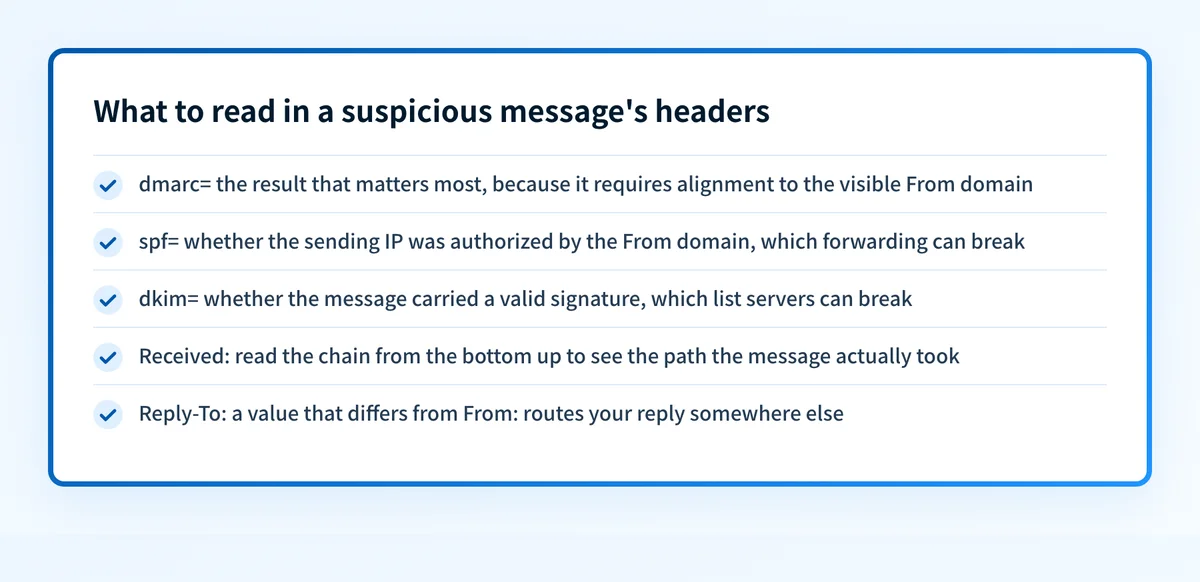
The dmarc= result is the one that matters most, because it is the only one that requires alignment with the domain a recipient actually reads. A message can pass SPF for the attacker's own domain and still fail DMARC for the brand it is impersonating.
Two more signals sit outside the authentication results. Read the Received: chain from the bottom up to see the path the message really took, and check whether Reply-To: points somewhere different from From:, which is a common way to route your reply to the attacker. An email header analyzer parses all of this and flags the failures for you.
If the message carries a link, resolve it before opening it. A phishing link checker or a URL reputation check follows redirects and tests the destination without exposing your device.
Common issues when verifying a sender
Four situations account for most of the confusion when a result does not match what the message looks like.
Why does mail from a real contact fail SPF or DKIM?
Forwarding changes the sending IP, which breaks SPF, and mailing-list servers sometimes modify the body, which breaks DKIM. Legitimate mail fails authentication this way routinely. Do not treat a single failure as proof of forgery. Read the full DMARC result and the Received: path, and confirm through a trusted channel when the request is sensitive.
Why does a message pass authentication but still feel wrong?
Mail from a genuinely compromised mailbox authenticates correctly, because it really was sent by an authorized account. Authentication cannot help here. Fall back to behavioral signals: an unusual request, manufactured urgency, a change of payment details, or a reply address that does not match. When the request involves money, verify by phone regardless of what the headers say.
Can link text be trusted when the domain looks right?
Visible link text and even a hovered domain can be disguised with redirects and shorteners. Check the destination with a tool rather than by clicking.
How do I tell whether my own domain is being spoofed?
A single message tells you about one message. For a domain-wide view, read DMARC aggregate reports, covered under "What to check next" below.
When the answer changes
The right response depends on what is being impersonated and what evidence you have.
If the message uses your exact domain in the visible From: field, DMARC is the domain-level control that applies. Start by inventorying real sending systems and confirm that each important mail path has an aligned SPF or DKIM pass. Then use DMARC reports to identify mail sources that still fail and remediate them before moving to a stronger policy.
If the message uses a similar domain or only copies a person's display name, DMARC for your domain cannot directly prevent it. RFC 9989 explicitly limits DMARC's direct protection to specific forms of exact-domain spoofing.
If a message came from a legitimate but compromised mailbox, it may authenticate successfully. A DMARC pass validates authorized use of the author domain for that message. It does not make a claim about the message's safety, content, or the account holder's intent. Investigate suspected account compromise through the affected mail system and identity provider.
For a recipient, treat an unexpected request for money, credentials, or sensitive information as suspicious even when the sender name looks familiar. Google's phishing guidance advises people to avoid interacting with suspicious requests and verify through an established, independent contact method.
Worked example: what DMARC can establish
This illustrative example shows a message claiming to be from yourdomain.com. Do not copy these values into a production configuration. Your sending service generates the real authentication details.
From: Billing <billing@yourdomain.com>
Authentication-Results: receiver.example;
  spf=fail smtp.mailfrom=mailer.example;
  dkim=pass header.d=yourdomain.com;
  dmarc=pass header.from=yourdomain.com
The message can pass DMARC because DKIM passes with header.d=yourdomain.com, which aligns with the visible From: domain. The failed SPF result does not by itself make DMARC fail when aligned DKIM passes.
Authentication-Results is a receiver-added field that records authentication assessments. RFC 8601 defines its syntax and trust model: use the result added by the receiving system you trust, not a similarly named header injected earlier in transit.
Use this decision rule:
- An exact visible
From:domain plus an aligned SPF or DKIM pass means DMARC can pass. - An exact visible
From:domain with no aligned SPF or DKIM pass means DMARC fails when the receiver evaluates DMARC. - A DMARC failure can trigger the domain owner's published request, but it does not prove every receiver rejected the message.
- A passing result does not rule out a compromised authorized sender.
What to check next
Start with the evidence you actually possess.
If you are a domain owner, inspect the public DMARC record for the exact domain used in the visible From: field. Then verify each production sending path in four layers:
- DNS: query the authoritative DNS service and a public resolver for the intended SPF, DKIM, and DMARC records.
- Vendor: confirm that each sending service shows its domain authentication as complete.
- Message: send a real message through each production path and inspect the trusted receiver's
Authentication-Results. - DMARC: review aggregate reports after they accumulate to find sources and alignment failures.
If you received a suspicious message, preserve it for your security team or report it through your mail provider. Do not reply, open attachments, or use the message's contact details to verify it. If the message appears to come from a known contact, use an existing phone number, chat channel, or address book entry instead.
A public email security score check can help you inspect exposed domain controls. It cannot establish the production sending path, a receiver's private filtering decision, or whether a particular message was spoofed.
Review the broader email security controls
Stopping sender spoofs requires more than a published record. Use the email threats learning hub to place DMARC, SPF, DKIM, user reporting, and account security in the same operating plan, and what an email security gateway is for where an inbound product fits alongside them.
Check your email security score
A guide or public score cannot prove that every sender is aligned, repair a compromised mailbox, or guarantee inbox placement.
Evidence
Sources and further reading
Questions readers ask
Frequently asked questions

Written by
Samuel ChenardCEO & Co-Founder, Palisade
Samuel Chenard is the CEO and co-founder of Palisade, AI-first DMARC software for IT teams and MSPs, from one domain to thousands.
More from Samuel →