Email spoofing in cyber security
 ChatGPT
 Claude
 Gemini
 Perplexity
 Grok
GrokIn brief
Email spoofing in cyber security is the use of a forged email identity to make a message appear to come from a trusted sender and domain.
Email spoofing in cyber security is the use of a forged or misleading email identity to make a message appear to come from a person, company, or domain that did not authorize it. The visible From address alone is not enough to establish who sent a message. Email authentication checks help receiving systems evaluate whether the sending path is authorized to use that domain.
At a glance
Quick takeaways
- Email spoofing makes a message appear to come from a different sender.
- The address displayed in an email client can differ from SMTP identities used to transmit the message.
- SPF and DKIM authenticate parts of the sending path or message, while DMARC applies alignment to the visible From domain.
- A message can look familiar and still require header and authentication checks.
- Opening an unexpected message is different from clicking a link, downloading a file, or providing information.
- A domain owner can reduce unauthorized use of its domain with correctly deployed email authentication and DMARC policy.
How email spoofing works
Internet email uses several identities. RFC 5322 defines the From field that recipients usually see in a mail client. SMTP also has an envelope sender used during message transport, defined in RFC 5321. These identities can be different for legitimate operational reasons, so a matching display name or visible address does not, by itself, prove authorization.
SPF lets a domain publish which hosts are authorized to send mail using an envelope sender or HELO identity. RFC 7208 defines SPF. DKIM adds a cryptographic signature that a receiver can verify against a public key published in DNS. RFC 6376 defines DKIM.
DMARC connects those checks to the domain in the visible From field. RFC 7489 defines DMARC as a mechanism that lets a domain owner publish a policy and request feedback when SPF or DKIM do not pass with the required alignment. A pass in SPF or DKIM is not automatically a DMARC pass. The authenticated domain must also align with the visible From domain under the applicable alignment rules.
For a wider view of impersonation risks, see Palisade's email threats learning hub.
When email spoofing changes from suspicious to actionable
A message is suspicious when its claimed identity, request, or delivery context does not match what the recipient can independently verify. The practical decision rule is to avoid treating the visible From line as proof.
Use the evidence available:
- If the message asks for a password, payment, sensitive information, or an unexpected action, verify the request through a known contact method rather than replying to the message.
- If you have access to message headers, inspect the authentication results and compare the visible From domain with the SPF and DKIM domains.
- If you manage the claimed domain, inspect its published authentication records and DMARC policy. A public DNS result shows what is published, not whether a particular message used an authorized production path.
- If the message contains a link or attachment, do not use it as the route to verify the request. Contact the organization through a previously known website, phone number, or internal directory.
A worked email-identity example
This illustrative example shows why the visible From address and the SMTP identities must be read together.
From: Billing Team <billing@yourdomain.com>
Return-Path: <mailer@unrelated-example.net>
Authentication-Results: mx.receiver.example;
  spf=pass smtp.mailfrom=unrelated-example.net;
  dkim=pass header.d=unrelated-example.net;
  dmarc=fail header.from=yourdomain.com
In this example, SPF and DKIM pass for unrelated-example.net. The visible From domain is yourdomain.com. Because neither authenticated identifier aligns with yourdomain.com, the example reports DMARC failure.
Authentication-Results is a structured field for communicating authentication assessments. RFC 8601 defines its syntax and trust boundary. Treat results added by a trusted receiving or intermediary system differently from text placed into a message by an unknown sender.
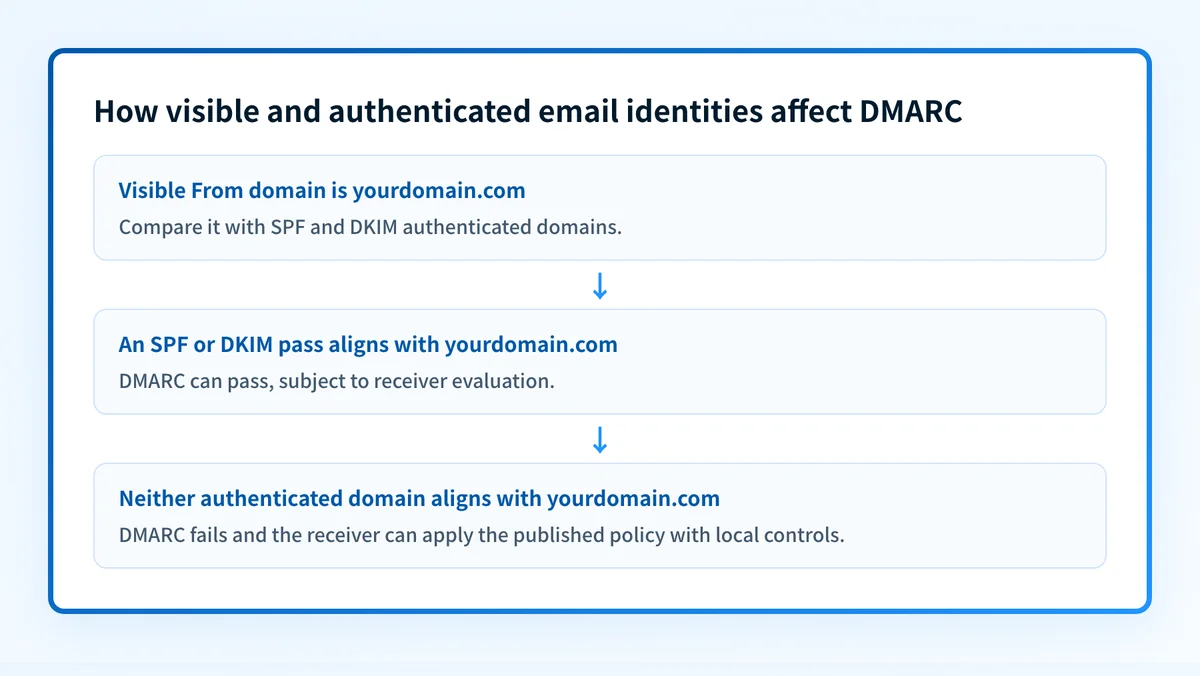
The example does not establish what happened to a real message. To investigate a particular email, preserve its full headers and use the recipient organization's security process or mail-provider controls.
What to check next
Choose the next check based on the evidence you have.
If you received a suspicious email, keep the message available for your security team and inspect its headers through an approved mail-client or security workflow. Do not rely on the sender name, logo, or display address alone. If the message concerns an account, open the service through a known bookmark or independently typed address.
If you manage a domain, start with the domain's published authentication posture. Palisade's email security score tool can help you inspect public email-security configuration. A public check cannot prove why one message was delivered, show a receiver's private reputation decision, or confirm that every application sending mail for the domain is authenticated.
For the protocol-specific context, read what DMARC is in cyber security. DMARC aggregate reports can later help domain owners identify sending sources and authentication or alignment issues, but they do not replace testing messages through the exact production path.
Do not publish a restrictive DMARC policy before legitimate senders have been inventoried and tested. A policy change can affect valid mail that is still failing alignment.
Build the broader email-security baseline
Email spoofing prevention is an operational email-security task, not a one-time visual check. Review the published DNS records, verify each sending service's authentication status, inspect real delivered messages from important production paths, and use DMARC reporting after data accumulates.
For the broader controls and operating context, see Palisade's email security guide.
Evidence
Sources and further reading
Questions readers ask
Frequently asked questions
What is spoofing in cybersecurity?
Spoofing in cybersecurity is the use of a false or misleading identity to make a communication, system, or request appear to come from a trusted source. In email, the misleading identity can involve the visible From address, display name, envelope sender, or another message attribute.
How can I tell if someone is spoofing my email?
Inspect the message headers and compare the visible From domain with the SPF, DKIM, and DMARC results from a trusted receiving system. A mismatch can be a warning sign, but a complete assessment also requires the message context and the recipient organization's security process.
What happens if I open a spoofed email?
Opening a spoofed email is not usually the risky step on its own. The risk starts when you click a link, download or open an attachment, run embedded content, reply with information, or follow an instruction in the message. Treat any unexpected request as unverified and confirm it through a contact path you already had, not one the message supplies.
Can I stop my email from being spoofed?
You cannot stop the attempts, because anyone can put your address in a message they send. What you can do is publish SPF, DKIM, and DMARC so receiving systems recognize unauthorized use of your From domain and apply the policy you asked for. That limits exact-domain spoofing rather than every message that name-drops your organization.
Does a DMARC pass prove that an email is safe?
No, a DMARC pass does not mean an email is safe. It shows only that SPF or DKIM passed with an identifier aligned to the visible From domain, which is a statement about the sender's authorization and not about the content. A compromised account sends perfectly authenticated mail, so keep judging the request itself.
Is email spoofing the same as phishing?
Email spoofing and phishing are not the same thing, though they often travel together. Spoofing is about a misleading sender identity, while phishing is a social-engineering attempt to obtain information, money, or access. A phishing message may use spoofing to look credible, and a spoofed message may exist for some other purpose entirely.

Written by
Ian BussieresCTO & Co-Founder, Palisade
Ian Bussieres is the CTO and co-founder of Palisade, agentic DMARC software for IT teams and MSPs.
More from Ian →