The goals of email spoofing include luring the user into
 ChatGPT
 Claude
 Gemini
 Perplexity
 Grok
GrokIn brief
The goals of email spoofing include luring users into sharing credentials, financial details, or visiting malicious sites through a trusted-looking.
The goals of email spoofing include luring the user into sharing sensitive information, visiting a malicious site, or taking an action that benefits an attacker. Spoofing makes a message appear to use a trusted sender's domain. RFC 9989 describes spoofed messages impersonating a business domain to entice recipients into providing usernames, passwords, and financial account information.
At a glance
Quick takeaways
- Email spoofing is unauthorized use of an email's visible author domain to make a message appear trustworthy.
- Spoofed messages commonly support phishing attempts for credentials or financial information.
- Phishing can also lure a recipient to a malicious website or deliver malware.
- A familiar display name or From address is not proof that a message came from that person or organization.
- DMARC helps combat specific forms of exact-domain spoofing, but it does not stop lookalike domains or display-name abuse.
- A suspicious message needs message-header and reporting evidence, not a visual check of the sender name alone.
How email spoofing supports a phishing goal
The visible From: field identifies the message author under the Internet Message Format standard. On its own, that field is not an authenticated identity. RFC 5321 explains that SMTP messages can be created to trick a recipient into believing they came from somewhere else.
That gap gives the attacker an opening. They can make a payment request, account alert, or password-reset message look like it came from a known business. RFC 9989 calls the unauthorized use of the Author Domain "spoofing" and says these messages are commonly called phishing when they try to entice recipients to disclose sensitive information.
US government phishing guidance identifies two documented goals:
- Obtaining login credentials for initial network access.
- Deploying malware for later activity, including disrupting systems, escalating privileges, or maintaining access.
When the answer changes
A message does not need to spoof an exact domain to be harmful. An attacker may use a visually similar domain, a misleading display name, or a compromised legitimate account.
The useful decision rule is:
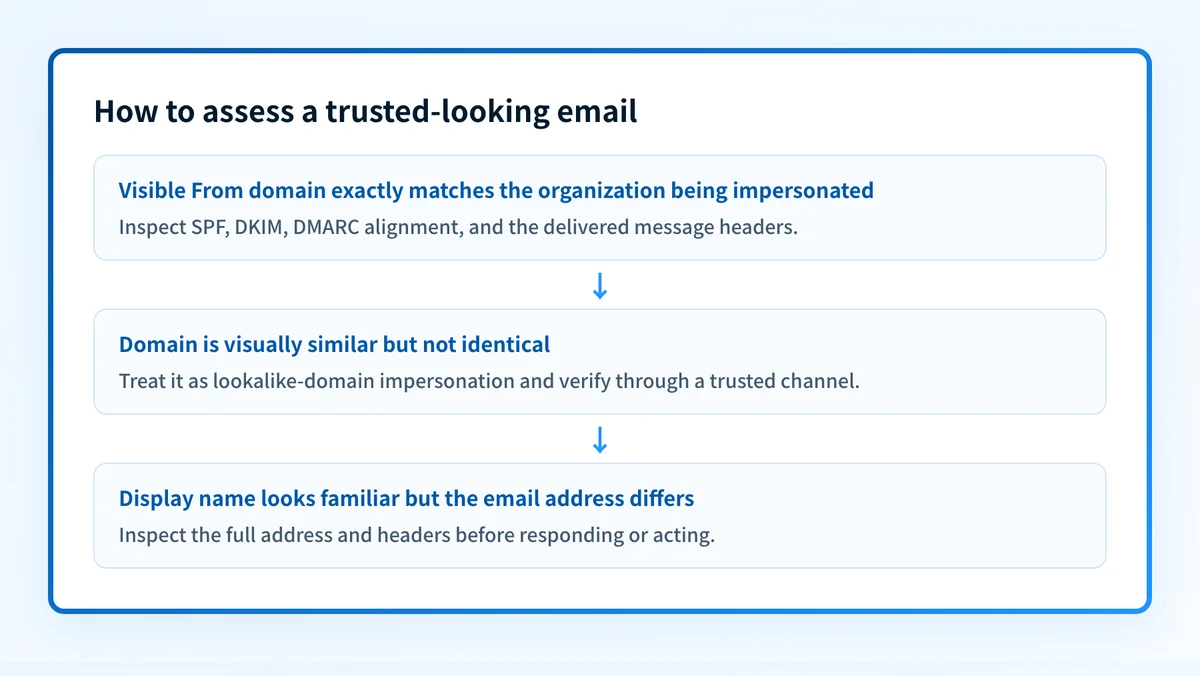
- If the visible From domain exactly matches the domain being impersonated, DMARC can help receivers identify and handle messages that fail the required authentication and alignment checks.
- If the domain only looks similar, such as a spelling variation, DMARC for the real domain does not directly solve that impersonation attempt.
- If the display name is misleading but the actual email address uses another domain, inspect the full address and the message headers rather than relying on the display name.
Worked example: a trusted-looking payment request
The FBI has documented a business email compromise pattern in which a company receives an invoice-payment request directing funds to an alternate fraudulent account. In that scenario, the email request is spoofed to appear similar to a legitimate request from a known supplier.
A recipient may see a familiar name, subject line, or visible address and assume the request is valid. The request's goal is not merely to impersonate the supplier. It is to persuade the recipient to send money to the attacker's account.
The following is an illustrative header shape, not a header from a real incident:
From: Accounts Payable <billing@yourcompany.com>
To: finance@recipient.example
Subject: Updated bank details for invoice 1042
Authentication-Results: mx.recipient.example;
  dmarc=fail header.from=yourcompany.com
Authentication-Results fields are standardized by RFC 8601. In this example, the visible From domain is yourcompany.com, while the receiving system records a DMARC failure for that domain. That result is evidence worth investigating, but it does not by itself identify the attacker, prove the message was malicious, or explain every receiver's handling decision.
A payment request that changes bank details should be verified through a previously known contact method. Do not use the phone number, reply address, or link in the suspicious message as the verification channel.
What to check after receiving a suspicious message
Start with the evidence available to you.
- If you only have the visible sender and domain, compare the full address with the legitimate organization's known address. Look for lookalike domains and unexpected subdomains.
- If you have the original message, preserve it and inspect its full headers. The visible From field alone cannot establish origin.
- If you administer the impersonated domain, review whether its sending services authenticate with aligned SPF or DKIM and whether its DMARC policy is appropriate. The Palisade Email Security Score tool can be a starting point for a public domain check, but a public check cannot prove the path used by a specific delivered message.
- If the message requests a payment, credentials, or a login action, report it through your organization's incident process and use a trusted channel to verify the request.
p=reject for sent email as protection against others impersonating a domain, while the receiving system still makes the final handling decision. CISA's Binding Operational Directive 18-01 applies this requirement to US federal executive-branch agencies, not to every private organization.
For organizations working through wider threat controls, the email security guide and the email threats learning hub provide the next context.
Review the controls behind the spoofing risk
If your domain could be impersonated, review its authentication posture and compare public DNS results with real message headers and DMARC reporting.
An article or public-domain check cannot determine whether one suspicious message was fraudulent, repair an affected mailbox, or stop attacks using lookalike domains.
Evidence
Sources and further reading
Questions readers ask
Frequently asked questions
What is the goal of email spoofing, including luring the user into?
The goal can be to lure the user into providing sensitive information, such as usernames, passwords, or financial account information. RFC 9989 describes this use of impersonated business domains. Government phishing guidance also identifies credential theft and malware deployment as documented goals.
What type of email typically lures users to sites or asks for sensitive information?
Phishing email typically lures users to malicious sites or deceives them into providing login credentials. CISA, NSA, FBI, and MS-ISAC define phishing as a form of social engineering that commonly uses email for that purpose.
Is sending emails to lure people into revealing personal information a technique known as phishing?
Yes. Phishing is social engineering that lures victims into visiting a malicious site or disclosing credentials. Spoofing may support phishing by making the message appear to come from a trusted domain, but spoofing is the impersonation technique rather than the full social-engineering objective.
What is an example of a spoofing email?
An example is an invoice-payment request that appears similar to a legitimate supplier request but directs funds to an alternate fraudulent account. The FBI has documented this as a business email compromise scenario. Verify changed payment instructions using an independently known contact method.
Does DMARC stop every spoofed email?
No. DMARC can combat specific forms of exact-domain spoofing when messages fail its authentication and alignment checks. RFC 9989 states that DMARC does not address visually similar domains or display-name abuse.

Written by
Ian BussieresCTO & Co-Founder, Palisade
Ian Bussieres is the CTO and co-founder of Palisade, agentic DMARC software for IT teams and MSPs.
More from Ian →