Spoofing vs phishing: what's the difference?
 ChatGPT
 Claude
 Gemini
 Perplexity
 Grok
GrokIn brief
Spoofing vs phishing: spoofing fakes an identity, while phishing uses deception to prompt a harmful action. Learn how email authentication fits.
Spoofing fakes or disguises an identity signal, such as an email address, sender name, or website URL. Phishing uses a deceptive message or site to make someone disclose information, open a harmful link, install software, or take another unsafe action. One email can be both, but phishing can come from a real compromised account and spoofing can occur without a request to a person.
At a glance
Quick takeaways
- Spoofing concerns a false claim about identity.
- Phishing concerns a deceptive request or attempt to cause harmful action.
- A forged From domain plus a fake sign-in request is both spoofing and phishing.
- A compromised legitimate mailbox can send phishing without forging its domain.
- DMARC helps receivers evaluate unauthorized use of an exact visible From domain. It does not detect all phishing or all spoofing.
- A public DMARC lookup checks a published DNS record, not the safety of an individual email.
How spoofing and phishing work
The FBI's spoofing and phishing guidance describes spoofing as disguising a communication to make it appear to come from a trusted source. In email, the false signal might be a display name, visible From address, Reply-To address, or a domain that resembles a known brand.
NIST defines phishing as a form of social engineering that uses fraudulent solicitation to acquire sensitive information or induce another harmful action. The deceptive request is the key distinction. An email that asks a recipient to sign in, pay an invoice, approve a transfer, or open an attachment may be phishing even if its sender identity is technically authentic.
For the domain-authentication part of the problem, RFC 9989 defines DMARC as a way for a domain owner to state handling preferences when mail using its visible From domain fails aligned SPF and DKIM authentication. DMARC addresses unauthorized use of the exact domain in the visible From field. It does not determine whether the words, attachment, or linked website are safe.
When the distinction changes
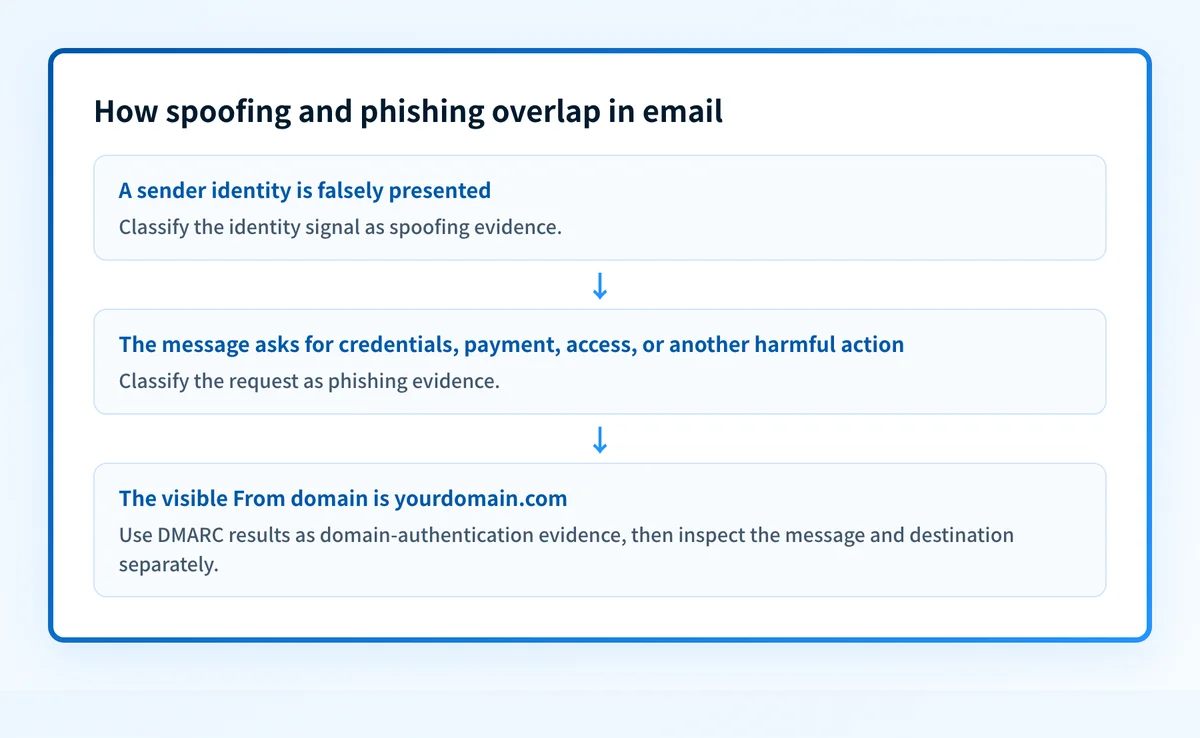
Use two separate observations: is the message making a false claim about a specific identity, and does it ask the recipient to take a deceptive or harmful action?
- A false sender identity with a credential-harvesting link is spoofing and phishing.
- A lookalike domain that asks for credentials can be phishing without spoofing the protected domain. RFC 9989 notes that visually similar domains are outside DMARC's direct scope.
- A legitimate but compromised mailbox can send phishing. The mailbox may use its normal authenticated sending path, while the request itself is malicious.
- A forged sender identity without a deceptive request is spoofing, but it does not necessarily meet the phishing definition.
For a related distinction, see spam vs phishing. Broader defensive context is available in the email threats learning hub.
Worked email example
Consider a message that appears to be from billing@yourdomain.com and asks the recipient to sign in through a link. The evidence should be recorded separately.
Visible From: billing@yourdomain.com
Reply-To: accounts@attacker-example.com
Requested action: Sign in to review an overdue invoice
Link destination: login.attacker-example.com
Authentication question: Did aligned SPF or DKIM authenticate yourdomain.com?
The visible From address claims to represent yourdomain.com. If the sender did not control an authorized, aligned authentication path for that domain, this is an exact-domain spoofing question that DMARC can help receivers evaluate.
The sign-in request and attacker-controlled destination are phishing evidence. Even a passing DMARC result would not establish that the linked site is safe. Conversely, a failing DMARC result does not by itself prove that every element of the message is malicious.
Do not reply to a suspicious message or use its phone number, link, or attachment to verify it. Use contact details from a known vendor portal, address book, or established internal channel.
What to check next
Start with the evidence you have.
- If you have the suspicious email, preserve the original message and record the visible From address, Reply-To address, destination URL, attachment name, and requested action. A screenshot can omit headers and link targets.
- If the request involves payment, credentials, or access, verify it through a known contact method. NIST's phishing guidance recommends using independently known contact information instead of details in the suspicious message.
- If the visible From domain belongs to your organization, inspect its published DMARC record. Compare that DNS result with the message's authentication results, if available.
- If the message came from a legitimate business address but is suspicious, escalate it through the relevant incident-response process. A DNS change is not a first response to a potentially compromised mailbox.
Authentication-Results header. RFC 8601 specifies that header field, including the authentication method results a receiver can report. Those results are message-specific evidence. A public DNS lookup cannot replace them.
For another operational distinction about what a point-in-time check can establish, see active vs passive monitoring.
Check the claimed domain's DMARC record
If a suspicious message claims to come from a domain you control, inspect that domain's public DMARC record before considering any policy change. Compare the published policy with the original message's authentication evidence and the sending path your team expects.
Check the claimed domain's DMARC record
A public DMARC check cannot inspect a private message, identify a compromised mailbox, prove a link is safe, or show a receiver's final phishing decision.
If you need ongoing visibility into unauthorized use of your domains, start monitoring with Palisade.
Evidence
Sources and further reading
Questions readers ask
Frequently asked questions
Is spoofing always phishing?
No. Spoofing is a false identity claim. Phishing requires a deceptive solicitation or request intended to cause a harmful action or disclosure.
Can phishing happen without spoofing?
Yes. A compromised legitimate mailbox can send a deceptive request through its normal mail system. A lookalike domain can also support a phishing lure without forging the exact domain it resembles.
Does DMARC stop phishing emails?
No. DMARC helps receivers evaluate unauthorized use of an exact visible From domain when aligned SPF and DKIM fail. It does not evaluate every malicious link, attachment, display-name impersonation, lookalike domain, or compromised account.
Can an email pass DMARC and still be phishing?
Yes. A message can authenticate for the domain it uses while still containing a deceptive request or malicious destination. A DMARC pass is domain-authentication evidence, not a content-safety determination.
What is the difference between a lookalike domain and email spoofing?
A lookalike domain resembles a known domain but is separately registered or controlled. Exact-domain spoofing claims to use the protected domain itself. RFC 9989 identifies visually similar domains as outside DMARC's direct scope.

Written by
Ian BussieresCTO & Co-Founder, Palisade
Ian Bussieres is the CTO and co-founder of Palisade, agentic DMARC software for IT teams and MSPs.
More from Ian →