Why do phishing emails pass SPF and DKIM checks?
 ChatGPT
 Claude
 Gemini
 Perplexity
 Grok
GrokIn brief
Why do phishing emails pass SPF and DKIM checks? They authenticate a sending domain, not whether a message, brand claim, or sender identity is honest.
Yes. Phishing emails can pass SPF and DKIM when the sender legitimately controls the domain and infrastructure those checks authenticate. SPF verifies whether an IP is authorized for the envelope sender domain. DKIM verifies a signature for its signing domain. Neither check decides whether the visible brand claim, display name, link, or request is honest. DMARC adds alignment to the visible From domain, but it cannot protect against a separately registered lookalike domain.
At a glance
Quick takeaways
- SPF checks authorization for the SMTP envelope sender domain, often shown later as
Return-Path. - DKIM checks whether a domain identified by the
d=tag signed an unmodified message. - A phisher can publish valid SPF and DKIM records for a domain they own.
- A passing SPF or DKIM result does not prove that the visible From domain is aligned.
- DMARC requires an aligned SPF or DKIM pass, but it applies only to the domain being evaluated.
- Authentication results are evidence about domain control and message handling, not proof that a message is safe.
How SPF and DKIM can authenticate a phishing message
SPF evaluates the domain supplied in the SMTP MAIL FROM command, also called the envelope sender. The receiving server checks that domain's published SPF policy to see whether the connecting IP address is authorized. The RFC does not define SPF as a test of the mail client's visible From: header.
DKIM adds a cryptographic signature to selected message fields and body content. The signature contains a signing domain in the d= tag. A receiver retrieves that domain's public key from DNS and can validate that the signed content has not changed in transit. A valid signature can be from any domain whose owner has configured DKIM, including a domain created for a phishing campaign.
That distinction explains a common result: an attacker registers yourcornpany-example.com, configures its own mail service, and sends a message claiming to be from a finance team. The attacker has not forged their own domain. SPF can pass for the envelope sender, and DKIM can pass for the attacker's signing domain.
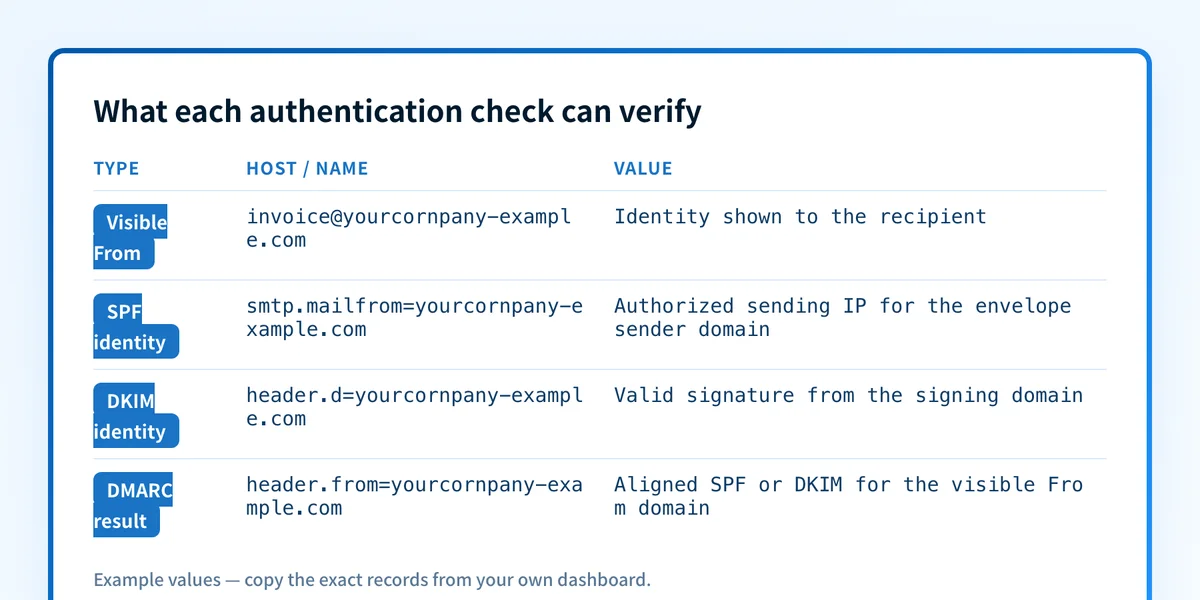
A delivered message can expose these results in an Authentication-Results field. RFC 8601 defines this field as a way for a receiving authentication service to report its evaluation. The result is meaningful only in the context of the service that added it. Do not treat a copied header line as proof that another receiver made the same decision.
When a phishing email changes from an SPF and DKIM pass to a DMARC failure
DMARC evaluates the visible From: domain and requires either SPF or DKIM to pass with an aligned identifier. Alignment means the authenticated SPF domain or DKIM d= domain has the required relationship to the visible From domain.
A phishing email can therefore pass SPF and DKIM but fail DMARC when its authenticated domains differ from the visible From domain. For example, a message can use an attacker-controlled return path and DKIM signature while showing billing@yourcompany.com in the visible From header. SPF and DKIM may each have a technical pass result, but neither aligns with yourcompany.com.
The answer changes when the attacker sends from a domain they own and also uses that same domain in the visible From header. In that case, the message can pass SPF, DKIM, and DMARC. DMARC confirms that the domain in the visible From header authorized the message. It does not establish that the domain is a legitimate business, that a display name is truthful, or that a linked sign-in page is safe.
Use this decision rule:
- If SPF or DKIM passes but the authenticated domain differs from the visible From domain, inspect DMARC alignment.
- If DMARC passes for a lookalike domain, the message is authenticated as that lookalike domain. Evaluate the sender identity, links, recipient context, and security controls separately.
- If mail claims to be from your exact domain but fails DMARC, your published DMARC policy can ask receivers to apply handling to that failure.
- If mail uses a different registered domain, your DMARC policy has no authority over that domain.
Worked header example: valid checks, dishonest purpose
This illustrative example shows why an authentication pass is not a trust verdict:
From: Accounts Payable <invoice@yourcornpany-example.com>
Return-Path: <bounce@yourcornpany-example.com>
Authentication-Results: receiver.example;
  spf=pass smtp.mailfrom=yourcornpany-example.com;
  dkim=pass header.d=yourcornpany-example.com;
  dmarc=pass header.from=yourcornpany-example.com
The domain spelling is the evidence that matters in this example. The sender controls yourcornpany-example.com, so it can authorize an IP for SPF, sign mail with DKIM, and publish a DMARC record. None of those checks make it yourcompany.com.
Compare the exact domains in these fields:
From:is the identity most mail clients show to the recipient.smtp.mailfromis the SPF identity reported inAuthentication-Results.header.dis the DKIM signing identity reported inAuthentication-Results.header.fromis the domain DMARC evaluates for alignment.
Do not block or allow mail solely because SPF or DKIM says pass. A pass can be correct while the message still impersonates a person, business function, or brand through a different domain.
What to check next, based on the evidence you have
If you have a suspicious delivered message, inspect its raw headers in the mail system that received it. Look for the receiver-added Authentication-Results field, then compare smtp.mailfrom, header.d, and header.from with the domain the recipient expected. A result from a forwarding service or another intermediary may not reflect the final recipient's assessment.
If you only have a domain name, check its published configuration with Palisade's SPF checker and DKIM checker. A public DNS check can show the record a domain publishes. It cannot prove the production message path, identify the party behind a domain, show a receiver's private filtering decision, or predict future inbox placement.
If the suspicious email uses your exact domain in the visible From header, review your DMARC policy and the aggregate reports for your domain. The email security learning hub covers the controls that complement authentication when the threat is impersonation rather than a direct domain forgery.
Track the senders that still fail alignment
A header review can explain one phishing message, and public SPF or DKIM lookups can show a domain's published DNS. Neither action inventories every legitimate source that sends as your domain or shows which sources later fail DMARC alignment.
Palisade is agentic DMARC software that analyzes DMARC aggregate-report data, identifies sending sources and authentication or alignment issues, and creates prioritized remediation tickets. It can propose the next policy stage when the evidence supports it, while your team reviews the evidence and applies any DNS policy change.
Palisade does not determine whether an attacker-controlled lookalike domain is trustworthy, guarantee inbox placement, or prove that every future message will authenticate.
Evidence
Sources and further reading
Questions readers ask
Frequently asked questions
Can a phishing email pass SPF and DKIM but fail DMARC?
Yes. SPF and DKIM can pass for attacker-controlled domains while neither identifier aligns with the visible From domain. DMARC fails when neither authenticated identifier meets the applicable alignment requirement.
Does a DMARC pass mean an email is safe?
No. A DMARC pass shows that SPF or DKIM aligned with the visible From domain. It does not verify the sender's business identity, assess the content, or determine whether a link is malicious.
Can a lookalike domain publish DMARC?
Yes. Any domain owner can publish a DMARC record for their own domain. A strict policy on a lookalike domain authenticates that lookalike domain. It does not make the domain affiliated with the brand it resembles.
Why does SPF not check the visible From address?
SPF was designed to authorize the SMTP envelope sender domain and connecting IP address. The visible From header is evaluated by DMARC alignment when a receiver performs DMARC evaluation.
Can a valid DKIM signature be used for phishing?
Yes. A valid DKIM signature proves that the signing domain authorized the signature and that signed content remained intact. An attacker can validly sign a phishing message with a domain they control.

Written by
Ian BussieresCTO & Co-Founder, Palisade
Ian Bussieres is the CTO and co-founder of Palisade, agentic DMARC software for IT teams and MSPs.
More from Ian →