Why does my DKIM signature fail alignment and how can I fix it?
 ChatGPT
 Claude
 Gemini
 Perplexity
 Grok
GrokIn brief
DKIM signature alignment fails when a passing DKIM d= domain does not align with the visible From domain. Inspect headers, fix signing identity, and.
A DKIM signature fails alignment when the domain in the signature's d= tag does not align with the visible From: domain under the receiving domain's DMARC alignment mode. The DKIM signature can still be valid. Start with the delivered message's trusted authentication results, identify the sender behind the observed signing domain, configure its domain-authentication option where available, then retest the same production path.
At a glance
Quick takeaways
- A
dkim=passresult proves that one DKIM signature verified. It does not prove that the signature aligns for DMARC. - DMARC compares the visible
From:domain with the DKIM signing domain, represented asheader.din receiver authentication results. - Relaxed DKIM alignment permits an organizational-domain match, including an aligned subdomain. Strict alignment requires an exact match.
- A provider-owned
d=domain is a common reason for a valid but unaligned DKIM signature. - A missing or invalid DKIM signature is a verification problem first. Do not treat it as an alignment-only problem.
- Retest with a new message through the same application and review DMARC aggregate reports after traffic accumulates.
What does the failure mean?
DMARC uses the domain in the RFC 5322.From field as the identifier that must align with an authenticated SPF or DKIM identifier. For DKIM, that authenticated identifier is the signing domain in the d= tag. A receiver can record its evaluation in an Authentication-Results header using the syntax defined by RFC 8601.
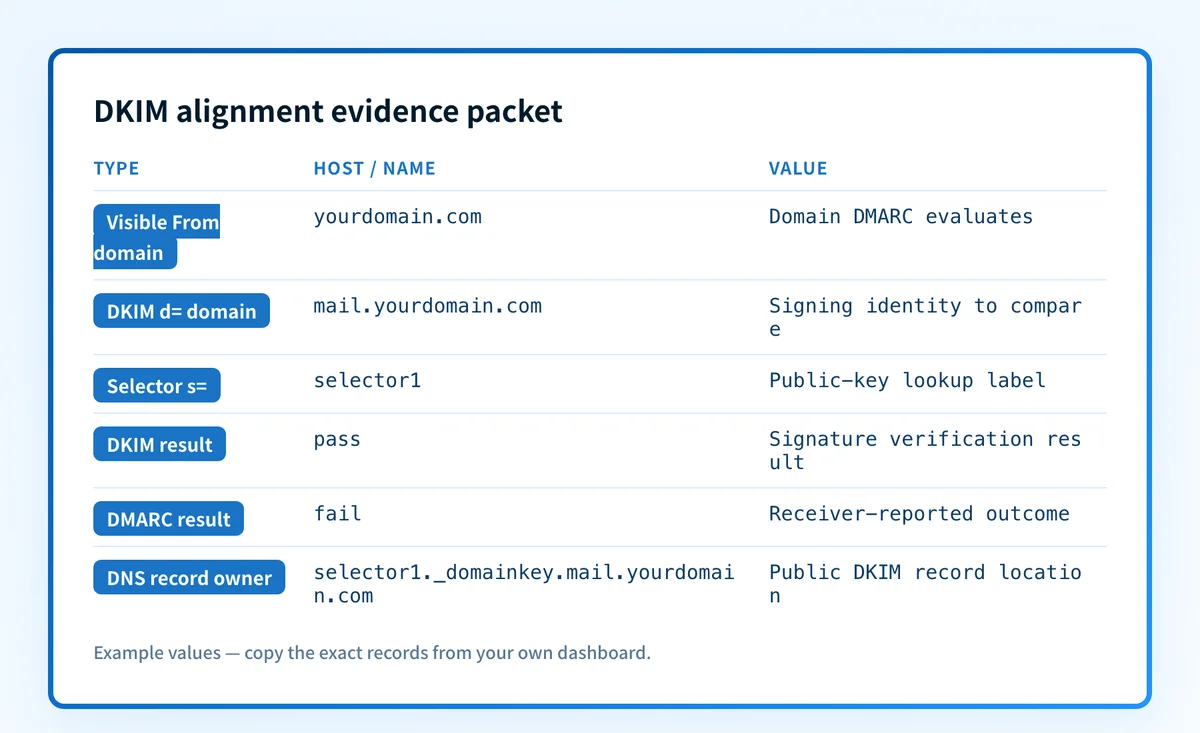
This illustrative, redacted fragment shows a valid DKIM signature that cannot satisfy DMARC through DKIM alignment:
Authentication-Results: receiver.example;
  dkim=pass header.d=mailer.example.net header.s=selector1;
  dmarc=fail header.from=yourdomain.com
The dkim=pass result means the receiver verified the signature according to the DKIM verification process in RFC 6376. It does not mean mailer.example.net aligns with yourdomain.com. In this example, it does not.
A compact comparison makes the distinction clear:
Unaligned, illustrative only
Visible From domain: yourdomain.com
DKIM d= domain:    mailer.example.net
DKIM result:       pass
DKIM alignment:    fail
Aligned under relaxed alignment, illustrative only
Visible From domain: yourdomain.com
DKIM d= domain:    mail.yourdomain.com
DKIM result:       pass
DKIM alignment:    pass
The DMARC record's adkim tag controls DKIM alignment. With relaxed alignment, the signing domain and visible From domain need the same organizational domain. With adkim=s, the domains must match exactly. RFC 9989 specifies relaxed alignment as the default when adkim is absent. The email authentication learning hub explains how DKIM, SPF, and DMARC work together.
What usually causes it?
A third-party sender signs with its own domain
A marketing platform, support system, billing service, or application can sign mail with a provider-owned domain by default. That signature may verify successfully, but it cannot align with your visible From domain unless the provider-owned domain is related to it.
When header.d is a provider domain, the usual next step is that service's custom-domain authentication or custom DKIM setup. Use the service's current documentation and DNS values generated for your account. Do not reuse another account's selector, CNAME target, or TXT value.
Custom DKIM is not active on the failing route
One service can use different signing identities for separate message streams, regions, accounts, or sending products. If a passing message and a failing message have different header.d or header.s values, that supports an inference that they took different signing paths. It does not prove a specific provider setting is wrong.
Compare the failing message with a known-good message sent by the same application. Identify the application and route before changing DNS.
The visible From domain changed
A template, brand, or application configuration can change the visible From domain while the signer continues to use the previous domain. A valid signature for oldbrand.example does not align with yourdomain.com.
Choose the intended visible From domain and the DKIM signing domain, then make them align under the policy you intend to publish. This repairs identity alignment. It does not repair a broken cryptographic signature.
Strict DKIM alignment is configured
If your DMARC record contains adkim=s, mail.yourdomain.com does not align with yourdomain.com. That same pair can align under relaxed mode. RFC 9989 defines strict alignment as an exact-domain comparison.
Treat this as a policy decision. If strict alignment is intentional, configure the sender to sign with the exact visible From domain, or use a visible From domain that matches the intended signer.
The message is unsigned or the DKIM signature is invalid
Alignment is evaluated only after DKIM verification produces a passing authenticated identifier. A message with no DKIM signature, or one reported as dkim=fail, has a DKIM verification issue before it has a usable DKIM alignment path.
Use the receiver-added result as evidence. The message's DKIM-Signature header is a sender claim, while RFC 8601 describes authentication results as assertions made by the receiving system that added the field. For failed verification, follow the separate DKIM fail troubleshooting guide.
How do I diagnose the failure?
1. Preserve the receiver's authentication evidence
Open the raw source of a message sent through the exact failing production path. Save the full message in an access-controlled incident record. Redact recipient addresses, content, identifiers, and routing details before sharing it outside the team.
Record the receiver-added Authentication-Results header, the visible From: address, each DKIM-Signature header, Message-ID, sending time, recipient provider, and sending application. Do not diagnose alignment from the rendered message alone.
2. Build an alignment evidence packet
Use a labelled packet so the signing identity, policy, and route can be compared without losing the message-level evidence:
Alignment evidence packet, illustrative only
Visible From domain: yourdomain.com
DKIM d= domain: mailer.example.net
DKIM selector s=: selector1
DKIM result: pass
DMARC result/disposition: fail / reject
Observed identifier comparison: mailer.example.net does not align with yourdomain.com
Expected aligned identifier: yourdomain.com or an aligned subdomain when adkim=r
Message ID and time: <redacted Message-ID>, <UTC timestamp>
Sending application: <identified application or provider>
DNS record owner name: selector1._domainkey.mailer.example.net
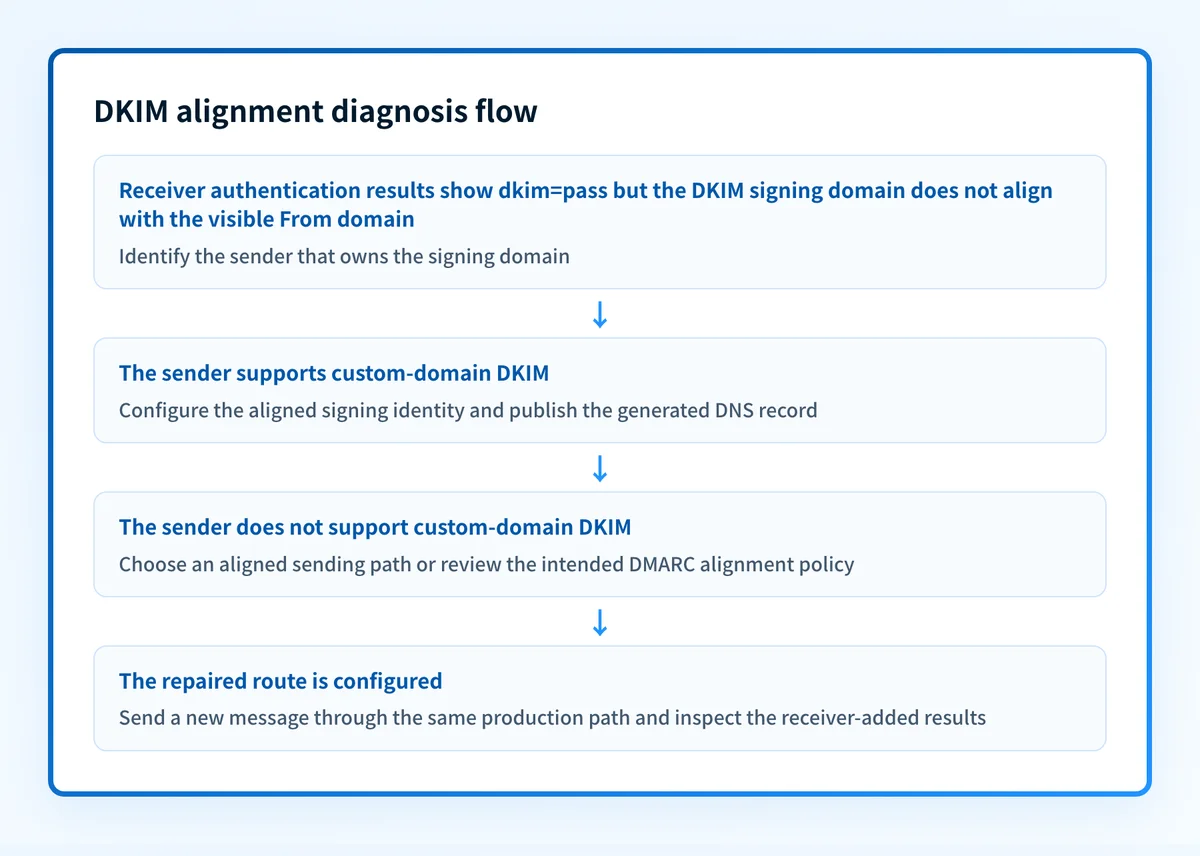
The DNS record owner name is derived from the selector and signing domain, not from the visible From domain. It tells you where a verifier looks for the public key. It does not prove which application generated the signature.
3. Compare the visible From domain with header.d
Check whether the observed signing domain matches the visible From domain exactly, or shares its organizational domain when relaxed alignment applies. Then inspect the published DMARC record for adkim.
Use a public DMARC checker to inspect the current record syntax and policy tags. A public DNS check cannot prove that the delivered message used that record, explain one receiver's private decision, or monitor later changes.
Do not change the DMARC policy to hide an alignment failure. Lowering p= changes requested enforcement. It does not make the sender's DKIM identity align.
4. Identify the service that owns the signing domain
Map each observed header.d domain to the application, ESP, relay, or service that sent that message class. Use application logs, campaign metadata, outbound relay records, and the message's Received chain. Do not infer ownership from a selector name alone.
If the message contains multiple DKIM signatures, compare each passing header.d value with the visible From domain. DMARC can use a passing aligned DKIM identifier. One passing unaligned signature does not prevent another signature from satisfying DKIM alignment.
5. Check the selector as a separate DNS question
Once you know the observed selector and signing domain, use the DKIM checker to inspect whether the corresponding public DKIM record resolves.
A selector lookup helps distinguish a missing or malformed public key from an alignment problem. It cannot inspect the delivered message, access the private key, prove that the production sender used the selector, or explain why a particular receiver handled a message in a particular way.
6. Inspect aggregate reports after the message check
After message evidence identifies the route, review DMARC aggregate reports to see whether the same source repeatedly produces unaligned results. Aggregate reports help establish the scope of a source problem, but they do not replace raw headers for an individual failure.
If the receiver reports signature verification failure instead of an alignment mismatch, investigate that evidence with DKIM signature verification failed guidance.
How do I fix it?
Configure domain DKIM for the sender with the wrong signing domain
When the evidence packet shows a provider-owned or unrelated d= domain, enable that sender's custom-domain DKIM or domain-authentication feature if it supports one. Publish only the selector-specific DNS values generated for your account, then wait for the sender's own verification status before retesting.
Many providers use CNAME records and others use TXT records. The record type is provider-specific. This repair changes the DKIM signing identity. It does not change DMARC enforcement or guarantee inbox placement.
Align the subdomain configuration with the DMARC policy
When the sender signs with mail.yourdomain.com and the visible From domain is yourdomain.com, check adkim. Under relaxed alignment, the pair can align. Under strict alignment, configure the sender to sign with the exact visible From domain if that is supported and required by your policy.
Changing adkim is a DMARC policy decision, not a substitute for understanding the sender inventory. Make the decision only after confirming the production paths that rely on the domain.
Repair an unsigned or invalid DKIM path before retesting alignment
If the message has no passing DKIM result, identify why the service did not sign or why verification failed. Check the sender's domain-authentication status, the selector record, and the complete delivered message. RFC 6376 verification requires the verifier to retrieve and use the relevant public key.
Do not regenerate keys or change records solely because alignment failed. Rotate or replace a key only when separate evidence establishes a key or verification problem.
How do I validate the repair?
Send a new message through the same application, account, template, route, and recipient provider that produced the failure. Check the receiver-added authentication result for dkim=pass, confirm that header.d aligns with header.from under the published adkim mode, and confirm the reported DMARC result.
Validate all four relevant layers:
- DNS: confirm the selector record through the authoritative DNS provider and at least one public resolver.
- Vendor: confirm that the identified sender reports the domain or DKIM configuration as verified.
- Message: inspect a newly delivered message from the exact repaired production path.
- DMARC: review aggregate reports after sufficient traffic has accumulated.
Track alignment failures across your sending sources
After the message-level repair, use Palisade to identify sources and authentication or alignment issues in DMARC aggregate-report data, then create prioritized remediation tickets for the remaining sources.
Palisade can analyze reported DMARC traffic and help prioritize alignment work, but it does not change your DMARC policy, repair every sender automatically, or prove a future message will authenticate or reach the inbox.
Evidence
Sources and further reading
Questions readers ask
Frequently asked questions
Can DKIM pass but still fail DMARC alignment?
Yes. dkim=pass means a signature verified, while DMARC also requires the signing domain to align with the visible From domain unless aligned SPF satisfies DMARC instead.
Does a subdomain align with the parent domain for DKIM?
Only under relaxed DKIM alignment. mail.yourdomain.com can align with yourdomain.com when adkim=r or when adkim is absent. With adkim=s, the domains must match exactly.
Will changing DMARC to p=none fix DKIM alignment?
No. Changing p= changes the DMARC policy's requested handling. It does not change the DKIM d= domain, the visible From domain, or their alignment.
Should I fix the DNS key if the DKIM signature is valid but unaligned?
No. A valid signature shows that the receiver could verify that signature. First configure the sender to use an aligned signing domain, unless the evidence packet also identifies a separate selector or verification problem.
Can a DKIM checker prove my production messages align?
No. A DKIM checker can inspect a public selector record. It cannot inspect the exact delivered message, prove which signing identity the application used, or determine a receiver's private handling decision.

Written by
Samuel ChenardCEO & Co-Founder, Palisade
Samuel Chenard is the CEO and co-founder of Palisade, agentic DMARC software for IT teams and MSPs, from one domain to thousands.
More from Samuel →