DKIM fail: body hash did not verify, and how to fix it
 ChatGPT
 Claude
 Gemini
 Perplexity
 Grok
GrokIn brief
This error means the message body changed after it was signed. Here are the five things that alter it in transit, and how to find which one is yours.
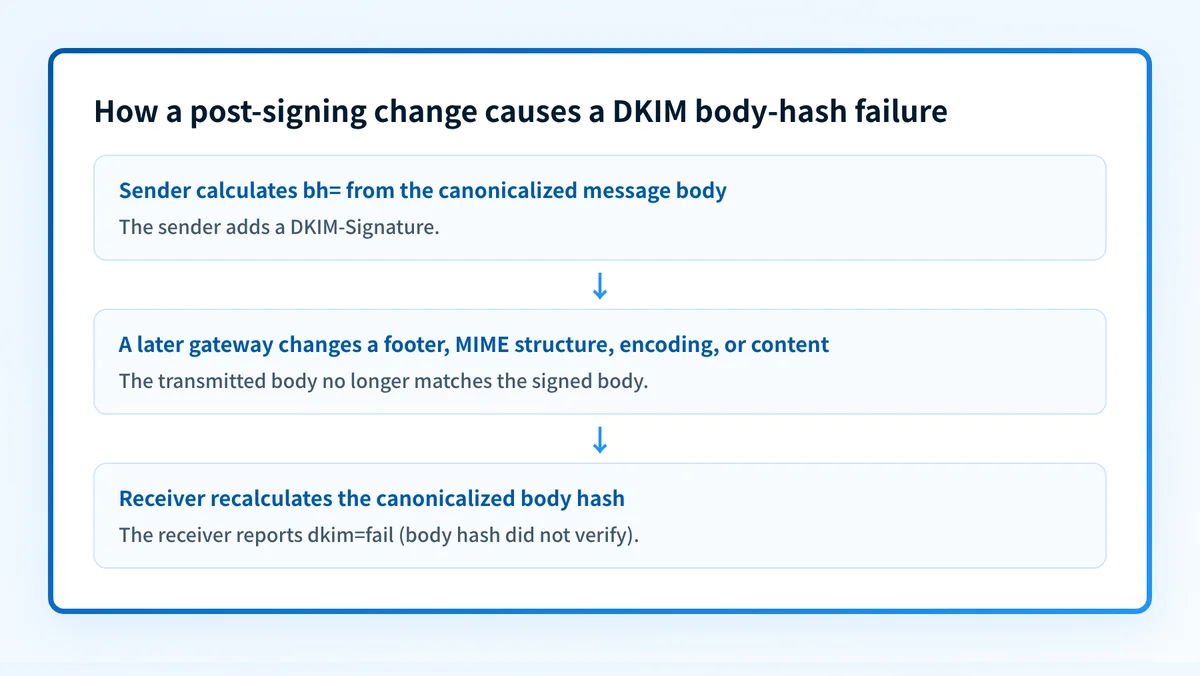
DKIM fail body hash did not verify means the receiver calculated a different hash for the canonicalized message body than the bh= value in the DKIM signature. Start with the raw message that failed, identify where DKIM signing happened, then compare it with the path after signing. Repair the confirmed body change, or sign after that change, and resend through the same production route.
At a glance
Quick takeaways
bh=contains the hash of the canonicalized message body, whileb=contains the DKIM signature data.dkim=fail (body hash did not verify)identifies a body-hash mismatch for one signature, not the system that caused it.- A valid DKIM public key does not repair a message body changed after signing.
- Footers, MIME rewrites, transfer-encoding changes, and mailing-list processing are possible causes until raw-message evidence confirms one.
- The receiver-added
Authentication-Resultsfield and the correspondingDKIM-Signatureheader are the strongest starting evidence. - Validate the repair with a new message through the same application, route, and content format.
What does the failure mean?
RFC 6376 defines bh= as the hash of the canonicalized message body and requires a verifier to compare its calculated hash with that tag. When the values differ, the DKIM signature does not verify. A Microsoft Learn support discussion documents the exact dkim=fail (body hash did not verify) result. That thread is provider-context evidence for the symptom, not an explanation for every failed message.
Authentication-Results: mx.receiver.example;
  dkim=fail (body hash did not verify) header.d=example.com header.s=selector1;
  spf=pass smtp.mailfrom=example.com
DKIM-Signature: v=1; a=rsa-sha256; c=relaxed/simple; d=example.com; s=selector1;
  h=from:to:subject:date;
  bh=BASE64_BODY_HASH_EXAMPLE=;
  b=BASE64_SIGNATURE_EXAMPLE=
This is illustrative and redacted. Do not publish live message headers, account-generated selector values, private keys, tokens, or customer content.
The bh= and b= tags have different jobs. bh= is calculated from the canonicalized body. b= is signature data for selected headers. A body-hash mismatch means the verifier did not get the same canonicalized body that the signer hashed. It is separate from a DMARC alignment issue, where a valid DKIM signature's d= domain does not align with the visible From domain.
For related protocol guidance, visit the email authentication learning hub.
What usually causes it?
Content changed after signing
A body change after signing can create this failure because DKIM hashes the canonicalized body. A disclaimer, footer, tracking insertion, rewritten link, or template transformation can matter when it occurs after the signer. RFC 6376 canonicalization and body-hash rules explain the mechanism.
The conclusion that a specific hop changed a particular message is an inference. Confirm it by comparing raw messages before and after that hop. Received fields help map the route, but they do not prove a body modification.
An intermediary rewrote MIME or encoding
A gateway, mailing list, forwarding service, or content-scanning service can alter MIME boundaries, transfer encoding, line endings, or message content. Those changes can affect the bytes used for the body hash even when the rendered email looks unchanged.
The Microsoft support discussion associates the failure with a disclaimer added after signing. Treat that as one documented scenario, not a universal diagnosis.
The signer hashed different content from what it transmitted
RFC 6376 defines the simple and relaxed canonicalization algorithms and records the selected algorithm in c=. If the signing system hashes one serialized message but sends another, the receiver calculates a different result.
This cause becomes more likely when controlled captures show no later service changed the message. Review the signing implementation, MIME generation, line endings, and exact message bytes supplied to the signer.
The signature uses a body-length limit
The optional l= tag states how many canonicalized body octets are included in the hash. RFC 6376 warns about the security consequences of limited body length. Do not add l= to accommodate a footer or another rewrite. Remove the confirmed rewrite or place it before signing.
The evidence came from another path
A forwarded, resent, or list-modified copy can differ from the production message that first failed. Use the full raw source containing the exact result. Rendered mail views can hide whitespace, encoded content, and MIME structure that affect DKIM verification.
How do I diagnose the failure?
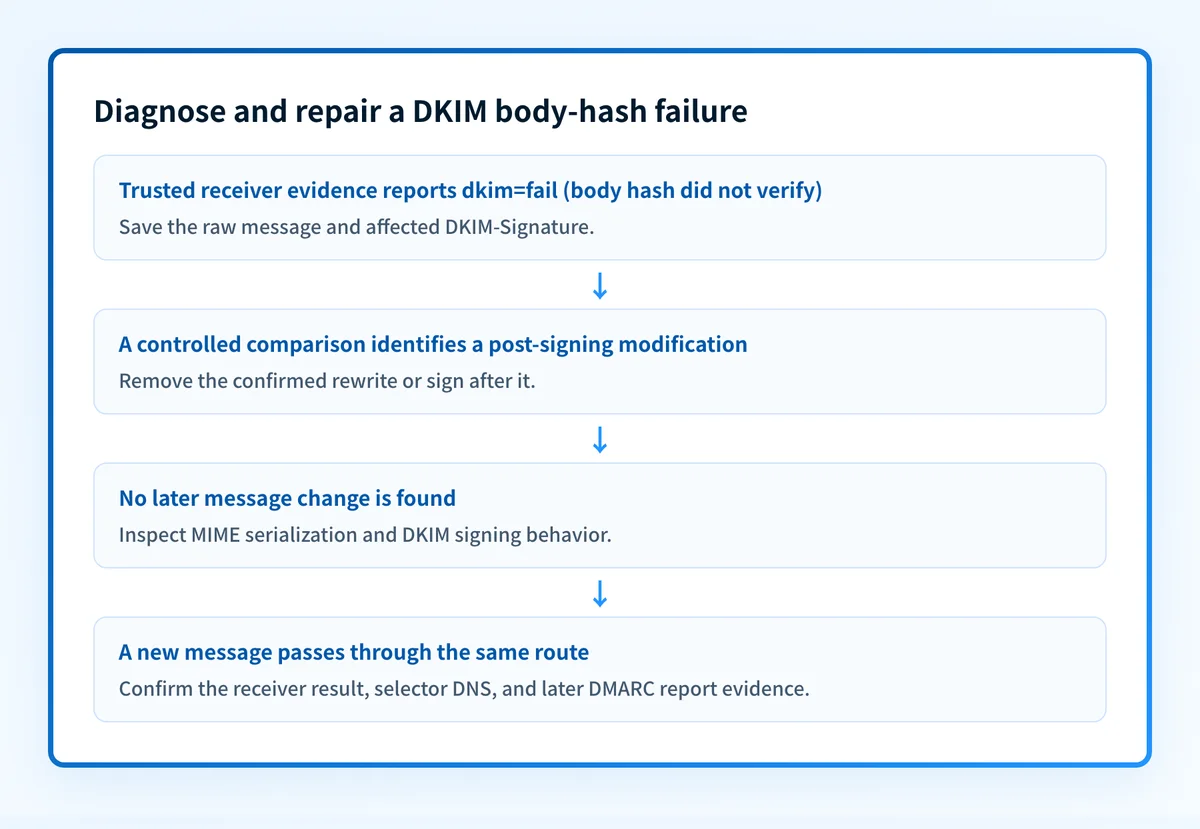
1. Preserve the receiver's message evidence
Save the raw source of the failed message. RFC 8601 defines Authentication-Results as an authentication-service field within a trust boundary, so prioritize the result added by the receiving system over an older copied header.
Record the Message-ID, delivery time, sending application, outbound route, d=, s=, c=, bh=, and any l= tag. Keep the exact dkim=fail (body hash did not verify) result with the incident record.
Redact recipients, message content, tokens, and customer data before sharing evidence outside the team.
2. Map the signing point and every later hop
Identify the system that added the affected DKIM-Signature. Then list every service that handled the message afterward.
application -> outbound MTA -> disclaimer gateway -> recipient
                    signs?         changes body?       verifies?
Read Received fields from bottom to top, then verify the route with mail logs and configuration records. A route-specific failure can indicate a later modification, but controlled raw-message comparison confirms the cause.
3. Send controlled same-path tests
Send a new minimal message through the normal production path and retain the receiver's raw source. If operationally approved, send the same content through a route that bypasses one suspected modifier.
Compare raw sources, not mail-client screenshots. Add production variables one at a time: HTML templates, disclaimers, rewritten links, attachments, and normal content encoding. A passing plain-text message does not prove the production template passes.
4. Check the published selector separately
Use the Palisade DKIM checker with the d= domain and s= selector from the failed signature. This checks whether a public DKIM record is available at that selector owner name.
A missing or incorrect selector record is a separate DNS or key-configuration problem. It does not prove that a body-hash mismatch disappeared. A public DKIM lookup cannot inspect the delivered message body, private key, signing implementation, intermediary changes, a receiver's private filtering decision, or future delivery outcomes.
How do I fix it?
Sign after the final required body mutation
When a required gateway adds a disclaimer, transforms links, or makes another confirmed body change, configure DKIM signing after that final change. The new bh= value then covers the message body sent onward.
Do not loosen the DMARC policy as a workaround. Changing p= changes requested DMARC enforcement. It does not change the message body or repair DKIM verification.
Confirm that every intended outbound route reaches the final signer. Moving signing to one gateway can leave another application route unsigned if it bypasses that gateway.
Remove the confirmed post-signing rewrite
If the body modification is unnecessary, disable only the confirmed post-signing transformation. Retest with the production template, not only a plain-text test message.
Keep the previous configuration available for rollback. If removing the transformation changes a legal disclaimer, security control, or customer-facing template, involve the control owner before making the change.
Correct the signing implementation
If the signer creates a mismatch before any downstream system handles the message, review its canonicalization, MIME generation, line endings, transfer encoding, and body-length behavior against RFC 6376 DKIM signing and verification requirements.
Change one component at a time. A signer replacement or configuration change should have a rollback plan, especially where multiple outbound applications rely on the same service.
Keep DMARC policy changes separate
A change to p= affects DMARC enforcement requested by the domain owner. It does not repair the body mismatch or make the failed DKIM signature pass. Keep the technical repair focused on the signer or the confirmed post-signing transformation.
How do I validate the repair?
Repeat the same route that produced the failure. Use the same application, outbound gateway, recipient provider, and content format. Test the production template, including any footer, attachment, link rewriting, and encoding behavior that appeared on the failed message.
Check four layers:
- DNS: confirm the selector record resolves through the authoritative DNS service and at least one public resolver.
- Vendor: confirm the sender or gateway reports its expected DKIM configuration state, where that status exists.
- Message: inspect the newly received raw source and confirm the trusted receiver-added result reports
dkim=passfor the intended signature. - DMARC: after reports accumulate, review aggregate data for the same sending source and confirm the passing signature can align with the visible From domain when DMARC depends on DKIM.
Check the DKIM selector after the same-path retest
After repairing the body change, check the published DKIM selector used by the failed signature. This helps rule out a separate public-key or DNS issue while you compare the newly delivered message.
A DKIM lookup cannot identify the system that changed this message body, inspect the private key, monitor every sending route, or guarantee future receiver behavior. If the production path has multiple senders or later DNS drift is a concern, Palisade is agentic DMARC software that analyzes DMARC aggregate-report data, identifies authentication and alignment issues, and creates prioritized remediation tickets for human review. Learn more about DMARC monitoring and reporting.
Evidence
Sources and further reading
Questions readers ask
Frequently asked questions
Can DNS propagation cause a body-hash failure?
No. A missing or stale DKIM public key creates a key retrieval or signature verification issue. body hash did not verify describes a mismatch between the received canonicalized body and the bh= value.
Will changing DMARC to p=none fix DKIM?
No. Changing p= changes requested DMARC enforcement. It does not change the message body, DKIM signature, or body-hash verification result.
Should I regenerate the DKIM key first?
No. Regenerating a key does not repair a confirmed body change. Rotate a key only when separate evidence shows that the key needs replacement.
Can a passing DKIM record lookup prove the repair worked?
No. A DKIM lookup can confirm that a public key is published for a selector. It cannot prove that the production sender used that selector or that the delivered message body remained unchanged after signing.
Check the DKIM public key for the selector
Enter your domain and selector.

Written by
Samuel ChenardCEO & Co-Founder, Palisade
Samuel Chenard is the CEO and co-founder of Palisade, agentic DMARC software for IT teams and MSPs, from one domain to thousands.
More from Samuel →