Why does a DKIM checker say no record found?
 ChatGPT
 Claude
 Gemini
 Perplexity
 Grok
GrokIn brief
DKIM checker says no record found? Verify the selector and signing domain, inspect the exact DNS query, fix the public record, and retest mail.
A DKIM checker says "no record found" when public DNS does not return an applicable DKIM public key for the selector and signing domain it checked. The safe next step is to take the s= selector and d= signing domain from a real DKIM-Signature header, query the exact DNS owner name, and then separate a missing public key from an unsigned message or a stale DNS answer.
At a glance
Quick takeaways
- A DKIM public-key lookup needs both the selector and the signing domain.
- The DNS owner name has the form
selector._domainkey.signing-domain. - The visible From address does not always match the
d=domain in a DKIM signature. - A no-record DNS result does not prove that the sending application failed to sign a message.
- A returned public key does not prove that the sender has the matching private key.
- Retest DNS and a newly delivered message through the same production path.
What this tool checks
The Palisade DKIM checker inspects publicly visible DKIM records for a submitted domain. Use it as a starting point to inspect the DNS side of DKIM, then match its findings to the exact selector used by a delivered message.
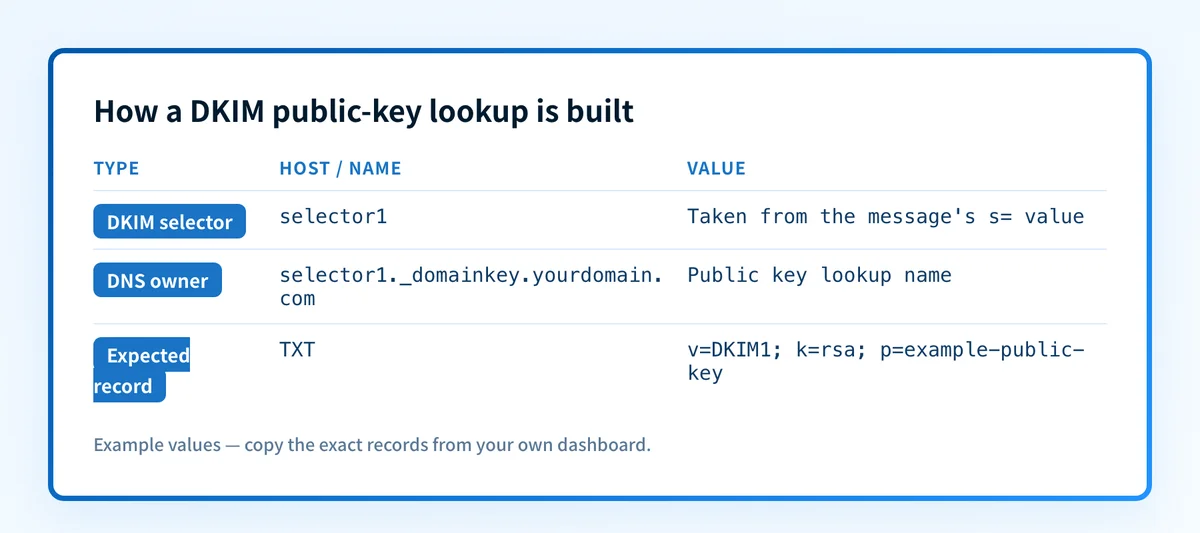
RFC 6376 defines DKIM key retrieval. A verifier builds the key-query name from the s= selector and d= signing domain in the message's DKIM-Signature header:
selector._domainkey.signing-domainFor example, a message signed with s=selector1 and d=yourdomain.com leads to this DNS query:
selector1._domainkey.yourdomain.comThe checker can inspect public DNS. It cannot see a private key, confirm that an application selected the expected key, prove a real message was signed, monitor later DNS changes, or reveal why one receiver made a private delivery decision. A public lookup also cannot guarantee inbox placement.
How to run the check
1. Get the selector and signing domain from a delivered message
Open the raw source of a recently delivered message from the affected application. Find the DKIM-Signature header and record its d= and s= values.
Do not substitute the visible From domain unless it matches d=. A sender can sign with a related domain or subdomain.
If the message has no DKIM-Signature header, there is no selector lookup to validate from that message. Move to the sending service's current domain-authentication settings and obtain the record values generated for that exact sending domain and mail stream.
2. Run the exact public DNS lookup
Enter the signing domain into the Palisade DKIM checker. Treat the result as domain-level public DNS evidence. If you have a selector from a real message, query the full owner name directly as well.
dig +short TXT selector1._domainkey.yourdomain.comA DKIM key record commonly uses a TXT record, though a provider may publish a CNAME that leads to its key material. Follow the current record instructions generated for your own account. Do not publish or copy another tenant's selector, CNAME target, or key value.
3. Record the evidence before changing DNS
Keep the values below with the test timestamp. This prevents a domain scan, a message header, and a later DNS change from being treated as the same evidence.
Illustrative redacted no-record result
Selector from message: selector1
Signing domain from message: yourdomain.com
Exact owner queried: selector1._domainkey.yourdomain.com
Returned DNS status: no TXT answer returned
Record type and value: none returned
Message DKIM d=: yourdomain.com
Message DKIM s=: selector1
This example means only that the queried public name did not return a TXT answer at that time. It does not establish why.
- No public key: the exact query is correct, but no applicable DKIM key record is published. Compare the DNS owner name and value with the current values generated by the sending service.
- Wrong selector: the message or provider configuration names a different
s=value. Query the selector from the real message, not a selector from an older setup. - Stale DNS response: the DNS zone may already be corrected while a resolver still returns an older answer. Query the authoritative DNS service and more than one public resolver before changing the record again.
- Message was never signed: no
DKIM-Signatureheader exists. Check the sender's configuration and sending path before treating DNS as the cause.
4. Compare the checker result with message evidence
DKIM selectors are chosen by domain owners and sending services. Public DNS does not provide a complete directory of every selector a domain may use.
A domain-level scan is useful when you have only a domain. When you are diagnosing production mail, the d= and s= values from the delivered message are the more specific evidence. The email authentication learning hub explains how DKIM, SPF, and DMARC use related but separate evidence.
How to interpret the results
No record found for the expected selector
This result means the lookup did not return an applicable public key record at the name built from the supplied selector and signing domain. RFC 6376 section 6.1.2 describes the verifier's key retrieval process. Without an applicable key record, the verifier cannot validate the signature with that key.
First compare the queried owner name with the s= and d= values in the message. Then compare it with the provider-generated DNS instructions for the same account and sending domain. A no-record result does not identify which of those values is wrong.
A public key record is returned
A usable public key record means public DNS can answer for that selector and signing domain. It does not prove the affected application has the matching private key or is currently signing mail with that selector.
Next, send a new message through the same application, account, sender address, and recipient path. Inspect the receiver-added authentication result. RFC 8601 defines the Authentication-Results header field, which records a receiving system's authentication assessment.
The message has no DKIM-Signature header
This is a sender-side configuration or mail-path question, not proof that the DNS key is absent. Check the sending service's authentication and signing status for the exact application or stream that produced the message.
Do not replace an existing DKIM record based only on an unsigned message. Another legitimate sender may still use that selector.
The message uses a different selector than the one checked
Query the selector in the message. A domain can have several DKIM records during key rotation, a provider migration, or when multiple platforms send mail.
If the next problem is a missing DMARC policy, use the related no DMARC record found guide. A bounce that reports no MX record is a different DNS failure and needs the workflow in what no MX record found means in a bounce.
How to act on the result
For an exact no-record result, use this order:
- Confirm the
d=ands=values in a newly delivered message. - Build the exact owner name as
selector._domainkey.signing-domain. - Compare that owner name, record type, and value with the current values generated by the sending service.
- Check that the record exists in the authoritative zone for the signing domain.
- Query at least one public resolver after the authoritative answer is correct.
- Send a new message through the same production path.
Do not copy a DKIM selector, CNAME target, or public key from another account. Those values belong to a specific sender configuration and can break authentication when reused.
If the public record exists but the message is unsigned, fix or escalate the sender configuration. If the message is signed and public DNS returns a key but DKIM still fails, preserve the raw message and the receiver's authentication result. The diagnosis has moved beyond a missing-record check.
How to retest
Run the same exact DNS query after the authoritative answer is corrected:
dig +short TXT selector1._domainkey.yourdomain.comThen validate four separate layers:
- DNS: the exact owner name returns the intended record from authoritative DNS and a public resolver.
- Vendor: the sending service reports the relevant domain configuration as verified, where it provides that status.
- Message: a new delivered message contains the intended
d=ands=values, and the receiver reports its DKIM result. - DMARC: once aggregate reports accumulate, review whether the authenticated DKIM domain aligns with the visible From domain.
Track the sending sources behind the result
A corrected record confirms that one public DKIM lookup can succeed. It does not identify every service sending as the domain, reveal which sources still fail DKIM or DMARC alignment, or decide when the DMARC policy is ready to advance.
Palisade is agentic DMARC software that analyzes DMARC aggregate-report data, identifies sending sources and authentication or alignment issues, and creates prioritized remediation tickets. It proposes a next policy step from the evidence, while a human reviews the evidence and applies any DNS or DMARC policy change.
Palisade does not change the DMARC policy for you, repair every sender automatically, prove private-key signing from a DNS lookup, or guarantee delivery.
Evidence
Sources and further reading
Questions readers ask
Frequently asked questions
Does "no record found" mean DKIM is disabled?
No. It means the checked public DNS name did not return an applicable DKIM public key. The cause may be a wrong selector, wrong signing domain, unpublished record, stale DNS response, or a lookup that does not match the sender's current configuration.
Can I use the From domain instead of the DKIM signing domain?
Only if it matches the d= value in the message's DKIM-Signature header. DKIM lookup uses the signing domain and selector, while the visible From domain is used later for DMARC alignment evaluation.
Does a DKIM TXT record prove that messages are signed?
No. The public record lets a receiver retrieve a key for a selector. A new delivered message must show the expected DKIM-Signature header and receiver result before you can confirm the production path is signing.
Why does one DKIM selector work while another says no record found?
Each selector identifies a separate DKIM key record. Different sending services or key-rotation periods can use different selectors, so the selector in the actual message is the one that matters for the diagnosis.
Should I delete an old DKIM record after fixing a new one?
Not immediately. Old messages can remain in transit with the earlier signature, and another active sender may use that selector. Confirm the current sending configuration and follow the provider's rotation guidance before removing an old record.
Check the DKIM public key for the selector
Enter your domain and selector.

Written by
Dominic LandryDeliverability & DNS
Dominic Landry works on email deliverability and DNS configuration at Palisade, from SPF and DKIM records through to DMARC enforcement.
More from Dominic →