How do I fix the 'No DMARC record found' warning?
 ChatGPT
 Claude
 Gemini
 Perplexity
 Grok
GrokIn brief
Fix the 'No DMARC record found' warning: create and publish a DMARC TXT record in DNS, then verify it, a step-by-step guide with examples.
"No DMARC record found" means your domain has no DMARC policy published in DNS. The fix is a single step: add one TXT record at _dmarc.yourdomain.com with the value v=DMARC1; p=none; rua=mailto:you@yourdomain.com. Once DNS propagates, the warning clears and receiving servers start sending you authentication reports. This guide walks through publishing the record, choosing the right policy, and verifying it.
Checkers phrase the same problem several ways. If you have seen any of these, you are missing a DMARC record:
- No DMARC record found
- DMARC record is missing
- No DMARC record published
- DMARC policy not enabled
- Unable to find DMARC record
Why "No DMARC record found" appears
A DMARC record is a TXT record published at the special host _dmarc.. A checker reports "No DMARC record found" whenever it queries that host and gets nothing back. In practice the cause is almost always one of these:
- You have never published a record. The most common case. DMARC is not on by default at any registrar or mailbox provider, so a brand-new domain has no policy until you add one.
- The record is at the wrong host. It must live at
_dmarc.yourdomain.com, not at the root domain and not atdmarc.yourdomain.com(no underscore). - DNS has not propagated yet. A record you added minutes ago may not be visible everywhere until the old cache entry expires.
How to fix it: publish a DMARC record
To clear the warning, publish a DMARC TXT record in your domain's DNS. The record lives at _dmarc.yourdomain.com, where yourdomain.com is your actual domain. If you would rather not hand-write the value, the DMARC record generator builds the string in your browser from the options you pick.
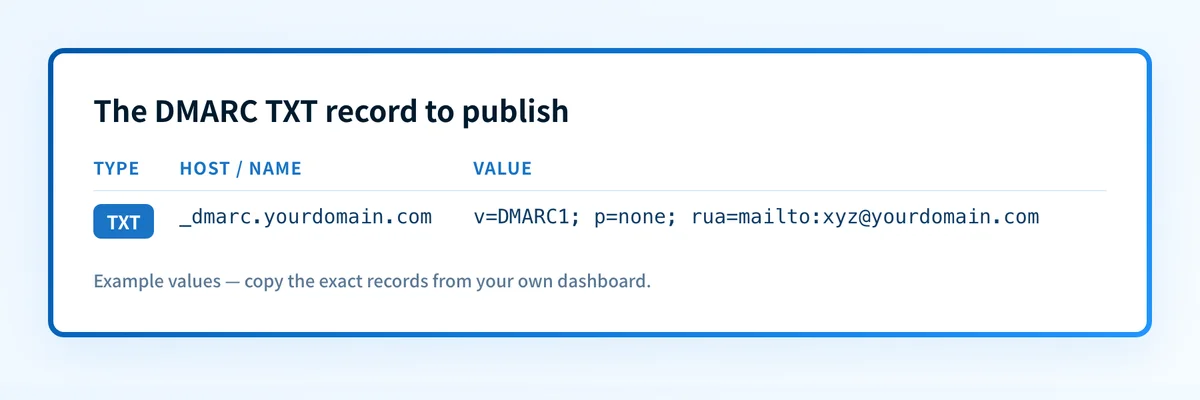 Replace yourdomain.com with your domain; choose p=none, p=quarantine, or p=reject.
- Sign in to your DNS host: the registrar or provider where your domain's DNS is managed (for example Cloudflare, GoDaddy, or Route 53). If you are on Cloudflare, follow our Cloudflare DMARC walkthrough.
- Create a new TXT record. Set the host / name to
_dmarc(most panels append your domain automatically, giving_dmarc.yourdomain.com). - Set the value to
v=DMARC1; p=none; rua=mailto:you@yourdomain.com. Use a mailbox you actually monitor for theruaaddress. - Save and wait for propagation. Changes usually appear within minutes but can take up to a few hours depending on your record's TTL.
v=DMARC1: the version tag. It is mandatory and must come first.p=none: the policy: what receivers should do with mail that fails checks. Start atnoneto observe without affecting delivery.rua=mailto:...: where aggregate reports are sent. Without it you get no data, which defeats the purpose.
sp, pct, adkim, and aspf, see what goes into a DMARC record.
Choose the right policy: none, quarantine, or reject
The p tag decides what a receiving server does with mail that fails DMARC. Move through the three levels in order. Do not jump straight to reject:
p=none(monitor). Nothing changes for delivery; receivers just send you reports. This is where every domain should start, so you can inventory every legitimate sender before you enforce.p=quarantine. Failing mail is delivered to spam/junk. A safe middle step once your reports show legitimate senders passing.p=reject. Failing mail is blocked outright. This is full enforcement and the only policy that actually stops exact-domain spoofing.
Validate and monitor your DMARC record
Publishing the record is step one; confirming it is correct is step two. A record with a typo: a missing semicolon, a policy of p=nome, or an rua pointing at a dead mailbox. Can read as present but do nothing useful. Run your domain through the free DMARC checker or the Email Security Score to confirm the record parses and to see your SPF and DKIM status alongside it.
Once the record is live and valid, the reports start arriving. DMARC produces two kinds:
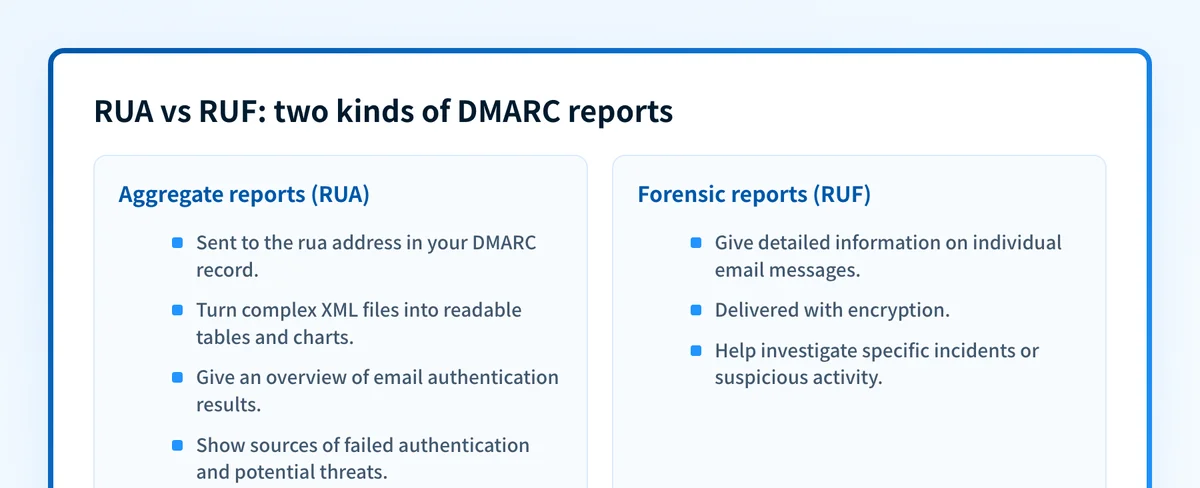 RUA reports summarize authentication results; RUF reports detail individual messages.
- Aggregate reports (
rua) are daily XML summaries of every source sending mail as your domain, with pass/fail counts. They are how you find unauthorized senders and confirm your own are aligned. Reading raw XML is painful, so most teams use a tool that turns it into charts, see how to understand DMARC reports. - Forensic reports (
ruf) are per-message samples of individual failures. They are far less widely supported and can carry sensitive header data, so many domains skip them and rely on aggregate data alone.
Common issues with DMARC records
Why does my checker still say "No DMARC record found" after I added the record?
Usually DNS propagation or a placement mistake. Confirm the record is at _dmarc.yourdomain.com (with the underscore), not the root domain, and that your panel didn't double-append the domain to make _dmarc.yourdomain.com.yourdomain.com. If placement is right, wait for the TTL to expire and re-check; if it lingers, flush your DNS cache or test from a different network.
Can I have two DMARC records on one domain?
No. A domain must have exactly one DMARC record. Publishing a second one is invalid and most receivers will ignore your policy entirely, effectively leaving you unprotected. If you find duplicates, common after migrating providers, delete all but the single correct record.
My mail started going to spam after I published DMARC. What happened?
Mail usually starts going to spam after you publish DMARC because the domain moved to p=quarantine or p=reject before every legitimate sender was authenticated. Drop back to p=none, read your aggregate reports to find which senders are failing SPF or DKIM alignment, fix those (add them to SPF, enable DKIM signing), and only re-enforce once the reports are clean.
Does the rua address have to be on the same domain?
Not necessarily, but if you send reports to a different domain (for example a monitoring service), that domain must publish an external-reporting authorization record. Missing that record is why some third-party addresses never receive data. Sending rua to a mailbox on your own domain avoids the extra step.
Evidence
Sources and further reading
Related reading
Questions readers ask
Frequently asked questions
Is DMARC enough on its own, or do I need SPF and DKIM too?
How long until DMARC actually protects my domain?
The record clears the "not found" warning immediately once DNS propagates, but real protection only comes at p=reject. A domain with clean SPF/DKIM alignment can typically reach enforcement in a few weeks. The pace is set by how quickly you confirm every legitimate sender passes at p=none.
Will publishing DMARC break my existing email?
Publishing DMARC at p=none will not break your existing email: it is monitor-only and changes nothing about delivery. Breakage only becomes possible at quarantine or reject, and only for senders that aren't authenticated. That's exactly why you inventory senders at none before enforcing.
What does "DMARC policy not enabled" mean versus "no record found"?
"No record found" means nothing is published at all. "DMARC policy not enabled" usually means a record exists but sits at p=none, so it's monitoring rather than enforcing. See DMARC policy not enabled for the fix.
Can I get to enforcement without reading XML by hand?
Yes. Palisade hosts your DMARC record behind a single CNAME at _dmarc., parses aggregate reports into readable charts, and lets you move none → quarantine → reject from a dashboard with a diff preview before anything changes. Get started with the free Email Security Score, or book a demo to see enforcement across multiple domains.

Written by
Samuel ChenardCEO & Co-Founder, Palisade
Samuel Chenard is the CEO and co-founder of Palisade, agentic DMARC software for IT teams and MSPs, from one domain to thousands.
More from Samuel →