DMARC reference
What is a DMARC record?

By Samuel Chenard · CEO & Co-Founder, Palisade · Reviewed September 18, 2026
A DMARC record is a single DNS TXT record published at _dmarc.yourdomain.com. It tells receiving mail servers what to do with messages that claim to come from your domain but fail SPF and DKIM alignment, and where to send reports about them. It is a list of tag=value pairs separated by semicolons, it always starts with v=DMARC1, and a domain may publish exactly one.
 ChatGPT
 Claude
 Gemini
 Perplexity
 Grok
Grok| DMARC record at a glance | |
|---|---|
| Record type | DNS TXT |
| Host | _dmarc.yourdomain.com |
| Shortest valid record | v=DMARC1 |
| Typical record | v=DMARC1; p=none; rua=mailto:dmarc@yourdomain.com |
| Per domain | Exactly one. Two records read as none. |
| Depends on | SPF and DKIM. DMARC evaluates their results, it performs no check of its own. |
| Current spec | RFC 9989, published May 2026, which retired three tags. |
| Required by | Gmail, Yahoo and Outlook.com, for bulk senders. Each publishes the rule: Google's email sender guidelines, Yahoo's sender best practices and Outlook's requirements for high-volume senders. |
What a DMARC record looks like
Every DMARC record is the same shape: a version, a policy, and then optional tags that adjust reporting and alignment. These four are all valid, and each one is appropriate at a different point in a rollout.
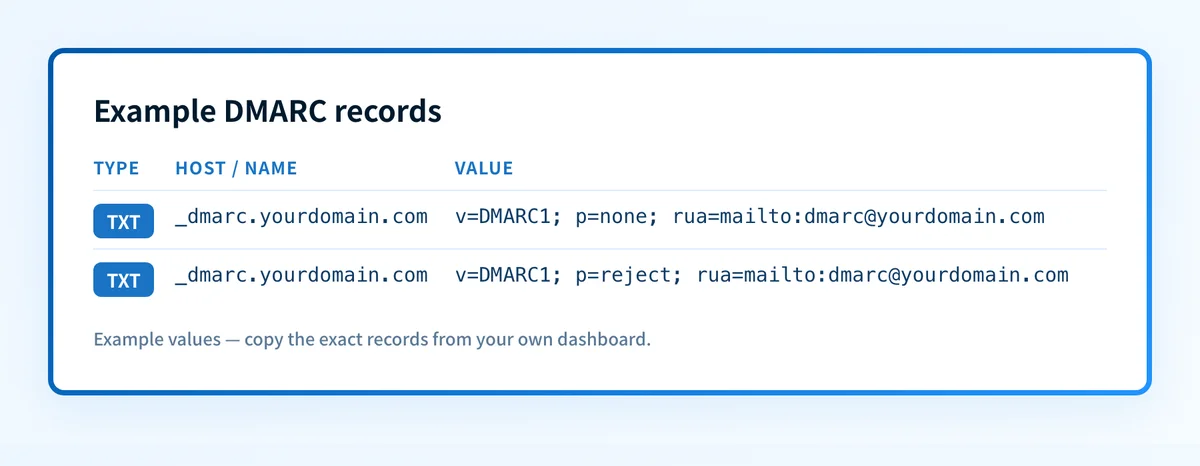
Monitoring, the record a first setup starts on
v=DMARC1; p=none; rua=mailto:dmarc@yourdomain.comNothing is blocked. Receivers deliver as before and report daily on every source sending as the domain, which is the evidence every later decision depends on.
Enforcement, the record a finished rollout ends on
v=DMARC1; p=reject; rua=mailto:dmarc@yourdomain.comMail that fails authentication is refused rather than delivered. Safe only once reports show every legitimate sender passing SPF or DKIM with alignment.
Parent enforcing, a sending subdomain still testing
v=DMARC1; p=reject; sp=none; rua=mailto:dmarc@yourdomain.comThe sp tag gives subdomains their own policy, so a subdomain whose senders are not sorted out yet can stay at monitoring while the parent domain enforces.
The shortest record that is still valid
v=DMARC1The version tag alone parses, but with no rua address receivers apply no DMARC processing at all, and nothing reports back. The record produces no evidence, so a rollout cannot progress from it.
The mistake that disables the policy
One record, amended
v=DMARC1; p=quarantine; rua=mailto:dmarc@yourdomain.comOne record carrying the new policy. Changing a policy means editing the value inside the record you already publish.
Two records at _dmarc
v=DMARC1; p=none; rua=mailto:old@yourdomain.com
v=DMARC1; p=quarantine; rua=mailto:dmarc@yourdomain.com
Publishing a second record instead of amending the first. Receivers that find two at _dmarc treat the domain as having no usable policy, so this disables both rather than replacing one.
Every tag, and what it does
Only v is required, and it is the only tag with a fixed position: it must come first or the whole record is ignored. Everything else is optional, including the policy tag. A record with no p is read as p=none when it carries a valid rua address, and gets no DMARC processing at all when it does not.
DMARC record tags
| Tag | Status | What it controls |
|---|---|---|
| v | Required, and must come first | Protocol version. The only valid value is DMARC1. A record that does not begin with it is ignored entirely. |
| p | Recommended | The policy receivers apply to mail that fails authentication: none to monitor, quarantine to send to spam, reject to refuse. A record that omits it is read as p=none if it has a valid rua address, and skipped entirely if it has no rua either. |
| rua | Strongly recommended | Where daily aggregate reports are sent, as a mailto: URI. Without it the record publishes but produces no evidence about who sends as your domain. |
| ruf | Optional, rarely useful | Where per-message failure samples are sent. Most large receivers, Gmail included, do not send them, and the samples can carry message content. |
| sp | Optional | A separate policy for subdomains. Without it, subdomains inherit the p value, so sp is how a parent domain enforces while a sending subdomain stays at monitoring. |
| np | Optional | A policy for subdomains that do not exist in DNS at all, which is what spoofers reach for once the real names are protected. |
| adkim | Optional, defaults to relaxed | How closely the DKIM signing domain must match the From domain. r accepts a subdomain match; s requires an exact one. |
| aspf | Optional, defaults to relaxed | The same alignment control for SPF. Relaxed suits nearly every domain, because legitimate services routinely send from subdomains. |
| fo | Optional | Which failure conditions generate a ruf report. Only meaningful if you publish a ruf address and your receivers actually send them. |
| t | Optional, defaults to n | Test mode. t=y asks receivers not to apply the policy yet while still sending reports, which is the RFC's named replacement for part of what pct used to do. |
| psd | Optional | Marks the domain as a public suffix domain. Relevant to registry operators rather than to an ordinary sending domain. |
| pct | Removed by RFC 9989 | Applied the policy to a percentage of failing mail. Receivers sampled inconsistently; omit it from new records. |
| rf | Removed by RFC 9989 | Named the failure report format. Only one format was ever in real use. |
| ri | Removed by RFC 9989 | Requested an aggregate reporting interval. Receivers sent daily reports regardless. |
The last three are the ones worth knowing about, because older guides still recommend them. pct, rf and ri were part of RFC 7489 and were removed by RFC 9989 in May 2026. A record that still carries them is not broken, but new records should leave them out.
ruf is current, but expect little from it. Google's DMARC setup guide lists the tag as not supported, so Gmail sends no failure reports whatever the record asks for, and Microsoft's DMARC guide says Microsoft 365 does not send them either.
Where the record lives
A DMARC record lives in public DNS, at the _dmarc host, published by whichever provider answers for the domain's nameservers. Two details cause most of the confusion here.
The first is that your mail platform is not where the record goes. Microsoft (set up DMARC for Microsoft 365) and Google (set up DMARC for Google Workspace) both document DMARC thoroughly, which leads people to look for a setting in the admin console. For a domain you own there is not one: the record is a DNS entry, and the admin console is where DKIM signing gets turned on beforehand. The one exception is a Microsoft 365 tenant's own *.onmicrosoft.com domain, whose DMARC record is added in the Microsoft 365 admin center.
The second is that the registrar is not always the DNS host. Buying a domain at GoDaddy does not mean GoDaddy answers for it, and a record saved at the registrar while another provider hosts the zone will never resolve. Running dig NS yourdomain.com settles it in one lookup.
Read a domain's DMARC record
Queries _dmarc for any domain and parses every tag, including the retired ones, so you can see exactly what is published rather than what someone believes is published.
How does a DMARC record work?
When a message arrives, the receiver checks SPF and DKIM, then looks up the DMARC record for the domain in the From header. The check that matters is alignment: SPF or DKIM passing is not enough on its own, because either can pass for a domain the recipient never sees. DMARC asks whether the domain that passed is the domain being displayed.
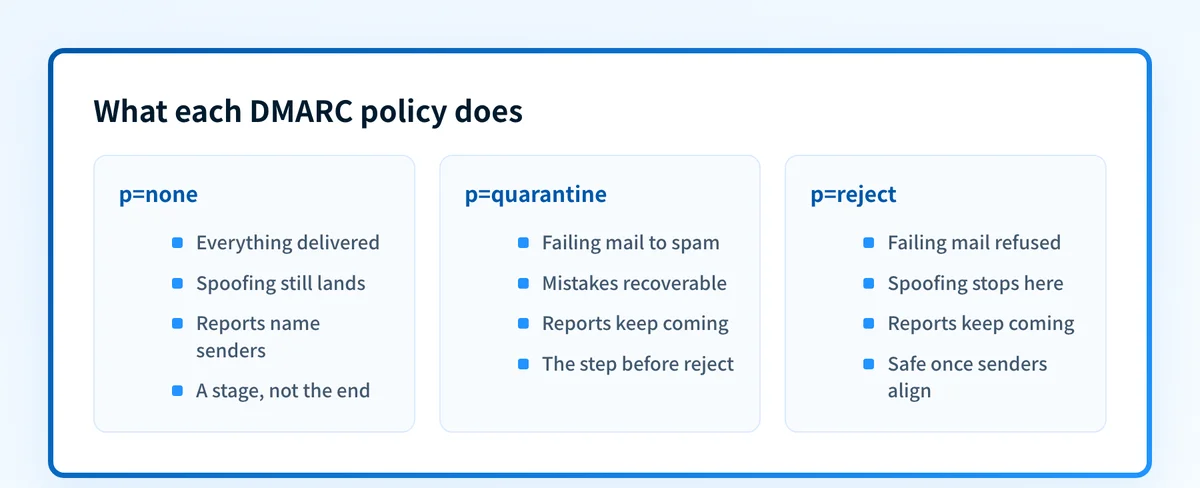
If at least one of them passes and aligns, the message passes DMARC and the policy is irrelevant. If neither does, the receiver applies p, and either delivers the message anyway (none), files it as spam (quarantine), or refuses it (reject). Either way it counts the result and includes it in the daily report sent to your rua address.
That last part is why a record with no reporting address is a wasted publication. The policy tells receivers what to do; the reports tell you whether it is safe to ask. Setting DMARC up end to end walks the sequence, and what DMARC is covers the protocol behind it.
DMARC software that does the work
A published record is the beginning of the work. Palisade's agent reads the aggregate reports the record generates, names every service sending as your domain, drafts the SPF and DKIM fixes each one needs, and proposes the next policy step when the evidence supports it. You review and approve every change before it ships.
15-day full-product trial. Nothing is charged until it ends.
Sources and last verified
The specification and provider facts on this page come from the two DMARC RFCs and from each provider's own documentation. Specifications and provider policies change; if a detail looks off, the linked source is authoritative. Last checked 2026-09-18.
- RFC 9989, published May 2026, is the current DMARC specification. It removed the pct, rf and ri tags, added t as the named replacement for part of what pct did, and says a domain that publishes more than one DMARC record has all of them discarded.www.rfc-editor.org · checked 2026-09-18
- RFC 7489, the original DMARC specification from 2015, defined the pct, rf and ri tags.datatracker.ietf.org · checked 2026-09-18
- Google's email sender guidelines require DMARC from anyone who sends more than 5,000 messages per day to Gmail accounts, and accept a policy of none.support.google.com · checked 2026-09-18
- Yahoo's sender best practices require bulk senders to publish a valid DMARC policy of at least p=none.senders.yahooinc.com · checked 2026-09-18
- Microsoft requires SPF, DKIM and DMARC from domains sending more than 5,000 messages a day to Outlook.com, with DMARC at p=none or stricter.techcommunity.microsoft.com · checked 2026-09-18
- Google's Set up DMARC guide has the record added at the domain host, and lists ruf as not supported.“Gmail doesn't support the ruf tag, which is used to send failure reports.”knowledge.workspace.google.com · checked 2026-09-18
- Microsoft's DMARC guide has the record for a custom domain created at the DNS host and the record for a *.onmicrosoft.com domain created in the Microsoft 365 admin center. It also says Microsoft 365 does not send failure reports.“Microsoft 365 doesn't send DMARC Forensic reports (also known as DMARC Failure reports), even if a valid ruf=mailto: address exists in the DMARC TXT record of the source domain.”learn.microsoft.com · checked 2026-09-18
Questions readers ask
Frequently asked questions
What does a DMARC record look like?
A DMARC record is a string of semicolon-separated tag=value pairs published as a DNS TXT record. The shortest record worth publishing is v=DMARC1; p=none, and a typical monitoring record is v=DMARC1; p=none; rua=mailto:dmarc@yourdomain.com. It always begins with v=DMARC1, which is the only required tag and the only one with a fixed position. Everything else is optional, including the policy tag p: a record without one is read as p=none if it carries a valid rua address, and gets no DMARC processing at all if it does not.
How do I find my DMARC record?
Query the TXT records at the _dmarc subdomain of your domain. On the command line that is dig TXT _dmarc.yourdomain.com or nslookup -type=TXT _dmarc.yourdomain.com, and a DMARC checker does the same lookup and parses the result. Looking up the domain itself returns SPF and verification records rather than DMARC, which is why a record often appears missing when it is simply being looked for at the wrong host.
Where is a DMARC record stored?
A DMARC record is stored in public DNS, as a TXT record at the host _dmarc, not in your mail platform. That distinction catches people out on Microsoft 365 and Google Workspace: both document DMARC, but neither stores the record for a domain you own. It lives wherever the domain's nameservers point, which may be a different company from the registrar you bought the domain from.
Can a domain have more than one DMARC record?
No. A domain must publish exactly one DMARC record. Receivers that find two at _dmarc treat the domain as having no usable policy, so a second record does not add to the first, it disables both. When you need to change something, amend the existing record rather than publishing another one.
What happens if there is no DMARC record?
Receivers have no instruction, so they fall back to their own filtering and generally deliver mail that fails SPF and DKIM instead of blocking it. Anyone can send mail that appears to come from the domain, you receive no reports about who is doing it, and bulk mail to Gmail, Yahoo, and consumer Outlook can be rejected or filtered under the sender requirements those providers introduced in 2024 and 2025.
What is the difference between a DMARC record and a DMARC policy?
The record is the whole TXT string; the policy is the p tag inside it. p=none, p=quarantine, or p=reject tells receivers what to do with mail that fails authentication. The policy is a value inside the record rather than a separate thing to publish, so changing it means editing that one value rather than creating a second record. A record can omit p altogether, and receivers then fall back to p=none only if it carries a valid rua address.
Do I need the pct tag in my DMARC record?
No, and new records should leave it out. The pct tag applied an enforcement policy to a percentage of failing mail, but receivers implemented that sampling inconsistently, and RFC 9989 removed it in May 2026 along with the rf and ri tags. Stage a rollout by moving the policy itself from none to quarantine to reject and watching the reports at each step. Where you want a policy published but not yet enforced, RFC 9989 names t=y as the replacement for that part of what pct did.
Is a DMARC record a TXT record or a CNAME?
Publish it as a TXT record. Some DMARC providers hand you a CNAME at _dmarc that points at a record they host, which is a legitimate way to let a vendor manage the value for you, and the record the CNAME resolves to is still a TXT record. What is never valid is a CNAME and a TXT record coexisting at _dmarc, because a CNAME cannot sit alongside other data at the same name.