Gmail bulk sender guidelines
 ChatGPT
 Claude
 Gemini
 Perplexity
 Grok
GrokIn brief
Gmail bulk sender guidelines: meet Gmail's 5,000-message threshold with SPF, DKIM, DMARC, TLS, alignment, unsubscribe, and validation for senders.
Gmail bulk sender guidelines apply when a sender delivers close to 5,000 or more messages to personal Gmail accounts in 24 hours. Configure SPF and DKIM in the platform that sends the mail, publish a DMARC record, use TLS, align the visible From domain with SPF or DKIM, and support one-click unsubscribe for marketing and subscribed mail. Google documents the requirements, but does not provide one universal Admin console setup path because the DNS and sending controls belong to your sending platform and domain.
At a glance
Quick takeaways
- Google's sender guidelines apply to mail sent to personal Gmail accounts, not mail sent to Google Workspace accounts.
- A bulk sender sends close to 5,000 or more messages to personal Gmail accounts in 24 hours, counted by primary domain.
- Bulk senders need both SPF and DKIM, plus DMARC. Google's DMARC policy requirement permits
p=none. - Gmail requires a DKIM key of at least 1024 bits and recommends 2048 bits where the DNS provider supports it.
- Keep the daily user-reported spam rate below 0.3%. Google recommends staying below 0.1%.
- A passing DNS record or vendor status does not prove that the production message path authenticates and aligns.
What should I check before configuring Gmail?
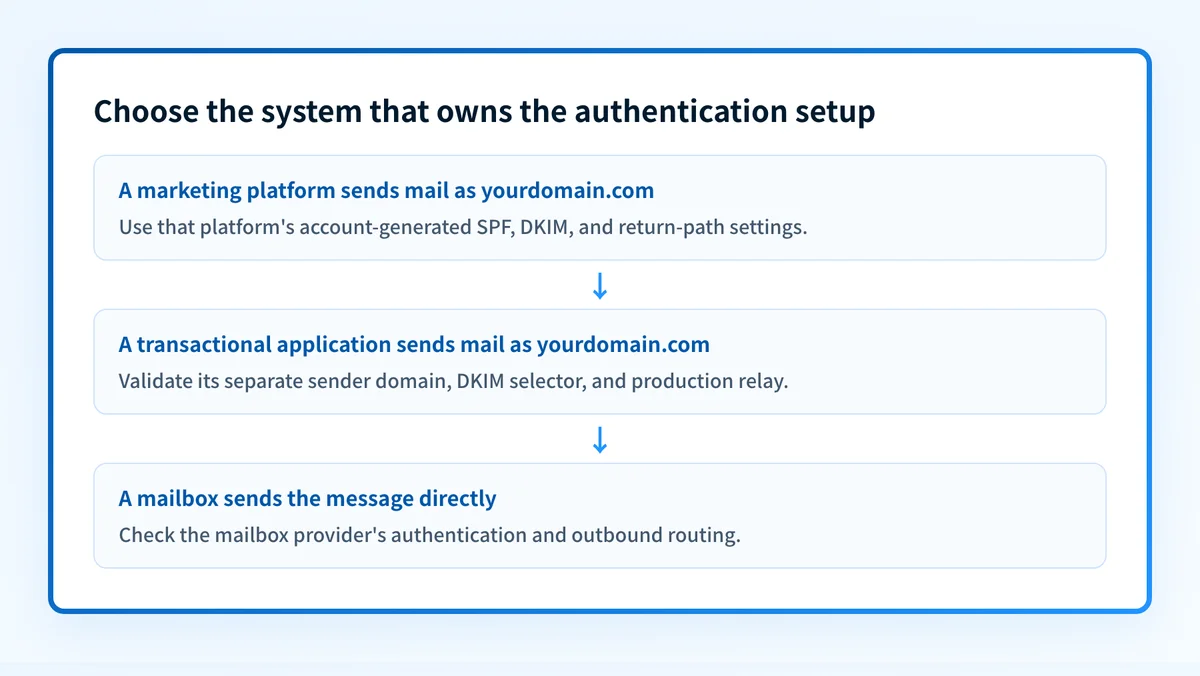
Start by identifying the exact system that sends the messages. A marketing platform, transactional-email provider, CRM, employee mailbox, and outbound gateway can use different SPF, DKIM, return-path, and TLS configurations. This guide is one provider-specific path within Palisade's email service provider setup guides.
Google states that its sender requirements apply to personal Gmail accounts, not Google Workspace recipients. A sender becomes a bulk sender when it sends close to 5,000 messages or more to personal Gmail accounts within 24 hours. Messages from the same primary domain count toward that threshold, even when more than one sending service is involved. See Google's sender-guidelines FAQ.
Confirm these items before changing DNS:
- The visible From domain for the messages in scope.
- The platform that generates the SMTP connection and signs DKIM.
- Access to the authoritative DNS zone for the From domain and any return-path domain.
- Access to the sending platform's current domain-authentication status.
- A test mailbox where you can inspect the raw source of a newly delivered message.
- Ownership of the unsubscribe process for marketing and subscribed messages.
Copy DNS values from the account and domain you are configuring. Do not publish selectors, targets, tokens, or hostnames from another account or from an online example.
Google's baseline rules require all senders to set up SPF or DKIM, use valid forward and reverse DNS for sending domains or IPs, use TLS, follow RFC 5322 message formatting, avoid impersonating Gmail From headers, and keep Postmaster Tools spam rates below 0.3%. Bulk senders need both SPF and DKIM, DMARC, alignment, and one-click unsubscribe. Google's Email sender guidelines are the authoritative requirement list.
Which setup method should I use?
Use the authentication workflow in the system that actually sends the messages. Gmail is the receiving service in this workflow. It does not generate your marketing-platform DKIM selector, your transactional provider's return-path target, or your sending IP's PTR record.
If a sending platform offers automatic domain authentication, use its account-generated DNS values for the selected domain. If DNS is managed through infrastructure-as-code or a change-control process, export the exact values from the selected platform account and submit them through that workflow. Do not replace a working SPF record when adding another sender. SPF has one effective record per domain, so the platform's required mechanism must be merged into the existing record according to that platform's documentation.
Use a dedicated IP only when the sending platform and your operational model require one. A dedicated IP does not remove Gmail's authentication, TLS, alignment, unsubscribe, PTR, or spam-rate requirements.
How do I configure SPF and DKIM for Gmail bulk sending?
1. Identify the production sender and visible From domain
List each service that sends mail using the domain, then separate marketing, transactional, and mailbox-hosted traffic. For each service, record the visible From domain, envelope sender or return-path domain, DKIM signing domain, selector, sending IP or relay, and test mailbox.
Google's bulk-sender rules require the direct-mail From domain to align with either the SPF domain or the DKIM domain. A message can pass SPF or DKIM without producing DMARC alignment if the authenticated domain does not match the visible From domain under the selected alignment mode.
2. Open the sending platform's domain-authentication settings
Open the selected sender's domain-authentication, sender-domain, or DKIM settings. Google does not document a universal Gmail settings page for publishing another platform's account-generated DNS records. Verify the path from the sending platform's current official documentation or authenticated account before making the change.
Select the precise sending domain. Do not assume that an organization domain, subdomain, branded return-path, and visible From domain share the same DNS setup.
3. Publish the account-specific SPF and DKIM records
Copy the SPF mechanism, DKIM selector, and DKIM value or CNAME target from the sending platform account. The following examples show record structure only.
SPF record type: TXT
SPF host: yourdomain.com
SPF value, illustrative only:
v=spf1 include:spf.example.net -allDKIM record type: TXT or CNAME, as generated by the sending platform
DKIM host, illustrative only:
selector1._domainkey.yourdomain.comDKIM value, illustrative only:
v=DKIM1; k=rsa; p=example-public-keyDo not publish these examples. Copy the complete SPF and DKIM values generated for the selected account and domain. Account-generated selectors, public keys, and CNAME targets can differ by provider and tenant.
Check how the DNS provider handles host names. Some interfaces append yourdomain.com automatically. Entering the full owner name into such an interface can create selector1._domainkey.yourdomain.com.yourdomain.com.
Before saving, inspect existing records. Do not add a second SPF record at the root domain. For DKIM, do not overwrite an active selector without using the provider's rotation process. A CNAME cannot coexist with other record data at the same DNS owner.
4. Publish a DMARC record and confirm alignment design
Google requires bulk senders to set up DMARC for the sending domain. Google explicitly states that the DMARC enforcement policy can be none, so Gmail's bulk-sender requirement does not require immediate p=quarantine or p=reject.
DMARC record type: TXT
DMARC host: _dmarc.yourdomain.com
DMARC value, illustrative only:
v=DMARC1; p=none; rua=mailto:dmarc-reports@yourdomain.comDo not publish this example unchanged. Use a reporting mailbox your organization controls, and verify that it can receive aggregate reports.
Ensure that a real message can produce SPF alignment or DKIM alignment with the visible From domain. Google's Email sender guidelines require this alignment for direct bulk email.
5. Verify in the sending platform and send a real message
Return to the sending platform and confirm that it accepts the published records for the selected domain. Then send a new message through the exact production path to a mailbox where raw headers are available.
A green platform indicator is useful evidence, but it is not proof that the message was sent through the expected return path, signed with the expected domain, or accepted by Gmail with aligned authentication.
How does this setup affect DMARC?
DMARC evaluates whether SPF or DKIM passes and aligns with the visible From domain. For bulk senders, Google requires both SPF and DKIM to be configured, while direct email needs the From domain aligned with either the SPF domain or DKIM domain.
Use Palisade's DMARC checker to inspect the published DMARC record before changing policy. A public DNS check can confirm the record that resolves now. It cannot prove the production sending path, Gmail's private spam assessment, future delivery, or whether a particular message aligned.
Palisade is agentic DMARC software for teams that need to move beyond a one-time record check. It analyzes DMARC aggregate-report data, identifies sending sources and authentication or alignment issues, and creates prioritized remediation tickets. A human reviews the evidence and applies any DNS or policy change.
How do I validate the setup?
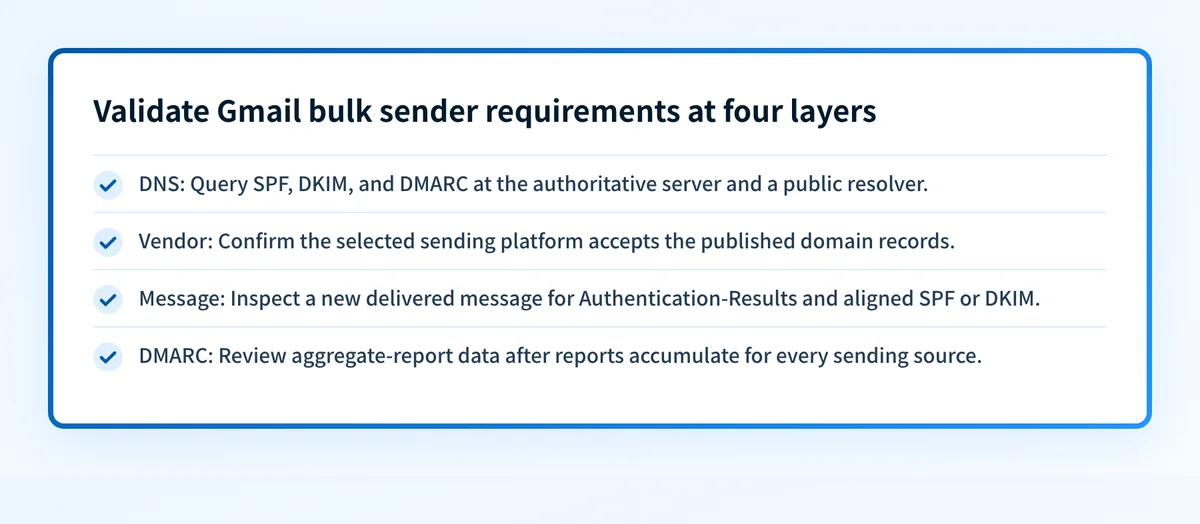
Check public DNS
Query the authoritative DNS provider and at least one public resolver for the SPF, DKIM, and DMARC owners. Confirm the final fully qualified owner names and complete values.
dig +short TXT yourdomain.com
dig +short TXT selector1._domainkey.yourdomain.com
dig +short TXT _dmarc.yourdomain.com
Also confirm that each sending IP has forward and reverse DNS consistency. Google documents PTR records as a sender requirement, and its SMTP error documentation identifies missing or mismatched PTR records as a 550 5.7.25 rejection condition.
Check the sending-platform status
Confirm that the platform recognizes the selected domain and that its authentication status is current. Record the selected account, domain, selector, and time of verification.
This checks the vendor layer only. It does not confirm that every campaign, relay, or application uses the approved configuration.
Inspect a delivered message
Inspect a newly delivered message from the production path. Confirm the DKIM-Signature domain and selector, then inspect the receiver-added Authentication-Results field. RFC 8601 defines this field and explains that recipients must evaluate its trust boundary.
Accept the message-path test only when the trusted result shows the expected authentication outcome and either SPF or DKIM aligns with the visible From domain. Keep a redacted header copy with the change record.
Review DMARC reports
After aggregate reports accumulate, review each sending source and its SPF and DKIM alignment results. A successful test message does not inventory every system that uses the domain.
Troubleshooting
Gmail returns 550 5.7.26
Google documents this error as:
This email has been blocked because the sender is unauthenticated. Gmail requires all senders to authenticate with either SPF or DKIM.Check the message headers for the actual SPF and DKIM results, then compare the sending platform's configured domain with the DNS records that resolve publicly. See Google's Gmail SMTP errors and codes.
Gmail returns 550 5.7.27 or 550 5.7.30
Google documents 550 5.7.27 for SPF failure and 550 5.7.30 for DKIM failure on bulk mail. Check whether the production route uses the return-path and DKIM selector that you configured. A common cause is testing one platform while the live campaign uses another relay or subdomain.
Gmail returns 550 5.7.29
Google documents this error when a bulk message was not sent over TLS. Check SMTP or relay logs for the negotiated connection and require TLS on the actual delivery path. A DNS checker cannot inspect SMTP transport logs.
SPF passes but DMARC fails
Compare the visible From domain with the SPF-authenticated envelope domain. If they are not aligned, DMARC does not use that SPF pass. Check DKIM alignment as well, then correct the sender-domain or return-path configuration in the platform that sent the message.
Spam rate approaches 0.3%
Google recommends keeping the user-reported spam rate below 0.1% and requires it to remain below 0.3%. The sender-guidelines FAQ states that spam rate is calculated daily and that senders above 0.3% are ineligible for mitigation until rates remain below 0.3% for seven consecutive days. Review consent, list quality, message frequency, and unsubscribe handling before increasing volume.
Check the DMARC record behind your Gmail bulk-sender setup
Check the published DMARC record for the exact From domain before relying on the bulk-sender configuration. Compare the record with the SPF and DKIM domains observed in a newly delivered message, then use aggregate-report evidence to find other production sources that may still fail alignment.
A DMARC record check cannot prove a receiver's private spam decision, inspect SMTP TLS, repair an individual sender configuration, or guarantee future Gmail placement. When you need ongoing evidence across multiple senders or domains, Start with Palisade. Signup and trial do not require a credit card.
Evidence
Sources and further reading
Questions readers ask
Frequently asked questions
What is the bulk sending limit for Gmail?
A Gmail bulk sender threshold is not a sending cap. Google defines a bulk sender as a sender that delivers close to 5,000 or more messages to personal Gmail accounts in 24 hours, counted by primary domain. Google Workspace Gmail has separate sending limits, including 2,000 messages per day for standard accounts. See Google's sender-guidelines FAQ and Workspace sending limits.
How do I send 10,000 emails from Gmail?
No, a Gmail or Google Workspace mailbox is not the right sending path for 10,000 messages per day. Google Workspace Gmail documents a 2,000-message daily limit, while personal Gmail documents sending errors above 500 emails in a day. Use a dedicated sending platform, then meet Gmail's bulk-sender requirements for SPF, DKIM, DMARC, alignment, TLS, unsubscribe, and spam rate. See Google's personal Gmail sending limits.
What is the most hacked email provider?
No reliable answer identifies one provider as the "most hacked" without a defined time period, user population, attack type, and comparable primary security data. Provider compromise risk also depends on account security controls, phishing exposure, recovery settings, and administrator practices. Choose providers based on documented security controls and your own threat model rather than an unsupported ranking.
Can I send 300 emails at once with Gmail?
Yes, for Google Workspace Gmail, 300 recipients is within Google's documented per-message limit of 2,000 total recipients, including a maximum of 500 external recipients. Those recipients still count toward daily limits, including 3,000 external recipients per day. Personal Gmail documents an error condition above 500 recipients in one email. See Google's Workspace sending limits and personal Gmail limits.
Does Gmail require DMARC enforcement for bulk senders?
No. Google requires bulk senders to set up DMARC, but its sender guidelines state that the DMARC enforcement policy can be set to none. A p=none record satisfies that Gmail requirement, though it does not instruct receivers to quarantine or reject failing mail.

Written by
Johanie DupontBrand & Ecommerce Email
Johanie Dupont works on brand and ecommerce email at Palisade: BIMI and verified marks, sender requirements, and getting marketing mail into the inbox.
More from Johanie →