How to improve HubSpot email deliverability
 ChatGPT
 Claude
 Gemini
 Perplexity
 Grok
GrokIn brief
HubSpot improve email deliverability by checking sender authentication, message results, and list signals before changing campaign practices.
Improve HubSpot email deliverability by treating it as a sending-path diagnosis, not a single platform setting. Confirm that the domain used in the visible From address has aligned SPF or DKIM authentication, inspect headers from real delivered messages, then review list and campaign signals. A successful configuration screen or DNS lookup alone cannot prove that HubSpot messages reach the inbox.
At a glance
Quick takeaways
- HubSpot deliverability depends on the authentication and reputation evidence receivers see for each message.
- DMARC passes when SPF or DKIM passes and aligns with the visible From domain.
- A public DNS result can show published records, but it cannot prove HubSpot used them on a production message.
- Delivered-message headers provide evidence of SPF, DKIM, and DMARC results for one sending path.
- List quality and recipient engagement can affect inbox placement after authentication succeeds.
- HubSpot's Knowledge Base offers "Setup, how-to, and troubleshooting guides" for account-specific configuration.
How HubSpot email deliverability works
Email deliverability is the ability to deliver a message to its intended recipient, while inbox placement is the receiver's decision about where an accepted message appears. The distinction matters when improving email deliverability: a message can be accepted but filtered to spam, or it can fail before placement is considered.
For a HubSpot campaign, receiving systems evaluate the message that arrives from its actual sending infrastructure. They can inspect the visible From domain, envelope sender, DKIM signature, IP address, content, recipient signals, and their own local policy. HubSpot is the sending platform, but the receiving system makes its own delivery and placement decision.
Authentication is an early diagnostic point because it gives a domain owner evidence that the message is authorized to use the visible From domain:
- RFC 7208 defines SPF as a DNS-based authorization check for the SMTP envelope sender or HELO identity.
- RFC 6376 defines DKIM as a signed message authentication mechanism.
- RFC 7489 defines DMARC as a policy and reporting framework that evaluates SPF and DKIM in relation to the visible From domain.
When the answer changes
The right next action depends on the evidence you have.
Use this decision rule:
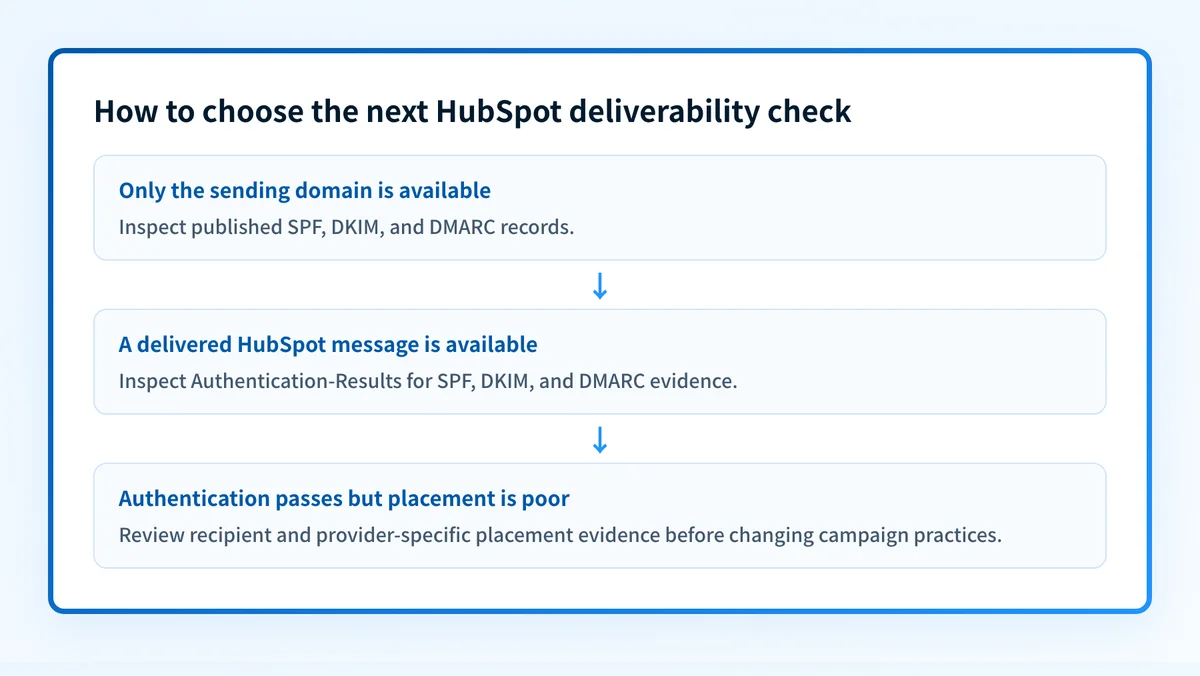
- If you only know the sending domain, inspect its public authentication posture first.
- If you have a delivered campaign message, inspect its raw headers before changing DNS or campaign behavior.
- If authentication passes on the delivered message but inbox placement is poor, investigate recipient engagement, list acquisition practices, message content, and receiver-specific signals through the relevant mailbox-provider tools or reports.
- If different HubSpot campaigns use different visible From domains or sending paths, validate each path separately. One passing message does not prove that every campaign authenticates the same way.
- If HubSpot shows an account-level status that conflicts with message headers, treat the headers as evidence of what the receiving system processed for that message and use HubSpot's Knowledge Base for the account-specific path.
A DNS record check and a green platform status do not prove a real campaign message passed DMARC. Send a controlled message through the production HubSpot path and inspect its received headers.
A worked authentication example
A delivered message can contain an Authentication-Results header. RFC 8601 defines this header field for reporting message-authentication results. The exact wording and properties vary by receiver, but the result can help separate an authentication problem from an inbox-placement problem.
Authentication-Results: receiver.example;
  spf=pass smtp.mailfrom=mail.yourdomain.com;
  dkim=pass header.d=yourdomain.com;
  dmarc=pass header.from=yourdomain.com
This illustrative example supports a narrow conclusion: for that message, the receiver reported SPF and DKIM passes, and reported a DMARC pass for yourdomain.com.
It does not show that every HubSpot message uses the same path. It also does not prove the message reached the inbox, that future campaigns will receive the same treatment, or that all recipients see the same result.
If the header instead reports dmarc=fail, compare the visible From domain with the SPF identity and DKIM d= domain. DMARC needs an aligned SPF or DKIM pass. If both SPF and DKIM pass but neither aligns with the visible From domain, DMARC can still fail.
What to check next
Start with the evidence available to you, in this order:
- Check the domain's public records if you have only a domain name. Look for SPF, DKIM, and DMARC publication, then compare them with the account-generated values in HubSpot. The ESP setup hub covers the broader task of validating sender-domain configuration for email platforms.
- Send a controlled campaign or test through the same HubSpot configuration used for production. Save the raw headers from a delivered copy and identify the SPF, DKIM, and DMARC results.
- Compare results across important message types. Marketing messages, lifecycle emails, and automated notices can use different From domains, reply-to addresses, or sender paths.
- If authentication is sound, use HubSpot's official setup and troubleshooting material to investigate the account-specific sending configuration. Its Knowledge Base is intended for setup, how-to, and troubleshooting guidance.
- Review placement evidence by recipient domain where available. A result at one mailbox provider does not establish the cause of filtering at another provider.
Check the domain before changing HubSpot campaigns
A public check is a useful first step when the only evidence you have is the sending domain. Inspect the authentication posture, then compare the result with a real message header from the HubSpot production path.
Check the email security score
A public-domain check cannot prove HubSpot used the published records, identify a receiver's private inbox decision, repair campaign configuration, or guarantee future inbox placement.
If your team manages several HubSpot sending domains, the unresolved gap is ongoing sender inventory and DMARC alignment evidence across each production path. Palisade is agentic DMARC software that analyzes DMARC aggregate-report data, identifies sending sources and authentication or alignment issues, and proposes the next policy step for human review. It does not change DMARC policy automatically or guarantee delivery.
Evidence
Sources and further reading
Questions readers ask
Frequently asked questions
Can HubSpot improve email deliverability by itself?
No, HubSpot cannot do it alone, because the receiving system makes its own delivery and placement decision for every message. HubSpot sends the campaign, so your job is to improve what receivers see. Start with an aligned SPF or DKIM pass on real delivered messages, then look at list quality and recipient engagement.
Does a HubSpot authentication status prove DMARC passes?
No, a HubSpot account status only confirms part of the configuration on HubSpot's side. A delivered message header shows the result the receiving system actually reported for that sending path. Check the visible From domain, the SPF identity, the DKIM d= domain, and the DMARC result together.
Should I change my sending domain after a spam-folder result?
Hold off until you have read the authentication results in a delivered message and traced the campaign's sending path. A spam-folder result can have causes that have nothing to do with the visible From domain, including recipient-specific filtering and sender reputation signals. Changing the domain first moves the campaign without explaining the result.
Can a public email security check show HubSpot inbox placement?
No, a public check cannot show inbox placement. It inspects published DNS and authentication posture, which tells you nothing about your HubSpot account configuration, a receiver's private filtering decision, or where a future campaign will land.
Where can I find HubSpot-specific setup instructions?
Use the HubSpot Knowledge Base for current setup, how-to, and troubleshooting guidance. Follow the instructions for your own account because generated authentication values and available options can differ by configuration.

Written by
Dominic LandryDeliverability & DNS
Dominic Landry works on email deliverability and DNS configuration at Palisade, from SPF and DKIM records through to DMARC enforcement.
More from Dominic →