SendGrid email warmup: what you can verify first
 ChatGPT
 Claude
 Gemini
 Perplexity
 Grok
GrokIn brief
SendGrid email warmup needs current provider guidance. Verify your sending path and email authentication before adopting a ramp schedule for your account.

SendGrid email warmup should begin with a verified view of the exact sending path and its authentication, not a copied volume schedule. Twilio identifies the product as the "Twilio SendGrid Email API," but the public pages cited here do not document a current SendGrid warm-up workflow, ramp schedule, or inbox-placement outcome. Treat any uncited schedule as unverified until SendGrid publishes guidance that applies to your account and sending configuration.
At a glance
Quick takeaways
- A SendGrid warm-up schedule is provider-specific guidance, not a universal DNS setting.
- The available SendGrid support landing page points to product guides and API documentation, but does not define a warm-up process.
- A sending-volume plan cannot prove that a domain is authenticated or that a message will reach the inbox.
- Separate authentication configuration from sending-volume decisions.
- Inspect the visible sending domain before treating a deliverability problem as a warm-up problem.
- Receiver inbox placement remains a receiver-controlled decision.
What SendGrid email warmup can mean
"SendGrid email warmup" is often used to describe gradually changing sending behavior before increasing mail volume. That phrase alone does not identify the relevant configuration, the appropriate volume, or the result a mailbox provider will make.
Twilio describes SendGrid as the Twilio SendGrid Email API. Its SendGrid support center directs customers to product guides and API documentation. Neither cited page publishes a warm-up definition, a daily ramp, a duration, or a threshold that can be safely applied to every SendGrid account.
That distinction matters because several different questions can hide behind one search:
- Is the visible From domain authenticated for the messages being sent?
- Is the mail sent through the intended SendGrid configuration?
- Is the question about a shared or a dedicated sending path?
- Is a receiver rejecting, filtering, or placing a specific message differently?
- Has SendGrid published current guidance for the account type and feature in use?
For wider context on the factors outside any one sending platform, see email deliverability. For SendGrid domain-authentication work, use how to set up SPF and DKIM for SendGrid rather than assuming that a volume change repairs authentication.
When the answer changes
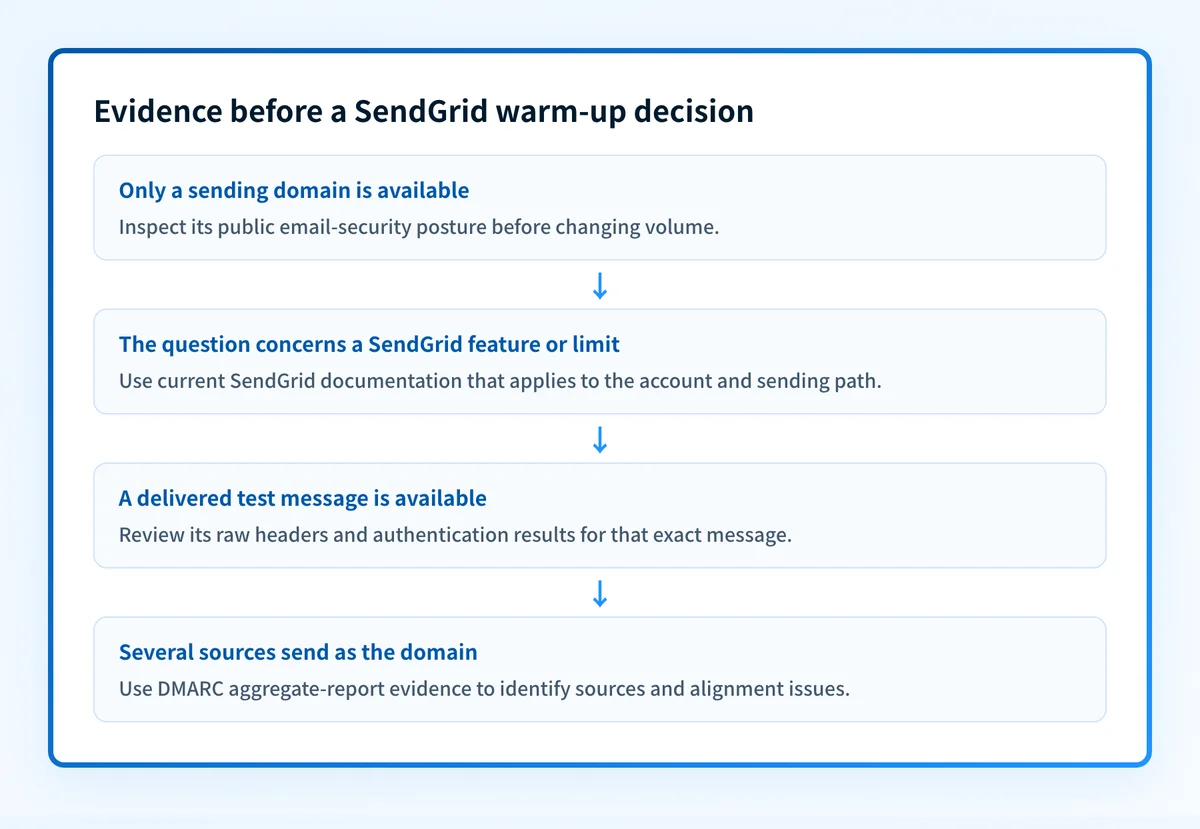
The right next action changes with the evidence available. Use this decision rule before changing sending volume.
- If you only have a domain name, inspect its published email-security posture first. A public DNS result can identify records that are visible now, but it cannot prove the production sending path or a receiver's private placement decision.
- If you have a SendGrid account question about a feature, limit, UI control, or sending-path type, check current SendGrid product guides and API documentation. Do not treat an external blog's schedule as provider policy.
- If you have a delivered message, preserve the raw headers and compare the visible From domain with the authenticated identifiers. This distinguishes a message-level question from a public DNS question.
- If a specific mailbox provider handled a message poorly, inspect that provider's available evidence and the exact delivered message. A general warm-up theory does not establish why that receiver made its decision.
- If you operate several domains or sending sources, record the source, visible From domain, authentication result, and owner for each path before making a broader change.
Do not increase production volume merely to test a hypothesis if the sending domain or message authentication has not been checked. A volume change can make diagnosis harder and can affect legitimate mail.
For adjacent ESP configuration topics, the ESP setup learning hub is the appropriate route. It does not replace current SendGrid documentation for account-specific controls.
A worked evidence object for a SendGrid warm-up question
Before asking whether to change volume, create a short evidence record. This does not prescribe a ramp. It makes the question specific enough to validate.
Visible From domain: updates.yourdomain.com
Sending platform: Twilio SendGrid Email API
Message evidence: raw headers from one delivered test message
DNS evidence: current public SPF, DKIM, and DMARC lookup results
Vendor evidence: current SendGrid documentation URL or account status
Receiver evidence: mailbox provider result for the same test message
Decision: do not change sending volume until the missing evidence is identified
The example separates facts from conclusions:
- The visible From domain tells you which domain should be evaluated for DMARC alignment.
- Raw headers are message evidence. They can show what happened to the delivered test message, but they do not predict future delivery.
- DNS results are public evidence. They do not prove that SendGrid used a particular configuration for the message.
- A vendor document or account status can support a SendGrid-specific decision only when it applies to the account and sending path.
- A receiver result concerns that receiver and message. It is not a universal deliverability verdict.
What to check before changing sending volume
Start with the evidence you actually have.
If you have only the domain, run an email security score check. Use the result to identify publicly visible email-authentication gaps that merit investigation. Then compare the result with the domain and sending path your team intended to use.
If you have a SendGrid configuration question, consult the current SendGrid documentation linked from its support center. Look for guidance that explicitly applies to the account type, feature, and sending path in question. If the documentation does not state the requested rule, do not present that rule as SendGrid policy.
If you have a message that reached a mailbox, review its raw headers and the authentication results for that same message. This is the point where a SendGrid configuration question can become an SPF, DKIM, or DMARC alignment question.
If your team needs an ongoing view after mail begins flowing, collect DMARC aggregate-report data. Palisade can analyze aggregate reports, identify sending sources and authentication or alignment issues, create prioritized remediation tickets, and propose a next DMARC policy stage for human review. It does not change the DMARC policy or guarantee receiver delivery decisions.
Check the domain posture before treating this as warm-up
A copied ramp cannot show whether the sending domain publishes the expected authentication records. Inspect the domain first, then compare the result with the specific SendGrid path and delivered-message evidence.
Check your email security posture
A public security check cannot prove that SendGrid sent a particular message, monitor future sending behavior, repair a sender configuration, or guarantee inbox placement.
For teams that need to track many sending sources after aggregate reports arrive, Start with Palisade. Signup and trial do not require a credit card. Palisade helps investigate DMARC-report evidence and prioritize remediation, while a human reviews the evidence and applies any DNS or policy change.
Evidence
Sources and further reading
Questions readers ask
Frequently asked questions
Does SendGrid warm up email automatically?
SendGrid's public support center does not describe an automatic warm-up, so plan your own ramp rather than assuming one runs for you. That page points to product guides and API documentation instead. Check the documentation for your account type and sending path before you change volume.
How long should SendGrid email warmup take?
SendGrid does not publish a fixed warm-up duration, so treat any number you find in a blog post as unverified. Look for a stated duration in the current SendGrid documentation that names your account type and sending path. Until you find one, do not present a duration as SendGrid policy.
Can a public DNS check prove SendGrid deliverability?
No, because a public DNS check only shows the records resolvers could retrieve at the moment you ran it. It cannot show which production path sent a message, how a mailbox provider decided to handle it, or where a future message will land.
Should I change sending volume before checking SPF, DKIM, and DMARC?
No, because changing volume does not repair missing or misaligned authentication. Identify the visible From domain first, inspect its public SPF, DKIM, and DMARC records, then review a delivered test message where you can. Make volume decisions after that.

Written by
Johanie DupontBrand & Ecommerce Email
Johanie Dupont works on brand and ecommerce email at Palisade: BIMI and verified marks, sender requirements, and getting marketing mail into the inbox.
More from Johanie →