Mailchimp email warmup: what is documented
 ChatGPT
 Claude
 Gemini
 Perplexity
 Grok
GrokIn brief
Mailchimp email warmup is not a documented Mailchimp workflow in available official evidence. Check authentication and sending evidence instead.
Mailchimp email warmup is not a Mailchimp-specific procedure that the available official Mailchimp evidence documents. Mailchimp describes itself as an email and SMS marketing platform with segmentation, analytics, and reporting, but those capabilities do not establish a warmup schedule, a receiver acceptance result, or inbox placement. Treat authentication, audience evidence, and delivered-message results as separate checks.
At a glance
Quick takeaways
- Mailchimp's public product page does not document a Mailchimp-specific email warmup workflow.
- Segmentation can help organize an audience, but it is not evidence that a sender has been warmed up.
- Reporting can show the impact of sends, but it does not prove a receiver's private reputation decision.
- SPF, DKIM, and DMARC checks are adjacent prerequisites, not proof of inbox placement.
- A public domain check cannot confirm the exact production Mailchimp sending path.
- Do not rely on a volume ramp or warmup-tool recommendation without current provider documentation for that exact method.
What Mailchimp email warmup can and cannot mean
Mailchimp calls its product an email and SMS marketing platform. Its homepage also says the platform has tools that "make segmentation easy" and offers analytics and reporting to help users measure the impact of sends.
Those statements support a narrow conclusion: Mailchimp can provide campaign organization and reporting capabilities. They do not document an email warmup feature, a prescribed sending ramp, or an outcome at Gmail, Yahoo, Microsoft, or another receiver.
Email warmup is often used loosely to describe gradually establishing a sending pattern. That broad description is not enough to prove that any receiver will accept, place, or trust a future message. Receiver systems make their own decisions, and a sender platform's controls are different from receiver-side delivery outcomes.
For the wider distinction between authentication, sending behavior, and recipient handling, see email deliverability. If the task is configuring the sending domain in Mailchimp, use the Mailchimp SPF and DKIM setup guide instead. That configuration is relevant evidence, but it is not a documented Mailchimp warmup process.
When the answer changes
The answer changes only when current primary documentation establishes a specific Mailchimp feature or recommended workflow. Until then, separate these questions:
- Platform capability: Does Mailchimp document a control, limit, status, or sending-practice recommendation for the account?
- Domain authentication: Does the visible From domain have the required published authentication records, and does the production message show an aligned SPF or DKIM pass?
- Audience evidence: Does the account's own reporting show the result of a particular send to the intended audience?
- Receiver outcome: Did the target receiver accept and place a message from the exact production path?
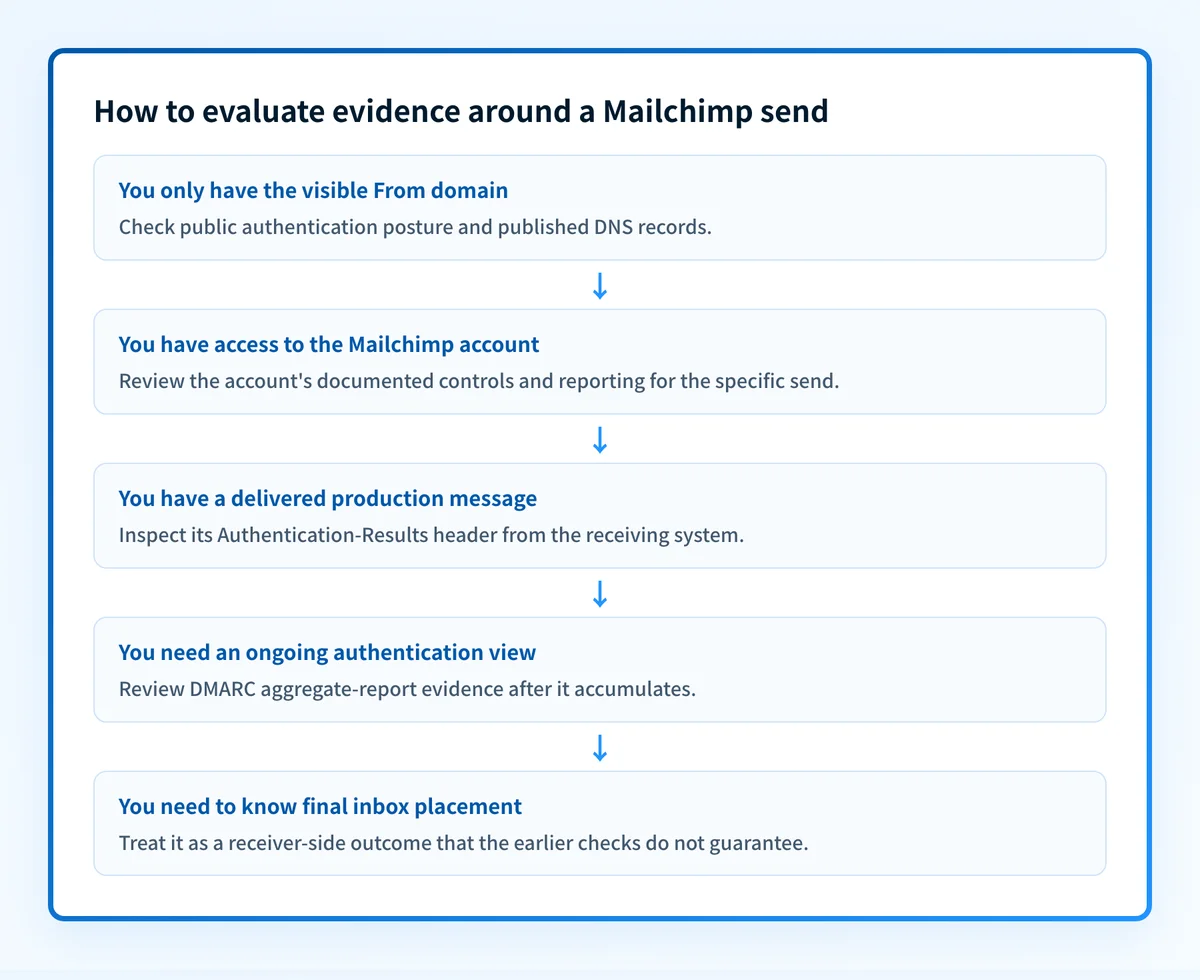
Use this decision rule: if you have only a public domain name, inspect the domain's published authentication posture. If you have a delivered test message, inspect its raw headers. If you need an account-specific sending control or status, use Mailchimp's current account documentation or support path. Do not substitute one kind of evidence for another.
A green DNS result does not prove that Mailchimp is signing the messages you send, that the correct return path is in use, or that a receiver will place the message in the inbox.
For broader sender-platform configuration, the ESP setup hub separates provider setup work from later message and DMARC validation.
A worked evidence rule for a Mailchimp send
A Mailchimp campaign can produce several evidence objects. Each answers a different question.
Published DNS record:
_dmarc.yourdomain.com TXT "v=DMARC1; p=none; rua=mailto:dmarc-reports@yourdomain.com"
Delivered-message evidence:
Authentication-Results: receiver.example;
  dkim=pass header.d=yourdomain.com;
  spf=pass smtp.mailfrom=yourdomain.com;
  dmarc=pass header.from=yourdomain.com
This is illustrative only. Do not publish account-generated values, selectors, return paths, report addresses, or raw customer message headers.
The DNS record shows that a DMARC policy is published for yourdomain.com. It does not show whether a Mailchimp campaign used that domain or passed DMARC.
The delivered-message evidence can show authentication results for one received message. RFC 8601 defines the Authentication-Results header field, including the authentication method results that a receiver can record. A header from the actual production campaign is more useful for that single message than a public DNS lookup alone.
Neither evidence object proves a continuing receiver reputation state or future inbox placement. Aggregate DMARC reports can later show authentication and alignment patterns across reported traffic, while a receiver's final placement decision remains its own.
What to check next
Start with the evidence you actually have.
- If you have a domain name, run an email security score check to inspect the public authentication posture. Compare the result with the domain that appears in the campaign's visible From address.
- If you have a delivered test message, obtain its raw headers and review the
Authentication-Resultsvalues from the receiving system. Confirm that the evidence came from the same Mailchimp production path you plan to use. - If you can access Mailchimp reporting, use it to review the measured impact of the specific send. Mailchimp states that its analytics and reporting help users measure the impact of every send.
- If DMARC reports are available, review them after data accumulates to identify sending sources and alignment issues. A report is not immediate proof for a single test message.
Check the domain posture behind the Mailchimp send
A domain-level check is a useful first diagnostic when you need to establish whether the visible From domain publishes basic email-authentication signals before reviewing real Mailchimp message headers.
Check your email security posture
A public security-score check cannot prove Mailchimp's account configuration, inspect a specific campaign's headers, monitor future sending behavior, or guarantee receiver acceptance or inbox placement. For ongoing DMARC work, Palisade can analyze aggregate-report data, identify authentication or alignment issues, and propose a next policy step for human review.
Evidence
Sources and further reading
Questions readers ask
Frequently asked questions
Does Mailchimp have an email warmup feature?
Mailchimp does not document an email warmup feature. Its public product pages describe segmentation, analytics, and reporting, and none of them name a warmup feature, a sending ramp, or a schedule. Set up SPF and DKIM for the sending domain first, then use Mailchimp's own reporting to watch how each send performs.
Why are people leaving Mailchimp?
Mailchimp does not publish why customers leave, and there is no independent survey of departing customers to point to. What you read on this is usually opinion or a competitor's marketing, so treat it that way. Judge the platform on what it documents and on what your own send reporting shows.
Does email warm up actually work?
Gmail, Yahoo, and Microsoft do not publish a warmup schedule or any rule that rewards warmup activity, so the practice cannot be shown to cause better placement on its own. Building up a sending pattern gradually is a reasonable habit, but the receiver still decides where each message lands. Check your authentication records and the headers of a real delivered message instead of trusting a warmup score.
What is the best email warmup tool?
There is no single best tool, because no independent comparison of them exists and no tool can control a receiver's placement decision. Judge each one on what it documents: the access it needs, the controls it gives you, and how it defines the numbers it reports. Then test your own production sending path before you scale volume.
Can SPF and DKIM warm up a Mailchimp sender?
No, because SPF and DKIM prove who sent a message, not how much or how often you send. They give a receiver useful authentication evidence when your production mail uses and passes them correctly, which is worth having on its own merits. Neither one builds sender trust over time or guarantees inbox placement.

Written by
Johanie DupontBrand & Ecommerce Email
Johanie Dupont works on brand and ecommerce email at Palisade: BIMI and verified marks, sender requirements, and getting marketing mail into the inbox.
More from Johanie →